






SleekPixel for security advisory cards
Security advisories travel through customer security teams, vulnerability mailing lists, and trust hubs. SleekPixel renders one og:image per advisory in WordPress, generated from the post fields on save.
♾️ Lifetime License available
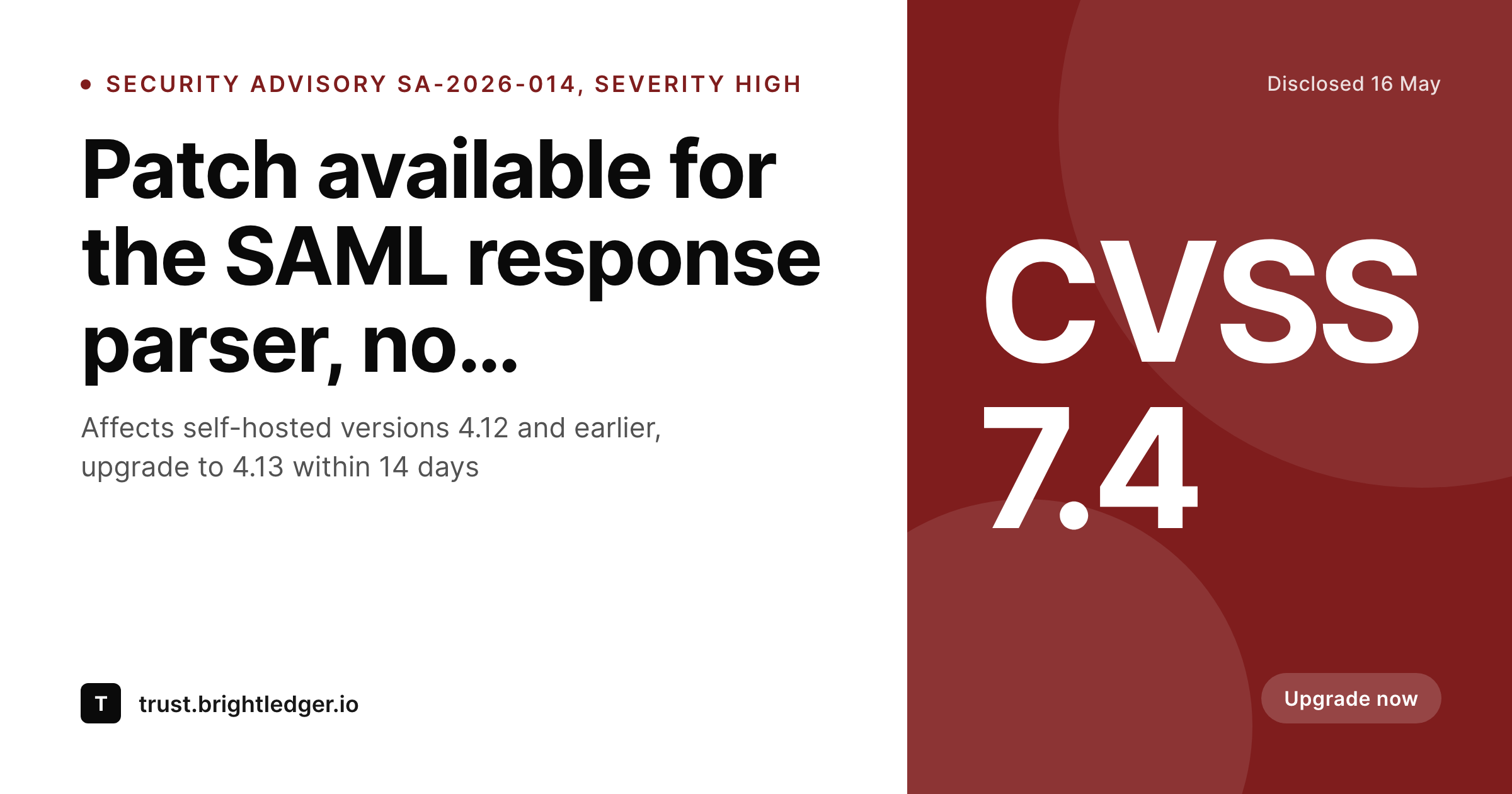
Security advisories are read first in the inbox preview
A security advisory is a high-trust communication aimed at security teams that have committed to act on it within a defined window. The advisory ID, the CVSS score, and the affected versions are the three numbers every reader is looking for in the first second. If those numbers are in the share preview, the email gets prioritized, the Slack pin gets noticed, and the patch window starts on time. If the preview is a generic site card, the advisory competes for attention with marketing emails for the next eight hours.
Teams that publish advisories on a regular cadence often build a Canva template, populate it for the first few, and then watch the consistency drift over the next six months. Different designers, slightly different layouts, CVSS numbers in different places, severity colors that no longer match the trust-page palette. The advisory program ends up with a visual inconsistency that erodes the trust signal it is supposed to carry.
SleekPixel binds the advisory card to the post. Advisory ID, CVSS score, severity, affected versions, and disclosure date bind to fields. The render fires on publish, writes the PNG to uploads, and the advisory URL unfurls with the right numbers everywhere it travels.
Workflow
From advisory draft to a published share card
Design the advisory template
Configure the advisory post type
Publish the advisory
Extend the window if needed
Output
What a generated security advisory card looks like
A 1200x630 share card with the advisory ID, CVSS score, severity, and affected version range pulled from the post.
Comparison
Default security advisory image vs SleekPixel
Default advisory image
- Same trust-hub logo on every advisory regardless of severity
- CVSS score never visible until the reader opens the page
- Severity colors drift across the trust-page palette over time
- Affected versions buried below the fold in the share
- No regeneration path when the patch window is extended
SleekPixel
- Render fires on publish for every advisory
- Advisory ID, CVSS, severity, and affected versions from post fields
- Severity accent color binds to a severity field
- Disclosure date and patch window visible in the card
- Patch-window extensions regenerate the card
Features
What SleekPixel gives you for security advisory cards
CVSS in the share
Bind the CVSS score to a numeric field. The score renders in the card, calibrated to the severity color, so security teams scanning a thread know the priority before clicking.
Affected versions visible
Show the affected version range in the share. Self-hosted customers can determine in one glance whether their deployment is in scope without opening the advisory.
Disclosure date and window
Render the disclosure date and the recommended patch window. The advisory carries its own timeline in the preview, which is the signal every security inbox is filtering for.
Use cases
Where security advisory cards earn their keep
B2B SaaS trust hubs
Companies running a public trust page that publishes advisories on a quarterly or as-needed basis. Each advisory gets a card matched to its severity.
Self-hosted product teams
Vendors shipping installable products with version-specific patches. The card carries the affected version range so customer security teams can triage faster.
Open source security teams
Maintainer teams publishing GHSA advisories. The card pulls from the same post fields, with CVE and GHSA IDs visible in the preview before the page loads.
The bigger picture
Why advisories need a card calibrated to severity, not a default tile
Security communication runs on two trust signals, content quality and visual consistency. The content side is owned by the security team and the technical writer, the visual side is usually owned by no one in particular, which is why trust pages tend to drift visually over a year of operation. A purpose-built advisory card that pulls severity, CVSS, affected versions, and disclosure date from structured fields keeps the visual side aligned with the content side, regardless of who is publishing on any given week.
That alignment is the signal that security teams reading the advisory are picking up subconsciously, the team knows how to communicate at this level. SleekPixel removes the design dependency from the security workflow, which means the advisory ships when the patch ships, and the share asset is ready by the same minute.
Questions
Common questions about SleekPixel for security advisory cards
Yes. Set the accent values in the template configuration to match the trust-page palette. The severity field maps to those colors, so cards stay consistent across the program.
Edit the CVSS field on the post and save. The card re-renders, the og:image overwrites, and the next scrape pulls the corrected score and severity color.
Yes. Bind a type field, and use conditional templates. CVE advisories can render with one layout, internal advisories with a more compact one, both fed by the same fields.
Templates can read the active locale and pick a layout per language. Translated headlines and date formats render correctly without separate manual exports.
Yes. SleekPixel can render in draft status. The PNG lands in uploads, the security team can review it alongside the draft post, and the og:image goes live on publish.
Add both ID fields on the post and render either or both in the card. Some teams show the CVE on the front face and the GHSA in the meta line.
SleekPixel renders the image and writes the meta tags. The feed itself is a WordPress concern, RSS or JSON feed of the advisory post type, and it can include the og:image URL as the enclosure.
Yes. The admin includes a bulk regenerate action that re-renders every advisory under a chosen template, useful after a brand refresh or a severity-palette change.
Pricing
More than 1000+
happy customers
Explore our flexible licensing options tailored to your needs. Upgrade your license anytime to access more features, or opt for a lifetime license for ongoing value, including lifetime updates and lifetime support. Our hassle-free upgrade process ensures that our platform can grow with you, starting from whichever plan you choose.
Lifetime ♾️
Most popular
EUR
once
- Unlimited websites
- Lifetime updates
- Lifetime support
...or get the Bundle Deal
and save €250 🎁
💎 Want everything forever? The All Access Pass is going away on 01.08.2026.
The Bundle (unlimited sites)
Pay once, own it forever
Elevate your WordPress site with our exclusive plugin bundle that includes all of our premium plugins in one package. Enjoy lifetime updates and lifetime support. Save significantly compared to buying plugins individually.
What’s included
-
SleekAI
-
SleekByte
-
SleekMotion
-
SleekPixel
-
SleekRank
-
SleekView
€749
Continue to checkoutBrowse more
- WooCommerce Payments
- YITH WooCommerce Quick View
- The SEO Framework
- WPvivid Backup
- Omnisend
- Bookly
- MotoPress Hotel Booking
- Notion databases
- Klarna Payments for WooCommerce
- Co-Authors Plus
- Essential Addons for Elementor
- Gravity Forms
- All In One WP Security
- Business Directory Plugin
- Disqus Comment System
- Beacons.ai banner
- LinkedIn ad images
- Farcaster cast images
- eBay listing images
- Ko-fi shop images
- LinkedIn document post covers
- Threads profile banners
- Tumblr header
- Bluesky feed banner
- Shopify product images
- Snapchat Spotlight covers
- KakaoTalk channel banners
- LinkedIn showcase page banners
- TikTok profile banners
- Facebook group banners