






SleekPixel for GitHub repositories
GitHub renders its own OG image for repo URLs, but most open source projects also run a marketing site on WordPress with the longer pitch. SleekPixel renders that WordPress page's share card from repo metadata so the project-site URL gets a card as polished as the GitHub one.
♾️ Lifetime License available
GitHub is documentation, the project site is the pitch
Most open source projects of any size run a marketing site alongside the GitHub repo. The repo holds the code, the issues, and the README. The marketing site holds the longer pitch, the docs, the install guide, and the social pages that link to all of it. When the project shares a launch post or a release announcement, the share URL is usually the marketing site, not the GitHub URL, because the marketing site has the wider context.
GitHub renders a clean OG card for repo URLs automatically. The marketing site usually does not, because building per-release OG images for a WordPress site is a chore that competes with shipping the actual code. The result: the GitHub URL shares better than the project's own marketing site, which is the wrong way around for a launch.
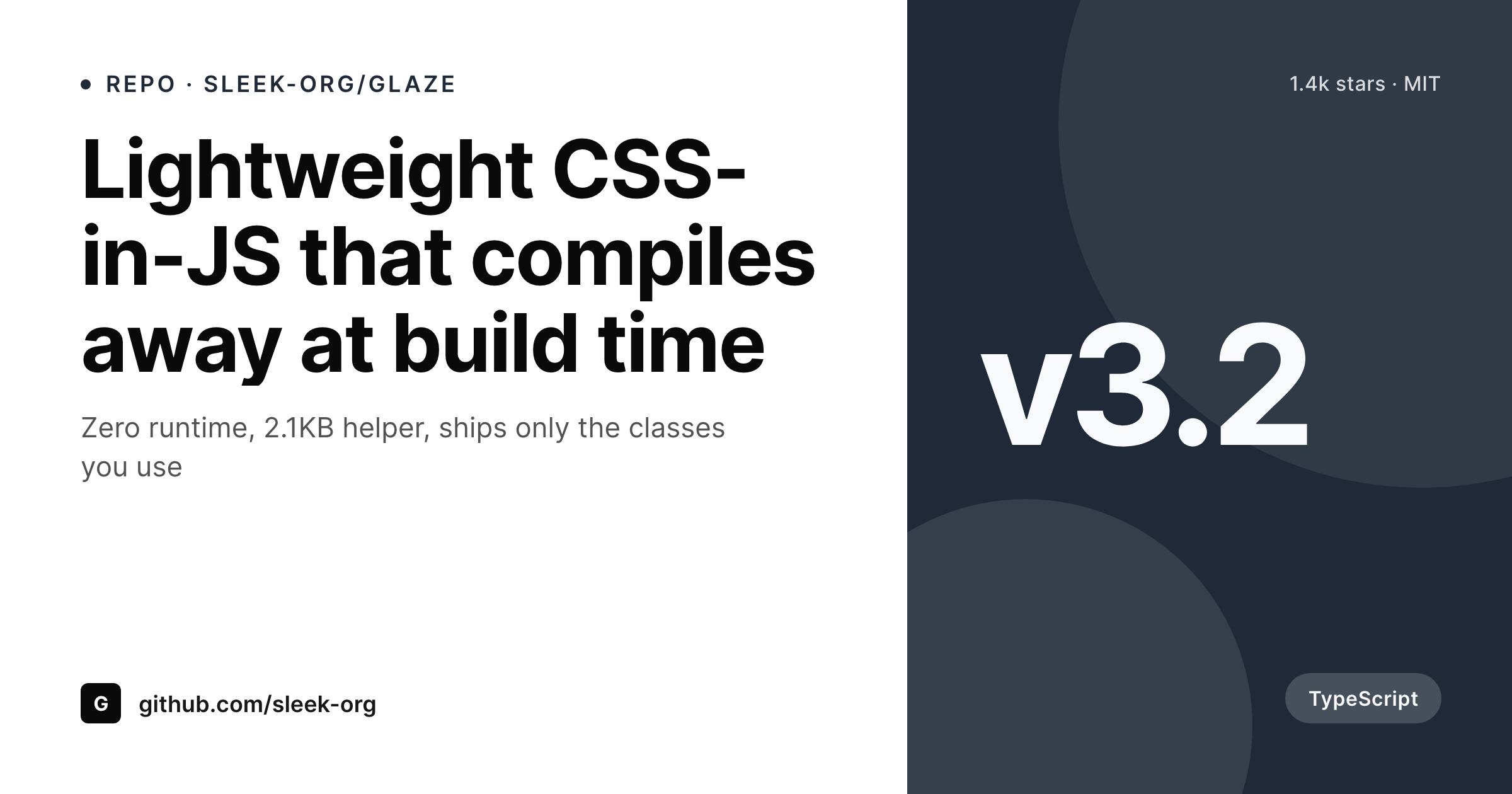
SleekPixel pulls repo metadata from the GitHub API and renders a branded card for the WordPress marketing pages. Repo description becomes the headline, stars and license render as meta, primary language renders as a small badge, and the latest release tag renders as a corner mark. The marketing site shares with a card that carries the same signals as the repo card, with the marketing brand applied on top.
Workflow
From repo metadata to WordPress share card
Connect the GitHub API
Build the project template
Save or sync
Share the launch
Output
Sample repository landing page card
A 1200x630 OG image: repo description, star count, language, license, and latest release tag, rendered from GitHub API data into the WordPress marketing post on save.
Comparison
Default theme OG vs repo-aware rendering
Default theme OG image
- Marketing pages share with the homepage banner instead of the repo signal
- Star counts, languages, and licenses never appear on the share preview
- Release announcements open with a generic theme image on launch day
- Manual per-release OG images stop happening after the first major version
- Brand updates require redoing every past release card by hand
SleekPixel
- Pulls repo metadata via the GitHub API on a schedule or webhook
- Description, stars, license, language, and tag render automatically
- Release posts and feature pages share the same template family
- Bulk re-render the back catalog when the brand or template changes
- Leaves the GitHub-side OG card alone, only the WordPress side changes
Features
What SleekPixel gives you for GitHub repositories
Repo description headlines
The repo description on GitHub becomes the marketing card headline. The line that engineers read on the repo also lands on every share of the project site.
Stars and language badges
Current star count renders as a small meta line, primary language renders as a badge. Social proof and tech-stack signal land on every share without manual updates.
Release-tag marks
Latest release tag renders as a corner mark. Release announcements automatically show the right version, and old release posts keep their original tag.
Use cases
What open source projects generate with SleekPixel
Major release announcements
Each major version's marketing post renders with the release tag, the headline feature, and current stars. Launch tweets open with a real release card.
Docs landing pages
Documentation index pages share with the repo description and language. Tutorial shares from the docs site carry the same project identity as the repo.
Showcase and contributor pages
Sites-using-X and contributor list pages each render their own card with the project brand. Community pages share with the same visual family as releases.
The bigger picture
Why marketing-side share previews matter for open source
Open source launches live on social shares. A release post on Hacker News, a launch tweet that gets picked up by an influential developer, a thread on Bluesky that summarizes the changelog, all of these decide whether the release reaches its audience in the first 48 hours after publication. The single most visible element of those shares is the OG preview, and most marketing sites for open source projects render the wrong thing entirely on those URLs.
The GitHub URL has a clean repo card by default, the marketing URL has a stretched homepage banner. The result is that contributors and maintainers end up sharing the GitHub URL even when the marketing site has the more compelling pitch, because the GitHub URL at least previews correctly. SleekPixel fixes the marketing side.
The same repo metadata that GitHub uses for its card lands on the marketing card, with the project brand applied on top. Major releases, doc pages, showcase pages, and changelog newsletters all share with cards that look as polished as the repo card, which means maintainers can confidently share the marketing URL where the pitch and the install instructions actually live. The compounding effect is that the marketing site becomes the canonical share target, which is where the analytics, the email capture, and the conversion to user actually happen.
Questions
Common questions about SleekPixel for GitHub repositories
No. GitHub renders its own OG card for repo URLs, which is fine for direct GitHub shares. SleekPixel runs on the WordPress side and renders the marketing-site card. Both can coexist, and you decide which URL gets shared depending on the audience.
A GitHub API token plus a scheduled sync, usually via WP Cron or an external scheduler. The sync writes stars, description, license, language, and latest release into custom fields. SleekPixel reads those fields when rendering.
As fresh as the sync. Most projects sync hourly or daily. The card re-renders when the field updates, so the displayed star count is never more stale than the last sync run.
Yes if you bind those fields. A small badge can render the CI status or the coverage percentage. Useful for project sites that want to project quality signals on every share.
One marketing post per package, each with its own card. The GitHub API supports per-directory metadata via labels, releases per package, and per-package READMEs. Each package shares with its own version tag and description.
Yes, with a token that has access to the private repo. The card still renders publicly on the marketing post, but only the data you choose to expose appears on the card. Many companies do this for internal SDKs documented publicly.
No. Sync uses authenticated requests with generous limits, and most setups sync hourly or daily, not on every page view. The rendered PNG serves from WordPress uploads with no API call on visitor traffic.
Yes. A taxonomy or a release-channel field on the marketing post picks the template variant. Stable releases render with the project brand color, beta releases render with a contrasting accent. The render picks the right variant automatically.
Pricing
More than 1000+
happy customers
Explore our flexible licensing options tailored to your needs. Upgrade your license anytime to access more features, or opt for a lifetime license for ongoing value, including lifetime updates and lifetime support. Our hassle-free upgrade process ensures that our platform can grow with you, starting from whichever plan you choose.
Lifetime ♾️
Most popular
EUR
once
- Unlimited websites
- Lifetime updates
- Lifetime support
...or get the Bundle Deal
and save €250 🎁
💎 Want everything forever? The All Access Pass is going away on 01.08.2026.
The Bundle (unlimited sites)
Pay once, own it forever
Elevate your WordPress site with our exclusive plugin bundle that includes all of our premium plugins in one package. Enjoy lifetime updates and lifetime support. Save significantly compared to buying plugins individually.
What’s included
-
SleekAI
-
SleekByte
-
SleekMotion
-
SleekPixel
-
SleekRank
-
SleekView
€749
Continue to checkoutBrowse more
- YouTube Shorts thumbnails
- Patreon cover images
- Snapchat Discover tiles
- YouTube community images
- LinkedIn company banners
- X ad images
- Mailchimp email banner
- SoundCloud banner
- KDP hardcover cover
- Rumble thumbnails
- Fansly banner
- Notion page covers
- Threads profile banners
- Facebook ad images
- Flickr cover photo