






SleekPixel for WooCommerce Bookings
WooCommerce Bookings stores duration, availability, and price on each bookable product. SleekPixel reads those fields on save and renders a share image with the service name, duration, and price, so a forwarded link previews as a real booking offer rather than a generic product page.
♾️ Lifetime License available
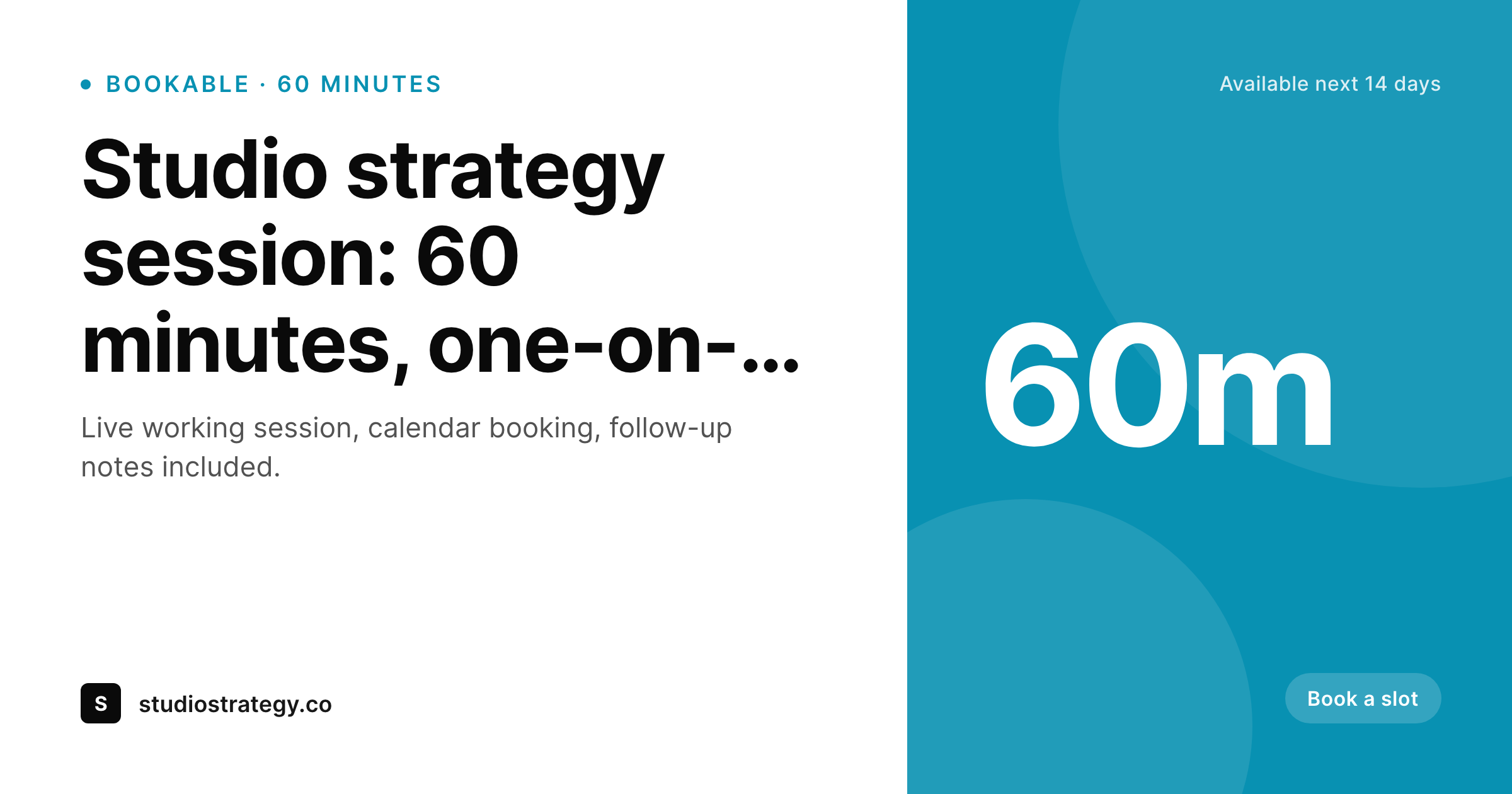
Bookable services share like products by default
WooCommerce Bookings turns a WooCommerce product into a calendar-aware service. The data model adds duration, resource type, availability window, buffer time, and per-block pricing on top of the standard product fields. The booking page itself renders all of this clearly: duration in minutes or hours, an availability calendar, the price per session. The share preview, on the other hand, treats a bookable service identically to a physical product. Title and image, no service context.
For a service business this is a wasted impression. Someone forwarding a link to a 60-minute strategy session or a half-day workshop sees only the product title in the unfurl. The duration, the price, and the availability, which are the entire offer, live below the fold of the preview. New visitors arriving from the forwarded link have to read the page to figure out whether the offer matches what they need. Drop-off in that gap is real, especially for higher-priced bookings.
SleekPixel reads the booking product fields and composes a card that names the service, duration, and price on save. '60 minutes, $240' renders into the OG image alongside the brand mark. The image saves to uploads as a real PNG and og:image points at it. The card carries the booking terms, the click-through lands on a calendar that already matches the share preview, and visitors who would have bounced on a vague preview now arrive ready to pick a slot. Booking product saves trigger a regenerate, so duration or price changes propagate to share cards automatically.
Workflow
From booking product to branded card
Build the booking template
Bind WooCommerce Bookings fields
Save a service
Cards travel with links
Output
What gets generated per booking product
A 1200 by 630 OG card with service title, duration, price, optional availability label, and brand mark, rendered on save and saved to uploads as a real PNG.
Comparison
Default product card versus SleekPixel
Standard WooCommerce OG image
- Bookable service previews show only title and image, no duration
- Forwarded links hide the price and session length until the click
- Renaming a service or adjusting duration doesn't update old cards
- Studios with many service tiers need per-service Canva exports
- Limited-availability promos stay invisible in social previews
SleekPixel
- Reads WooCommerce Bookings fields: duration, unit, price, resource
- Cards show '60 minutes' or 'half day' from product meta automatically
- Renders a price label from base cost or per-block cost when configured
- Regenerates on product save: duration and price changes flow to cards
- Bulk regenerate covers an entire booking catalog after a brand refresh
Features
What SleekPixel gives you for WooCommerce Bookings
Duration aware
Reads the booking duration and unit from the product post and renders '60 minutes', '2 hours', or 'half day' on the card. No manual duration labels.
Price label
Renders a price from base cost or per-block cost. A 60-minute strategy session at $240 ships its price in the share card without any per-product edits.
Schedule-change safe
Update a service's duration or price and saving regenerates the share card. Old cards never linger with stale duration or price in social previews.
Use cases
Where booking cards earn their keep
Consulting and strategy sessions
Each session product shares with duration and price visible. Forwarded links carry the offer terms in the preview, conversion happens on the calendar page.
Workshops and small-group programs
Half-day and full-day workshops render with duration and price. Sharing to a peer surfaces the format and commitment in the unfurl, not after a click.
Studio service catalogs
Studios with multiple bookable services render a card per service with each one's own duration and price. The catalog stays consistent across all SKUs.
The bigger picture
Why bookable services need terms in the preview
Service businesses live or die at the share preview because services are intangible and harder to evaluate than physical goods. A 60-minute strategy session is a different commitment from a half-day workshop, even when both are sold by the same studio, and the share preview is the moment where that distinction either becomes visible or stays hidden. Showing only title and image flattens a service into a generic product card, which forces new visitors to read the page before they understand what they are evaluating.
Many of them close the tab. Naming the duration and the price on the share card answers the two questions a prospect actually has in three seconds: how long is this and what does it cost. The second angle is the calendar conversion path.
Once the prospect clicks, the booking flow shows availability and prompts them to pick a slot. A share preview that already named the duration and price means the calendar page does not have to re-pitch the service, it can lead with availability. The conversion conversation moves from 'is this what I want' to 'when can I do this', which is a much shorter conversation.
WooCommerce Bookings already collects all the data to make this work. SleekPixel just turns the data into a visible card on save, which means every shared link from every studio service starts the conversation in the right place without manual graphics.
Questions
Common questions about SleekPixel for WooCommerce Bookings
Yes. Fixed-duration bookings render the configured duration ('60 minutes', '2 hours'). Customer-defined duration products render a duration range or omit duration in favor of a per-block price label like '$60 per hour'. The template chooses based on the product's _wc_booking_duration_type meta.
Resource availability is calculated dynamically based on the calendar, so cards do not show real-time slots. The template can render 'Available next 14 days' or 'Booking now' as a static label, refreshed when the product is saved or via a scheduled regenerate.
Multi-day bookings render their duration unit ('days' or 'nights') on the card. Equipment rentals and venue bookings work the same way as service bookings: the template reads the unit and price meta and renders 'Per day, $120' or '3-night minimum, $480'.
Yes. Resources are an extra layer of meta on the booking product. If a service is bookable across multiple staff members or rooms, the template can render the resource type ('Coach', 'Room A') as a small label. Most cards keep this off to reduce clutter.
Bundled bookings sold via WooCommerce Product Bundles or Composite Products render based on the parent product's title and price. The template ignores per-component duration and shows the bundle's marketing label, like 'Studio retainer, 4 sessions'.
Cancellation policy lives in product description and confirmation emails, not in the OG card. The card shows duration and price, which are the conversion-relevant fields. Cancellation terms appear on the booking page itself.
Renders happen on product save, not on page load. Customers viewing the calendar hit cached PNGs. Even studios with hundreds of services run smoothly because each service only re-renders when its post is updated.
Yes. The bulk regenerate command walks every bookable product and rebuilds each card. After a seasonal price update or a service rename, one command refreshes the whole catalog without per-product edits.
Pricing
More than 1000+
happy customers
Explore our flexible licensing options tailored to your needs. Upgrade your license anytime to access more features, or opt for a lifetime license for ongoing value, including lifetime updates and lifetime support. Our hassle-free upgrade process ensures that our platform can grow with you, starting from whichever plan you choose.
Lifetime ♾️
Most popular
EUR
once
- Unlimited websites
- Lifetime updates
- Lifetime support
...or get the Bundle Deal
and save €250 🎁
💎 Want everything forever? The All Access Pass is going away on 01.08.2026.
The Bundle (unlimited sites)
Pay once, own it forever
Elevate your WordPress site with our exclusive plugin bundle that includes all of our premium plugins in one package. Enjoy lifetime updates and lifetime support. Save significantly compared to buying plugins individually.
What’s included
-
SleekAI
-
SleekByte
-
SleekMotion
-
SleekPixel
-
SleekRank
-
SleekView
€749
Continue to checkoutBrowse more
- Threads profile banners
- Warpcast frame images
- YouTube community images
- Pinterest Idea Pins
- Substack podcast cover
- LinkedIn showcase page banners
- Patreon post thumbnails
- Patreon tier images
- Poshmark listing images
- eBay listing images
- Facebook group banners
- Etsy shop banners
- Buy Me a Coffee banners
- Gumroad product covers
- X social cards