






SleekPixel for kombucha brewer
Hibiscus ginger, jun-style lemongrass, the seasonal pear shrub. Each batch has a flavor, a fermentation time, an ABV, and a tap window. SleekPixel renders the 1080x1080 card the moment the batch post is saved.
♾️ Lifetime License available
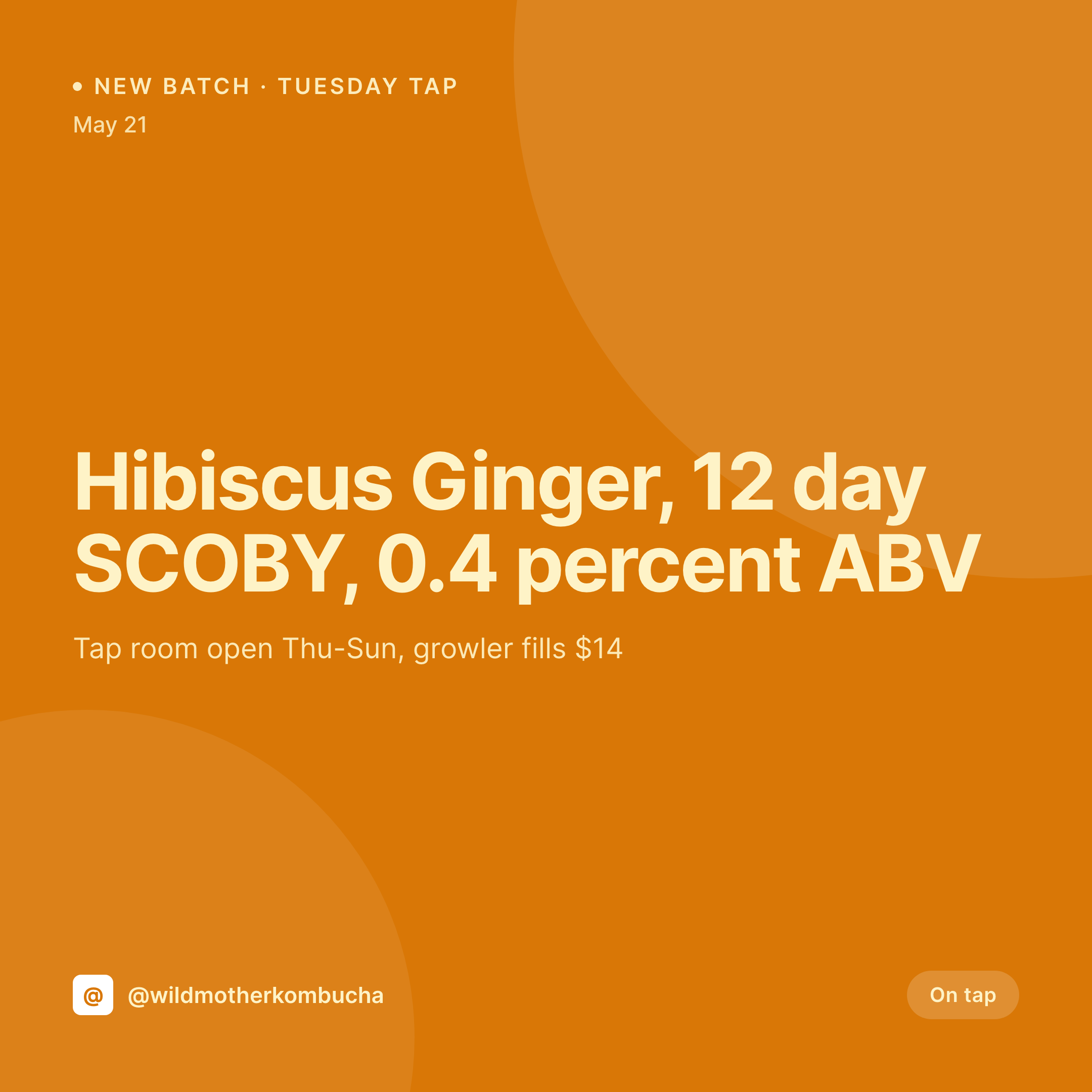
New batches drop and the tap room needs a card
A kombucha brewery runs on small batches. Twenty gallons at a time, a new flavor every week or two, the tap rotating as one keg blows and another comes online. Each batch has a name, a fermentation length, an ABV, ingredients, sometimes a SCOBY origin story for the regulars who care.
The website already knows all of it. The product post or the batch CPT carries the flavor, the ferment days, the ABV, and the ingredients. The tap room hours sit on a location post. The growler price is on the WooCommerce product. The data has been typed.
SleekPixel takes it from there. Saving the batch post renders a 1080x1080 card with the flavor name, the ABV, the ferment days, and the tap availability. The tap room manager posts it before the new keg is even tapped. The grid stays on-brand from batch one to batch one hundred.
Workflow
From batch save to tap room card
Map batch fields
Design one square template
Publish the batch
Post before the tap
Output
What gets generated per batch
A 1080x1080 square card with the batch flavor, fermentation time, ABV, ingredients, and tap availability, pulled from the batch or product post.

Comparison
Default kombucha brewer image vs SleekPixel
Default kombucha brewer image
- Brewer rebuilds a Canva card for every new batch
- ABV on the card drifts from what the lab actually measured
- Ingredient list gets typed differently across batches
- Tap room hours on the card lag behind the schedule
- Multi-flavor releases each get a slightly different layout
SleekPixel
- Save the batch post, the 1080x1080 card lands in uploads
- Flavor, ABV, ferment time, and ingredients pulled from fields
- Tap and growler availability render from the product status
- OG image wires to the batch URL for clean share previews
- One template across batches keeps the brewery on-brand
Features
What SleekPixel gives you for kombucha brewer
Batch fields baked in
Flavor, fermentation days, ABV, and SCOBY notes pull from the post. The card doesn't need a brewer in Canva to render.
Ingredients accurate
The ingredient list and any allergen or sugar info render from structured fields, so the label and the social card agree.
Tap and growler
On tap, kegged, growler fill, sold out. Each tap state renders as a variant tied to the product status.
Use cases
Who uses SleekPixel for kombucha brewers
Tap room brewers
Brewers with a tap room render a card per batch with the flavor, ABV, and tap hours, ready before the new keg goes on.
Bottled and canned lines
Bottled and canned releases render cards with the SKU, size, and case pricing alongside the flavor and ABV.
Seasonal and limited drops
A seasonal pear shrub kombucha or a limited collaboration with a coffee roaster renders a card with the release window and collab tag.
The bigger picture
Why kombucha breweries need to ship the batch graphic on time
Kombucha is a regulars business with a short batch window. Twenty gallons gets tapped on a Thursday and is gone by Sunday in a healthy week. The customers who come in for that batch are the ones who saw the Instagram post on Wednesday night, not the ones who walked by on Saturday.
If the post lands late, the keg blows before the regulars know it existed. The fix is to treat the social card as something the batch post produces, not as a separate Canva file. The flavor name, the ABV, the ferment days, and the tap hours all live in the post that the brewer typed when they kegged the batch.
Saving that post renders the card. The tap fills, the keg blows, the next batch ships. The grid reads as one brewery across two years of small batches, which is the surface where loyal kombucha drinkers decide where to fill their growler.
Questions
Common questions about SleekPixel for kombucha brewer
Yes. An ABV field on the batch post can be the lab-measured value. The card renders that exact number, so the social card and the label agree.
Both. SleekPixel reads any post type and any field, so WooCommerce products, a Batch CPT, or a hybrid model all map onto the card template.
Yes. When the stock or tap-status field flips, the card re-renders with a sold-out variant. The OG image updates so the share preview stays current.
Bundles can be their own product or post type. The card renders the bundle name, the included flavors, and the price.
Bottle and can labels can use the same fields, but label printing is usually a separate workflow. SleekPixel renders the social and OG image.
No. SleekPixel saves the image to uploads. Posting stays a manual step or runs through a third-party scheduler.
Yes. A single save can produce a 1080x1080 grid card, a 1080x1920 story, and a 1200x630 OG image, each rendered from the same fields.
Edit the template once and bulk regenerate. Every batch in the catalog gets a fresh card in the new identity, so the brand stays cohesive.
Pricing
More than 1000+
happy customers
Explore our flexible licensing options tailored to your needs. Upgrade your license anytime to access more features, or opt for a lifetime license for ongoing value, including lifetime updates and lifetime support. Our hassle-free upgrade process ensures that our platform can grow with you, starting from whichever plan you choose.
Lifetime ♾️
Most popular
EUR
once
- Unlimited websites
- Lifetime updates
- Lifetime support
...or get the Bundle Deal
and save €250 🎁
💎 Want everything forever? The All Access Pass is going away on 01.08.2026.
The Bundle (unlimited sites)
Pay once, own it forever
Elevate your WordPress site with our exclusive plugin bundle that includes all of our premium plugins in one package. Enjoy lifetime updates and lifetime support. Save significantly compared to buying plugins individually.
What’s included
-
SleekAI
-
SleekByte
-
SleekMotion
-
SleekPixel
-
SleekRank
-
SleekView
€749
Continue to checkoutBrowse more
- Facebook event covers
- Slack channel headers
- Threads profile banner
- Nostr note images
- Notion page covers
- Douyin cover
- Instagram Reels covers
- Substack post thumbnail
- Substack post headers
- Apple Podcasts covers
- Depop listing images
- Etsy cover photos
- YouTube Shorts thumbnails
- YouTube podcast thumbnails
- Patreon cover images