






SleekPixel for ACT prep service
Summer bootcamp, fall booster, winter retake push. Each cohort renders a 1200x630 OG card with composite target, section emphasis, schedule, seats, and price baked in, so every link previews the actual cohort.
♾️ Lifetime License available
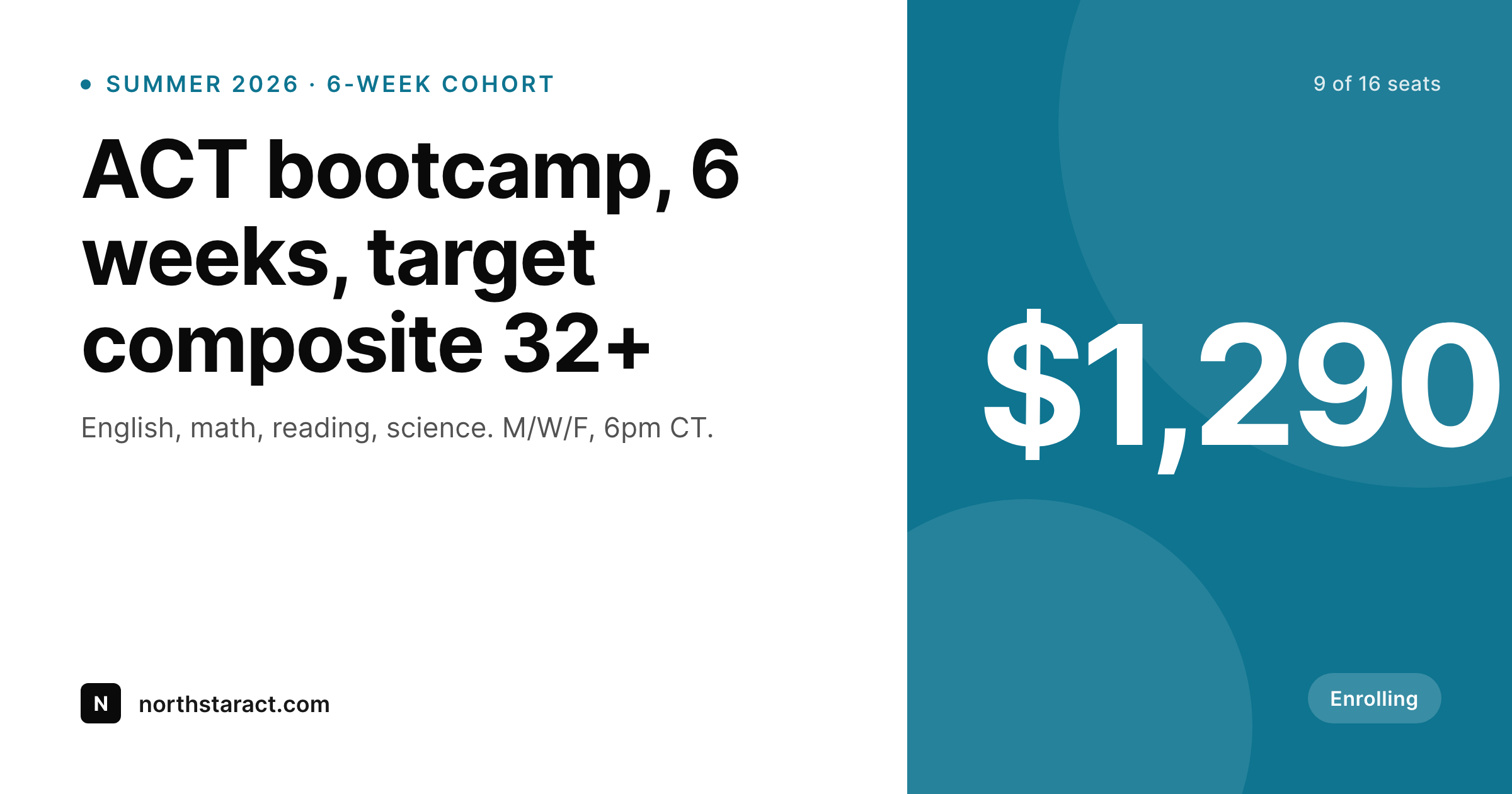
ACT prep links travel through group chats, the OG card does the selling
ACT enrollment moves through parent group chats, counselor lists, and pre-college email threads. The forwarded link does most of the persuasion work because most recipients never click. The OG card is the entire pitch in the inbox. Default WordPress sites ship one site-wide OG image, so the spring bootcamp and the winter retake push both preview the same way, and the parent forwarding the link never gets the click.
The cohort data is already on the WordPress site. Most ACT prep services run a cohort CPT or a WooCommerce product per cohort with composite target, section emphasis, schedule, seats, and price as fields. The page reads well. The OG card is the bottleneck because it is rebuilt by hand each enrollment window, if it is rebuilt at all.
SleekPixel renders the OG card from the same fields. The cohort post saves and the 1200x630 image lands in uploads with composite target, section emphasis, schedule, and seats on the image. Every shared link from then on previews like a real cohort.
Workflow
From cohort listing to share-ready card
Map the cohort fields
Design one OG template
Publish a cohort
Share the link
Output
What gets generated per cohort
A 1200x630 OG and Twitter card with the cohort name, composite target, section emphasis, schedule, seats remaining, and price.
Comparison
Default ACT prep image vs SleekPixel
Default ACT prep image
- One site-wide OG card across every cohort link
- Composite target band is invisible until the parent clicks through
- Section emphasis (heavy math, heavy science) never appears on the share
- Seats remaining hidden behind the link, scarcity doesn't carry into the preview
- Spring and fall cohorts share the same preview, telling parents nothing useful
SleekPixel
- Composite target band renders per cohort (28+, 30+, 32+)
- Section emphasis labeled on the card so families self-select
- Seats remaining updates the image when enrollment changes
- Same template for retake bootcamps and full prep cohorts
- Twitter card uses the same render so previews are consistent across platforms
Features
What SleekPixel gives you for ACT prep service
Composite target on the card
28+, 30+, 32+. The target band renders from the cohort field so parents and students see the ambition immediately.
Section emphasis labeled
Heavy math, heavy science, full four-section coverage. The emphasis field renders on the card so families self-select.
Schedule and seats
M/W/F at 6pm CT, 9 of 16 seats. The schedule and seats render together so the preview captures both fit and urgency.
Use cases
Who uses SleekPixel for ACT prep services
Midwest and southern prep services
ACT is the dominant test in the midwest and south, so prep services in those regions enroll heavy ACT cohorts and use SleekPixel for clean cohort cards.
Hybrid SAT and ACT centers
Tutoring centers running both SAT and ACT cohorts use the same template engine with different fields per test, so the grid reads as one practice.
Retake-focused bootcamps
Two-week retake bootcamps for students who already have a score and want to break a band render OG cards with retake-specific framing.
The bigger picture
Why ACT cohort links underperform without a per-cohort OG image
Most ACT prep enrollment happens in private channels. Counselor newsletters, parent group chats, alumni email threads, school college nights. The link travels through people who already trust the source, so the preview does not have to win the parent's full attention, it just has to look serious enough to keep the forwarding chain alive.
A generic OG card kills that chain because the recipient sees the same image they saw three months ago for a different cohort and assumes the link is recycled. A specific card with the composite target, the schedule, the seats, and the price reads as a current enrollment, gets the click, and starts the parent down the funnel. The data is already typed, in the cohort post on the WordPress site.
SleekPixel turns that data into the image, so every shared link is current without anyone opening Canva.
Questions
Common questions about SleekPixel for ACT prep service
Yes. WooCommerce products with custom fields are a common ACT prep setup. SleekPixel reads price, stock (seats), and any ACF fields on the product.
Yes. The seats field re-renders the card when enrollment changes. Bulk regenerate covers a multi-cohort refresh.
Yes. The 1200x630 render is wired to og:image, twitter:image, and the standard meta tags, so the preview is consistent across platforms.
Section-specific cohorts render with the section emphasis prominent on the card. Templates can be conditional on category, so single-section cohorts get a different layout if needed.
Yes. The same template works for free diagnostics and paid cohorts. Templates can be conditional on product type.
No. SleekPixel renders the image and saves it to uploads. Posting is a manual step.
The OG meta tags are standard, so any portal that respects OG (most email clients, Slack, Discord, LMS link cards) renders the preview correctly.
No. SleekPixel renders static PNG and JPG only.
Pricing
More than 1000+
happy customers
Explore our flexible licensing options tailored to your needs. Upgrade your license anytime to access more features, or opt for a lifetime license for ongoing value, including lifetime updates and lifetime support. Our hassle-free upgrade process ensures that our platform can grow with you, starting from whichever plan you choose.
Lifetime ♾️
Most popular
EUR
once
- Unlimited websites
- Lifetime updates
- Lifetime support
...or get the Bundle Deal
and save €250 🎁
💎 Want everything forever? The All Access Pass is going away on 01.08.2026.
The Bundle (unlimited sites)
Pay once, own it forever
Elevate your WordPress site with our exclusive plugin bundle that includes all of our premium plugins in one package. Enjoy lifetime updates and lifetime support. Save significantly compared to buying plugins individually.
What’s included
-
SleekAI
-
SleekByte
-
SleekMotion
-
SleekPixel
-
SleekRank
-
SleekView
€749
Continue to checkoutBrowse more
- conference recap card
- press kit card
- good vs bad cards
- office opening card
- downtime notice cards
- song of the day cards
- merch drop cards
- GitHub release card
- support update cards
- tip of the day cards
- playlist cards
- podcast appearance card
- fundraising announcement cards
- monthly roundup cards
- product launch cards
- Twitch schedule banners
- Twitter card images
- Facebook post images
- Behance project covers
- X list banners
- Douyin cover
- Stan Store cover
- YouTube Music cover art
- Bluesky profile banners
- Facebook ad images
- Spotify podcast covers
- Apple Podcasts covers
- Mastodon link previews
- Odnoklassniki banners
- KakaoTalk channel banners