






SleekPixel for contributor spotlight card
Open-source maintainers credit contributors with a monthly spotlight post. SleekPixel renders a 1080x1080 Instagram-ready card from each spotlight, with photo, name, PR count, and bio pulled from fields on the post.
♾️ Lifetime License available
Recognition is how OSS communities retain contributors
The unpaid contributors who keep an open-source project alive get one form of compensation that scales: visible recognition. A monthly contributor spotlight, posted on the blog and reshared on Twitter and Instagram, is how mature OSS projects acknowledge the people doing the work. The post itself takes an hour to write. The matching graphic, the one that turns the post into a shareable Instagram tile, traditionally takes another thirty minutes per contributor in Figma or Canva, and that is the work that gets dropped first when maintainers are busy.
SleekPixel takes the contributor spotlight post and renders a 1080x1080 square automatically. The contributor's photo lives as an ACF image field. The name, PR count, contribution area, and bio are post fields. The card uses a recognizable square layout so monthly spotlights stack visually on Instagram. The post saves, the PNG renders, the maintainer downloads from the Gutenberg sidebar, posts to the project Instagram, tags the contributor.
The contributor sees a polished card with their name on it, the kind of thing they can pin to their own profile or LinkedIn. The recognition lands, and the maintainer did not spend thirty minutes in Canva to get there.
Workflow
From contributor commit to spotlight tile
Design the spotlight template
Write the spotlight post
Save and download
Post and tag
Output
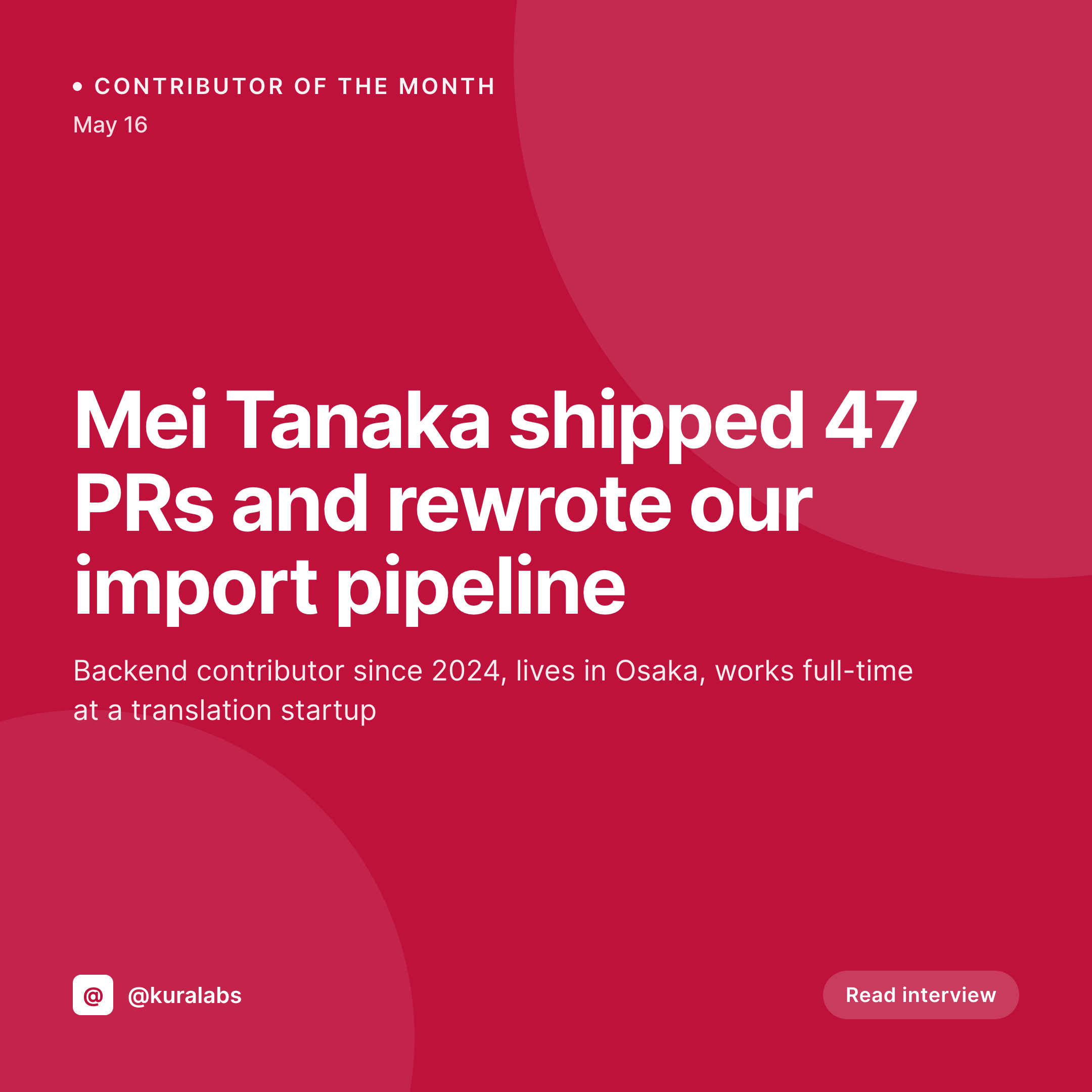
Sample contributor spotlight card
A 1080x1080 Instagram square with the contributor's photo, name, PR count, and contribution area, rendered from the spotlight post.

Comparison
Per-contributor Canva tile vs SleekPixel
Manual design per spotlight
- Thirty minutes in Canva per contributor, every single month
- Spotlight series stops after three months when the maintainer gets busy
- Tiles drift in style as different community managers build them
- Contributor photo gets cropped wrong, names overflow the layout
- No matching OG image for the blog post version of the spotlight
SleekPixel
- Square tile renders on save, no Canva round-trip
- Contributor photo from an ACF image field, auto-cropped to template shape
- PR count and contribution area bound to post fields
- Bulk regenerate to backfill a year of past spotlights
- Same engine renders the blog post's OG image alongside the Instagram tile
Features
What SleekPixel gives you for contributor spotlight card
Photo-first layout
The contributor's photo anchors the card with a defined crop and shape. Auto-fit handles different aspect ratios so no contributor's photo overflows the frame.
Contribution metrics
PR count, commits, issues triaged, or whichever metric the project tracks. The metric renders as a number in a fixed corner, recognizable across the spotlight series.
Monthly recognition
Layouts designed for a monthly cadence. Each month's spotlight stacks visually with the previous ones on the project's Instagram grid, forming a recognizable series.
Use cases
Contributor programs this fits
Monthly OSS spotlights
Open-source projects that publish a contributor of the month post. The square card becomes the Instagram and Twitter share that drives traffic to the spotlight interview.
Hacktoberfest and program crediting
Annual contributor programs where multiple contributors get recognized over a short window. Templated cards handle the volume without overwhelming the maintainer team.
Community spotlights for paid products
Community-driven SaaS or DevTool companies recognizing user-community members. Same template family, different audience, same recognition mechanic.
The bigger picture
Why visible contributor recognition compounds
Open-source projects are economies of attention as much as code. Contributors who feel seen submit more PRs, review more issues, and recruit friends into the project. Contributors who feel invisible drift out within a quarter.
The cost of being visible to a contributor is low: a written spotlight, a square tile, a tag on the social post. The cost of doing this manually for every spotlight, every month, is the reason most projects either skip recognition entirely or run it in bursts. Burst-recognition reads as unserious.
Monthly cadence reads as a commitment, and contributors notice the cadence as much as the content. Templating the visual layer with SleekPixel makes the cadence achievable without a designer in the loop. The maintainer writes the interview, fills in three fields, hits save, and the recognition asset exists.
Over a year, the grid of monthly spotlights becomes a visible artifact of the community's health, which both retains existing contributors and recruits new ones who see the project as a place where their work would be acknowledged.
Questions
Common questions about SleekPixel for contributor spotlight card
Yes. Use a custom field that holds the avatar URL, or paste the GitHub-hosted image URL into an ACF field. The avatar renders at whatever crop and size the template defines.
The template can render with a generic avatar and handle-only when the photo field is empty. Conditional layers detect missing fields and adjust. The contributor stays anonymous in the public spotlight.
Yes. Tag first-time contributors with a custom field, assign a different template (a 'first PR' badge, a welcome treatment). Regular contributors use the standard spotlight template.
No. The PR count is a manual field, or you can populate it via the WordPress REST API from a script that queries the GitHub API. SleekPixel itself does not call external APIs at render time.
Add a quote field to the post and a quote layer to the template. Short quotes render directly on the card, longer ones get truncated with an ellipsis. The full quote lives in the post body.
Yes. Bulk regenerate from the admin. Write retroactive spotlight posts for past contributors, fill the fields, save. SleekPixel renders the tiles. The grid fills in retrospectively with the current template.
Yes. The whole point is removing the marketing-team requirement. The maintainer or any community member with WordPress access can publish a spotlight and get a polished tile without a designer.
Yes. A custom field flags the role (contributor, maintainer, sponsor). The template can render a different ribbon or badge based on the role, but the layout stays consistent across the series.
Pricing
More than 1000+
happy customers
Explore our flexible licensing options tailored to your needs. Upgrade your license anytime to access more features, or opt for a lifetime license for ongoing value, including lifetime updates and lifetime support. Our hassle-free upgrade process ensures that our platform can grow with you, starting from whichever plan you choose.
Lifetime ♾️
Most popular
EUR
once
- Unlimited websites
- Lifetime updates
- Lifetime support
...or get the Bundle Deal
and save €250 🎁
💎 Want everything forever? The All Access Pass is going away on 01.08.2026.
The Bundle (unlimited sites)
Pay once, own it forever
Elevate your WordPress site with our exclusive plugin bundle that includes all of our premium plugins in one package. Enjoy lifetime updates and lifetime support. Save significantly compared to buying plugins individually.
What’s included
-
SleekAI
-
SleekByte
-
SleekMotion
-
SleekPixel
-
SleekRank
-
SleekView
€749
Continue to checkoutBrowse more
- Facebook post images
- Threads post images
- SoundCloud banner
- KDP paperback cover
- Facebook cover photos
- Lens Protocol posts
- Klaviyo email banner
- Twitch overlay
- YouTube podcast thumbnails
- Telegram channel images
- Behance project covers
- Threads profile banner
- TikTok profile banners
- Bluesky link cards
- Mastodon post images