






SleekPixel for playlist cards
Curators who host playlists on a WordPress site get one square share card per playlist, with track count, runtime, and theme pulled from the post fields.
♾️ Lifetime License available
Playlist cards are how rotations get discovered
Playlists travel on Instagram and Twitter, not on the streaming services themselves. A Spotify or Apple Music link previews as a small icon with a thumbnail. A custom playlist card, with the title, the track count, the runtime, and the curator's handle, previews as something readers actually click. The cards are how rotations get discovered and shared.
Curators with serious followings build a card style and stick with it. The visual identity over six months of playlists is what tells a reader "this is the slow-morning person" or "this is the high-energy gym person." That consistency is what carries the byline. Producing the card by hand for every playlist is the work that breaks the discipline.
SleekPixel anchors the card design in the playlist post. Title from post title, track count from a field or block count, runtime from a field, theme from the post excerpt. On save, SleekPixel renders the 1080x1080 square card and writes the og:image. Stream link in the body, card on Instagram, post URL gets shared, and the card travels with it.
Workflow
From rotation to share-ready card in one save
Design the playlist template
Write the playlist post
Save the post
Share the playlist
Output
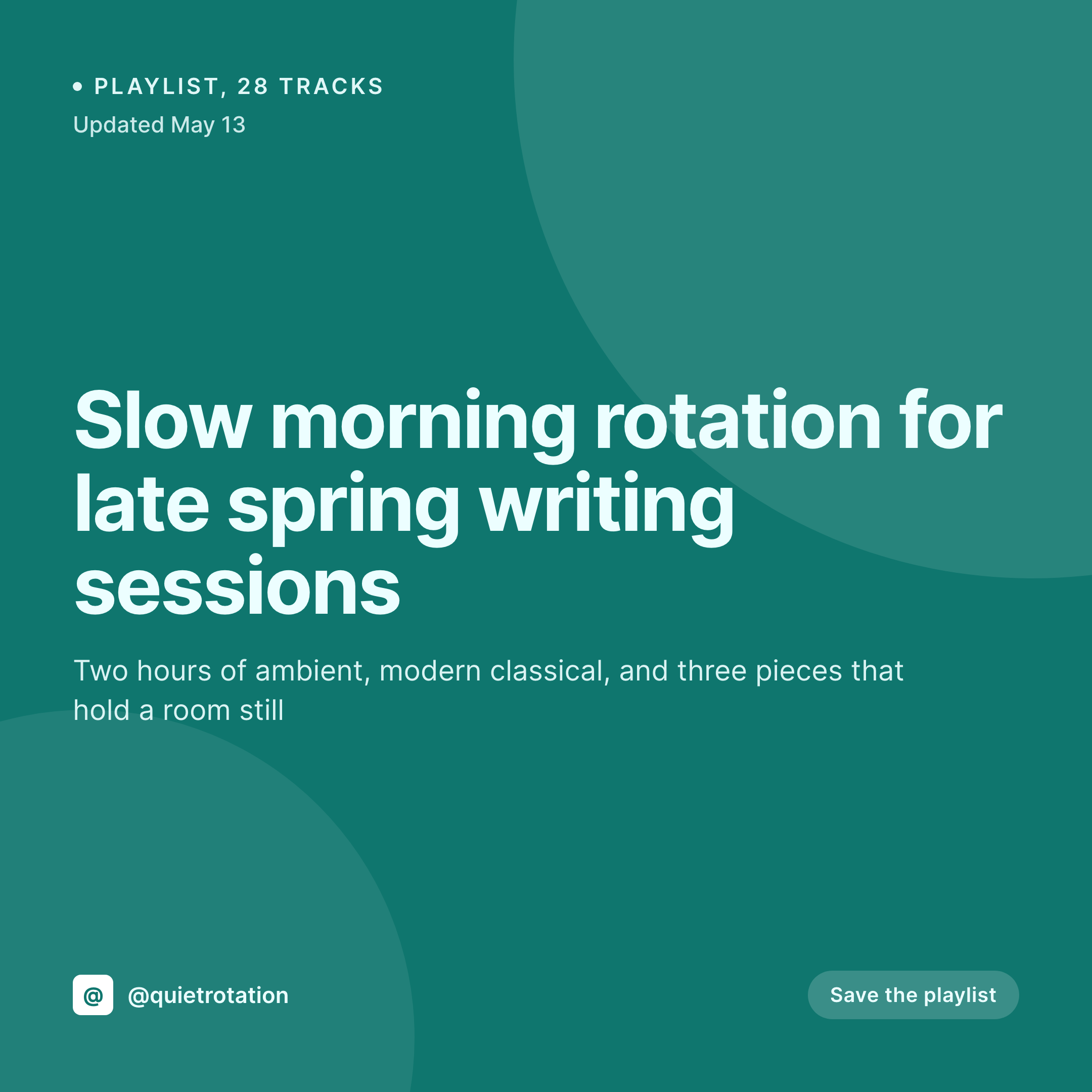
What a generated playlist card looks like
A 1080x1080 square card with the playlist title, track count, runtime, and the curator's handle pulled live from the post.

Comparison
Spotify embed screenshots vs SleekPixel
Spotify screenshot + crop
- Every playlist post shares as a tiny Spotify icon with no context
- Manual Canva cards drift across the year, byline visual identity splinters
- Track count and runtime on the card go stale when tracks get swapped
- No way to enforce a consistent card style across multiple contributors
- Old playlists never pick up updated visual treatments
SleekPixel
- Render fires on save for every playlist post
- Title, track count, runtime, and theme from post fields
- 1080x1080 square aspect that works on Instagram, OG, and Twitter
- Per-mood templates if the curator runs themed series
- Bulk regenerate when the visual identity evolves
Features
What SleekPixel gives you for playlist cards
Track-count aware
Templates bind to a numeric track-count field. The number renders consistently on every card without manual entry on the design side.
Runtime as a slot
Total playlist runtime gets its own slot in the layout. Update the playlist, refresh the runtime field, save, the card reflects the new total.
Mood-aware variants
Morning playlists, late-night rotations, focus mixes each get their own template. SleekPixel picks the right one from category or custom field at render time.
Use cases
Where playlist cards earn their keep
Solo selectors
One curator, a fresh playlist every other week, no design partner. SleekPixel removes the per-playlist card step so the post is the only artifact to maintain.
Themed series
Curators running weekly themed series ("Sunday slow," "Friday energy") want the series to read as a series. One template per theme keeps the identity tight.
Multi-curator publications
Group blogs where several curators contribute playlists. Every contributor's playlist ships with the same locked card frame, only the title and track list change.
The bigger picture
Why playlist cards are the unit of curator identity
A playlist is an inherently visual content type even though the medium is audio. The cover art on Spotify, the typography on the share image, the corner mark on the curator's account, these are the visual signals that turn a one-off mix into part of a recognizable rotation. Curators who treat their playlists as a publication build that visual identity early.
SleekPixel makes the work structural. The playlist post in WordPress is the source, the template is the card, and the render runs on save. A curator publishing forty playlists a year ships forty cards without ever opening a design tool, and the visual identity accumulates as quickly as the rotation does.
Over a year, that compounds into a recognizable selector account, which is the only sustainable engine for playlist discovery outside the streaming platforms' own algorithmic recommendations.
Questions
Common questions about SleekPixel for playlist cards
The card is a static PNG. The streaming preview happens via the embedded player inside the blog post itself. The card is what gets shared on social, the player is what plays inside the post.
Yes. SleekPixel does not care which streaming service hosts the playlist. The card is generated from your WordPress post fields, and the embedded player inside the post handles the actual stream.
Update the track count and runtime fields on the post and save. The card re-renders with the new values. Anyone sharing the URL afterwards gets the updated numbers.
Yes. Configure per-category or per-tag templates. A "slow morning" series can carry a different palette than a "high energy" series, with SleekPixel selecting the right template automatically.
Optional. Bind an image layer to a custom field that holds the cover art, or rely on typography alone. Both styles work, depends on the curator's visual taste.
If the runtime is stored on the post as a field, yes. If you want SleekPixel to calculate it from a tracklist field, that requires custom binding logic. Most curators store the runtime explicitly.
Run a bulk regenerate from the admin. Every playlist post gets re-rendered against the current template. A two-year rotation archive can be unified in a single batch.
Yes. A static handle slot in the template renders the @ or domain on every card without per-post setup, useful for cross-platform sharing and reposts.
Pricing
More than 1000+
happy customers
Explore our flexible licensing options tailored to your needs. Upgrade your license anytime to access more features, or opt for a lifetime license for ongoing value, including lifetime updates and lifetime support. Our hassle-free upgrade process ensures that our platform can grow with you, starting from whichever plan you choose.
Lifetime ♾️
Most popular
EUR
once
- Unlimited websites
- Lifetime updates
- Lifetime support
...or get the Bundle Deal
and save €250 🎁
💎 Want everything forever? The All Access Pass is going away on 01.08.2026.
The Bundle (unlimited sites)
Pay once, own it forever
Elevate your WordPress site with our exclusive plugin bundle that includes all of our premium plugins in one package. Enjoy lifetime updates and lifetime support. Save significantly compared to buying plugins individually.
What’s included
-
SleekAI
-
SleekByte
-
SleekMotion
-
SleekPixel
-
SleekRank
-
SleekView
€749
Continue to checkoutBrowse more
- X list banners
- Lens Protocol posts
- Dailymotion thumbnails
- TikTok Now image
- Depop listing images
- Stan Store cover
- Lemmy post images
- Xiaohongshu cover images
- Instagram highlight covers
- Lemon Squeezy product covers
- SoundCloud banner
- Passes page banner
- Gumroad product covers
- Tumblr header
- Tidal cover art