






SleekPixel for moderator cards
Panel moderators carry the conversation, and on most conference sites their share card is invisible. SleekPixel renders a dedicated moderator card per panel, with headshot, role, panel name, and a clear host label.
♾️ Lifetime License available
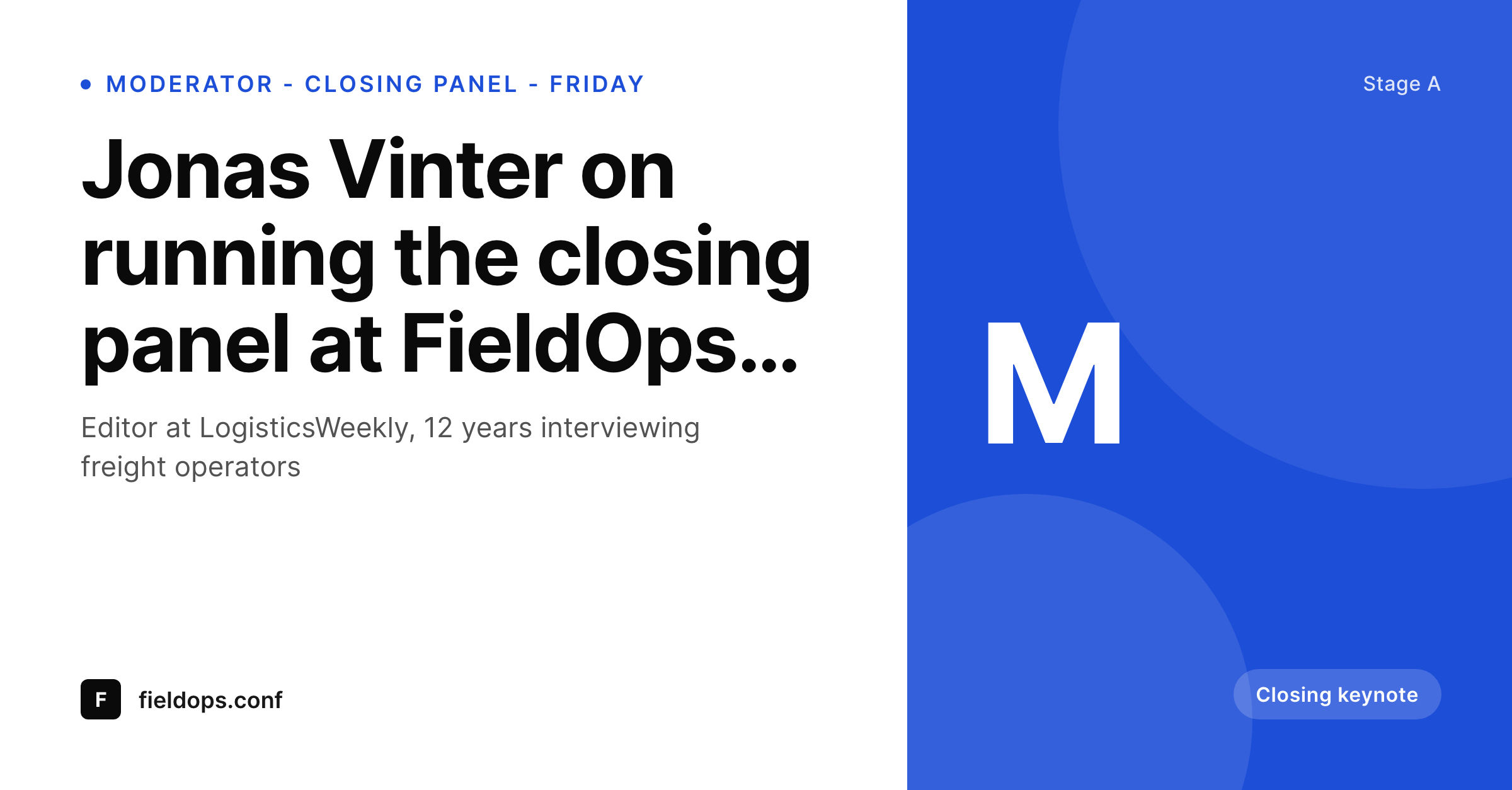
Moderators are the ones who chose the lineup
The moderator on a conference panel is usually the journalist, analyst, or operator who picked who is on the stage. Their audience is one of the strongest sources of panel attendance, because they trust the host to have curated the conversation. When the moderator posts the panel announce, the share card decides whether their following clicks through.
Default share cards either bury the moderator inside the speaker grid or skip them entirely. Hand-built Canva cards solve this for one panel and break the moment a second moderator is added. The result is uneven moderator presence across the program, where some panels read as hosted events and others as committee assignments.
SleekPixel runs a dedicated moderator card variant. The same panel post that drives the panelist card also writes a moderator card variant for the host's own share, with the role explicitly labeled, the panel title in context, and the conference brand locked. The moderator's audience sees a real curated session, not a generic event ad.
Workflow
From host announce to social-ready card in one save
Design the moderator template
Mark the moderator on the panel post
Moderator shares the URL with their handle
Swap a moderator and re-render
Output
What a generated moderator card looks like
A 1200x627 LinkedIn-tuned PNG built for the moderator variant of the panel post, with the host headshot featured, role label, panel title, and stage and time.
Comparison
Default moderator share image vs SleekPixel
Default moderator cards image
- Moderator buried inside a five-headshot strip
- No host label, audience cannot tell who runs the panel
- Generic event logo when the moderator shares their slug
- Each moderator builds a personal Canva card, brand drifts
- Schedule edits never reach the moderator's existing share
SleekPixel
- Dedicated moderator card variant per panel post
- Host role label rendered consistently across the program
- Panel title, room, and time pulled from the panel fields
- Variant served on the moderator-anchored share URL
- Bulk regenerate when a moderator swaps last minute
Features
What SleekPixel gives you for moderator cards
Host-anchored layout
The moderator headshot takes the lead position with a small host role label so the audience reads who runs the conversation.
Variant per role
Same panel post, two cards. A panelist variant for guests, a moderator variant for hosts, all driven from the same template configuration.
Lineup visible as context
Panelist names appear in a small strip so the moderator's audience sees who they are about to interview, without losing the host emphasis.
Use cases
Who uses SleekPixel for moderator cards
Journalist-hosted summits
Events where a trade publication runs the marquee panels. The moderator brings their audience, and the share card frames the host role clearly.
Academic chair-led sessions
Program chairs and session leads at academic conferences. The host label respects the formality of the role and the chair's institutional affiliation.
Analyst-hosted industry days
Vertical industry events where named analysts run the closing panels. Their share card is the strongest single attendance driver on the program.
The bigger picture
Why a host-anchored card outperforms the lineup card on the moderator's feed
Panels travel on two distinct social waves. The lineup wave is driven by the panelists posting from their own audiences, where a complete multi-headshot card converts best. The host wave is driven by the moderator, whose audience clicks because they trust that specific person to ask the right questions.
On the moderator's feed, a generic five-face lineup card mutes the host's signal. A dedicated card with the moderator front, role labeled, panel title in context, reads as their curated session. Both cards live on the same panel post, just routed by the share path.
SleekPixel handles that routing so the conference does not need to maintain two design files per session, and the moderator's audience sees a card that earns the click.
Questions
Common questions about SleekPixel for moderator cards
You can split by share path, by referrer, or by a query parameter the moderator uses in their share link. The plugin supports either model out of the box.
You can. The simplest setup is one template with conditional layers that show the host emphasis when the moderator field is detected and the lineup layout otherwise.
The plugin falls back to the panelist or speaker template. Sessions without a host stay on the standard share path.
Yes. The template can be configured to lay out two host headshots side by side with a shared host role label, while the lineup strip continues to show the panelists.
Yes. Moderator, host, chair, anchor, interviewer, the label is a configurable template field bound to whatever role term you set on the speaker.
Yes. SleekPixel writes og:image, twitter:image, and the matching width and height meta tags so platforms render the moderator card immediately on first share.
Yes. The bulk regenerate command refreshes every panel post against the current moderator and panelist templates after an edit.
That is a different asset and usually lives on a session-recap post type. SleekPixel can drive that template too, but it stays separate from the pre-event moderator card.
Pricing
More than 1000+
happy customers
Explore our flexible licensing options tailored to your needs. Upgrade your license anytime to access more features, or opt for a lifetime license for ongoing value, including lifetime updates and lifetime support. Our hassle-free upgrade process ensures that our platform can grow with you, starting from whichever plan you choose.
Lifetime ♾️
Most popular
EUR
once
- Unlimited websites
- Lifetime updates
- Lifetime support
...or get the Bundle Deal
and save €250 🎁
💎 Want everything forever? The All Access Pass is going away on 01.08.2026.
The Bundle (unlimited sites)
Pay once, own it forever
Elevate your WordPress site with our exclusive plugin bundle that includes all of our premium plugins in one package. Enjoy lifetime updates and lifetime support. Save significantly compared to buying plugins individually.
What’s included
-
SleekAI
-
SleekByte
-
SleekMotion
-
SleekPixel
-
SleekRank
-
SleekView
€749
Continue to checkoutBrowse more
- Passes page banner
- YouTube podcast thumbnails
- WeChat Moments images
- Lemon8 post
- Farcaster cast images
- Twitch starting soon screen
- Dribbble shot covers
- Facebook Shop product images
- Etsy listing images
- Etsy cover photos
- Behance banner
- YouTube channel banners
- Pinterest product pin covers
- YouTube Shorts thumbnails
- Amazon Storefront banners