






SleekPixel for Farcaster cast images
Generate per-post 1200x630 cards that Warpcast and other Farcaster clients pull when your link is cast. Title, author, and channel baked in straight from WordPress.
♾️ Lifetime License available
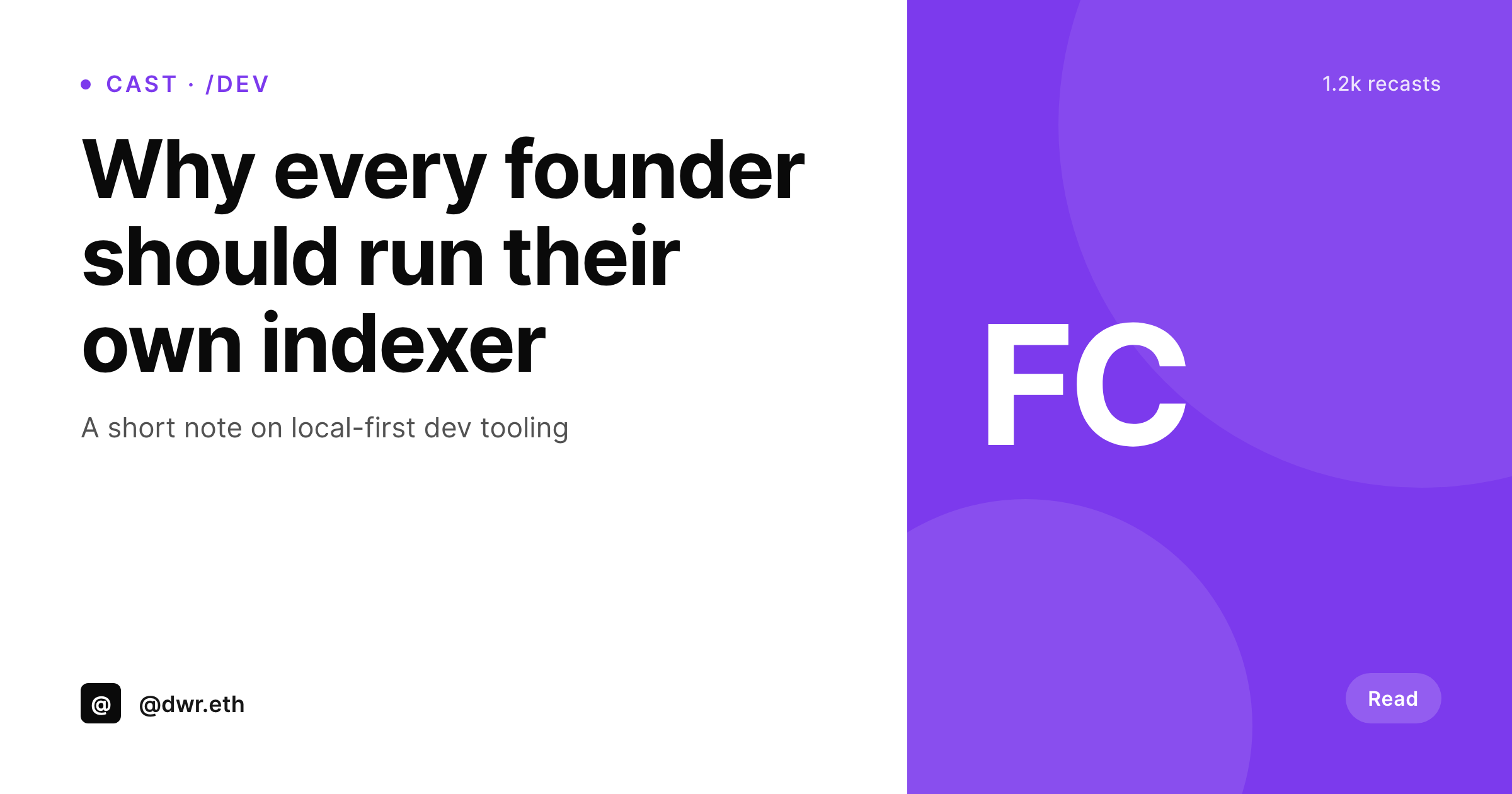
Casts that link to your site deserve a real preview
Farcaster clients render link previews using the standard og:image and og:title meta tags. A cast with a link to your essay or product page surfaces whatever your theme happens to ship, which for most WordPress sites is either the featured image or a stretched logo. The result is the same flat preview for every cast, no matter how different the underlying posts are.
SleekPixel writes a per-post 1200x630 PNG and the matching og:image meta tag. When the cast goes out on Farcaster, Warpcast pulls the image and renders the title, the author handle, and your brand mark next to the cast text. The preview reads as a piece of content rather than a generic link.
For Farcaster channels that focus on a specific topic, you can scope different templates to different post categories so a /design cast and a /dev cast surface with the right visual cue.
Workflow
From post to cast-ready link preview
Design the card
Bind post fields
Save the post
Cast the link
Output
What casters see in their feed
A 1200x630 card with the post title, author, and channel mark, sized for the link preview slot in Warpcast and most Farcaster clients.
Comparison
Default cast preview vs SleekPixel for Farcaster cast images
Default cast preview
- Every cast surfaces the same theme-level OG image
- Featured images get stretched or cropped into the preview slot
- Long titles overflow or get truncated in client rendering
- No author handle or channel cue inside the preview
- Re-casts and quote-casts amplify the same flat thumbnail
SleekPixel
- Per-post 1200x630 PNG with title, author, and channel cue
- og:image meta tag written into the post head automatically
- Per-category templates for channel-aligned casts
- Self-hosted brand fonts render exactly the same in every preview
- Real PNG in uploads, downloadable from the Gutenberg sidebar
Features
What SleekPixel gives you for Farcaster cast images
Standard OG tags
Writes og:image and og:title into the head, which is what Warpcast and other Farcaster clients read. No custom Frame work needed for plain link previews.
Channel-aware templates
Scope a different template to each WordPress category so casts in /dev, /design, or /writing surface with their own visual cue.
Title-safe layout
Auto-wraps and clamps long post titles. Nothing overflows the safe zone, even on three-line headlines pulled from longer essays.
Use cases
Where Farcaster cast previews change the feed
Crypto and dev writers
Long-form essayists who cross-post to Farcaster get a preview that signals the piece, not just the domain.
Indie builders
Launches, changelogs, and ship updates get distinct previews per post instead of one generic project logo.
Channel hosts
Channel curators casting roundups and threads keep their feed visually coherent by scoping templates to channel posts.
The bigger picture
Why Farcaster link previews compound for serious posters
Farcaster is small enough that a coherent visual identity reads across the entire client. Posters who cast often with the same brand mark are recognisable in feed even before the cast text is read, and that recognition shifts the marginal recast and reply rate. The default WordPress OG image flattens that recognition because every cast surfaces the same logo regardless of the underlying post.
SleekPixel turns each link into a real preview by rendering a per-post card from real fields, which gives every cast its own moment in feed. The cost stays low because the render is automatic on save, and a brand refresh re-renders the archive so older casts in deep threads keep matching the current system.
Questions
Common questions about SleekPixel for Farcaster cast images
No, SleekPixel renders the standard og:image link preview that Warpcast and other clients show for plain links. Interactive Frames require a Frames server with its own endpoints and is out of scope. SleekPixel covers the static link preview case.
Yes, once the og:image meta tag is in the post head and the image is accessible. Warpcast caches previews on first render, so if you change the image you may need to clear the cache via their refresh link.
The standard og:image is shared across most platforms including Twitter, Facebook, LinkedIn, and Farcaster clients. SleekPixel sticks to standard OG output so the same PNG works everywhere.
1200x630, the size most Farcaster clients render at full width in feed. Smaller or larger sizes work but may be downscaled or cropped depending on the client.
Yes, map the post's category to a small badge in the template. The badge renders inside the card without changing the layout.
Yes, the post author's display name renders by default. If you store Farcaster handles in an ACF field, map that field to the brand slot for a per-author render.
Warpcast caches the og:image on first cast of a URL. If you update the template and want the new image to surface, recast with a fresh URL or refresh the preview cache from inside Warpcast.
In the WordPress uploads directory as real PNGs. They sit in your media library, are included in normal backups, and are downloadable from the post sidebar.
Pricing
More than 1000+
happy customers
Explore our flexible licensing options tailored to your needs. Upgrade your license anytime to access more features, or opt for a lifetime license for ongoing value, including lifetime updates and lifetime support. Our hassle-free upgrade process ensures that our platform can grow with you, starting from whichever plan you choose.
Lifetime ♾️
Most popular
EUR
once
- Unlimited websites
- Lifetime updates
- Lifetime support
...or get the Bundle Deal
and save €250 🎁
💎 Want everything forever? The All Access Pass is going away on 01.08.2026.
The Bundle (unlimited sites)
Pay once, own it forever
Elevate your WordPress site with our exclusive plugin bundle that includes all of our premium plugins in one package. Enjoy lifetime updates and lifetime support. Save significantly compared to buying plugins individually.
What’s included
-
SleekAI
-
SleekByte
-
SleekMotion
-
SleekPixel
-
SleekRank
-
SleekView
€749
Continue to checkoutBrowse more
- Telegram channel images
- Shopify product images
- Etsy shop banners
- Discord server banners
- Telegram bot avatar
- YouTube banner art
- Snapchat ad images
- Signal sticker pack
- VK community cover photos
- Spotify playlist cover
- KakaoTalk channel banners
- YouTube Music cover art
- TikTok ad images
- Mastodon post images
- Dailymotion thumbnails