






SleekPixel for word of the day cards
Sites running a word of the day series need the share card to carry the word, the part of speech, and a one-line definition. SleekPixel renders one og:image per post in WordPress, generated from the post fields on save.
♾️ Lifetime License available
Vocabulary posts are tiny, so the share image has to do the work
Word of the day posts are intentionally short. The whole appeal of the format is that a reader gets one word, one definition, one example sentence, and moves on. That makes the share card unusually important, because the social preview is doing roughly the same job as the post body. If the card carries the word, the part of speech, and a definition fragment, the reader has already gotten value before clicking. If it carries a generic site logo, the post has been hidden behind a click and the format loses its point.
The default WordPress approach is to upload a featured image per post, which is fine for ten words and a quiet disaster for a thousand. Editors copy a Canva template per word, drop the word in, export, upload. Three months in the fonts have drifted, the part of speech labels are inconsistent, and one word out of twenty has the wrong definition on its share card because the post was edited after the export.
SleekPixel binds the card to the post fields. Word, part of speech, definition, and etymology all come from meta keys or block attributes. The render fires on save, writes the 1200x630 PNG, and sets the og:image meta tag. Correct a definition, save, the next platform re-scrape gets the corrected card. The series runs without a Canva queue.
Workflow
From word to a real share card in one save
Design the word template
Write the daily entry
Save and publish
Push to readers
Output
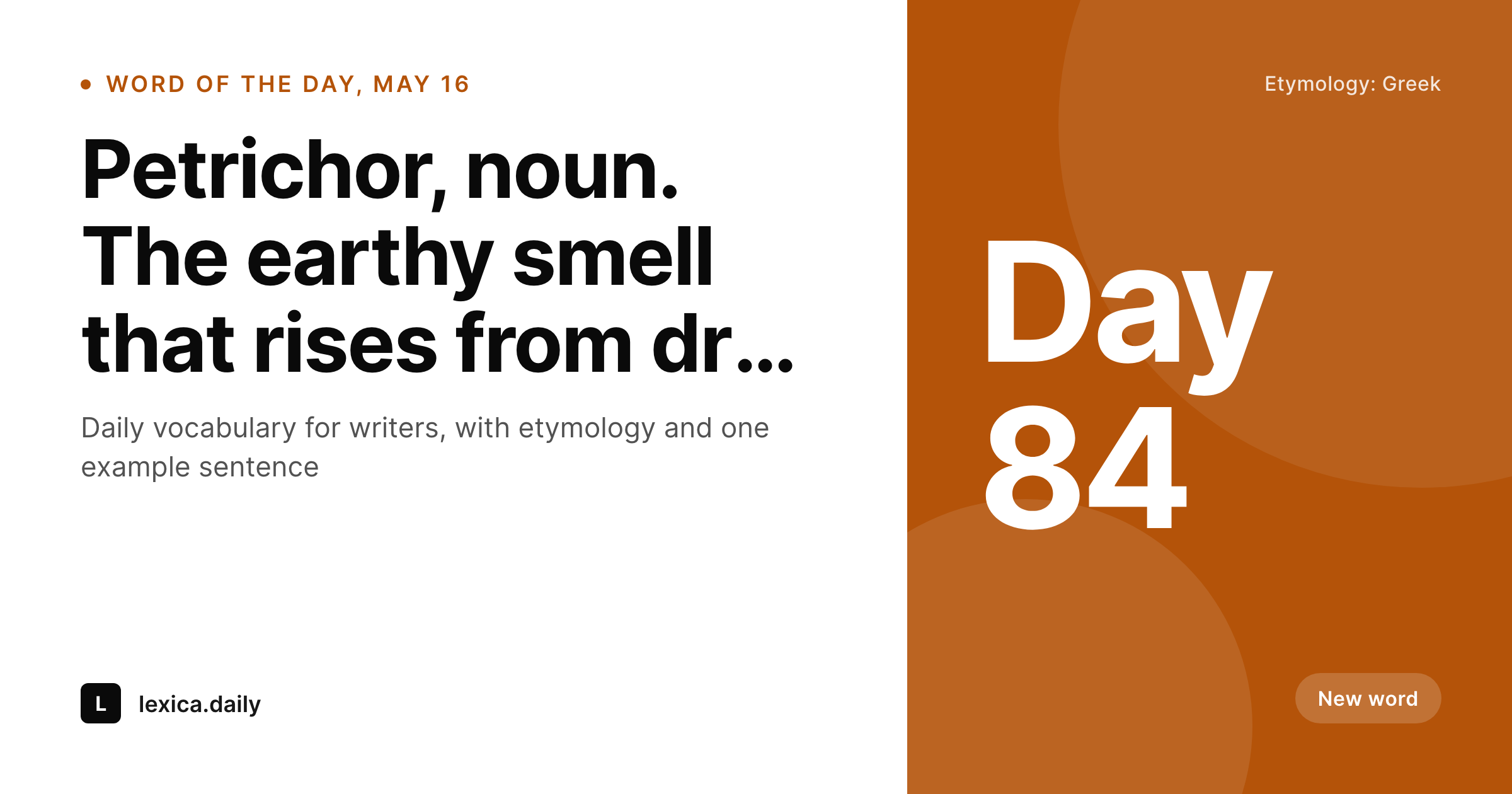
What a generated word of the day card looks like
A 1200x630 share card with the word in large display type, the part of speech, a short definition, and an etymology line pulled from the post fields.
Comparison
Default word of the day image vs SleekPixel
Default word of the day image
- Generic site logo as the share image for every word
- Part of speech labels drift across the series
- Definitions on the card go stale after edits
- Long words shrink inconsistently across the template
- No regeneration path when the brand refreshes
SleekPixel
- Render fires on save for every word of the day post
- Word, part of speech, definition, and etymology pulled from post fields
- og:image and twitter:image meta tags written automatically
- Auto-fit display type so a 4-letter word and a 14-letter word both read
- Bulk regenerate after a brand refresh or template tweak
Features
What SleekPixel gives you for word of the day cards
Display type that fits
The word slot uses auto-fit type so short words fill the card and long words shrink without breaking the layout. The reader sees the word, big, on every card.
Part of speech as a label
Bind a small part-of-speech tag to a meta field. Noun, verb, adjective, adverb render with consistent styling and color across the series.
Etymology in a tiny line
An optional etymology line at the foot of the card adds depth without crowding the word. Greek, Latin, Old English origins read in the share preview itself.
Use cases
Where word of the day cards earn their keep
Writing and editing newsletters
Daily vocabulary for writers. The og:image carries the word and definition so the newsletter and the blog preview match without an extra export.
Language learning sites
Daily vocabulary for learners of a target language. The card can include the translation, the pronunciation, and the part of speech in the learner's interface language.
Reference and dictionary projects
Indie reference sites publishing a featured term each day can render a clean card per entry so search referrals and social previews look the same.
The bigger picture
Why a vocabulary series needs the word visible before the click
Word of the day works because the format is honest about its tiny size. A reader is being offered one word, and the implicit contract is that the word is interesting enough to be worth thirty seconds. The share card is the first half of that contract.
When the word and the definition are visible in the preview, the reader can decide whether the term is new to them and whether they want the longer explanation, which is exactly the decision the format is built around. When the share card is a generic logo, the contract is broken, because the reader cannot evaluate the offer without clicking. Most sites running this format are small, often a single writer, and cannot spend twenty minutes a day designing a card.
Binding the card to the post fields removes the design step entirely. The writer types the word, the part of speech, and the definition, and a coherent visual series falls out as a side effect.
Questions
Common questions about SleekPixel for word of the day cards
SleekPixel supports any web font loaded into the template. Words with accents, umlauts, or non-Latin scripts render correctly as long as the font covers the glyph range.
Yes. Add a pronunciation slot to the template, bind it to a meta field, and the IPA or simplified pronunciation renders under the word.
Yes. The renderer enforces a minimum readable size and wraps to a second line if needed. Compound German nouns and other long terms render without breaking the card.
Yes. A small image slot can pull from a featured image, a meta image field, or a glyph set. Useful for nature or culinary vocabulary series.
Edit the field, save the post. SleekPixel re-renders the card, the og:image is overwritten, and the next platform scrape pulls the corrected version.
Yes. Per-category templates let nouns, verbs, and adjectives render with distinct accent colors while staying inside one consistent brand system.
Yes. The bulk regenerate action renders every post under a chosen template. Sites can run the action once after installing and the entire archive gets fresh share cards.
The card itself is a PNG, so the link is on the post URL. SleekPixel sets the og:image meta tag so platforms pair the card with the correct destination automatically.
Pricing
More than 1000+
happy customers
Explore our flexible licensing options tailored to your needs. Upgrade your license anytime to access more features, or opt for a lifetime license for ongoing value, including lifetime updates and lifetime support. Our hassle-free upgrade process ensures that our platform can grow with you, starting from whichever plan you choose.
Lifetime ♾️
Most popular
EUR
once
- Unlimited websites
- Lifetime updates
- Lifetime support
...or get the Bundle Deal
and save €250 🎁
💎 Want everything forever? The All Access Pass is going away on 01.08.2026.
The Bundle (unlimited sites)
Pay once, own it forever
Elevate your WordPress site with our exclusive plugin bundle that includes all of our premium plugins in one package. Enjoy lifetime updates and lifetime support. Save significantly compared to buying plugins individually.
What’s included
-
SleekAI
-
SleekByte
-
SleekMotion
-
SleekPixel
-
SleekRank
-
SleekView
€749
Continue to checkoutBrowse more
- VSCO cover
- Twitch schedule banners
- Threads post cover
- Ghost feature images
- X social cards
- YouTube ad thumbnails
- Klaviyo email headers
- LinkedIn event banners
- Instagram collab post images
- YouTube Shorts thumbnails
- LinkedIn post images
- TikTok Now image
- Threads post images
- LinkedIn newsletter headers
- Reddit subreddit banners