






SleekPixel for breweries
SleekPixel reads each beer's name, style, ABV, hops, and release date and renders a custom square Instagram graphic on save. No more dropping into Photoshop the night before a release.
♾️ Lifetime License available
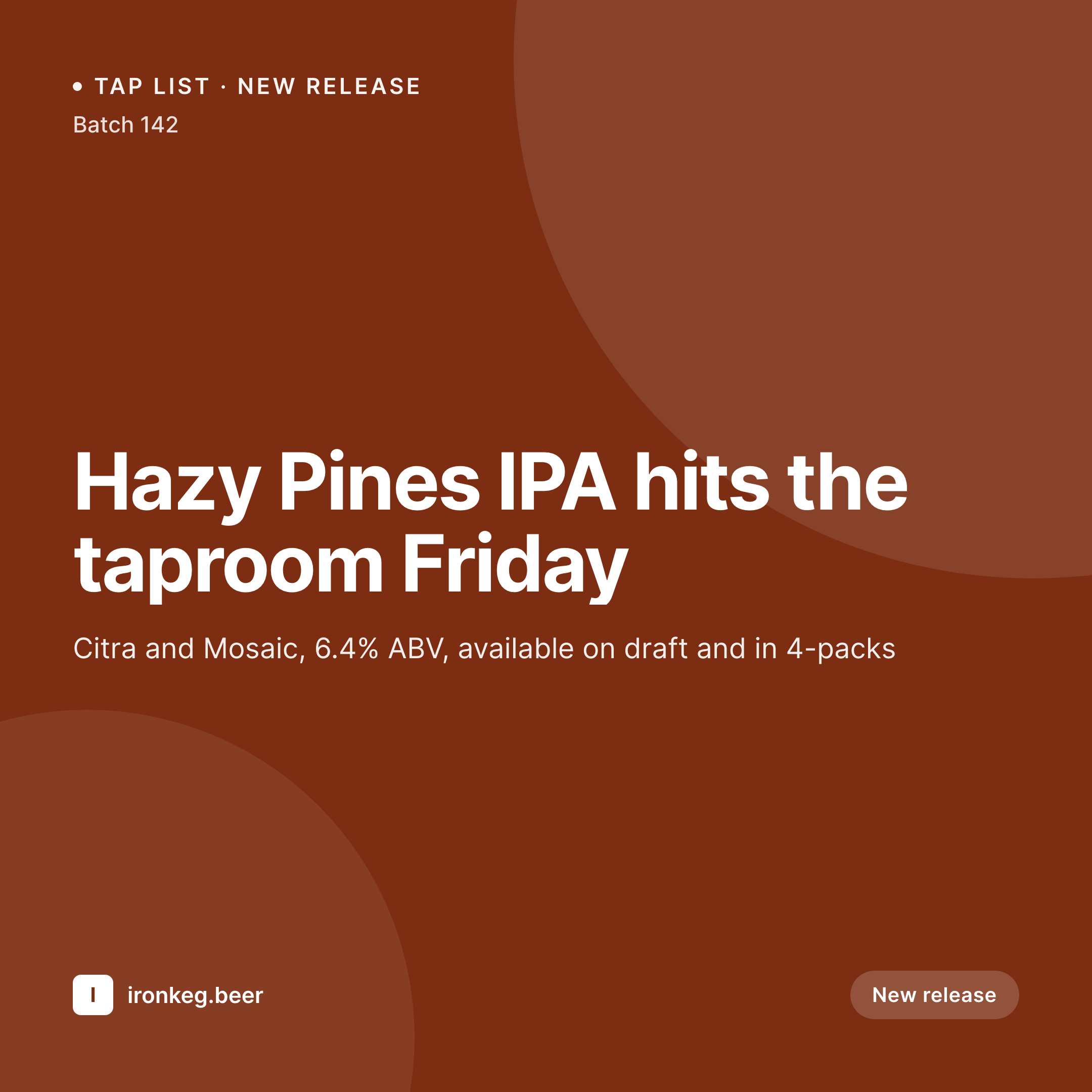
Stop redesigning the same beer card every Friday
Every brewery release follows the same rhythm. The brewer finalizes the recipe, the taproom manager announces the date, and someone - usually the same overworked someone - opens a design tool to make the Instagram graphic. Hazy Pines IPA, 6.4%, Citra and Mosaic, dropping Friday. Then next week it's a stout, then a sour, then a pilsner, and the template gets rebuilt slightly differently every time.
SleekPixel ends that loop. You design one Instagram template in WordPress with fields like {beer_name}, {style}, {abv}, {hops}, and {release_date}. Every time a brewer adds a beer to the site - whether that's a custom post type, a WooCommerce product, or a regular post - SleekPixel renders the template with that beer's data and saves a square 1080 x 1080 PNG ready for Instagram.
Edit the template once and every beer's release graphic refreshes. Add a new field like {dry_hop_schedule} and every beer inherits it. The taproom manager publishes the post; the social graphic is already done.
Workflow
From keg to grid in one save
Design the template
Connect to the beer post type
Save the beer
Drop into Instagram
Output
Sample Instagram post from a beer release
This square card was rendered from a beer's name, style, ABV, hop bill, and release date. Same template, every batch.
Comparison
Hand-made beer graphics vs SleekPixel
Manual graphic per release
- Every beer release means another evening in Canva or Photoshop
- Templates drift - one IPA's card looks nothing like the next
- ABV and hop info gets retyped from the beer page into the graphic
- Last-minute recipe changes mean re-exporting and re-uploading the image
- Seasonal lineups need a full pass when the brand evolves
SleekPixel
- Auto-generated Instagram post per beer on save, every time
- Per-beer variables: name, style, ABV, IBU, hops, release date, batch number
- One template = one consistent visual identity across the entire tap list
- Edit the template once and every beer's graphic refreshes
- Falls back gracefully when a field like IBU isn't measured
Features
What SleekPixel gives you for breweries
Template-driven
Design the release graphic once with shapes, type, and dynamic fields. Every new beer inherits the layout automatically on the next save.
Beer data, mapped
Pull ABV, IBU, style, hops, and malt bill from custom fields or a beer CPT. The fields you already maintain on the site become the graphic.
Regenerate on demand
Refreshed the brand for the new taproom? Bulk-regenerate every beer's image from the admin in one click.
Use cases
Where this fits best
Production breweries
A new release every couple of weeks means dozens of graphics a year. Automating them frees the taproom team to actually tap the keg.
Taproom event posts
Trivia nights, food truck takeovers, Oktoberfest - every event post becomes its own square Instagram graphic with no extra work.
Brewery webshops
WooCommerce 4-pack listings get their own social cards on save, so every product share looks like a coordinated drop.
The bigger picture
Why a consistent release graphic matters
A brewery's Instagram grid is its tap list before customers walk through the door. Drinkers scroll, see a hazy IPA they like the look of, and decide where they're going on Friday. The grid is the storefront.
When every release looks visually distinct in a chaotic way - one in serif type, one in script, one with a stock background - the brewery reads as scattered. When the grid looks coordinated, the brewery reads as serious. The middle path - a template that adapts to each beer automatically - is how the busiest production breweries keep up without a full-time designer.
SleekPixel brings that to the WordPress sites breweries already use to manage their tap list, beer pages, and event calendar, so the social graphic is just another field that gets filled in automatically when the brewer hits save.
Questions
Common questions about SleekPixel for breweries
Yes. SleekPixel works with any post type - the default 'post', WooCommerce products, or a dedicated beer CPT registered by your theme or a plugin. Tell it which post type to apply the template to and it handles the rest.
Yes. SleekPixel reads from ACF, Meta Box, native custom fields, and WooCommerce product attributes. Drop the field name into the template like {abv} or {hops} and it renders on save.
The template renders without it. You can set defaults per field, hide the IBU block when empty, or design the layout so missing fields collapse. Nothing breaks if data is incomplete.
Yes. SleekPixel supports per-category, per-tag, and per-CPT routing rules. Tag a beer 'IPA' and it gets the IPA template; tag it 'Sour' and it gets a different one.
SleekPixel saves the PNG to your uploads folder. Download from the post screen or pull it via the URL into a scheduling tool like Later, Buffer, or Meta's own scheduler - whichever your brewery already uses.
Yes. The admin has a one-click bulk regeneration that re-renders graphics for every beer using the template. Useful when the brewery rebrands or rolls out new can artwork.
Stores. Each rendered square is a real PNG in the uploads folder, so it loads fast and survives even if the plugin is later disabled.
Yes. SleekPixel can write og:image meta on the beer page in addition to producing the Instagram square - one template, both outputs, depending on how you configure the format.
Pricing
More than 1000+
happy customers
Explore our flexible licensing options tailored to your needs. Upgrade your license anytime to access more features, or opt for a lifetime license for ongoing value, including lifetime updates and lifetime support. Our hassle-free upgrade process ensures that our platform can grow with you, starting from whichever plan you choose.
Lifetime ♾️
Most popular
EUR
once
- Unlimited websites
- Lifetime updates
- Lifetime support
...or get the Bundle Deal
and save €250 🎁
💎 Want everything forever? The All Access Pass is going away on 01.08.2026.
The Bundle (unlimited sites)
Pay once, own it forever
Elevate your WordPress site with our exclusive plugin bundle that includes all of our premium plugins in one package. Enjoy lifetime updates and lifetime support. Save significantly compared to buying plugins individually.
What’s included
-
SleekAI
-
SleekByte
-
SleekMotion
-
SleekPixel
-
SleekRank
-
SleekView
€749
Continue to checkoutBrowse more
- summit recap card
- shareholder letter card
- AMA card
- waitlist closing card
- waitlist cards
- integration launch card
- library of the week card
- shipping update cards
- customer spotlight cards
- behind the scenes cards
- loyalty program cards
- milestone celebration cards
- podcast episode
- team hire card
- moderator cards
- Kick channel banners
- TikTok Now image
- Snapchat snap images
- Substack podcast cover
- LinkedIn post images
- Dailymotion thumbnails
- Flickr cover photo
- TikTok ad images
- Twitch schedule banners
- LinkedIn newsletter headers
- Odnoklassniki banners
- podcast cover art
- Stan Store cover
- Mastodon profile banners
- Reddit subreddit banners