






SleekPixel for bakeries
SleekPixel reads each item's name, ingredients, bake date, and pre-order link and renders a vertical Pinterest pin on save. No more reformatting the same announcement every Friday.
♾️ Lifetime License available
Stop redrawing the weekly bake announcement
A small bakery's week revolves around the bake list. Saturday is sourdough and cardamom buns; Wednesday is laminated croissants; Friday morning the seasonal galette goes up for pre-order. The list lives on the website. The Pinterest pin announcing it lives somewhere else - usually a design tool that the owner opens on Thursday night to rebuild a layout that looked fine last week but somehow got slightly different fonts.
SleekPixel turns the bake list into the pin. You design one vertical 1000 x 1500 Pinterest layout in WordPress with fields like {bake_name}, {ingredients}, {bake_date}, and {preorder_url}. Every time the bakery publishes or updates an item - whether that's a custom post type, a WooCommerce product, or a regular post - SleekPixel renders the template with that item's data and saves a pin-ready PNG.
Pinterest is built for vertical, evergreen, recipe-shaped content. A bakery's catalog is exactly that. With SleekPixel, every bake on the site becomes a pin without a separate design pass, so the bakery's Pinterest board grows in step with the menu instead of falling behind.
Workflow
From oven to Pinterest in one save
Design the template
Connect to the bake post type
Save the bake
Schedule on Pinterest
Output
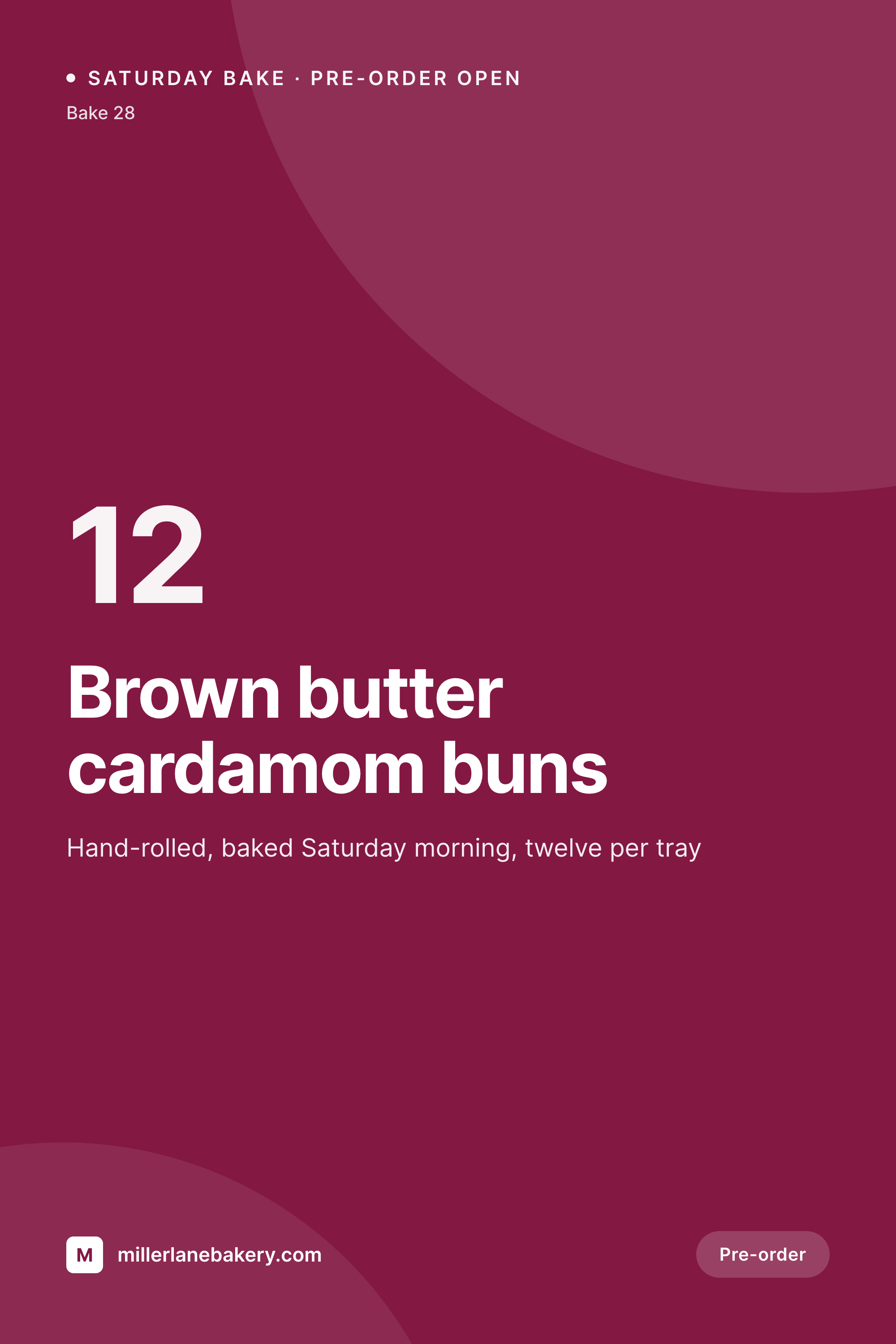
Sample Pinterest pin from a weekly bake
This vertical pin was rendered from a bake's name, ingredients, and bake date. Same template, every Saturday.
Comparison
Hand-made bakery pins vs SleekPixel
Manual pin per bake
- Every Friday means another design session before the Saturday bake
- Pin styles drift week to week, the board looks unrelated to itself
- Pre-order details get retyped from the website into the pin
- Quick additions like a midweek loaf skip Pinterest entirely
- Seasonal menus need a full design pass each quarter
SleekPixel
- Auto-generated vertical Pinterest pin per bake on save
- Per-bake variables: name, ingredients, bake date, batch size, pre-order link
- One template = one coordinated Pinterest board across seasons
- Edit the template once and every bake's pin refreshes
- Falls back gracefully when a field like 'allergens' is absent
Features
What SleekPixel gives you for bakeries
Template-driven
Design the pin once with the bakery's wordmark, color palette, and dynamic fields. Every new bake inherits the layout on the next save.
Ingredients, mapped
Pull ingredients, allergens, batch size, and bake date from custom fields. The fields the bakery already maintains become the pin.
Regenerate on demand
Refreshed the bakery's wordmark? Bulk-regenerate every bake's pin from the admin in one click.
Use cases
Where this fits best
Weekly pre-order bakeries
Each Saturday's bake list becomes a fresh batch of pins automatically, ready to schedule into Pinterest for the week.
Bakeries with online ordering
WooCommerce product pages get matching pins on save, linking the pin straight to the pre-order URL.
Specialty pastry shops
Seasonal items - king cake at Mardi Gras, panettone at Christmas - get their own pins without a separate art-direction pass.
The bigger picture
Why a consistent Pinterest board matters
Pinterest sends traffic for years, not days. A pin that goes out today still drives website visits two springs from now if the visual works. That makes it the highest-leverage social channel a small bakery has - one bake announcement can keep earning pre-orders long after the actual bake is gone.
The catch is consistency. A board that looks scattered reads as amateur, and Pinterest's recommendation engine quietly favors creators whose pins look like they belong together. The middle path - a template that adapts to each bake automatically - is how busy bakeries keep up without hiring a designer.
SleekPixel brings that to the WordPress site the bakery already uses to publish its weekly list, so a fresh, board-ready pin appears every time a bake is published.
Questions
Common questions about SleekPixel for bakeries
Yes. Whether the bakery uses a 'bake' CPT, WooCommerce products for pre-orders, or regular posts for the weekly list, SleekPixel applies its template wherever you point it.
Yes. SleekPixel reads from ACF, Meta Box, native custom fields, and WooCommerce attributes. Drop {ingredients} or {allergens} into the template and they render on save.
The template renders without missing fields. Set defaults, hide blocks, or design the layout so absent values collapse cleanly. Nothing breaks if data is incomplete.
Yes. SleekPixel routes by category, tag, or post type. Tag a post 'sourdough' and it gets a different template than 'laminated' or 'pastry'.
SleekPixel saves the PNG to the uploads folder. Download from the post screen or pull the URL into Tailwind, Later, or Pinterest's native scheduler.
Yes. One-click bulk regeneration in the admin updates every pin in the catalog at once.
The pin is an image; the pre-order link is set when you upload it to Pinterest. SleekPixel can also write the URL into the post so it's always paired with the pin.
No. Pins are rendered at save time and stored as static PNGs in the uploads folder, so page loads stay fast.
Pricing
More than 1000+
happy customers
Explore our flexible licensing options tailored to your needs. Upgrade your license anytime to access more features, or opt for a lifetime license for ongoing value, including lifetime updates and lifetime support. Our hassle-free upgrade process ensures that our platform can grow with you, starting from whichever plan you choose.
Lifetime ♾️
Most popular
EUR
once
- Unlimited websites
- Lifetime updates
- Lifetime support
...or get the Bundle Deal
and save €250 🎁
💎 Want everything forever? The All Access Pass is going away on 01.08.2026.
The Bundle (unlimited sites)
Pay once, own it forever
Elevate your WordPress site with our exclusive plugin bundle that includes all of our premium plugins in one package. Enjoy lifetime updates and lifetime support. Save significantly compared to buying plugins individually.
What’s included
-
SleekAI
-
SleekByte
-
SleekMotion
-
SleekPixel
-
SleekRank
-
SleekView
€749
Continue to checkoutBrowse more
- YouTube thumbnails
- TikTok cover images
- Rumble thumbnails
- Patreon post thumbnails
- Amazon A+ content images
- LinkedIn newsletter headers
- Facebook Marketplace images
- Spotify playlist cover
- Threads story-style images
- Discord stage banner
- VSCO cover
- TikTok shop images
- Douyin cover
- Warpcast frame images
- Mastodon link previews