






SleekPixel for podcast clip cards
Podcasters cut 30 to 60 second clips per episode and post them to Instagram and TikTok. SleekPixel renders the square clip card from the clip's WordPress post, with quote, episode number and timestamp baked into the locked template.
♾️ Lifetime License available
Clips are how podcasts grow, the card is how clips get clicked
The growth lever for an indie podcast is the clip post. Thirty to sixty seconds of the best moment from an episode, pulled out and posted on Instagram or TikTok with the show's branding, drives more new listeners than almost anything else. The quote on the card sells the clip before the audio plays, and the show name plus episode number ties the clip back to the full episode.
The catch is that producing those clip cards manually is a grind. Pull the quote, find the timestamp, open Canva, type it in, export, post. Repeat for every clip, every week. The template drifts, the fonts inherit weird kerning, the episode numbers stop showing up because the producer forgot to update that layer.
SleekPixel anchors the clip card to a WordPress post, one post per clip. Quote, timestamp, episode number, guest name all live as fields on the post. The template renders on save and the producer downloads the PNG from the Gutenberg sidebar, ready to post anywhere.
Workflow
From clip note to feed post in one save
Design clip template
Create the clip post
Download from sidebar
Post and link back
Output
What a generated clip card looks like
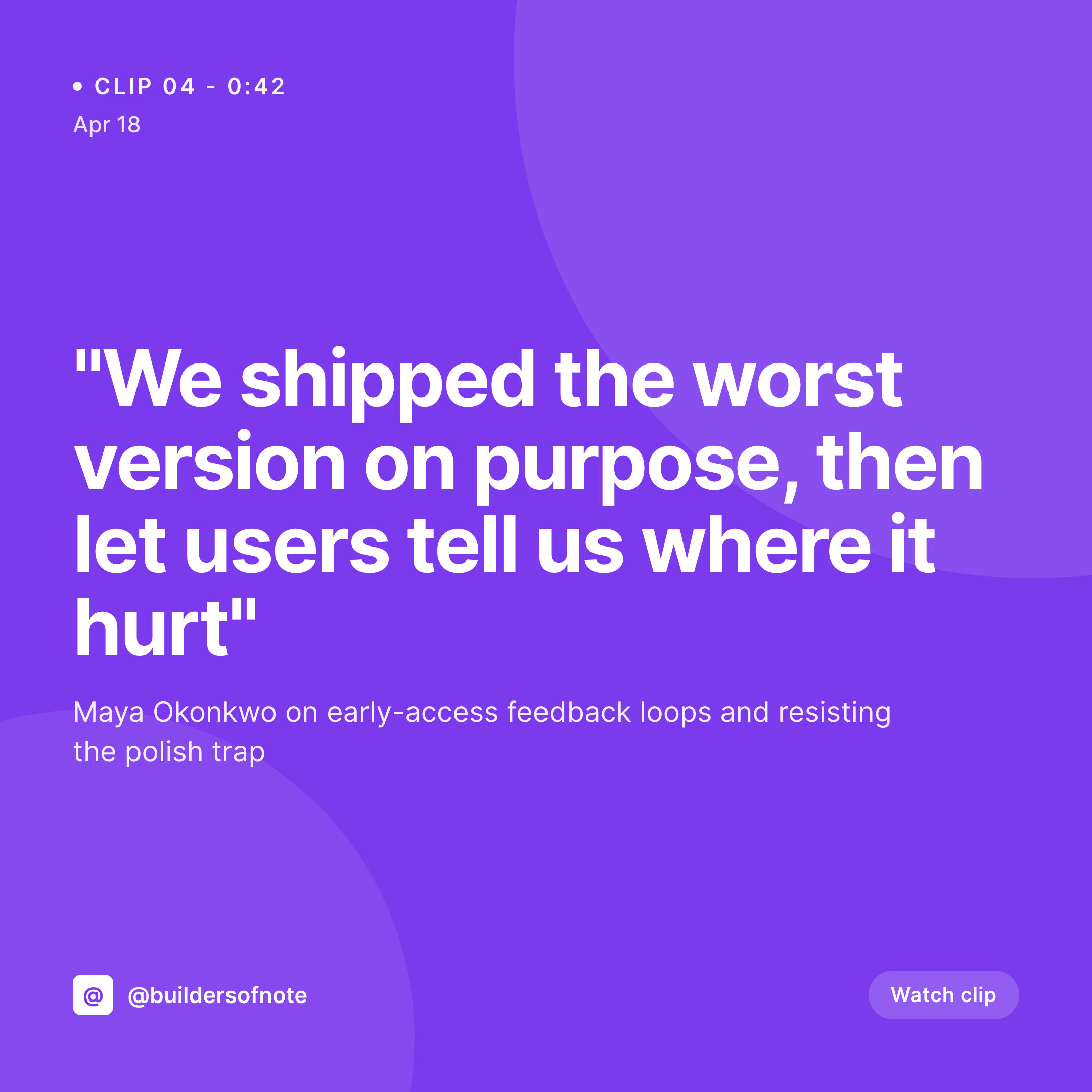
A 1080x1080 PNG with the quote, episode number and timestamp on the locked template, ready to post to Instagram or TikTok.

Comparison
Manual clip cards vs SleekPixel
Default podcast clip cards image
- Producer rebuilds the same Canva clip card every week
- Long quotes overflow or get awkwardly truncated
- Episode numbers and timestamps drift across the year
- Style varies from clip to clip, no recognizable series feel
- Schedule slips when the producer is busy with audio editing
SleekPixel
- Locked 1080x1080 clip card template, identical every time
- Quote, timestamp, episode number from clip post fields
- Long quotes auto-shrink within a configurable bounding box
- Guest name and photo pulled from ACF or Meta Box
- Sidebar download means no Canva round-trip
Features
What SleekPixel gives you for podcast clip cards
Clip-post aware
Treats every clip as a WordPress post with quote, timestamp and episode meta. The card renders against the clip's data, not an abstract design file.
Quote-aware typography
Long pull quotes auto-scale between minimum and maximum font sizes so the text always fills the frame without overflowing or breaking the layout.
Sidebar download
Gutenberg sidebar shows the rendered preview and a download button. Producer grabs the PNG and posts to Instagram, TikTok or X without a design round-trip.
Use cases
Who uses SleekPixel for podcast clip cards
Interview podcasts
Shows that pull two to four clips per guest. Each clip post produces its own card with the guest quote and episode number, ready to schedule across the week.
Network shows
Podcast networks running multiple shows in one WordPress install. Each show can have its own template, picked automatically by show category.
Daily clip schedules
Shows that post a clip every weekday. Producers do not have time to rebuild a Canva file every morning, the render handles the design work on save.
The bigger picture
Why consistent clip cards earn listeners
Podcast discovery on social is driven by clip posts, not full episode posts. The clip card is what stops the scroll, and the clip itself converts the stop into a listener. Cards that read as one series, with the same quote treatment, episode number placement and show logo, build instant recognition over time.
A viewer who tapped a clip from your show last month sees a new clip card in a feed and recognizes the format before reading a word. That recognition is worth more than any one-off design flourish. Producers who keep this consistent week after week build an audience the algorithm cannot easily take away.
Producers who drift end up with a grid that looks like several shows uploading at once. SleekPixel keeps the system anchored to the clip post in WordPress, so the consistency does not depend on a designer's discipline.
Questions
Common questions about SleekPixel for podcast clip cards
No. The audio clip itself still gets cut in whatever editor the producer uses, Descript, Riverside, Auphonic. SleekPixel handles the visual card that goes alongside the clip when posted to Instagram, TikTok or X.
Yes. ACF, Meta Box and native post meta all work as text-layer sources. The most common setup is an ACF text field on the clip post type, bound to the main quote layer.
SleekPixel supports multiple templates per post type. You can render the 1080x1080 square for Instagram feed and a 1080x1920 vertical for TikTok and Reels off the same clip post.
The text layer auto-scales between minimum and maximum sizes you configure. Quotes up to about 220 characters render cleanly. Longer pull quotes work but compress aggressively, so a copy edit on input is usually worth it.
Yes. SleekPixel works alongside Castos, Seriously Simple Podcasting and PowerPress because it operates at the post-data layer. If clip data lives on a post, the template can read it.
Yes. Bind the image layer to the clip post's featured image or to a separate guest photo ACF field. The image is cropped to the shape you set in the template.
That is the recommended setup, one post per clip, because it keeps the per-clip metadata clean. If you prefer to render multiple clips off one episode post via repeater fields, that is also supported with a small custom template hook.
Yes. The render fires on save, so a corrected quote produces a fresh PNG. The og:image URL stays stable so re-shares pick up the updated card.
Pricing
More than 1000+
happy customers
Explore our flexible licensing options tailored to your needs. Upgrade your license anytime to access more features, or opt for a lifetime license for ongoing value, including lifetime updates and lifetime support. Our hassle-free upgrade process ensures that our platform can grow with you, starting from whichever plan you choose.
Lifetime ♾️
Most popular
EUR
once
- Unlimited websites
- Lifetime updates
- Lifetime support
...or get the Bundle Deal
and save €250 🎁
💎 Want everything forever? The All Access Pass is going away on 01.08.2026.
The Bundle (unlimited sites)
Pay once, own it forever
Elevate your WordPress site with our exclusive plugin bundle that includes all of our premium plugins in one package. Enjoy lifetime updates and lifetime support. Save significantly compared to buying plugins individually.
What’s included
-
SleekAI
-
SleekByte
-
SleekMotion
-
SleekPixel
-
SleekRank
-
SleekView
€749
Continue to checkoutBrowse more
- Twitch profile banner
- Instagram ad images
- Passes page banner
- Facebook group banners
- Mastodon post images
- Threads profile banner
- X Space banners
- Poshmark listing images
- Douyin thumbnails
- YouTube end screens
- Flickr cover photo
- Facebook cover photos
- Twitter/X header
- Patreon post thumbnails
- LINE official account banners