






SleekPixel for syllabus cards
Syllabus pages get circulated in onboarding emails, university directories, student forums and Slack channels. SleekPixel renders a branded OG card from the syllabus post, with course code, term, instructor and meeting times.
♾️ Lifetime License available
The syllabus is the course's front door
The syllabus URL is the most-shared link in any course's lifecycle. It goes into the registration system, the orientation email, the academic advising page, the student club's reading recommendation, the parent's verification request. Every share generates a link preview, and the link preview is most prospective and current students' first visual touch with the course.
The default link preview is a generic site logo on a flat color. That card adds no information, so the recipient has to read the URL or the surrounding text to know what the course is. For instructors with multiple courses, the default makes every syllabus link look identical, which is the opposite of useful.
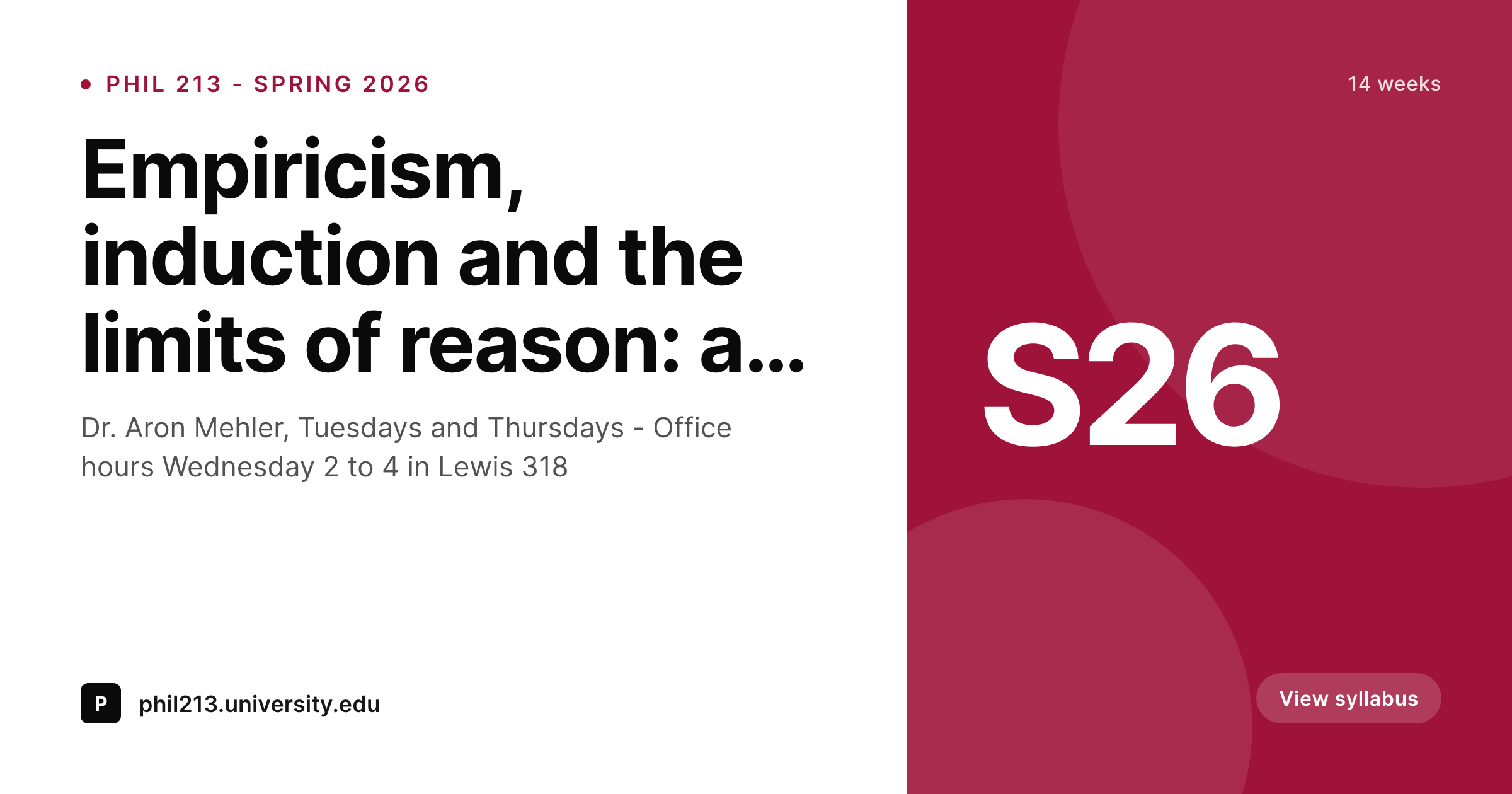
SleekPixel renders a syllabus card with the course code, term, instructor, and meeting times baked in. The og:image tag is written into the syllabus page's head on save, every share now communicates exactly which course is at the end of the link, and the instructor stops typing 'PHIL 213 syllabus, Spring 2026' before every shared URL.
Workflow
From syllabus publish to shareable card in one save
Design syllabus template
Publish the syllabus
Share the link
Update across the term
Output
What a generated syllabus card looks like
A 1200x630 PNG with course code, term, instructor and meeting schedule on the locked template, written to og:image at save time.
Comparison
Default syllabus share image vs SleekPixel
Default syllabus cards image
- Generic site logo on every syllabus link
- Recipients cannot tell which course or term the link goes to
- Manual design per syllabus drifts year over year
- Instructors with multiple courses share indistinguishable links
- Updating meeting times never updates the card
SleekPixel
- Render fires on save for every syllabus post
- Course code, term, instructor, meeting times all bound
- Per-department or per-instructor template variants
- Schedule edits regenerate the card
- Bulk regenerate handles every prior term in one pass
Features
What SleekPixel gives you for syllabus cards
Syllabus-page aware
Reads from native posts, custom syllabus CPTs, or department-wide templates. Course code, term, instructor and schedule bind to template layers.
Multi-course instructors
Instructors with several courses publish multiple syllabus pages. Each renders with its own course code and term so a syllabus link is always identifiable.
Per-department variants
Department-level course sites can have a template per department, picked by category, keeping each department's syllabus links visually distinct.
Use cases
Who uses SleekPixel for syllabus cards
University instructors
Faculty running self-hosted syllabus pages alongside the LMS. The card makes the syllabus link useful in any channel, from email to student-run forums.
Department course sites
Whole departments running a shared WordPress site for syllabi. Per-instructor or per-course variants keep the system organized without manual switching.
Bootcamps and cohorts
Non-academic programs that publish a syllabus per cohort. Each cohort gets its own card with the term and the meeting schedule, making the cohort identifiable.
The bigger picture
Why a syllabus card matters more than instructors expect
Syllabus pages outlive courses. A syllabus from a course taught five years ago still circulates as a teaching reference, gets linked from other instructors' resource pages, and shows up in academic-job-application teaching portfolios. Every one of those shares surfaces a link preview, and the preview is often the only context the recipient gets.
A card that names the course, the term and the instructor makes that long tail of shares useful. A generic site logo wastes it. Instructors who handle this once at the post level get years of compounding benefit: cleaner job-market presentation, recognizable teaching across cohorts, reduced per-email context-pasting overhead.
SleekPixel makes the syllabus card a default of publishing the syllabus page, not an extra design step nobody finds time for.
Questions
Common questions about SleekPixel for syllabus cards
Yes. Most academic syllabus card setups are exactly self-hosted instructor sites on WordPress, often parallel to a Canvas or Blackboard LMS course. SleekPixel handles the WordPress syllabus pages.
Yes. Bind an image layer to the post author's avatar or to an ACF instructor photo field. Most academic templates run text-only, but the photo option is supported.
Yes. Each syllabus is its own post, each post renders against its own field values. Multi-course instructors get distinct cards per course automatically.
Yes. Tag each syllabus with a department taxonomy, configure a template per department, and the plugin picks the right one for each syllabus.
Yes. The render fires on save, so updates to meeting times, office hours, or any bound field produce a fresh card. The og:image URL stays stable across edits.
Yes. The bulk regenerate command takes a term taxonomy filter, so you can refresh every syllabus from a prior decade in one queued run without touching current-term cards.
That is a separate asset usually linked from the WordPress page. SleekPixel only handles the page's OG card. The PDF stays in place and downloads as before.
Yes. Plugins that add academic-specific fields (course codes, terms, meeting times) typically store them as post meta or custom taxonomies, both of which SleekPixel reads from directly.
Pricing
More than 1000+
happy customers
Explore our flexible licensing options tailored to your needs. Upgrade your license anytime to access more features, or opt for a lifetime license for ongoing value, including lifetime updates and lifetime support. Our hassle-free upgrade process ensures that our platform can grow with you, starting from whichever plan you choose.
Lifetime ♾️
Most popular
EUR
once
- Unlimited websites
- Lifetime updates
- Lifetime support
...or get the Bundle Deal
and save €250 🎁
💎 Want everything forever? The All Access Pass is going away on 01.08.2026.
The Bundle (unlimited sites)
Pay once, own it forever
Elevate your WordPress site with our exclusive plugin bundle that includes all of our premium plugins in one package. Enjoy lifetime updates and lifetime support. Save significantly compared to buying plugins individually.
What’s included
-
SleekAI
-
SleekByte
-
SleekMotion
-
SleekPixel
-
SleekRank
-
SleekView
€749
Continue to checkoutBrowse more
- Spotify podcast covers
- Linktree banner image
- Twitch overlay
- Buy Me a Coffee banners
- Twitch stream overlay images
- Audible audiobook cover
- Kindle book cover
- Substack post thumbnail
- Threads profile banner
- Spotify Canvas
- Telegram bot avatar
- Douyin thumbnails
- KDP paperback cover
- Medium article headers
- Odnoklassniki banners