






SleekPixel for discount code cards
SleekPixel reads each promo code's value, percentage, and expiry and renders a square Instagram card on save. The post becomes the source - codes ship to social with the same on-brand layout, every time.
♾️ Lifetime License available
Stop redrawing every code card by hand
Discount codes accumulate fast - newsletter signup codes, abandoned-cart recovery codes, partner codes, influencer codes, seasonal codes. Each one ideally has a clean card with the code rendered large enough to be readable in a story or feed. Most brands ship two or three of these well at the start of a quarter and then fall back to text overlays on whatever stock photo is handy.
SleekPixel removes the design fall-off. You design one square layout in the WordPress admin with fields like {code}, {discount_value}, {expiry_date}, and {category}. Every promo code lives as its own post (or row in a CPT). On save, SleekPixel renders the template with the code's actual data and writes it as the og:image. The card has the code rendered in monospace, the discount amount large, the expiry as a strip - same proportions, every code, no Canva tab needed.
Edit the template once and every code card updates. Move the expiry strip to the bottom and every active code follows. The code logic lives in your e-commerce backend; the share card is just a programmatic representation of it.
Workflow
From code created to social-ready in one save
Design the template
Connect to the codes post type
Save the code
Share anywhere
Output
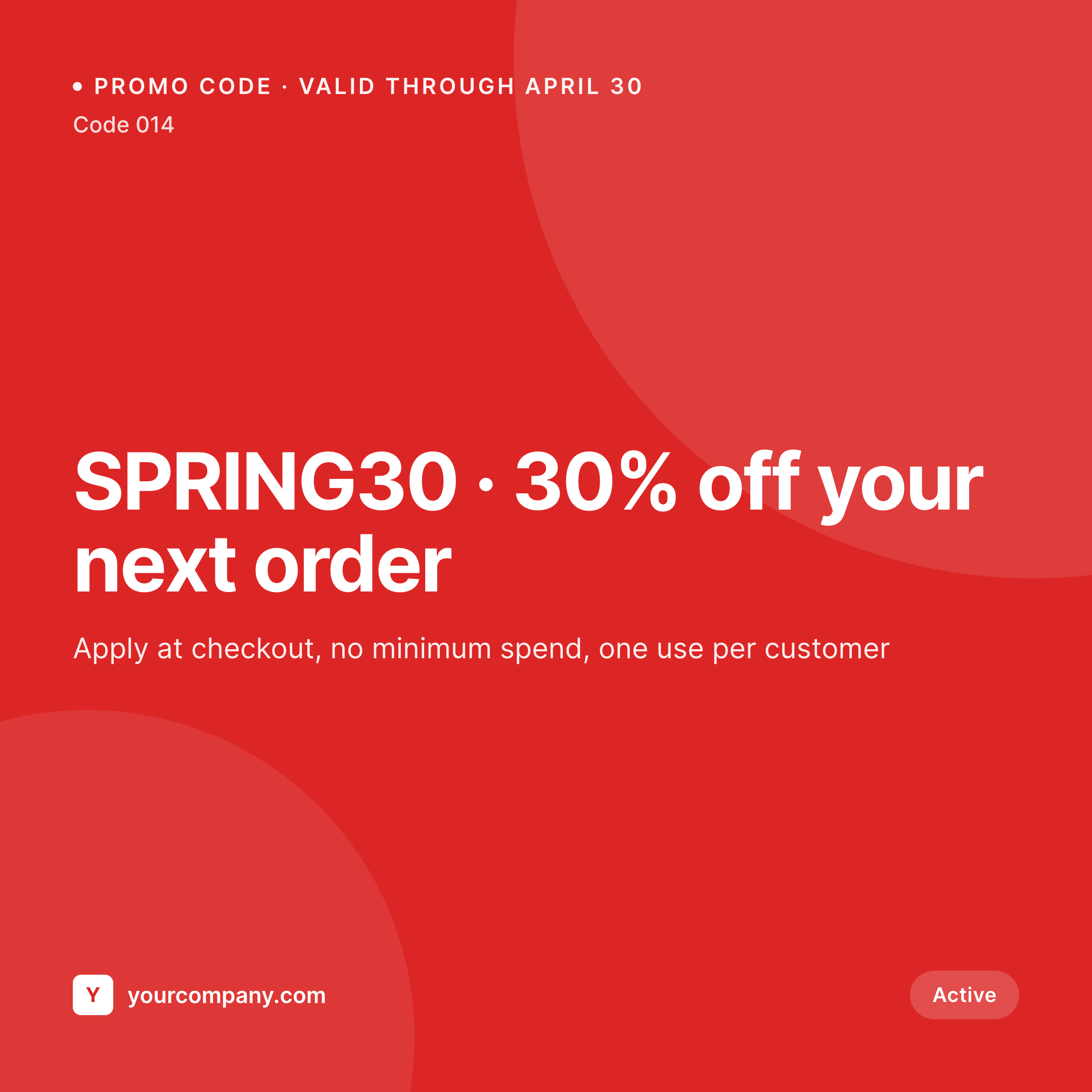
Sample code card from a promo post
This card was rendered from a code's value, percentage, and expiry. Same template, every promo code.

Comparison
Hand-made code graphics vs SleekPixel
Designed in Canva per code
- Each code waits for a design step before social can share it
- Code typography drifts - some monospace, some sans, hard to read in some
- Expiry dates go stale on shared images while codes are extended
- Brand refresh leaves old code cards looking dated
- No bulk update - every code is a one-off PNG
SleekPixel
- Auto-generated card per discount code on save
- Per-code variables: code, discount value, expiry, category, terms
- One template = one consistent visual identity across every code
- Edit the template once and every code card refreshes
- Falls back gracefully if terms or category is missing
Features
What SleekPixel gives you for discount code cards
Template-driven
Design the code card layout once with monospace code text, percentage numerals, and dynamic fields. Every code inherits it on save.
OG + Instagram-ready
SleekPixel writes a square 1080 × 1080 image and the og:image meta tag - share to LinkedIn, Twitter, or push to Instagram via a scheduler.
Regenerate on demand
Code extended? Update the post, hit save, and the card re-renders with the new expiry. Bulk-regenerate after a brand update.
Use cases
Where this fits best
E-commerce stores
Welcome codes, abandoned-cart codes, win-back codes - each gets a polished Instagram card the moment it's added to the system.
Influencer partnerships
Each creator's unique code renders to the same brand template, with the creator name baked into the card via a custom field.
Loyalty and referral programs
Member-tier discounts, referral codes, anniversary perks - all rendered to a consistent card style across the program.
The bigger picture
Why a consistent code card matters
Discount codes are one of the few pieces of marketing where the actual content is the image - the code text itself has to be legible in the share, not just the headline. A card where the code is rendered in clean monospace, large enough to read on a phone in a story, converts measurably better than a code dropped into the caption. The brands whose codes spread through screenshots and resharing are the ones whose cards are designed for that legibility.
Doing it by hand means each new code waits for a design step, and the design step is often where the code itself gets typo'd. A template that pulls the code from the post removes both problems - the code is always rendered the same way, always sourced from the same field that drives the e-commerce backend. SleekPixel makes the polished code card the default outcome of creating the code, the way Notion and Linear treat their per-feature launch graphics.
Questions
Common questions about SleekPixel for discount code cards
Yes. If your codes live in a custom post type or are managed by an e-commerce plugin that creates posts (or you mirror them in a CPT), SleekPixel renders cards for each one. Map the relevant fields to your template variables.
Update the post and save. SleekPixel re-renders the card with the new expiry, and the og:image URL updates. Reshare the URL on social or use platform debuggers to refresh the cached preview.
Yes. The admin has a one-click bulk regeneration that re-renders all code cards using the template. Useful after brand updates or template tweaks.
No. The image is rendered once at save time and stored as a static PNG/JPG. Visitors load a regular image URL - no rendering happens at view time.
Instagram doesn't read og:image directly, but a feed-to-Instagram plugin or scheduler (Buffer, Later, Publer) can read the URL SleekPixel writes and queue the post.
Yes. SleekPixel supports per-category, per-tag, and per-CPT templates. Influencer codes can use one template, sitewide codes another - routing rules pick automatically.
SleekPixel renders the code as text in whatever font the template specifies - monospace works best for legibility. Set a character cap if you want to ensure the code always fits within the layout.
Stores. Each generated card is a real PNG/JPG saved to the uploads folder. This keeps page loads fast and means images survive even if the plugin is later disabled.
Pricing
More than 1000+
happy customers
Explore our flexible licensing options tailored to your needs. Upgrade your license anytime to access more features, or opt for a lifetime license for ongoing value, including lifetime updates and lifetime support. Our hassle-free upgrade process ensures that our platform can grow with you, starting from whichever plan you choose.
Lifetime ♾️
Most popular
EUR
once
- Unlimited websites
- Lifetime updates
- Lifetime support
...or get the Bundle Deal
and save €250 🎁
💎 Want everything forever? The All Access Pass is going away on 01.08.2026.
The Bundle (unlimited sites)
Pay once, own it forever
Elevate your WordPress site with our exclusive plugin bundle that includes all of our premium plugins in one package. Enjoy lifetime updates and lifetime support. Save significantly compared to buying plugins individually.
What’s included
-
SleekAI
-
SleekByte
-
SleekMotion
-
SleekPixel
-
SleekRank
-
SleekView
€749
Continue to checkoutBrowse more
- team spotlight cards
- bundle deal cards
- patch note cards
- OKR recap card
- remote first card
- release note cards
- merch drop cards
- conference recap card
- fundraising announcement cards
- command of the day card
- SDK release card
- scheduled maintenance card
- weekend project card
- survey result card
- early access card
- Mastodon post images
- Bluesky profile banner
- Twitch schedule banners
- Twitter header banners
- Fanvue page banner
- Shopify product images
- VSCO cover
- Pinterest shop banners
- Threads profile banners
- Spotify podcast covers
- Douyin thumbnails
- Amazon Storefront banners
- YouTube banner art
- Instagram bio link banners
- Farcaster cast images