






SleekPixel for Kajabi courses
Kajabi runs the offer and the delivery. Many operators keep a separate WordPress site for SEO, blog content, and brand pages. SleekPixel renders a per-offer OG and Twitter card on the WordPress side so every launch share unfurls with the offer title, price, and cohort badge.
♾️ Lifetime License available
Kajabi handles offers, WordPress handles SEO
Kajabi packages a lot under one roof: courses, memberships, email automation, pipelines, communities. For many operators, that is enough. For a larger group, the marketing side stays on WordPress, because the blog, the SEO landing pages, the case studies, and the long brand history already live there. Kajabi runs the offer delivery; WordPress runs the public storefront.
The storefront usually mirrors Kajabi offers as a custom post type. Each post carries the offer title, the price, the cohort date if any, the module count, and a buy-button URL that points at the Kajabi checkout. Everything sits in WordPress except the share preview, because the OG image typically falls back to a generic theme banner.
SleekPixel reads the offer post fields on save and renders the per-offer card. Cohort launches render with date and seats; evergreen offers render with module count and a calmer badge. Memberships render with a tier badge and recurring price. The PNG lands in uploads, the og:image tag updates, and every launch share, affiliate post, or Slack forward of the WordPress URL unfurls with a card that matches the catalog brand.
Workflow
From Kajabi offer to share-ready WordPress page
Mirror offers to WordPress
Build the catalog template
Save the WordPress post
Run the launch
Output
Per-offer card layout
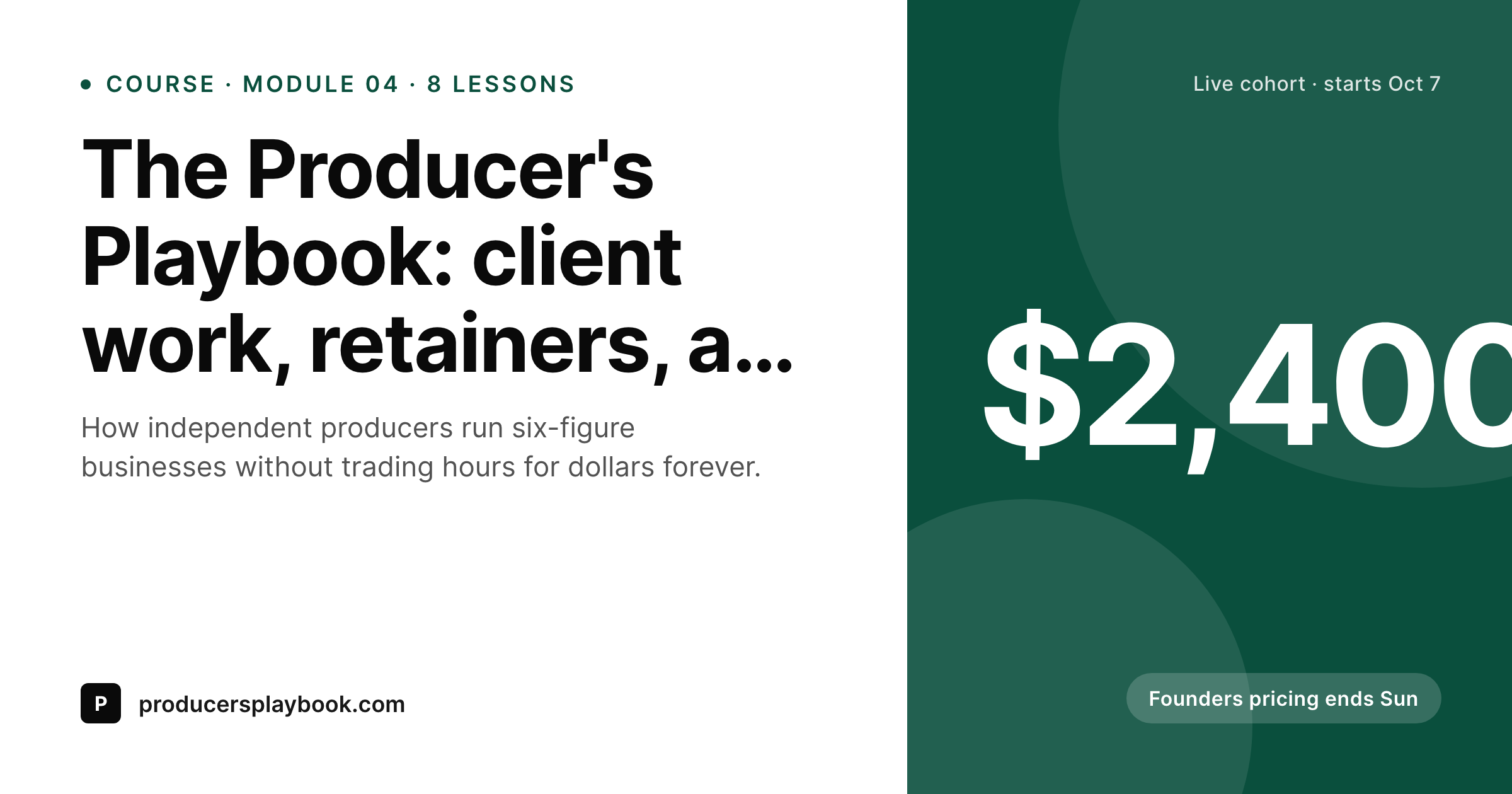
A 1200 by 630 OG and Twitter card: offer title, cohort or evergreen badge, price, module count or start date, and brand wordmark, rendered from the WordPress offer post.
Comparison
Default WordPress unfurl vs Kajabi-aware rendering
Default theme OG
- Offer pages on the WordPress side unfurl with a homepage banner
- Cohort dates and module counts never reach the share preview
- Featured images framed for hero crops misalign at 1200 by 630
- Manual cards per cohort or per offer stop happening after launch 2
- Brand or price updates require redoing every past card by hand
SleekPixel
- Reads WordPress fields for each Kajabi offer sold through WP
- Cohort, evergreen, and membership offers share the same template family
- Title, price, module count, and badge render automatically
- Bulk re-render the offer catalog on a template change
- Runs alongside any Kajabi embed or buy-button shortcode
Features
What SleekPixel gives you for Kajabi courses
Offer-type variants
Cohort, evergreen, and membership variants share one template family. Cohort offers render dates, evergreen render module counts, memberships render recurring price.
Launch-window badges
Optional 'founders pricing', 'closes Sunday', or 'seats remaining' badges render from a custom field, useful for launch windows where urgency carries the headline.
Module count
Module or lesson count renders as a small slot, signalling scope to readers without forcing them onto the page first.
Use cases
Who runs Kajabi plus a WordPress marketing site
High-ticket cohort programs
Operators running four-figure cohort programs on Kajabi use WordPress as the trust layer, with each launch getting a dated card.
Membership operators
Recurring memberships rendered on WordPress get a per-tier card with recurring price and access scope on the share image.
Coach-led catalogs
Coaches running ten to thirty Kajabi offers keep a WordPress catalog page where every offer unfurls with a brand-aligned preview.
The bigger picture
Why per-offer cards matter for high-ticket Kajabi launches
High-ticket cohort launches concentrate revenue into narrow windows. A four-figure program might do most of its yearly sales in a two-week launch, and within that window every share matters. The OG image is the last visual a prospect sees before the click, and on a high-ticket page the difference between a generic site banner and a real per-offer card is the difference between a curious tap and a click that ends in a discovery call.
The second compounding effect applies across a catalog. Operators selling eight or ten Kajabi offers look like a real brand when every offer unfurls with the same template family, and look unfocused when each share looks different. SleekPixel produces the consistent share visual for every WordPress save, and the marketing site finally matches the quality of the offers Kajabi is delivering on the back end.
The Kajabi platform itself does not need to know SleekPixel exists; the work happens on the WordPress side where the public URLs live.
Questions
Common questions about SleekPixel for Kajabi courses
Not directly. SleekPixel reads WordPress post fields. Kajabi continues to handle offer delivery, checkout, and pipelines. Only the WordPress mirror post needs to exist for the share card to render.
Then SleekPixel has nothing to render against. The plugin only writes OG tags on WordPress URLs. Operators who keep their marketing on WordPress for SEO get the benefit; operators fully on Kajabi rely on Kajabi's own previews.
Yes. A custom field selects between cohort, evergreen, and membership variants. Cohort variants get a date and seats; memberships get a recurring-price slot and a tier badge.
SleekPixel renders whatever price is on the WordPress post. If you change price on Kajabi, also update the WordPress field. Some teams sync this via a webhook or a periodic script.
If the pipeline opt-in page is mirrored on WordPress, yes. A lead-magnet pipeline can render its own card with a 'free guide' badge and a download-format label.
Static countdowns work fine: a 'closes Oct 7' or 'founders pricing ends Sunday' badge renders cleanly as static text. Live countdowns inside a PNG do not exist; live timers belong on the page itself, not the share image.
Affiliate URLs add query parameters that platforms strip when fetching OG tags. The share preview is consistent across affiliates, which is the desired behavior: the card sells the offer, not the affiliate.
Yes. A WP-CLI command walks every offer post and re-renders the card with the current template and tokens. The new PNGs replace the old ones in uploads, and social platforms refresh their cache on their own cycle.
Pricing
More than 1000+
happy customers
Explore our flexible licensing options tailored to your needs. Upgrade your license anytime to access more features, or opt for a lifetime license for ongoing value, including lifetime updates and lifetime support. Our hassle-free upgrade process ensures that our platform can grow with you, starting from whichever plan you choose.
Lifetime ♾️
Most popular
EUR
once
- Unlimited websites
- Lifetime updates
- Lifetime support
...or get the Bundle Deal
and save €250 🎁
💎 Want everything forever? The All Access Pass is going away on 01.08.2026.
The Bundle (unlimited sites)
Pay once, own it forever
Elevate your WordPress site with our exclusive plugin bundle that includes all of our premium plugins in one package. Enjoy lifetime updates and lifetime support. Save significantly compared to buying plugins individually.
What’s included
-
SleekAI
-
SleekByte
-
SleekMotion
-
SleekPixel
-
SleekRank
-
SleekView
€749
Continue to checkoutBrowse more
- Weibo post images
- Apple Music cover art
- Twitch panel images
- Linktree banner image
- eBay listing images
- GitHub README banners
- Ghost feature images
- Facebook cover photos
- Instagram bio link banners
- Dailymotion thumbnails
- KDP paperback cover
- VK community cover photos
- Substack post thumbnail
- Facebook post images
- Vimeo thumbnails