






SleekPixel for WP Simple Booking
WP Simple Booking handles availability calendars for small vacation rentals, B&Bs and short-stay hosts on WordPress. SleekPixel renders a 1000 by 1500 Pinterest pin per property, so listings reach guests through travel boards looking like a real Airbnb-grade listing.
♾️ Lifetime License available
Direct-booking rentals lose Pinterest reach to OTA listings
WP Simple Booking is a long-running availability-calendar plugin used by small vacation-rental owners, family B&Bs and short-stay hosts who want to take direct bookings instead of routing everything through Airbnb and Booking.com. The plugin handles per-property calendars, season pricing and a basic enquiry flow without the OTA commission cut.
The hardest part of running a direct-booking site is reach. The OTAs dominate Google for the obvious keywords, the host's site sits below them, and the share preview from the direct site is a generic theme banner that does not look like a listing. Pinterest is one of the channels that still works for direct rentals, because travel-planning audiences search and save there, and a pin that looks like a real listing earns saves the way a stock travel photo does not.
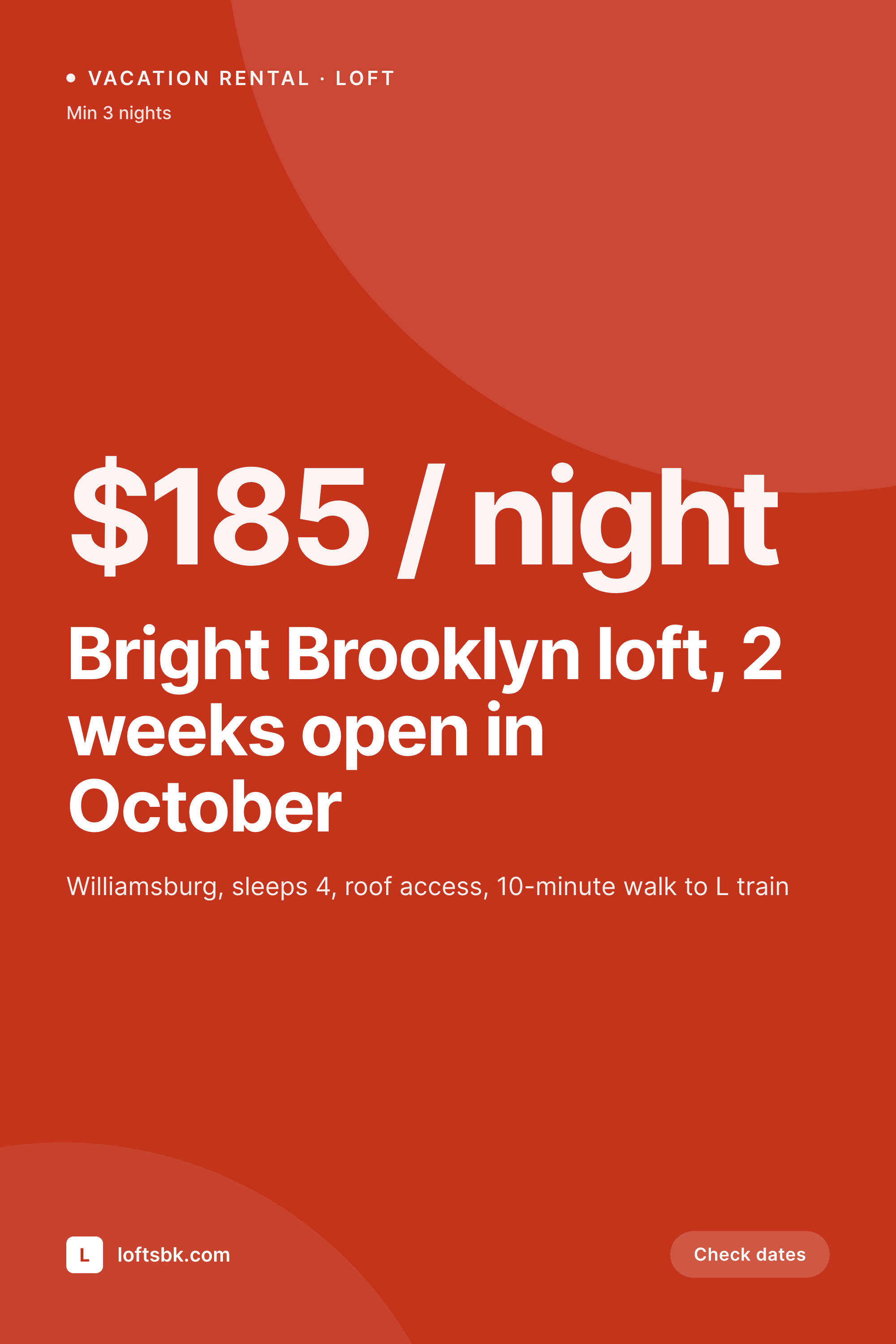
SleekPixel reads the WP Simple Booking property post and renders a 1000 by 1500 Pinterest pin per listing. Property name, neighbourhood, sleeps and starting rate all bind to template slots. The pin saved to a 'Brooklyn weekend' board looks like a listing rather than an ad, and the click-through goes to the WordPress booking page, not to an OTA.
Workflow
From WP Simple Booking property to Pinterest pin
Set up the property
Build the pin template
Render on save
Pin to travel boards
Output
What ships per WP Simple Booking property
A 1000 by 1500 Pinterest pin: property name, location line, sleeps count, starting rate and brand mark, rendered from the WP Simple Booking property fields.
Comparison
Stock travel pin vs WP Simple Booking pin
Stock travel pin
- Stock travel pins drive traffic to OTAs, not to direct-booking sites
- Generic theme OG never looks like a real rental listing
- Rate, sleeps and minimum stay never reach the pin preview
- Designing a pin per property by hand is unrealistic across a portfolio
- Seasonal rate changes never refresh the saved pins
SleekPixel
- Reads WP Simple Booking property post and meta directly
- Per-property 1000 by 1500 PNG sized for Pinterest pins
- Starting rate and sleeps count render onto dedicated slots
- Bulk re-render at the start of a season when rates change
- Pin URLs deep-link into the direct-booking calendar
Features
What SleekPixel gives you for WP Simple Booking calendars
Property-aware
Each property gets its own pin. Title, neighbourhood, sleeps and amenities bind to template slots from the property post fields.
Rate slot
Starting nightly rate is rendered prominently. Travellers planning a trip use the pin to compare rentals at a glance before saving.
Minimum stay
The pin can carry a small minimum-stay line, so a 3-night-minimum loft and a 7-night-minimum cottage are clearly differentiated.
Use cases
Who hosts on WP Simple Booking
Single-property hosts
Hosts who own one or two properties and run their own direct-booking site instead of leaning entirely on Airbnb.
Family B&Bs
Small B&Bs with three to ten rooms whose direct site benefits from per-room pins driving Pinterest-based traffic.
Boutique short-stay portfolios
Small portfolios of curated vacation rentals managed by independent hosts who want to grow a direct audience.
The bigger picture
Why direct rentals need a Pinterest-grade pin
Independent rental hosts compete with OTAs that spend on every imaginable channel. The few channels where a small host still has a real chance are the ones where the platform rewards specificity over budget, and Pinterest is one of them. A pin that shows the actual loft, the actual neighbourhood and the actual rate gets saved to travel-planning boards in a way that a generic pin never will.
SleekPixel makes that pin generation a templated output rather than a per-property design job, which is the only way a small host with ten properties can keep up across seasons and rate changes. Once the template is built, the autumn rate refresh, the spring kitchen renovation that bumped the rate, the change of neighbourhood description after the new café opened on the corner, all of those updates re-render the pin automatically. The host gets to think about hosting rather than about marketing assets, and the direct site quietly starts taking enquiries from people who originally found the property on a Pinterest board.
Questions
Common questions about SleekPixel for WP Simple Booking calendars
No. SleekPixel renders the PNG. Pinning still happens through Pinterest, manually or via a scheduling tool like Tailwind or Buffer that picks up the rendered file.
The pin carries a 'check dates' prompt rather than live availability, because pins are saved and re-shown across time. The booking calendar inside WP Simple Booking handles live availability when the click-through lands.
WPML or Polylang let you maintain translated property pages. SleekPixel renders a pin per language, so an English-speaking traveller and a German-speaking one each see a pin in their language.
Yes. SleekPixel supports per-category template assignment. A loft and a cottage can use different layouts driven by the property category.
A second template can be set as 'winter' or 'summer' and rendered alongside the main pin. Hosts pin the seasonal variant to season-specific boards while keeping the evergreen pin on their main board.
Yes, if reviews are stored as property meta. The template can pull a top review snippet into a small block. Hosts typically use this on a secondary 'social proof' pin variant rather than the main listing pin.
Yes. WP Simple Booking property URLs already render the calendar inline. The pin link is the property URL, and the visitor lands on the calendar without further navigation.
Yes. Bulk re-render walks every property post and regenerates each pin with the new template. The file URLs stay the same, so existing Pinterest pins update on the next platform scrape.
Pricing
More than 1000+
happy customers
Explore our flexible licensing options tailored to your needs. Upgrade your license anytime to access more features, or opt for a lifetime license for ongoing value, including lifetime updates and lifetime support. Our hassle-free upgrade process ensures that our platform can grow with you, starting from whichever plan you choose.
Lifetime ♾️
Most popular
EUR
once
- Unlimited websites
- Lifetime updates
- Lifetime support
...or get the Bundle Deal
and save €250 🎁
💎 Want everything forever? The All Access Pass is going away on 01.08.2026.
The Bundle (unlimited sites)
Pay once, own it forever
Elevate your WordPress site with our exclusive plugin bundle that includes all of our premium plugins in one package. Enjoy lifetime updates and lifetime support. Save significantly compared to buying plugins individually.
What’s included
-
SleekAI
-
SleekByte
-
SleekMotion
-
SleekPixel
-
SleekRank
-
SleekView
€749
Continue to checkoutBrowse more
- YouTube ad thumbnails
- YouTube end screens
- Pinterest board covers
- Etsy shop banners
- Klaviyo email banner
- Patreon post thumbnails
- Discord stage banner
- Pinterest Idea Pins
- Instagram ad images
- Substack podcast cover
- Notion page covers
- Mastodon post images
- LinkedIn post images
- Dribbble shot covers
- Threads post images