






SleekPixel for merch drop cards
Artists, labels, and brands running limited merch drops in WooCommerce get a clean Instagram-ready card per drop. Run size, price, ship date, and product name come from the product fields.
♾️ Lifetime License available
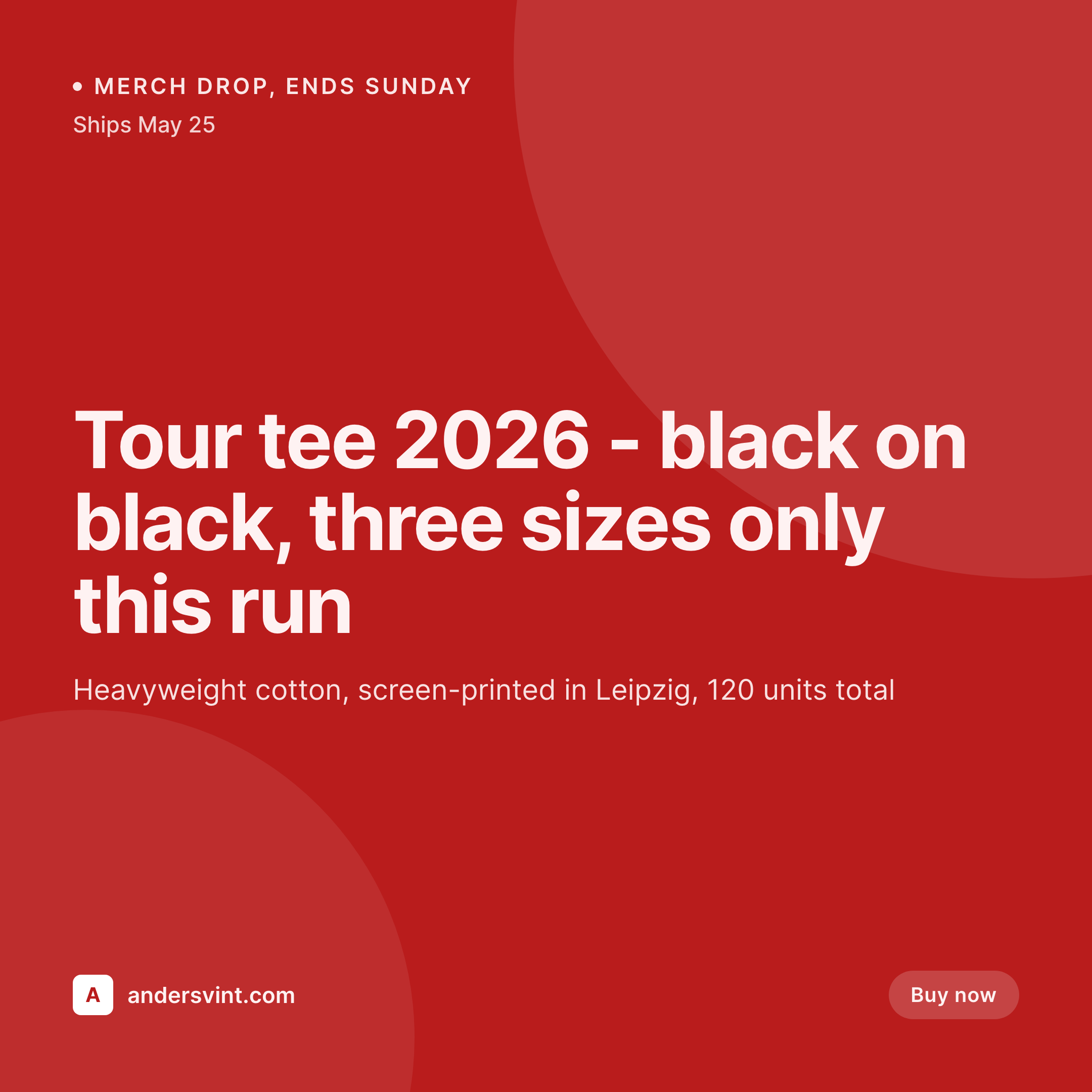
A drop is a moment, the card has to land
A merch drop is a finite-window sale. Forty-eight hours, or until the run sells out, whichever comes first. That window is short enough that the card has to be ready before the drop opens and clean enough that the buyer trusts the listing. Generic product photos with shop-brand watermarks read as catalog. A clean drop card with the run size, the price, the end date, and the product name reads as a limited release.
The work of producing the card per drop is what most small merch operations skip. The product post on WooCommerce has all the fields already, the title, the price, the SKU, custom fields for run size and end date. Designers build a card once for the first drop and then re-export it manually for every subsequent drop, swapping the title, the date, the run size by hand. By the fifth drop the template has drifted, the fonts vary, and the brand looks improvised.
SleekPixel binds the card template to the product post. Title from product name, price from the WooCommerce price field, run size from a custom field, end date from a scheduled custom field. On save the 1080x1080 card renders, the og:image gets written, and the product URL previews as the same branded drop card on every channel.
Workflow
From product post to drop-ready in one save
Design the drop template
Create the product post
Save the product
Promote the drop
Output
What a generated merch drop card looks like
A 1080x1080 square card with the product name, run size, price, and end date pulled live from the WooCommerce product post.


Comparison
Designer per-drop card vs SleekPixel
Designer + manual export
- Designer ships the card for drop one, drop five gets improvised
- Run size on the card disagrees with the actual SKU count
- End date in the card and end date in the product expire on different days
- Same product photo gets cropped differently per drop card
- No way to refresh older drop cards when the brand evolves
SleekPixel
- Render fires on save for every product post
- Name, price, run size, end date from product fields
- 1080x1080 square aspect built for Instagram feed and OG
- WooCommerce custom fields and ACF both supported as sources
- Bulk regenerate when the brand or template updates
Features
What SleekPixel gives you for merch drop cards
Run-size aware
Templates bind to a numeric run-size field. The number renders consistently on every drop card without manual entry, with formatting for ranges if applicable.
End-date countdowns
End date is bound to a field. Update the date if the drop window extends, save, the card reflects the new closing date across every share.
WooCommerce native
Works against WooCommerce product posts out of the box. Price, SKU, stock, and meta fields all bindable to the template without custom integration.
Use cases
Where merch drop cards earn their keep
Independent artists and brands
Self-running merch operations selling tour tees, vinyl, prints. SleekPixel removes the per-drop design step so the team can run more frequent drops without scaling design.
Limited-run apparel
Small clothing brands doing capsule drops every few weeks. Consistent card style across drops builds brand recognition over the year.
Tour merch
Bands selling tour merch online and at venues. The same card style on the WooCommerce listing matches the tour visual identity that lives elsewhere in the campaign.
The bigger picture
Why the drop card is the brand work for a limited release
Limited merch drops compress every brand decision into a 24 to 72 hour window. The product photo, the run-size announcement, the price, the deadline, the visual frame on every share, all have to be in place before the drop opens and have to remain consistent across channels for the duration of the window. Brands that do this well build a card template once and reuse it across every drop with different fields.
Brands that do it poorly improvise per drop and end up with a catalog of slightly different cards that fragment the brand over a year. SleekPixel makes the consistent path the easy one. The product post is the source, the template renders on save, the card is identical across drops except for the values it actually needs to communicate.
The brand stays tight, the team ships more drops without growing the design payroll, and the buyer trusts the listing because every drop they have ever seen from this brand looks like part of the same operation.
Questions
Common questions about SleekPixel for merch drop cards
Yes. WooCommerce product posts, price fields, SKU, stock status, and custom meta are all bindable to the template. No custom plugin glue required.
Yes. Configure the template with a state field bound to stock status. When stock drops to zero, the card re-renders with a "Sold out" badge or color treatment. The og:image updates automatically.
Yes, or from a custom image field if you prefer a separate clean photo for the share card. SleekPixel binds an image layer to either source.
Stock changes are reflected in the card. Configure the template so the run-size slot shows remaining units, total units, or a sold-out badge based on stock status.
Yes. Bind the end date to a custom field. The card can show "Ends Sunday" or a specific date format. If the drop extends, update the field, save, the card refreshes.
Yes. WooCommerce sale prices and sale dates can drive the card. Configure separate templates for regular and sale states, SleekPixel picks the right one based on whether sale is active.
Run a bulk regenerate from the admin. Every product post gets re-rendered with the current template. Older drops get the new brand treatment in a single batch.
The render runs asynchronously after save. Editors see the save complete immediately, the card lands in uploads within a few seconds. No noticeable lag in the admin workflow.
Pricing
More than 1000+
happy customers
Explore our flexible licensing options tailored to your needs. Upgrade your license anytime to access more features, or opt for a lifetime license for ongoing value, including lifetime updates and lifetime support. Our hassle-free upgrade process ensures that our platform can grow with you, starting from whichever plan you choose.
Lifetime ♾️
Most popular
EUR
once
- Unlimited websites
- Lifetime updates
- Lifetime support
...or get the Bundle Deal
and save €250 🎁
💎 Want everything forever? The All Access Pass is going away on 01.08.2026.
The Bundle (unlimited sites)
Pay once, own it forever
Elevate your WordPress site with our exclusive plugin bundle that includes all of our premium plugins in one package. Enjoy lifetime updates and lifetime support. Save significantly compared to buying plugins individually.
What’s included
-
SleekAI
-
SleekByte
-
SleekMotion
-
SleekPixel
-
SleekRank
-
SleekView
€749
Continue to checkoutBrowse more
- Xiaohongshu cover images
- Twitch panel images
- Pinterest pins
- Telegram channel images
- YouTube end cards
- Instagram feed posts
- Reddit subreddit banners
- YouTube channel banners
- YouTube ad thumbnails
- Depop listing images
- Instagram collab post images
- Linktree banner image
- TikTok Now image
- Ghost feature images
- Mastodon link previews