






SleekPixel for Snapchat Spotlight covers
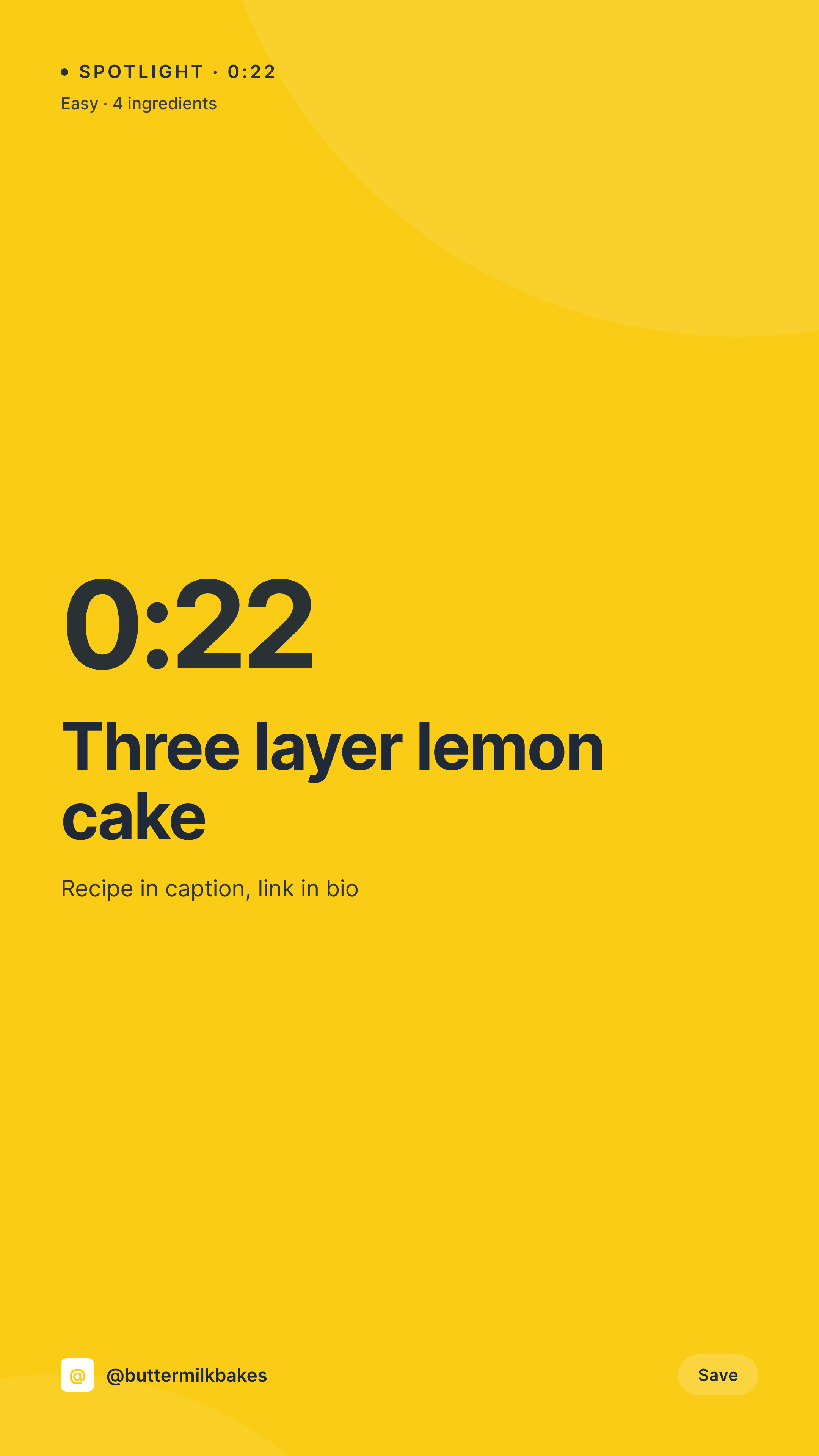
1080x1920 cover images for Snapchat Spotlight clips, with title, duration, and brand mark baked in. Same template, different clip data, every time.
♾️ Lifetime License available
Snapchat Spotlight covers carry the click in a feed full of clips
Snapchat Spotlight is a vertical clip feed where the cover image is what the user sees before play begins. The cover has to read at thumbnail size in a feed alongside other clips. A templated cover with the title, the duration, and a brand mark stands out against raw frames pulled from the clip itself.
SleekPixel renders the cover from a clip record in WordPress. The fields are the title, the duration, the topic cue, and the brand mark. The output is a 1080x1920 PNG sized for Spotlight's cover slot.
A bakery, a creator, or an editorial brand publishing weekly Spotlight clips can produce a clean cover per clip without a per-clip design session.
Workflow
From clip record to Spotlight-ready cover
Create the clip record
Map the cover template
Save the post
Upload alongside the clip
Output
Sample Snapchat Spotlight cover
1080x1920 vertical PNG with clip title, duration, and brand mark.

Comparison
Raw clip frame vs SleekPixel cover
Raw still from the clip
- Raw frame from the clip with no title overlay
- Duration and topic cues missing from the cover
- Brand mark inconsistent across clips
- Per-clip Photoshop work skipped for the long tail
- Older covers fall out of sync when the brand refreshes
SleekPixel
- 1080x1920 cover PNG per Spotlight clip
- Title and duration baked into the cover
- Brand mark sized consistently across the catalog
- Source clip record drives one source for cover, story, and Reels variants
- Batch refresh re-renders the entire cover fleet
Features
What SleekPixel gives you for Snapchat Spotlight covers
Duration cue
Clip length renders as a tag so users in the feed can decide whether to commit before tapping. Especially useful in tutorial categories.
Topic accent
Each topic, recipe, fashion, fitness, gets its own accent and small icon while sharing the cover template family.
Hero composition
Featured frame or product asset composites into a hero region behind a safe-zone title overlay.
Use cases
Where Spotlight covers help short clips earn taps
Recipe and food clips
Recipe Spotlights with title, duration, and ingredient count in the cover read better than raw frames of the cooking shot.
Fitness and tutorial clips
Short-form workouts where duration and difficulty cue help users self-select the right clip from the feed.
Education microlearning
Tip-of-the-day or quick-explainer clips where the cover title decides whether the clip earns the play.
The bigger picture
Why Spotlight covers beat raw frames
Snapchat Spotlight competes with TikTok and Reels for the same vertical attention. The clip-level production budget is often lower, which makes the cover the easiest place to win the click. A raw frame from the clip rarely reads at thumbnail because the frame was chosen for video, not for stillness.
A templated cover with the title and a duration cue gives the feed a reason to slow down. Doing this per clip by hand limits a creator to a fraction of their catalog. Templating from a WordPress source lets every clip ship with a clean cover, including the long tail of clips that would otherwise default to whatever frame Snapchat picks.
Questions
Common questions about SleekPixel for Snapchat Spotlight covers
Yes. Spotlight uploads support a cover image override. SleekPixel renders the PNG for that slot, sized correctly at 1080x1920.
Snapchat picks a frame from the clip. The frame is often visually weak because it was filmed for motion, not for a still composition.
Yes. The 1080x1920 vertical format is shared across Spotlight, TikTok, Reels, and Stories. Many creators use one template family across all four.
It is a WordPress field. When the clip is re-edited, the duration field is updated and the cover refreshes on save.
Yes. Map clip categories to accent colors and icons in the template so each Spotlight category has a visual signature without losing brand cohesion.
No. SleekPixel renders the cover. Uploading the clip and attaching the cover happen in the Snapchat creator tools.
Batch regenerate from the SleekPixel admin re-renders every cover. Older Spotlight covers can be replaced by editing the clip's cover in Snapchat with the refreshed PNG.
In WordPress uploads as real media. Backed up with the rest of your site assets, downloadable from the clip post sidebar.
Pricing
More than 1000+
happy customers
Explore our flexible licensing options tailored to your needs. Upgrade your license anytime to access more features, or opt for a lifetime license for ongoing value, including lifetime updates and lifetime support. Our hassle-free upgrade process ensures that our platform can grow with you, starting from whichever plan you choose.
Lifetime ♾️
Most popular
EUR
once
- Unlimited websites
- Lifetime updates
- Lifetime support
...or get the Bundle Deal
and save €250 🎁
💎 Want everything forever? The All Access Pass is going away on 01.08.2026.
The Bundle (unlimited sites)
Pay once, own it forever
Elevate your WordPress site with our exclusive plugin bundle that includes all of our premium plugins in one package. Enjoy lifetime updates and lifetime support. Save significantly compared to buying plugins individually.
What’s included
-
SleekAI
-
SleekByte
-
SleekMotion
-
SleekPixel
-
SleekRank
-
SleekView
€749
Continue to checkoutBrowse more
- Facebook ad images
- KDP hardcover cover
- Facebook event covers
- VSCO cover
- Twitter/X header
- Amazon A+ content images
- Snapchat Discover tiles
- YouTube channel banners
- Facebook Shop product images
- WeChat Moments images
- Klaviyo email banner
- X community banners
- Pinterest video pin covers
- Dribbble shot covers
- Instagram carousel slides