






SleekPixel for Wistia videos
Wistia ships thumbnails for the player, not for social. SleekPixel reads the post and the Wistia API on save and writes an OG image that shows the actual video title, duration, and host instead of a stretched homepage banner.
♾️ Lifetime License available
Wistia handles playback. Share previews are a separate problem.
Wistia is the player of choice for brands that care about video as a first-class part of marketing: clean playback, captioning, lead capture, analytics that actually map to revenue. The piece Wistia does not really own is the share preview. When somebody pastes a link to a WordPress page that embeds a Wistia video into Slack, LinkedIn, or X, the social platform pulls whatever og:image the WordPress page exposes. If the theme has not been taught about video, that is usually a stretched site logo.
The miss is that everything needed for a real video card already lives on the post. The video title is in the embed code or the post itself. The duration comes back from the Wistia API. The host's name and headshot live in the post fields or the byline. The series name is the parent category. A respectable share card writes itself from data that is already saved; it just needs a renderer that knows where to look.
SleekPixel renders that card automatically. The video title becomes the headline, the duration sits in the meta line, the host or guest name shows up below, the series badge sits in the corner, and the brand wordmark anchors the bottom. The card is generated when the post saves, so every new episode lands with a share preview that feels like the brand commissioned it on purpose.
Workflow
From Wistia upload to share-ready in one save
Embed the Wistia video
Build the video template
Save the post
Share anywhere
Output
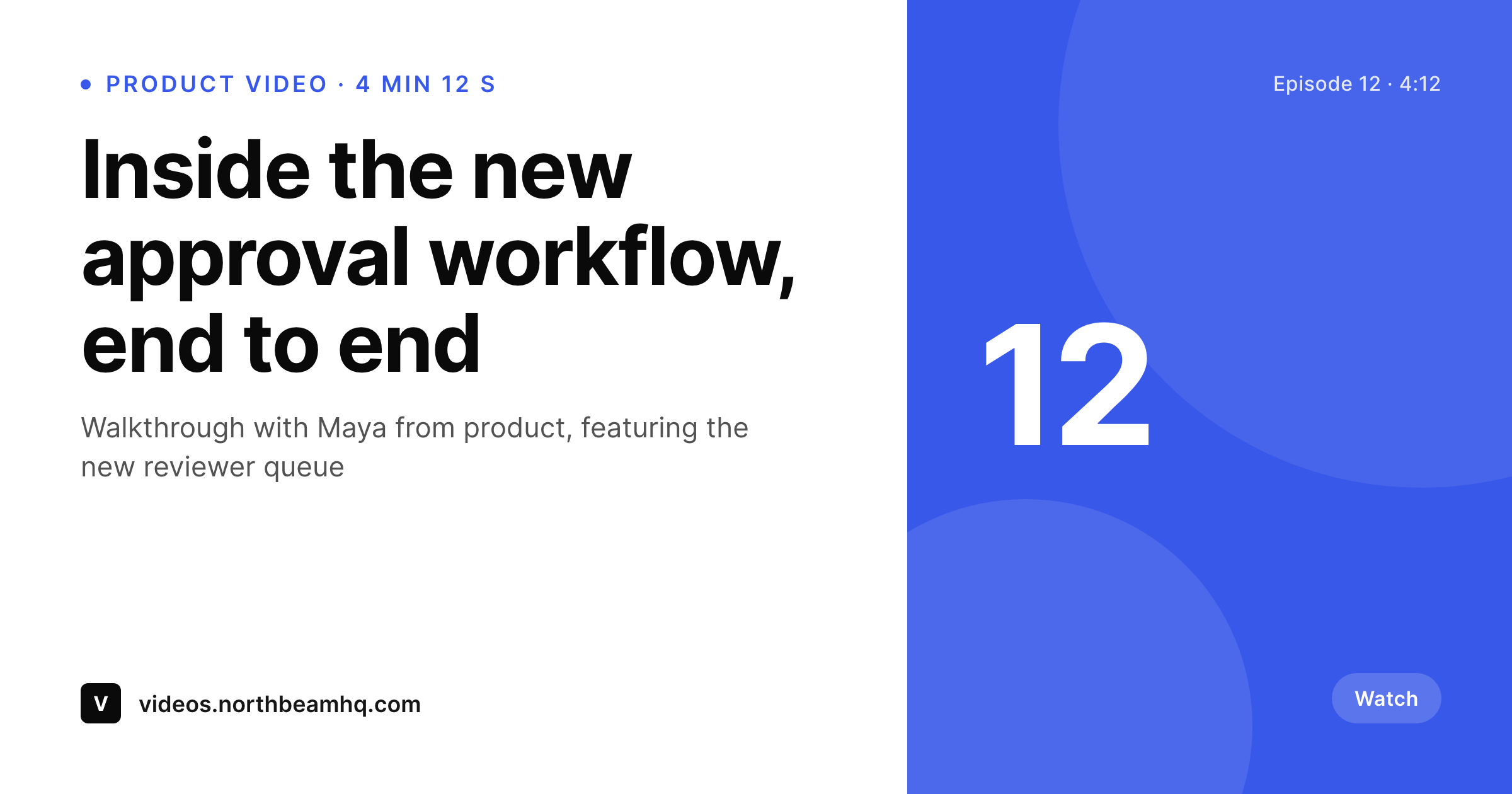
Sample Wistia video card
A 1200 by 630 OG image: video title, duration, host name, series badge, and brand wordmark, rendered from the post fields and the Wistia API on save.
Comparison
Default Wistia share vs SleekPixel rendering
Default theme OG image
- Wistia's player thumbnail does not become the WordPress page's og:image automatically
- Embedded video pages share with the site logo unless someone hand-uploads art
- Duration, host, and series never appear on the share preview
- Manual Figma exports stop happening after the first three episodes
- Brand redesigns leave every old episode card mismatched
SleekPixel
- Reads the embedded Wistia video ID and pulls title, duration, and thumbnail from the API
- Host name, guest, and series taxonomy render automatically from the post
- Plays nicely with the Wistia WordPress plugin and manual embeds
- Bulk re-render the whole video library when the template evolves
- Renders for product walkthroughs, customer stories, and webinar archives alike
Features
What SleekPixel gives you for Wistia videos
Video-title headlines
The title you set on the Wistia upload or the WordPress post becomes the share card headline. No retyping, no second copy pass for socials.
Duration on the card
Runtime pulls from the Wistia API and renders into the meta line. Viewers can see at a glance whether the link is a 90-second teaser or a 22-minute deep dive.
Host and guest credits
Custom fields for host and featured guest render as a small byline. Customer stories and interview videos share with the right name on the card.
Use cases
What Wistia-powered sites generate with SleekPixel
Product walkthroughs
Every feature deep dive gets its own card with the feature name, duration, and product version. Sales reps share the link with confidence in any thread.
Customer story library
Case study videos render with customer logo position, industry tag, and headline metric. Outbound emails and LinkedIn posts open with a real preview.
Webinar replays
On-demand webinar pages share with the session title, host names, and date instead of the generic events landing page banner.
The bigger picture
Why video shares deserve the same care as the player
Brands that pay for Wistia have already accepted that video quality matters and that generic players are a liability. The same logic extends to share previews. A team will invest two weeks producing a customer story, then watch the link to that story show up on LinkedIn looking like a stretched homepage banner.
That gap is small to fix and large in effect. The card is the first impression in a feed scroll; if it looks edited and specific, the click happens; if it looks like a default WordPress fallback, the scroll continues. The second consideration is the back catalog.
A library of 80 product walkthroughs is an asset for sales reps who paste links during deals. Consistent cards across the whole library tell prospects that the brand cares about its own work. Inconsistent cards, with maybe a third of episodes having custom thumbnails and the rest sharing with the homepage banner, do the opposite.
SleekPixel pays the consistency tax once at template time and stops the back catalog from drifting again.
Questions
Common questions about SleekPixel for Wistia videos
No. Wistia's player thumbnail is what plays inside the embed on the page. SleekPixel renders the WordPress page's og:image, which is what social platforms scrape when the URL is shared. The two are separate concerns and both still exist.
Only if you bind a field to the API. Most templates use the post title and a custom field for duration, which is enough. If you want the duration to be authoritative from Wistia, a small helper can fetch it once per video and cache the result.
Supported. The plugin saves the video ID in post meta or in the embed shortcode. SleekPixel reads that field, optionally pulls duration and title, and renders the card for the post URL.
Yes, if you supply a square headshot URL in a custom field. The template renders it as a small circular avatar next to the byline. For interview series this turns the share card into a real episode card.
If your template reads the title from Wistia's API, yes, on the next post save. If the template reads from the WordPress post title, then updating the post title triggers the re-render. Either flow works; the cache is invalidated on save.
Both. A WordPress page that embeds a Wistia Channel can render a card representing the channel itself, with channel title and video count. Pages that embed a single video render an episode card. The template binding decides the shape.
Yes. A taxonomy or custom field on the post selects the template. Product walkthroughs might render in one accent and series; customer stories in another. Selection happens at render time.
The WordPress post still exists, so the og:image keeps pointing at the rendered PNG. The player on the page will show Wistia's missing-video state, but the share preview itself is decoupled and continues to work for any older links already in the wild.
Pricing
More than 1000+
happy customers
Explore our flexible licensing options tailored to your needs. Upgrade your license anytime to access more features, or opt for a lifetime license for ongoing value, including lifetime updates and lifetime support. Our hassle-free upgrade process ensures that our platform can grow with you, starting from whichever plan you choose.
Lifetime ♾️
Most popular
EUR
once
- Unlimited websites
- Lifetime updates
- Lifetime support
...or get the Bundle Deal
and save €250 🎁
💎 Want everything forever? The All Access Pass is going away on 01.08.2026.
The Bundle (unlimited sites)
Pay once, own it forever
Elevate your WordPress site with our exclusive plugin bundle that includes all of our premium plugins in one package. Enjoy lifetime updates and lifetime support. Save significantly compared to buying plugins individually.
What’s included
-
SleekAI
-
SleekByte
-
SleekMotion
-
SleekPixel
-
SleekRank
-
SleekView
€749
Continue to checkoutBrowse more
- Bluesky profile banner
- GitHub README banners
- Apple Music cover art
- YouTube community images
- LinkedIn post images
- Notion page covers
- Twitch stream overlay images
- Snapchat Discover tiles
- Facebook post images
- Threads social images
- Instagram carousel slides
- Facebook Marketplace images
- Amazon Storefront banners
- X community banners
- Passes page banner