






SleekPixel for downtime notice cards
Status pages and trust hubs publish downtime notices on a regular cadence. SleekPixel renders one og:image per notice in WordPress, generated from the post fields on save.
♾️ Lifetime License available
Downtime notices live in inboxes, Slack, and incident channels
A scheduled maintenance notice travels through more channels than almost any other piece of content a SaaS team publishes. Customer success forwards it to enterprise contacts, the support team pins it in the help center, the marketing site cross-posts a short version, and the link itself ends up in dozens of Slack channels and shared incident bridges. Every one of those surfaces unfurls the URL, which means the og:image is read more often than the page itself.
Most teams ship downtime notices with the default site card, the company logo and tagline that never changes. The result is an inbox where six separate notices unfurl as identical company-logo tiles, and the on-call engineer has to open each one to find out which window applies to their service. The share preview becomes a wrapper that buyers and operators learn to ignore, which is the opposite of what an availability communication is for.
SleekPixel binds the maintenance card to the notice post. Service name, window, region, and the affected component list bind to fields. The render fires on publish, writes the PNG to uploads, and serves it as og:image and twitter:image. Edit the window because the change board moved it, save the post, the card updates everywhere the URL re-scrapes.
Workflow
From maintenance window to a real share card on publish
Design the notice template
Set up the notice post type
Publish the notice
Update if the window slips
Output
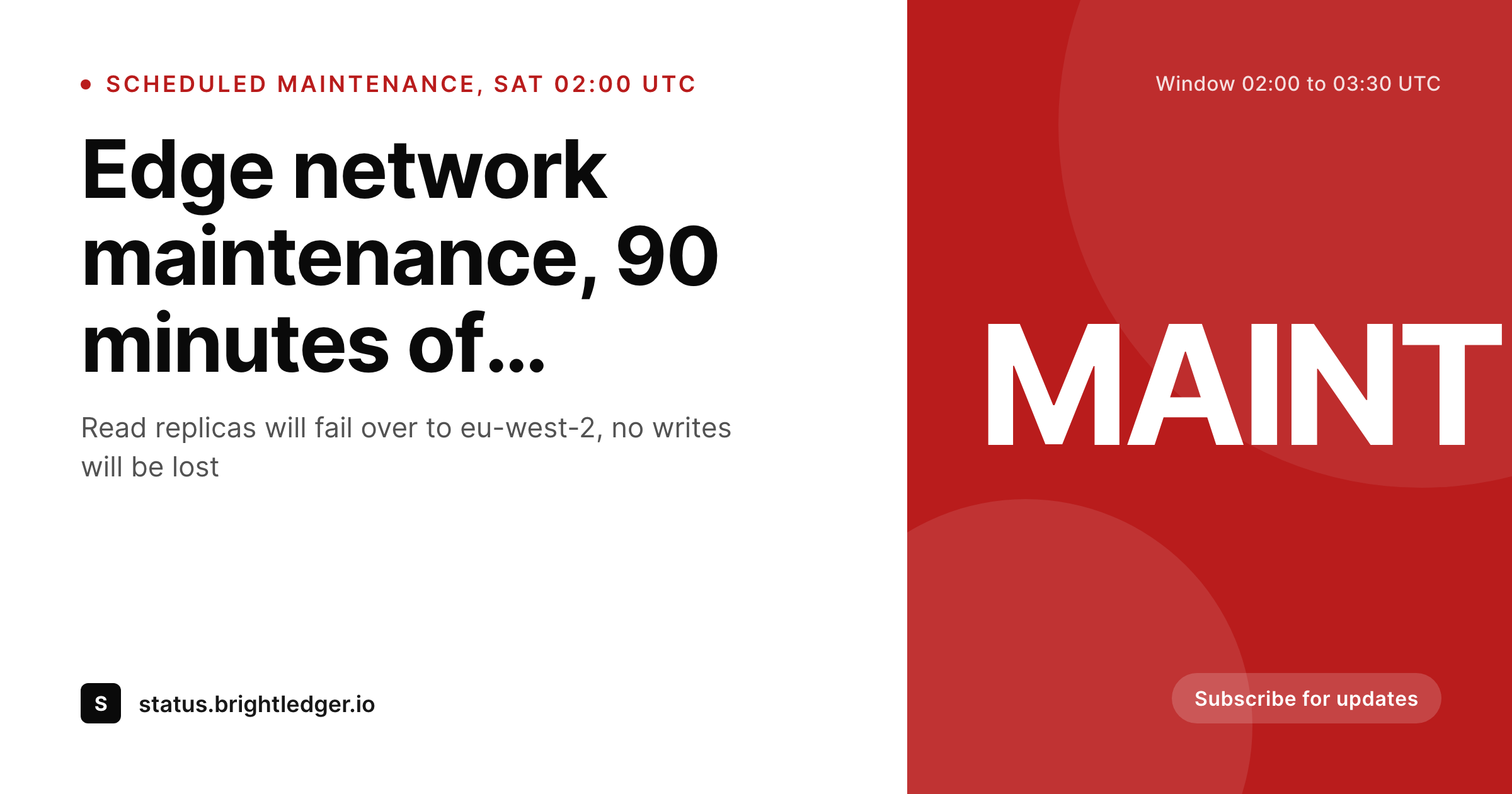
What a generated downtime notice card looks like
A 1200x630 share card with the service name, the maintenance window, the affected region, and a maintenance label pulled from the notice post.
Comparison
Default downtime notice image vs SleekPixel
Default downtime image
- Same company-logo tile on every maintenance notice
- Window times in a static Canva file go stale when the change board reschedules
- Affected region never visible in the preview, only inside the post
- Multiple notices unfurl as identical tiles in the same inbox thread
- No regeneration path when the window slips by 30 minutes
SleekPixel
- Render fires on publish for every downtime notice
- Service name, window, and region pulled from notice fields
- og:image and twitter:image meta tags written automatically
- Severity color band can bind to a status-page severity field
- Reschedules regenerate the card before the next share
Features
What SleekPixel gives you for downtime notice cards
Window stays accurate to the minute
Bind the window line to a start and end datetime field. If the change board moves the slot, edit the post, the share card updates on the next scrape with the corrected times.
Affected region in the share
Show the impacted region or cluster in the card. The on-call reading the unfurl in Slack knows whether their service is in scope before they open the link.
Severity color band
Optional accent band ties to a severity field, so an informational notice and a degraded-service window look visually distinct in the inbox.
Use cases
Where downtime notice cards earn their keep
SaaS status pages
Public status hubs that publish scheduled maintenance on a weekly cadence. Each notice gets a unique card so enterprise contacts can scan a thread without opening every link.
Trust hubs and compliance portals
Sites that publish availability advisories alongside policy updates. The shared card carries the window, the region, and the maintenance label without manual design work.
Managed services and hosting providers
Hosting and DBaaS providers running rolling maintenance windows. Each window posts as a notice and renders its own card with the affected pool and the operator-readable window.
The bigger picture
Why downtime notices need a real share card, not a default tile
Availability communication is one of the highest-trust surfaces a SaaS team operates. Customers do not mind scheduled maintenance, they mind being surprised by scheduled maintenance, and the share preview is the first surface where that surprise either gets prevented or not. A notice that unfurls in Slack with the service name, the window, and the region in the card itself reaches every on-call engineer and account owner before anyone has to click.
A notice that unfurls as a generic company tile gets opened by half as many readers and creates a thread of clarifying questions. The render path is also the operational fit, the on-call writing the notice is the same person who needs the share asset, and asking them to also stand up a Canva file is the step that breaks. SleekPixel makes the card a side effect of publishing the post, which keeps the trust signal high and the workflow boring.
Questions
Common questions about SleekPixel for downtime notice cards
Yes. Bind a severity or type field and use conditional templates. Emergency notices can render with a different accent and badge while still pulling from the same post fields.
Yes. SleekPixel can read from any post type. Point it at the changelog or notice type you already maintain, map the fields, and the render fires on save.
Edit the start or end time and save. The card re-renders, the og:image overwrites in uploads, and platforms that re-scrape the URL pull the corrected version.
Yes. Bind the affected-services field to a slot in the template, and render a compact list. The template can truncate after three items and add a remainder count.
SleekPixel renders inside WordPress. If your status page is a separate hosted product, mirror the notice as a WordPress post for the share asset, or point an iframe at the rendered PNG.
Slack uses og:image and twitter:image meta tags, both of which SleekPixel writes on save. The same render that powers email unfurls powers the Slack preview.
SleekPixel runs a headless render on save. For most templates the render completes in under a second, the post save returns as normal, and the file lands in uploads in the background.
Yes. The admin includes a bulk regenerate action that re-renders every post under a chosen template, useful after a logo update or a status-page redesign.
Pricing
More than 1000+
happy customers
Explore our flexible licensing options tailored to your needs. Upgrade your license anytime to access more features, or opt for a lifetime license for ongoing value, including lifetime updates and lifetime support. Our hassle-free upgrade process ensures that our platform can grow with you, starting from whichever plan you choose.
Lifetime ♾️
Most popular
EUR
once
- Unlimited websites
- Lifetime updates
- Lifetime support
...or get the Bundle Deal
and save €250 🎁
💎 Want everything forever? The All Access Pass is going away on 01.08.2026.
The Bundle (unlimited sites)
Pay once, own it forever
Elevate your WordPress site with our exclusive plugin bundle that includes all of our premium plugins in one package. Enjoy lifetime updates and lifetime support. Save significantly compared to buying plugins individually.
What’s included
-
SleekAI
-
SleekByte
-
SleekMotion
-
SleekPixel
-
SleekRank
-
SleekView
€749
Continue to checkoutBrowse more
- Xiaohongshu cover images
- YouTube ad thumbnails
- X Space banners
- Discord server banners
- Snapchat Discover tiles
- Substack post headers
- Mastodon profile header
- Dribbble shot covers
- Lemon Squeezy product covers
- Poshmark listing images
- Mastodon post images
- Mailchimp email banner
- Discord stage banner
- Instagram Shop product images
- YouTube end cards