






SleekPixel for Vanilla Forums discussions
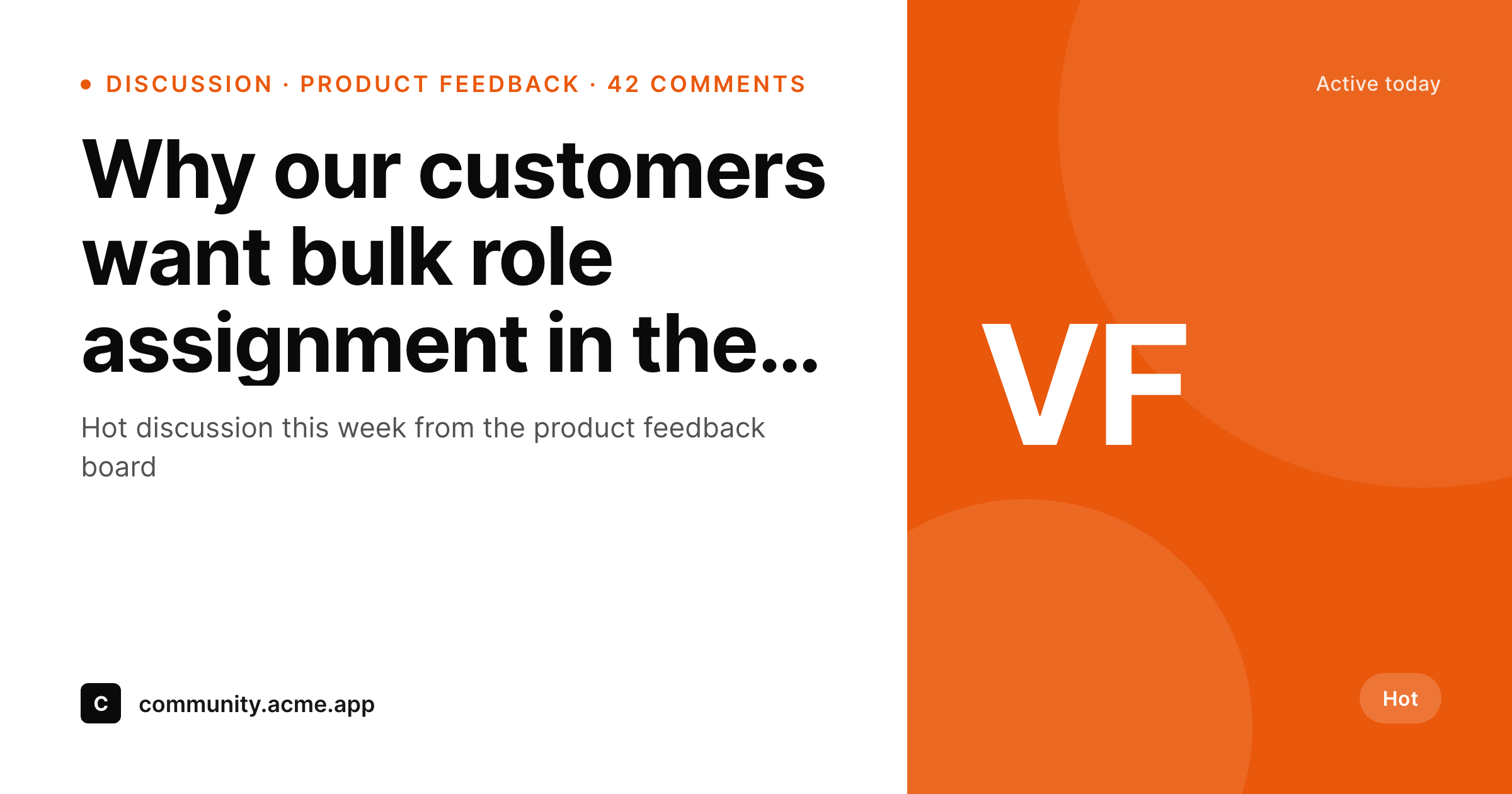
Vanilla Forums runs many SaaS community sites, but its default OG image is generic. SleekPixel renders a per-discussion 1200 by 630 card on the WordPress side of a Vanilla to WordPress bridge, with category, comments and status visible at a glance.
♾️ Lifetime License available
SaaS communities ship threads, default previews ship logos
Vanilla Forums powers a large slice of SaaS community sites: product feedback boards, customer-success Q and A, partner forums. The actual conversations on those forums are gold for marketing, support and product, but the default social preview for a Vanilla discussion URL is usually a generic banner. Category, comment count and status never make it to the card.
Community teams compensate by screenshotting threads for LinkedIn and customer emails. The screenshots look slightly different every time, often miss the brand entirely, and need to be redone whenever the thread gets new comments worth highlighting. The work scales badly across a busy product feedback board.
SleekPixel sits on the WordPress side of a Vanilla Forums to WordPress bridge built on the Vanilla REST API. A sync mirrors discussion metadata (title, category, comment count, author handle, status) into a WordPress custom post type. SleekPixel reads those fields and renders a per-discussion 1200 by 630 card. The WordPress URL becomes the canonical share link; the click resolves back to the live discussion on Vanilla.
Workflow
From Vanilla discussion to branded share card
Sync via the Vanilla API
Build the discussion template
Render on save
Share the WordPress link
Output
What ships for every Vanilla discussion
A 1200 by 630 OG-sized PNG: discussion title, category tag, comment count, status pill, author handle and a brand wordmark, rendered from the fields mirrored from the Vanilla API.
Comparison
Default Vanilla discussion share vs SleekPixel card
Default Vanilla share
- Default Vanilla OG image is often a community-wide banner, not per-discussion
- Category and tag never reach the social card on most installs
- Comment count and recency are invisible to the reader pre-click
- Status (accepted answer, idea shipped, etc.) does not surface
- Brand styling of the SaaS host is absent on every share
SleekPixel
- Reads WordPress fields mirrored from the Vanilla API
- Per-discussion 1200 by 630 PNG sized for OG and Twitter
- Category, comments and status bind to dedicated slots
- Variant templates for ideas, questions and announcements
- Bulk re-render across the full discussion archive
Features
What SleekPixel gives you for Vanilla Forums discussions
Idea-status slots
Product feedback ideas with status fields (under review, planned, shipped) get a status pill on the card. The state of the idea is visible before the click.
Author and engagement
The poster's handle and the comment count get dedicated slots, so a busy thread reads as busy on the social card.
Category accents
Category color bindings let the same template render a feedback thread, a Q and A thread and an announcement thread with three distinct visual cues.
Use cases
Who shares Vanilla discussions as branded cards
Product feedback boards
Top voted ideas get shared externally with a card that shows the title, vote count and status, so the post does the work of explaining the idea before the click.
Customer success Q and A
Accepted answers get a green status pill on the card, so the share reads as a real solved problem rather than a generic forum link.
Announcements
Release notes and policy threads ship to LinkedIn with a branded card that matches the parent SaaS brand.
The bigger picture
Why SaaS community threads deserve a real card
Community-led marketing only works when the community's best work is presentable outside the community. Vanilla Forums ships a serious platform for SaaS communities, but it leaves the social-preview layer up to each customer to solve. Most do not solve it.
The result is that a quarter of the threads worth promoting end up shared as screenshots, and the other three quarters end up as bare URLs in a digest. SleekPixel does not replace Vanilla and does not pull readers away from the forum. The Vanilla install stays the platform of record for the community.
The WordPress side is a thin mirror that already exists for SEO, search and aggregation. SleekPixel attaches the brand layer to that mirror so every discussion link that leaves the building carries the same standard as the rest of the marketing.
Questions
Common questions about SleekPixel for Vanilla Forums discussions
No. SleekPixel reads WordPress post fields. Pulling discussions from the Vanilla REST API into WordPress is a separate step, handled by a custom sync, a Power Automate flow, or a Node service running on a cron.
Yes. The sync can filter by category id and only push discussions from the categories worth promoting. Private categories and internal-only threads can stay out of the WordPress mirror entirely.
The Vanilla API exposes status on ideas and questions. The sync stores that as a custom field on the WordPress post, and the template binds a status pill slot to that field. Solved, accepted, planned and shipped all get distinct visual treatments.
Author badges from Vanilla can be carried as a comma-separated field. The template can render up to two badge icons next to the author handle on the card, so a thread from a community MVP signals as much.
Yes. SleekPixel only affects the WordPress URL. If readers share the Vanilla URL directly, they get the Vanilla OG image. The WordPress mirror is the route for branded previews.
Yes. A WP-CLI command iterates the mirrored posts and re-renders the PNGs. Useful after a brand refresh or a template change. The forum itself is untouched.
No. SleekPixel renders images on the WordPress side and does not touch authentication. SSO setups using JS or jsConnect continue to work as before.
Yes. A Vanilla webhook can ping a small endpoint on WordPress that updates only the comment count field for one post. The template re-renders the card with the new number, and a full sync is not needed for that update.
Pricing
More than 1000+
happy customers
Explore our flexible licensing options tailored to your needs. Upgrade your license anytime to access more features, or opt for a lifetime license for ongoing value, including lifetime updates and lifetime support. Our hassle-free upgrade process ensures that our platform can grow with you, starting from whichever plan you choose.
Lifetime ♾️
Most popular
EUR
once
- Unlimited websites
- Lifetime updates
- Lifetime support
...or get the Bundle Deal
and save €250 🎁
💎 Want everything forever? The All Access Pass is going away on 01.08.2026.
The Bundle (unlimited sites)
Pay once, own it forever
Elevate your WordPress site with our exclusive plugin bundle that includes all of our premium plugins in one package. Enjoy lifetime updates and lifetime support. Save significantly compared to buying plugins individually.
What’s included
-
SleekAI
-
SleekByte
-
SleekMotion
-
SleekPixel
-
SleekRank
-
SleekView
€749
Continue to checkoutBrowse more
- Dailymotion thumbnails
- Apple Podcasts covers
- Discord stage banner
- Rednote (Xiaohongshu) post
- Mastodon profile header
- Odnoklassniki banners
- Mastodon profile banners
- Weibo post images
- Snapchat Spotlight covers
- Twitch overlay
- Etsy shop banners
- Farcaster cast images
- X social cards
- TikTok Now image
- YouTube Shorts thumbnails