






SleekPixel for online coach
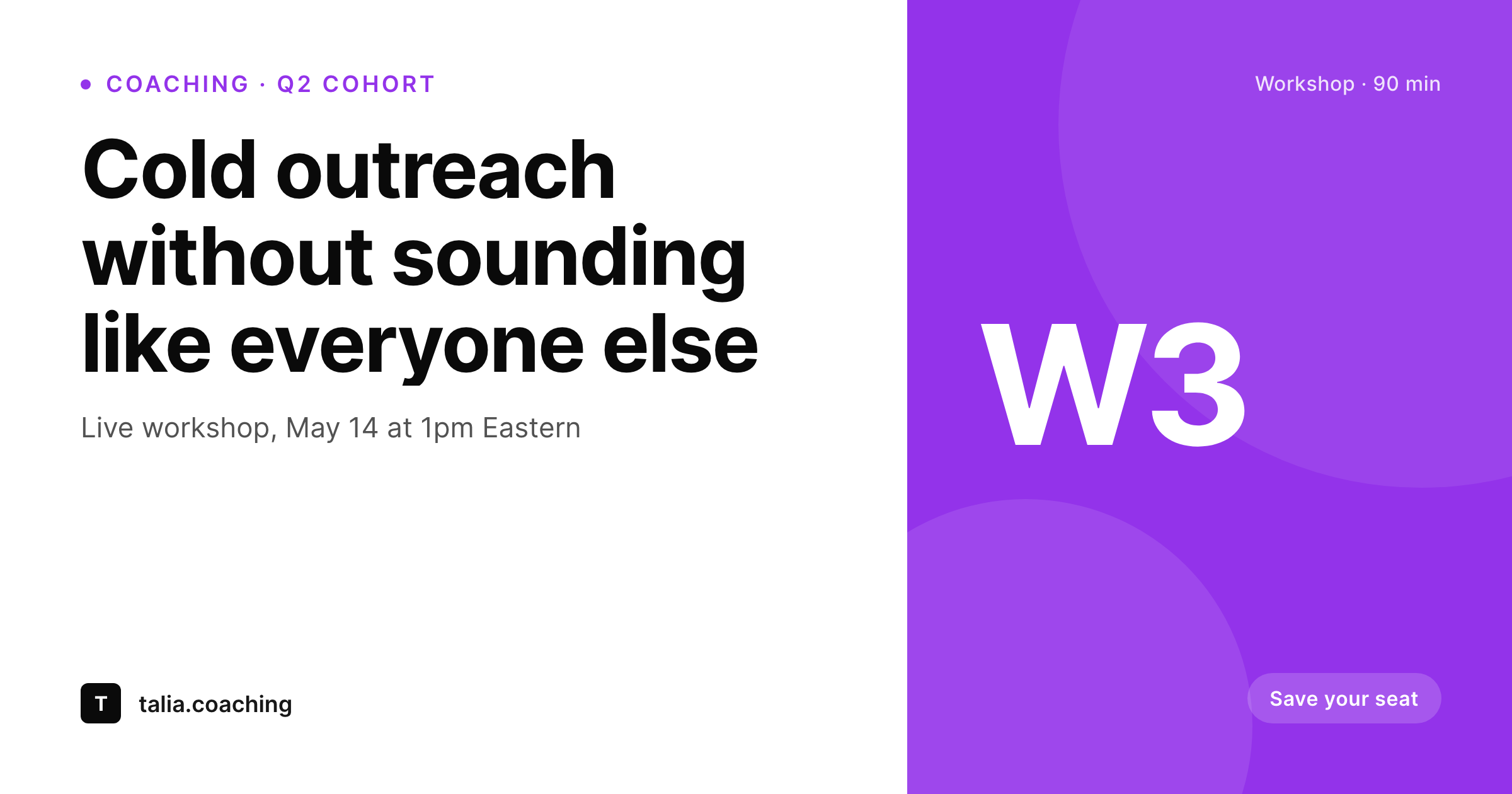
Workshop title, start date, format, and price live as fields on each offer post. SleekPixel renders a branded share card on save, so the link preview is ready before you paste it into the email.
♾️ Lifetime License available
Online coaching runs on a calendar of launch days
An online coach lives by a calendar of launch days. Q1 cohort opens, fills, closes. Q2 workshop replaces it. A free training drops in between. Each launch is a sprint of emails, social posts, partner referrals, and DM follow-ups, and every link sent during that sprint shares with whatever OG image WordPress decides to grab. When that image is the homepage hero or, worse, nothing at all, the launch loses momentum. The email gets the click; the forwarded link does not.
The coaching site already structures the data. Workshops are a post type with start date, format, lead coach, and price. Cohorts have a session count, format, and tier. Free trainings have a topic and runtime. Each of those fields is exactly what a launch share card should display. Yet most coaches still hand-build the card in Canva on launch day, race the clock, and ship a card that has the wrong date or last cohort's price.
SleekPixel binds the launch art to the post. Update the cohort start date, the card regenerates. Bump the price, the card regenerates. Add a partner workshop next quarter, save the post, and the share card exists. Launch sprints stop including a Canva subtask, and link previews across email, LinkedIn, and DMs stay accurate every time the coach updates the offer.
Workflow
From draft offer to share-ready in one save
Map offer post types
Design templates per offer
Publish on launch day
Bulk refresh between cohorts
Output
What ships with every offer post
A 1200x630 share card with workshop title, start date, format, and the coach's brand mark, pulled live from the offer post fields.
Comparison
Canva launch art vs auto-rendered offer cards
Canva / Manual export
- Launch day means racing Canva to ship matching cards across email and social
- Date or price changes ship with the old card baked into the OG tag
- Free training, paid workshop, and cohort all need separate manual exports
- Partner shares pull last cohort's image because the OG tag never updated
- Brand refresh stalls launches while every old offer card gets redone
SleekPixel
- Each workshop, cohort, and free training saves with a current share card
- Date, price, and format updates regenerate the OG image automatically
- 1200x630 PNG stored in uploads, wired into og:image and twitter:image
- Bulk regenerate the offer catalog when the brand evolves
- Manual download in the Gutenberg sidebar for launch emails and DMs
Features
What SleekPixel gives you for online coach
Workshop cards
Each workshop post saves with a card showing title, start date, and format. Email forwards and DM shares all open with current art.
Cohort previews
Cohort start date, session count, and tier render onto a branded preview. Update the price, the card refreshes on next save.
Free training art
Lead-magnet trainings get the same template treatment. Free, paid, evergreen, and live offers all share with consistent visuals.
Use cases
Where offer cards earn their click
Launch email forwards
When a subscriber forwards your launch email to a friend, the link preview shows the workshop title and date instead of a homepage hero.
LinkedIn posts
LinkedIn previews on every cohort link show the cohort tier, dates, and price. The share looks like a campaign, not a casual post.
Partner referrals
Affiliate partners pasting your offer link into newsletters and DMs see proper preview cards, so partner-driven shares convert better.
The bigger picture
Why launch art is non-negotiable for online coaches
Online coaching converts on momentum. The launch window is short, the audience is distracted, and every share that loses the preview to a generic homepage thumbnail loses a chunk of conversion. Coaches who treat the OG image as part of the launch checklist outperform coaches who treat it as a nice-to-have, simply because more shares survive the forward.
The second factor is consistency across the offer catalog. Coaches who run multiple workshops, cohorts, and trainings in a quarter end up with a portfolio of offer pages that prospects browse before booking. If half those pages have polished cards and half look broken, prospects pattern-match the inconsistency to the coaching itself.
Auto-rendered share cards collapse both problems into a single solved one. The launch sprint drops a subtask. The catalog stays unified.
The coach ships more launches in the same calendar without burning out on Canva, and the link previews carry their weight every time someone forwards an email or pastes a cohort URL into a DM.
Questions
Common questions about SleekPixel for online coach
SleekPixel renders share cards for the WordPress offer page that links to checkout. The checkout page itself is hosted by Stripe or ThriveCart and uses their preview cards. Your WordPress offer page is what gets forwarded and shared, so that is where SleekPixel adds value.
SleekPixel renders one OG image per page based on the active template. For A/B testing, set up two duplicate offer pages with different templates and split traffic between them. Each page renders its own card and you measure which one converts better.
Add a 'sold out' field to the cohort post and bind it to a conditional slot on the template. Toggle the field on, save, and the card regenerates with a 'Sold out, join the waitlist' badge. No re-export, no Canva pass.
Yes. Evergreen offer pages use the same template engine. Bind any field that changes per visitor (urgency timer, dynamic price tier) to a SleekPixel slot only if it should appear on the static OG card. Per-visitor personalization is rendered client-side, not in the OG image.
Coaches who run group programs sometimes want alumni to share their cohort experience. SleekPixel can generate per-cohort alumni share cards if cohort data lives on a post. Per-individual student cards are out of scope and would need a custom integration.
1200x630 for OG and Twitter, 1080x1080 for Instagram squares, 1080x1920 for Stories, and 1000x1500 for Pinterest pins. Configure once per offer template, render all formats on save, all stored in uploads.
Email clients fetch the OG image when the link is rendered in the inbox. Most cache the preview, so an update to the OG image appears the next time the link is shared, not retroactively in already-sent emails. Plan card updates before launch day, not during.
Solo coaches running fewer than two launches a year may not feel the lift. For coaches running monthly workshops, quarterly cohorts, and an evergreen funnel, the automation pays back in the first launch. Most solo coaches who try it cite the time saved on launch-week design as the main return.
Pricing
More than 1000+
happy customers
Explore our flexible licensing options tailored to your needs. Upgrade your license anytime to access more features, or opt for a lifetime license for ongoing value, including lifetime updates and lifetime support. Our hassle-free upgrade process ensures that our platform can grow with you, starting from whichever plan you choose.
Lifetime ♾️
Most popular
EUR
once
- Unlimited websites
- Lifetime updates
- Lifetime support
...or get the Bundle Deal
and save €250 🎁
💎 Want everything forever? The All Access Pass is going away on 01.08.2026.
The Bundle (unlimited sites)
Pay once, own it forever
Elevate your WordPress site with our exclusive plugin bundle that includes all of our premium plugins in one package. Enjoy lifetime updates and lifetime support. Save significantly compared to buying plugins individually.
What’s included
-
SleekAI
-
SleekByte
-
SleekMotion
-
SleekPixel
-
SleekRank
-
SleekView
€749
Continue to checkoutBrowse more
- SoundCloud track art
- Amazon A+ content images
- LinkedIn company banners
- Signal sticker pack
- Passes page banner
- Discord stage banner
- Instagram ad images
- Instagram Reels covers
- Mastodon profile banners
- Lemon8 post
- LinkedIn showcase page banners
- Discord server banners
- Instagram collab post images
- LinkedIn document post covers
- Dailymotion thumbnails