






SleekPixel for recipe
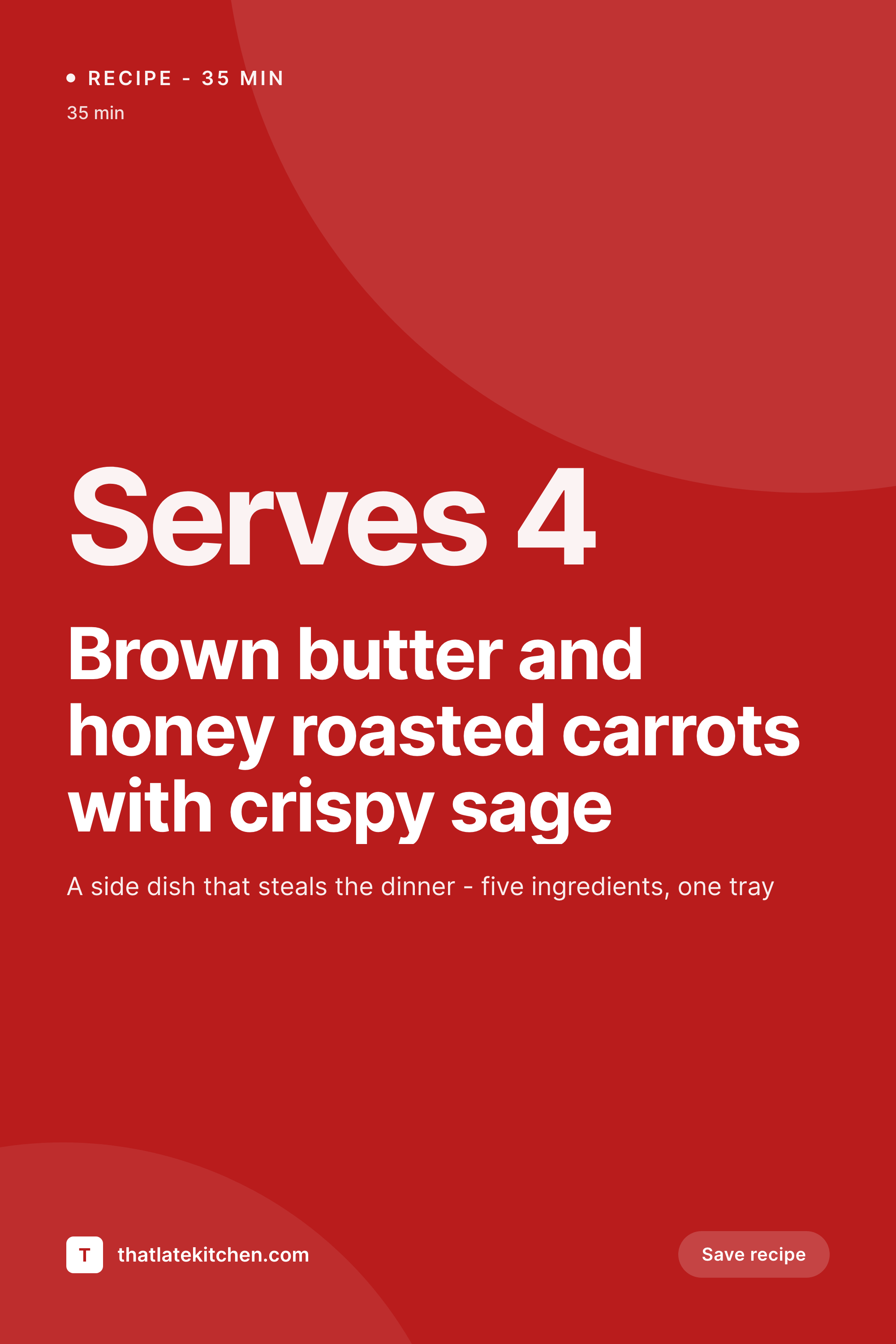
Recipe sites live on Pinterest, and Pinterest pins are 2:3 vertical with the title baked into the image. SleekPixel renders that pin from your recipe post on save - title, photo, prep time, servings.
♾️ Lifetime License available
Recipe sites live on Pinterest
Pinterest is still the dominant traffic source for recipe blogs that have figured out the platform. The pins that convert are 2:3 vertical, have the recipe title overlaid on a beautiful food photo, and include a prep-time or servings cue. Click-through depends almost entirely on whether the pin reads at thumbnail size in the Pinterest feed - the title visible, the photo appetizing, the recipe legible at a glance.
The traditional way to ship pins is to design each one in Canva or Photoshop after the recipe is photographed. The food photographer hands the blogger the hero shot, the blogger writes the post, then opens Canva and rebuilds the pin from a duplicated template. The fonts drift over time. The title placement creeps. Old pins look nothing like new pins, which is exactly the wrong outcome on a platform that rewards visual consistency.
SleekPixel templates the pin and renders it on recipe save. Recipe title, photo, prep time, cook time, and servings all live as fields on the post (whether through WP Recipe Maker, Tasty, or a custom recipe CPT) and the template binds to those fields. The pin renders to uploads, ready to download from Gutenberg and upload to Pinterest, Tailwind, or any scheduler.
Workflow
Recipe pin workflow from post to Pinterest
Build pin template
Publish recipe
Download from sidebar
Pin to Pinterest
Output
What a recipe pin looks like
A 1000x1500 PNG with the recipe title, hero photo, and prep-time cues, optimized for the Pinterest feed at thumbnail size.

Comparison
Manual pins vs SleekPixel
Canva pin per recipe
- Blogger rebuilds the pin in Canva for every recipe
- Title placement and fonts drift across the year
- Old recipe pins look nothing like new ones, hurting board consistency
- Recipe title edits on the post do not update the published pin
- Photographer ships the photo, blogger has to wait to design the pin
SleekPixel
- Locked 1000x1500 pin template renders consistently
- Recipe title, hero photo, prep time, servings from post fields
- Works with WP Recipe Maker, Tasty Recipes, custom CPT
- Headline edits regenerate the pin
- Download from Gutenberg ready for Pinterest or Tailwind
Features
What SleekPixel gives you for recipe
Hero photo aware
Bind the image layer to the recipe's hero photo or featured image. Auto-crop to the 2:3 frame, add the title overlay, ship the finished pin.
Prep-time cues
Pull prep time and total time from recipe-plugin fields and render them onto the pin. Pinterest users decide based on time as much as title - put it on the pin.
Edits regenerate
Tweak the title, add a comma, change the prep time. The pin re-renders so the version on Pinterest matches the post live on the site after a re-pin.
Use cases
Recipe sites this fits
Solo food blogs
One-person operations where the blogger does everything. SleekPixel removes the per-recipe Canva step so publishing only requires writing the recipe and shooting the photo.
Multi-author cooking sites
Sites with multiple recipe contributors. Every recipe ships with a pin in the same visual system regardless of which author wrote it, keeping the brand consistent.
Niche cookbooks online
Sites focused on a specific cuisine or diet. The pin template emphasizes the niche cue - "30 min", "vegan", "low carb" - bound to a recipe-attribute field.
The bigger picture
Why pin consistency drives recipe traffic
Pinterest's algorithm rewards consistency. Boards that look like one cohesive collection of pins outperform boards that look like a scrap pile of inconsistent uploads. Click-through-rate is shaped by the pin reading well at thumbnail size, which means the title needs to be visible, the photo needs to be appetizing, and the visual style needs to feel like the publisher's brand.
Bloggers who manage this well end up with thousands of pins on their boards that all look like they belong together, and that consistency itself drives discovery - a Pinterest user who tapped one pin and liked it will recognize the next one and tap again. Bloggers who do not manage it end up with pins from 2019 that look nothing like pins from today, and the board reads as inconsistent. The painful part is that pin design is exactly the kind of work that gets cut when a blogger is also the writer, photographer, recipe developer, and SEO person.
SleekPixel automates the pin step at the WordPress layer so it never gets cut. Recipe is published, pin is rendered, blogger downloads and schedules. Two-year-old recipes can be backfilled with the same template so the entire archive ships fresh pins that match today's brand.
Pinterest reach grows accordingly.
Questions
Common questions about SleekPixel for recipe
No. SleekPixel renders the PNG inside WordPress. The blogger downloads it from the Gutenberg sidebar and uploads to Pinterest manually or queues it through Tailwind, Buffer, or any Pinterest-compatible scheduler.
Yes. SleekPixel reads from any post field including the structured fields plugins like WP Recipe Maker, Tasty, and Cooked store. Bind the template to recipe title, prep time, and other fields directly from those plugins.
Yes. Pinterest rewards posting multiple pins per article over time. SleekPixel supports multiple templates per post type, so you can have 2-3 pin layouts and pick which renders for each recipe, or render all of them and rotate uploads.
Pinterest's recommended pin size is 1000x1500 pixels at 2:3 aspect, under 20MB. SleekPixel defaults to that canvas for pinterest-pin templates and outputs PNG by default - well under the size limit and the recommended ratio for the smart feed.
Yes. Bind the image layer to the recipe's featured image or to a custom hero-photo ACF field. The template auto-crops to the area you defined - full-bleed background or a portion of the pin.
SleekPixel renders static images only. Idea pins and video pins on Pinterest accept video uploads, which is outside the plugin's scope. The static pin remains the best entry point for most recipe traffic.
Yes. The bulk regenerate command runs through existing recipe posts and renders pins for them. A 500-recipe archive can be backfilled overnight in a queued background process so the editor stays responsive.
Yes. SleekPixel reads post fields and does not interfere with affiliate or schema plugins. Lasso, AAWP, AdSanity all coexist - SleekPixel only handles the visual asset and the og:image meta tag.
Pricing
More than 1000+
happy customers
Explore our flexible licensing options tailored to your needs. Upgrade your license anytime to access more features, or opt for a lifetime license for ongoing value, including lifetime updates and lifetime support. Our hassle-free upgrade process ensures that our platform can grow with you, starting from whichever plan you choose.
Lifetime ♾️
Most popular
EUR
once
- Unlimited websites
- Lifetime updates
- Lifetime support
...or get the Bundle Deal
and save €250 🎁
💎 Want everything forever? The All Access Pass is going away on 01.08.2026.
The Bundle (unlimited sites)
Pay once, own it forever
Elevate your WordPress site with our exclusive plugin bundle that includes all of our premium plugins in one package. Enjoy lifetime updates and lifetime support. Save significantly compared to buying plugins individually.
What’s included
-
SleekAI
-
SleekByte
-
SleekMotion
-
SleekPixel
-
SleekRank
-
SleekView
€749
Continue to checkoutBrowse more
- Twitch alert
- YouTube community images
- KakaoTalk channel banners
- Snapchat ad images
- Twitter header banners
- Instagram feed posts
- LinkedIn event banners
- LinkedIn company banners
- Twitch stream overlay images
- KDP paperback cover
- TikTok profile banners
- Vimeo thumbnails
- Mastodon profile header
- Instagram carousel slides
- Patreon cover images