






SleekPixel for Podia courses
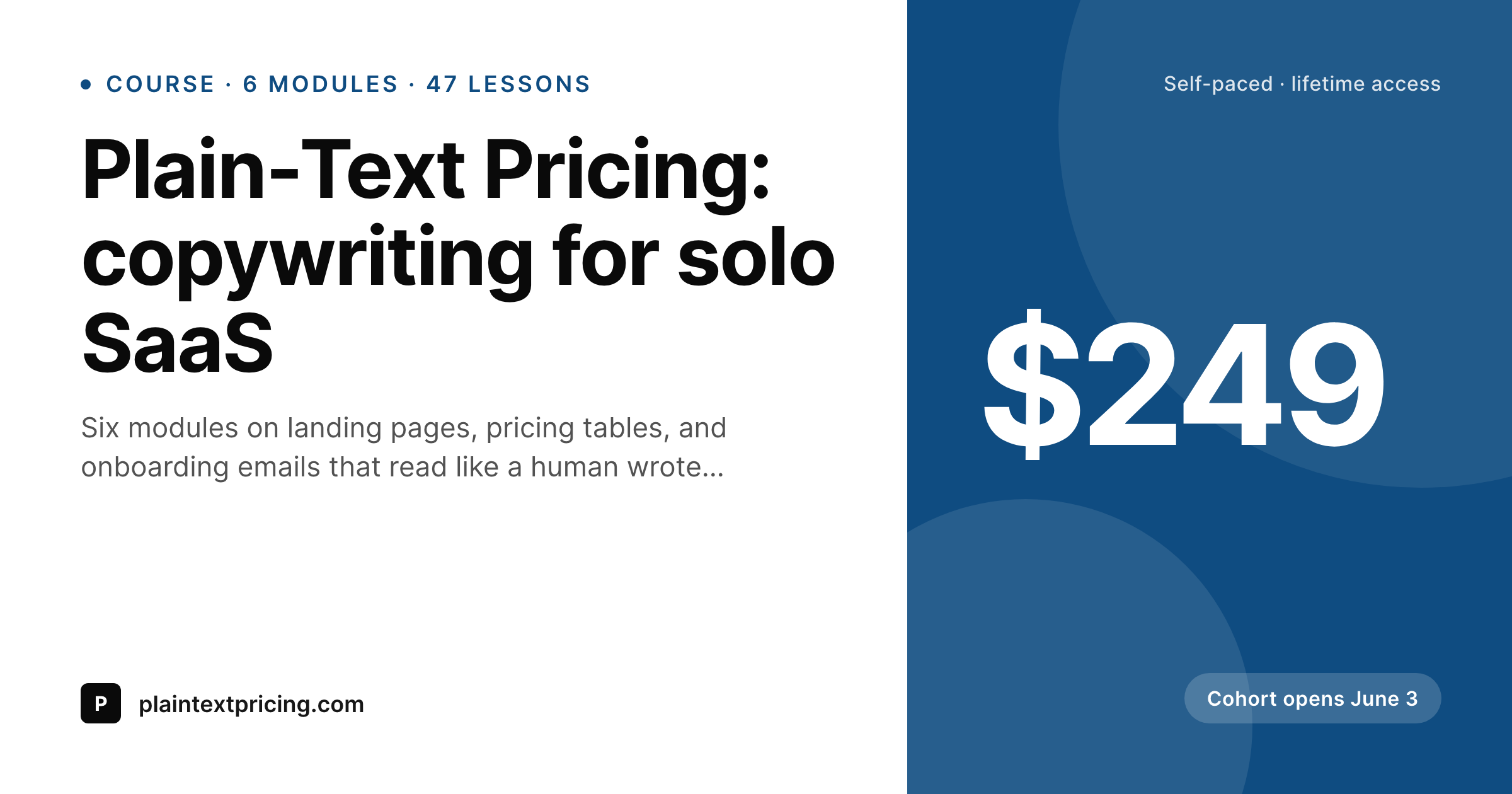
Podia hosts the lessons and the checkout. WordPress hosts the public sales page. SleekPixel renders a branded OG and Twitter card for every course page on the WordPress side so each share unfurls with the actual course title, price, and module count.
♾️ Lifetime License available
Podia handles delivery, WordPress handles the public face
Podia is built around the transaction: it stores the lessons, runs the checkout, manages the student accounts, and sends the drip emails. What it does not try to be is the marketing site. Most Podia creators run a separate WordPress site for the brand, the blog, the case studies, and the public-facing course pages, with a buy button that points at the Podia checkout. That arrangement works well, except for one weak point: the share preview.
When somebody tweets the WordPress course page, posts it to LinkedIn, or pastes it into a Slack channel, the unfurl uses whatever OG image WordPress can find. On a default theme that means a stretched logo or, worse, no image at all. The course title, price, and number of modules never make it into the preview, even though all three are sitting in the post fields.
SleekPixel reads those fields on save and renders a 1200 by 630 PNG with the course name, module or lesson count, price, and brand mark. The og:image and twitter:image tags update on the same save. The Podia side does not change at all. The checkout still runs on Podia, the lessons still stream from Podia, and the public WordPress course pages now share with cards that look like a real product page instead of a fallback.
Workflow
From Podia course to share-ready WordPress page
Build the WordPress course post type
Design the course-card template
Save the WordPress post
Share the course URL
Output
What ships with every Podia course page
A 1200 by 630 OG and Twitter card: course title, module or lesson count, price, brand wordmark, and an optional cohort or launch badge, rendered from the WordPress course post fields on save.
Comparison
Default WordPress unfurl vs Podia-aware rendering
Default theme OG
- Course landing pages unfurl with a generic site banner on Twitter and LinkedIn
- Course price and lesson count never show on the share preview
- Manual Canva exports per launch get skipped after the first two cohorts
- Featured images framed for in-post hero look cramped at 1200 by 630
- Brand updates require redoing every past course card by hand
SleekPixel
- Reads WordPress fields for every Podia course you republish on WP
- Course title, lesson count, price, and badge render automatically
- Self-paced and cohort courses can use the same template family
- Bulk re-render the whole catalog when the brand evolves
- Lives on the WordPress side, no Podia plugin or API key needed
Features
What SleekPixel gives you for Podia courses
Course-aware headlines
The course title and subtitle you already wrote on the WordPress sales page become the card headline and supporting line, no second copy pass.
Module and lesson counts
A small badge renders the module or lesson count from a custom field, so the share preview signals scope without forcing readers onto the page first.
Price and cohort tags
Price, currency, and optional cohort start date render as compact badges, useful for launch tweets where the headline is the offer itself.
Use cases
Who runs Podia plus a WordPress marketing site
Solo course creators
One-person operations selling a single flagship course pair a WordPress sales page with a Podia checkout, and need a share card that matches the brand.
Coaches with course libraries
Coaches running five to fifteen self-paced courses on Podia maintain a WordPress catalog page, with each course getting its own branded preview.
Launch-driven creators
Cohort-based course operators run launch campaigns where every tweet and LinkedIn post needs a clean preview, and each cohort iteration gets a fresh card.
The bigger picture
Why share cards matter more for Podia creators than they look
Podia creators rarely run paid ads at scale, so most growth comes from a mix of newsletter drops, podcast mentions, affiliate posts, and word of mouth across Twitter and LinkedIn. Each of those channels ends with a shared URL. The share preview is the last impression before the click, and on a course page the difference between a generic site banner and a real course card is the difference between a curious tap and a click with intent.
The second compounding effect is consistency across a catalog. A creator with eight Podia courses listed on a WordPress catalog page looks like a real school when every course unfurls with the same card system, and looks scattered when each course unfurls with whatever the theme picked. SleekPixel makes the catalog feel coherent without forcing the creator to design eight separate share images by hand.
The Podia checkout still does what it does best, the WordPress site still hosts the marketing, and the share layer that used to be the weak link starts working in favor of the brand.
Questions
Common questions about SleekPixel for Podia courses
No. SleekPixel reads WordPress post fields. If your course details live as custom post meta on the WordPress side, the template renders from there. The Podia API is not touched by the plugin.
Then SleekPixel does not have anything to render against. The plugin needs a WordPress post per course. Many creators set this up specifically to gain OG control and SEO; if you do not, Podia's own hosted pages will keep handling shares.
Yes. A custom field or category on the post selects the template variant. Self-paced courses might render with a lifetime-access badge, cohort courses with a start date. The template chooses based on whatever field you bind.
Yes, if you mirror those as WordPress posts. Digital downloads can use a simpler card variant with file count instead of lesson count; webinars can render the date and runtime. The template just reads the fields you give it.
Affiliate links typically add query parameters that platforms strip when fetching OG tags. The share preview is identical regardless of the affiliate ref, which is what you want, since the card should sell the course not the affiliate.
SleekPixel renders on WordPress post save, so the price on the share card reflects the price on the WordPress post. If you update price on Podia, you also need to update the matching WordPress field for the share image to follow. Some teams sync this via a small webhook.
Static countdowns work fine: a 'starts June 3' badge renders cleanly. Live countdowns inside a static PNG do not work; for a live countdown you would need the page itself to render the count, which is unrelated to OG images.
Rendering happens once per save, as a background job. There is no per-pageview overhead. The only cost on the public side is serving a PNG from uploads, which is no different from serving any featured image.
Pricing
More than 1000+
happy customers
Explore our flexible licensing options tailored to your needs. Upgrade your license anytime to access more features, or opt for a lifetime license for ongoing value, including lifetime updates and lifetime support. Our hassle-free upgrade process ensures that our platform can grow with you, starting from whichever plan you choose.
Lifetime ♾️
Most popular
EUR
once
- Unlimited websites
- Lifetime updates
- Lifetime support
...or get the Bundle Deal
and save €250 🎁
💎 Want everything forever? The All Access Pass is going away on 01.08.2026.
The Bundle (unlimited sites)
Pay once, own it forever
Elevate your WordPress site with our exclusive plugin bundle that includes all of our premium plugins in one package. Enjoy lifetime updates and lifetime support. Save significantly compared to buying plugins individually.
What’s included
-
SleekAI
-
SleekByte
-
SleekMotion
-
SleekPixel
-
SleekRank
-
SleekView
€749
Continue to checkoutBrowse more
- LinkedIn banner images
- Bluesky profile banners
- TikTok cover images
- Facebook cover photos
- Vimeo channel banners
- Discord stage banner
- YouTube Shorts covers
- Etsy shop banners
- Depop listing images
- Instagram collab post images
- Mailchimp email banner
- Facebook post images
- VK community cover photos
- Open Graph images
- Lemon8 post