






SleekPixel for SchemaPress
SchemaPress writes the structured data for reviews, articles, FAQs, recipes and products on WordPress. SleekPixel reads the same source fields and renders a per-post share card, so the markup and the social preview agree on what the post is.
♾️ Lifetime License available
The schema is precise, the share card is generic
SchemaPress is one of the more thorough schema plugins on WordPress, with detailed support for Article, Review, FAQ, HowTo, Recipe, Product and LocalBusiness markup. Editors fill in fields that map cleanly onto Google's structured data requirements: rating, item reviewed, ingredients, steps, FAQ pairs. The plugin writes the JSON-LD into the page head, and rich results start showing up in search.
The OG image and Twitter card never reflect any of that detail. A review post with a 4.8 rating and a clearly named product shares with the same banner as a recipe post or an FAQ page, because the OG image is decided by the theme, not by the schema. The rich result on Google looks like a thought-through review. The Twitter card looks like a fallback.
SleekPixel reads the same fields SchemaPress uses to build the schema. For a Review, it pulls rating and item reviewed. For a Recipe, it pulls dish name and total time. For an FAQ post, it pulls the headline question. The card renders from real values, so the share preview tells the truth about the post type, and the schema and the social card finally tell the same story.
Workflow
From SchemaPress field to branded card
Fill in the schema in SchemaPress
Bind template slots
Render on save
Publish and share
Output
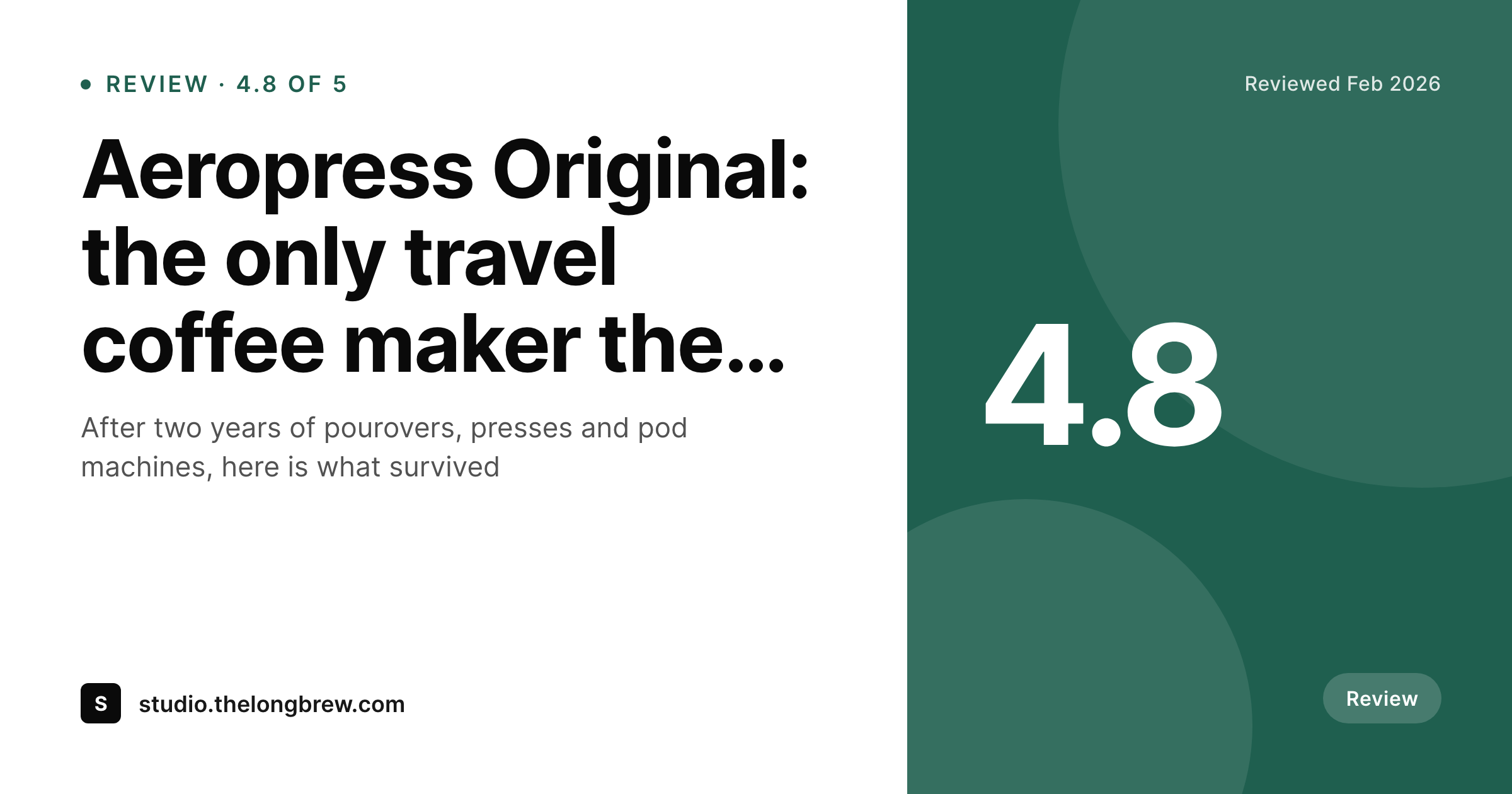
Sample SchemaPress review card
A 1200 by 630 OG image: review title, item reviewed, rating and brand mark, rendered from the SchemaPress review fields.
Comparison
Default review share vs schema-aware card
Default theme OG image
- Rich-data posts share with the same generic theme banner
- Rating, recipe time or FAQ question never reach the social preview
- Reviews, recipes and articles look identical on Twitter and LinkedIn
- Manual OG uploads per post are rarely done in long content operations
- Schema improvements never reflect on the share surface
SleekPixel
- Reads SchemaPress fields directly per schema type
- Distinct templates for review, recipe, FAQ, HowTo and article
- Rating, time, ingredients-count and other schema values slot in
- Schema and share image always pulled from the same source fields
- Bulk re-render when the brand evolves
Features
What SleekPixel gives you for SchemaPress
Review-aware slots
Reviews render a card with the item reviewed, the rating and a one-line verdict, all drawn straight from the SchemaPress review schema fields.
Recipe-aware slots
Recipes render a card with dish name, total time and a primary photo, matching what the Recipe schema reports to search engines.
FAQ-aware slots
FAQ posts render a card around the headline question, with a subtitle from the first answer, so the social preview matches the rich result.
Use cases
Who uses SleekPixel for SchemaPress
Review sites
Product review publications ship per-review cards with rating and item, matching the rich result Google already shows.
Food blogs
Recipe-heavy blogs render per-recipe cards with dish name and time, replacing the recipe photo crop most themes default to.
Knowledge bases
FAQ-driven help centers and knowledge bases share per-question cards, ready to drop into support threads and chats.
The bigger picture
Why schema and share previews should agree
Schema makes a page legible to search engines, but a share preview is what makes it legible to a person scrolling LinkedIn or Twitter at six in the evening. When the two disagree, the search result looks rigorous and the social card looks lazy, and the audience that meets the brand through the social card never gets the impression the schema worked to earn. SchemaPress already collects every fact a share card would need, because schema demands the same precision a designed graphic would.
SleekPixel just reuses those facts on a different surface. The review rating that shows up as stars in Google shows up as a clean numeric badge on the OG card. The recipe time that drives the rich result drives the share image too.
A content team that already invested in schema discipline gets the visual side for free, and the brand reads as a single coherent operation across search and social.
Questions
Common questions about SleekPixel for SchemaPress
Yes. Both versions store schema input as post meta. SleekPixel reads post meta directly, so templates work the same regardless of license tier. Pro adds richer schema types that SleekPixel can bind to with extra slots.
SchemaPress keeps writing the JSON-LD. SleekPixel does not touch the schema output, only the OG image URL and the rendered PNG. The two systems operate on different parts of the head and body.
Yes, this is the recommended setup. Reviews, recipes, FAQs and articles each get their own template, picked by post type or by a schema-type field on the post.
Rating is a numeric field in SchemaPress. The template can render it as a numeric badge ('4.8') or as a small star row. Most brands pick the numeric badge because it stays legible at thumbnail sizes.
If the recipe schema includes nutrition fields, the template can render a compact panel (calories, protein, time) at the bottom of the card. Most cards skip nutrition and prioritise dish and time for legibility.
Directly, no. Search ranking is driven by content and schema, both of which stay the same. Indirectly, a better social card can drive more click-through and engagement, which downstream signals can favour.
The card itself is a single image, so cycling questions per render is not the model. Most teams pick the headline question; the FAQ schema still surfaces the full list in rich results.
Yes. Each translated post carries its own schema and its own card, rendered from the translated fields. The brand layer stays consistent across languages.
Pricing
More than 1000+
happy customers
Explore our flexible licensing options tailored to your needs. Upgrade your license anytime to access more features, or opt for a lifetime license for ongoing value, including lifetime updates and lifetime support. Our hassle-free upgrade process ensures that our platform can grow with you, starting from whichever plan you choose.
Lifetime ♾️
Most popular
EUR
once
- Unlimited websites
- Lifetime updates
- Lifetime support
...or get the Bundle Deal
and save €250 🎁
💎 Want everything forever? The All Access Pass is going away on 01.08.2026.
The Bundle (unlimited sites)
Pay once, own it forever
Elevate your WordPress site with our exclusive plugin bundle that includes all of our premium plugins in one package. Enjoy lifetime updates and lifetime support. Save significantly compared to buying plugins individually.
What’s included
-
SleekAI
-
SleekByte
-
SleekMotion
-
SleekPixel
-
SleekRank
-
SleekView
€749
Continue to checkoutBrowse more
- Discord server icon
- Twitch camera frame
- Discord event cover
- Shopify product images
- Instagram feed posts
- TikTok ad images
- Fanvue page banner
- Twitch profile banner
- Slack channel headers
- Twitch offline banners
- YouTube podcast thumbnails
- WhatsApp status images
- Twitter header banners
- Discord stage banner
- Warpcast frame images