






SleekPixel for sourdough bakery
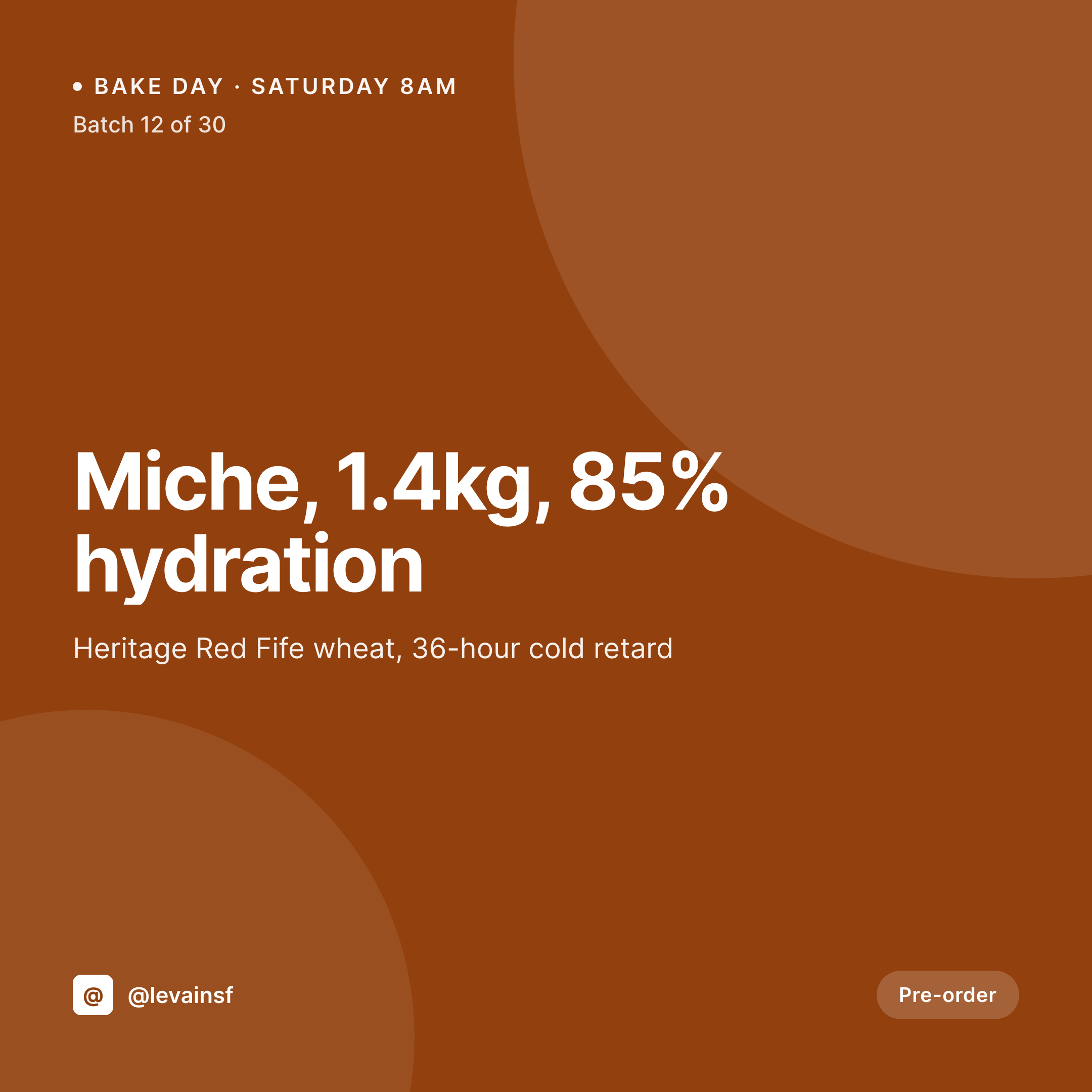
Sourdough buyers care about flour origin, hydration, and fermentation time. SleekPixel pulls those fields from the product post onto a 1080x1080 tile, so every Saturday bake list looks like a serious bakery.
♾️ Lifetime License available
Sourdough customers read the label, not the photo
A serious sourdough buyer doesn't pick a loaf by the photo. They pick by the flour origin, the hydration percentage, the fermentation time, and whether the levain is rye or wheat. That's why sourdough bakeries fill their Instagram captions with the same data their product page already lists. The problem is that the captions live in one place and the image lives in another, and updating both for every Saturday bake doubles the work.
The bake data already lives on the WordPress site. Most sourdough bakeries run a product CPT or WooCommerce store with custom fields for flour blend, hydration, fermentation hours, batch size, and pickup window. The page reads cleanly to anyone visiting the site. What's missing is putting the same fields on the Instagram tile, so a buyer scrolling the feed sees miche / 85% / 36h on the image and decides without leaving Instagram.
SleekPixel renders the tile from the same fields. The product post saves and the 1080x1080 image lands in uploads with flour origin, hydration, and batch number baked in. Saturday's bake list looks like the bakery's website, not a Canva file made on a phone.
Workflow
From bake schedule to posted batch
Map the sourdough fields
Design the bake template
Publish the weekly bake
Post the bake list
Output
What gets generated per batch
A 1080x1080 Instagram tile with loaf name, flour blend, hydration percentage, fermentation time, and pickup window from the product post.
Comparison
Manual Canva batch list vs auto-rendered bake card
Manual / Canva / spreadsheet
- Hydration and flour blend live in the caption, not on the image
- Saturday bake list is rebuilt in Canva every Friday night
- Batch sizes change weekly and the tile shows last week's count
- Flour origin gets misspelled when typed by hand into Canva
- Pre-order links don't match between Instagram and the product page
SleekPixel
- Hydration, flour blend, and fermentation time rendered on the tile
- Pre-order link tied to the product post URL, no manual paste
- Batch number updates automatically when inventory changes
- Same template across loaves, pastries, and starter kits
- OG image for the product page generated in the same save
Features
What SleekPixel gives you for sourdough bakery
Hydration on the image
Sourdough customers read hydration before they look at price. SleekPixel pulls the percentage from the product field straight onto the tile.
Flour origin labeled
Red Fife, einkorn, freshly milled rye - whatever the flour field says appears on the tile, so the feed reads like a flour-first bakery.
Fermentation time
36-hour cold retard, 18-hour autolyse, whatever the process field captures shows on the tile. Buyers know the bake is serious before they tap through.
Use cases
Where sourdough bakery tiles get used
Saturday bake list
The weekly bake list goes from a Canva file to a stack of tiles auto-rendered from the products, ready to post Friday night.
Pre-order campaigns
Holiday miches and limited-edition collaboration loaves get tiles that link back to the pre-order product page, no manual URL paste.
Class announcements
Bread-making classes and starter workshops each get a tile pulling date, price, and seat count from the class post.
The bigger picture
Why sourdough customers read the tile before they read the caption
Sourdough is the rare baked good where the buyer reads the spec sheet. They want flour origin, hydration percentage, fermentation time, and whether the levain is wheat or rye. That information lives on the product page already, because it has to, to satisfy customers who care.
When the Instagram tile doesn't carry the same data, the buyer has to leave Instagram, tap through, scroll, and then come back to decide. Every extra tap is a buyer lost. Treating the tile as a derived rendering of the product post means the spec sheet and the social image stay in sync forever.
The hydration percentage typed once shows up on the website, the OG image, the Instagram tile, and the story. Saturday morning's bake list looks like a bakery that takes its craft seriously, instead of a Canva file made at midnight. And when the head baker changes the flour blend for a seasonal run, every tile, every preview, and every link updates from one field edit.
Questions
Common questions about SleekPixel for sourdough bakery
Yes. A bakery shipping 30 batches a week generates 30 tiles per save sweep. The renderer is queued, so even publishing the entire bake list at once doesn't slow down the admin.
Yes. Templates can be conditional on category or product type. Country loaves use one layout, baguettes another, and seasonal panettone a third. All pull from the same flour-and-hydration fields.
Repeater fields (ACF, Meta Box) are supported. The template can loop over each flour with origin and percentage. A 70/20/10 wheat/rye/spelt blend renders as a stacked list on the tile.
Yes. A 1080x1920 story renders alongside the tile in the same save. When inventory drops below threshold, the story can be posted as a sellout warning with the same flour-and-hydration data.
Yes. Pre-order products are still WooCommerce products, and their fields are readable. SleekPixel renders the tile when the pre-order is published and again when stock or price changes.
If the site uses multisite or a location taxonomy, each location can have its own template variant. The flour and hydration data is global, the storefront address and pickup window are per-location.
Yes. Starter kits are products too. The tile pulls heritage name, age of the culture, jar size, and shipping zone from the product fields. The same template engine handles bread and starter.
Yes. Update the template, run bulk regenerate, and every product in the catalog (current and archived) re-renders against the new design. No per-tile rebuild in Canva.
Pricing
More than 1000+
happy customers
Explore our flexible licensing options tailored to your needs. Upgrade your license anytime to access more features, or opt for a lifetime license for ongoing value, including lifetime updates and lifetime support. Our hassle-free upgrade process ensures that our platform can grow with you, starting from whichever plan you choose.
Lifetime ♾️
Most popular
EUR
once
- Unlimited websites
- Lifetime updates
- Lifetime support
...or get the Bundle Deal
and save €250 🎁
💎 Want everything forever? The All Access Pass is going away on 01.08.2026.
The Bundle (unlimited sites)
Pay once, own it forever
Elevate your WordPress site with our exclusive plugin bundle that includes all of our premium plugins in one package. Enjoy lifetime updates and lifetime support. Save significantly compared to buying plugins individually.
What’s included
-
SleekAI
-
SleekByte
-
SleekMotion
-
SleekPixel
-
SleekRank
-
SleekView
€749
Continue to checkoutBrowse more
- YouTube playlist covers
- Telegram channel cover images
- X Space banners
- X list banners
- Pinterest pins
- GitHub README banners
- Instagram bio link banners
- Twitch overlay
- Amazon Storefront banners
- Shopify collection banners
- Douyin thumbnails
- Ghost feature images
- Rednote (Xiaohongshu) post
- Xiaohongshu cover images
- Signal sticker pack