






SleekPixel for tea shop
First flush Darjeeling in spring, single-estate matcha in May, autumn oolongs in October. Each new tea on the website saves with a 1080x1080 grid card and a matching OG image.
♾️ Lifetime License available
Tea releases follow the harvest calendar, the grid has to follow with them
A specialty tea shop's year is shaped by the harvest calendar. Darjeeling first flush ships in March, the new shincha lands in May, a single-estate matcha drops in time for matcha season, autumn oolongs arrive in October. Each release sells through in weeks and each one wants a square for the Instagram grid, a Story for the announcement, and an OG image for the product page so a link to the shincha doesn't share as the shop logo.
The data is on the website. The shop runs a tea CPT or a WooCommerce catalog with origin (Goomtee Estate, Yame, Anxi), region, harvest year, grade (sencha, gyokuro, kabusecha), processing notes, tin weight, price, and a hero shot of the leaf. The information that took the buying team a season to compile lives in the post once. The gap is the image, the 1080x1080 that goes on Instagram next to last season's release.
SleekPixel reads the tea product and renders the grid card on save. The origin, harvest year, grade, and price land in the layout. The PNG is in uploads, the og:image wires into the product URL, the shop manager posts from a phone before opening. The grid reads as one shop across every season, even when the catalog rotates twice a year.
Workflow
From new harvest to grid card
Map the tea fields
Design one square template
Publish the new tea
Post from a phone
Output
What gets generated per tea
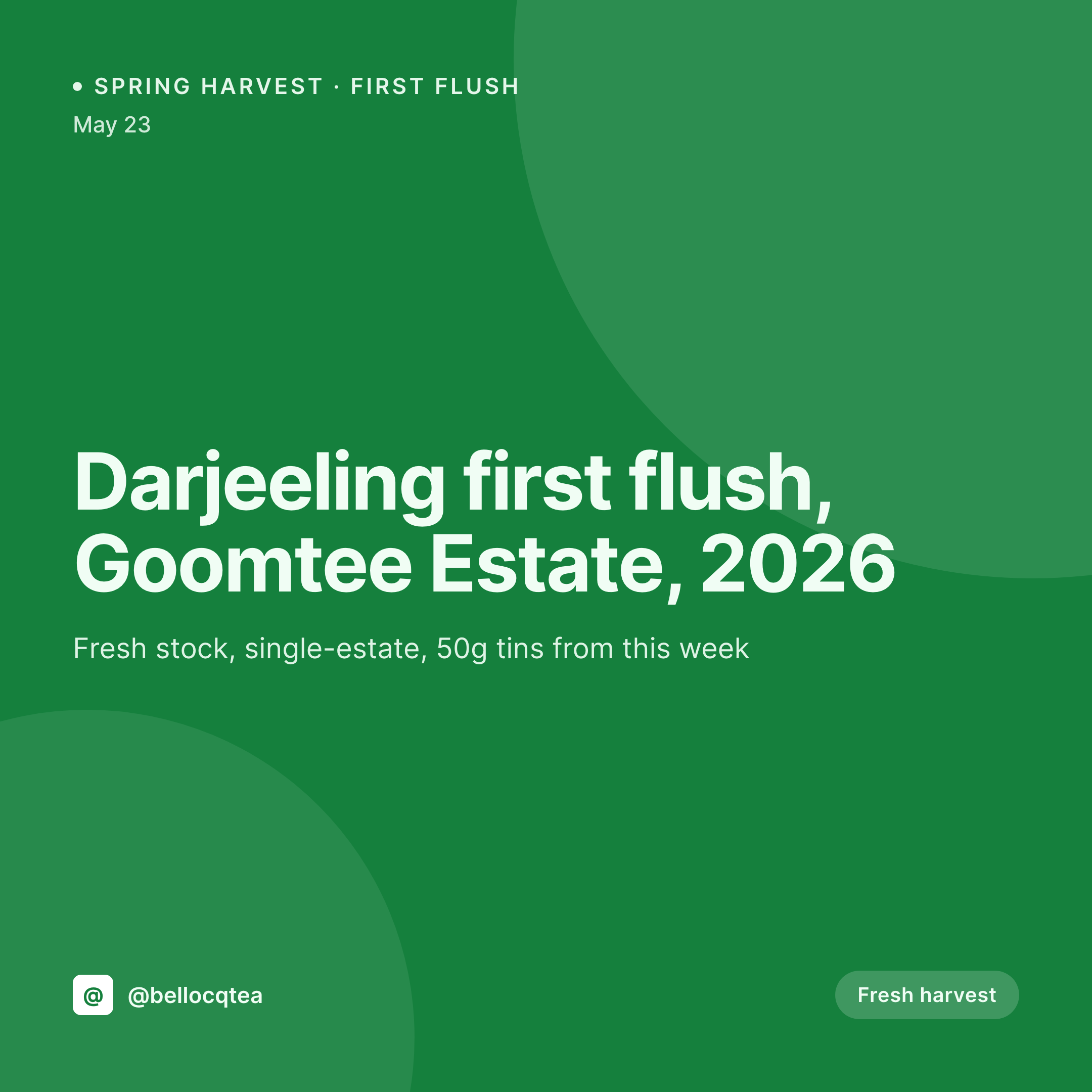
A 1080x1080 square card with the origin, estate, harvest year, grade, and tin price, pulled from the tea product fields.

Comparison
Default tea shop image vs SleekPixel
Default tea shop image
- Manager rebuilds a Canva card for every new harvest release
- Estate names misspelled in transit (Goomtee, Marybong, Makaibari)
- Harvest year on the card drifts from what's printed on the tin
- Sencha, gyokuro, and kabusecha all use slightly different templates
- Wholesale tea program shares cards that look off-brand from the retail site
SleekPixel
- Save the tea product, the 1080x1080 PNG lands in uploads
- Origin, estate, harvest year, grade, and price pulled from the catalog
- Square format sized for Instagram and Facebook grids
- Harvest badge so first flush, shincha, and autumn flush stay distinct
- Single template across teas keeps the catalog visually coherent
Features
What SleekPixel gives you for tea shop
Card per harvest
Every new flush, every estate, every seasonal blend saves with its own card. Origin and harvest year come from the product, not a Canva file.
Estate-aware
Goomtee, Marybong, Yame, Anxi. The estate name and country render in the same hierarchy every release.
Harvest year visible
First flush 2026, autumn 2025, shincha 2026. The harvest year is part of the card layout so customers see the freshness at a glance.
Use cases
Who uses SleekPixel for tea shops
Single-estate tea importers
Darjeeling first flush, Yunnan dian hong, Wuyi rock oolong. Each release renders as a card from the tea catalog, ready to post.
Matcha specialists
Ceremonial, premium, culinary grades from named producers. Each new lot saves with a card that names the grade and the producer.
Tea cafes and tasting rooms
Brewed-flight specials and pot-of-the-day pours render from the same catalog as the retail tins, with the cafe price and pour size.
The bigger picture
Why a tea catalog needs cards that reflect the harvest
Tea customers shop on freshness and provenance. They want to see the harvest year on the tin, the estate name on the label, and the same information on the Instagram post that brought them to the product page. The moment those three surfaces drift, the trust the shop spent a season building dissolves.
A misspelled estate is a tell. A missing harvest year is a tell. A first-flush card that's still labeled with last year's date when the new crop just landed is a tell.
The fix is to type the harvest once into the tea record, and to let every surface render from that source. The grid reads as one shop. The product page matches the grid.
The tin matches the product page. A specialty tea shop that gets that loop right reads as a serious importer across years, which is the only brand that survives the rotation of two harvests a year.
Questions
Common questions about SleekPixel for tea shop
Yes. Sencha, gyokuro, longjing, tieguanyin all render in kanji or pinyin alongside the English name. Custom web fonts keep the typography consistent.
Yes. Templates can be conditional on a harvest taxonomy. First flush uses one layout with a spring badge, autumn oolong uses another with an autumn accent color.
Brewed pots and flights can be their own records that reference retail tea products. The card renders the brewed price, the steep time, and the pot size together.
Yes. SleekPixel reads any post type and any field, so WooCommerce, WP Tasty, or a plain custom post type all map onto the card template.
Yes. The PNG is in uploads and the og:image wires into the product URL. A wholesale partner can share the URL and the link unfurls with the harvest card.
No. SleekPixel renders the PNG and saves it to uploads. Posting is a manual step from Instagram or a scheduling tool like Later.
Yes. One save can render a 1080x1080 square, a 1000x1500 Pinterest pin, and a 1200x630 OG image. Each format is configured once and renders together.
Editing the product and flipping the stock status re-renders the card with a sold-out badge. The image stays attached to the product URL for archive shares.
Pricing
More than 1000+
happy customers
Explore our flexible licensing options tailored to your needs. Upgrade your license anytime to access more features, or opt for a lifetime license for ongoing value, including lifetime updates and lifetime support. Our hassle-free upgrade process ensures that our platform can grow with you, starting from whichever plan you choose.
Lifetime ♾️
Most popular
EUR
once
- Unlimited websites
- Lifetime updates
- Lifetime support
...or get the Bundle Deal
and save €250 🎁
💎 Want everything forever? The All Access Pass is going away on 01.08.2026.
The Bundle (unlimited sites)
Pay once, own it forever
Elevate your WordPress site with our exclusive plugin bundle that includes all of our premium plugins in one package. Enjoy lifetime updates and lifetime support. Save significantly compared to buying plugins individually.
What’s included
-
SleekAI
-
SleekByte
-
SleekMotion
-
SleekPixel
-
SleekRank
-
SleekView
€749
Continue to checkoutBrowse more
- KDP hardcover cover
- X Space banners
- TikTok Now image
- WhatsApp status images
- Klaviyo email banner
- YouTube podcast thumbnails
- Apple Podcasts covers
- Bluesky feed banner
- Telegram channel images
- X list banners
- Weibo post images
- YouTube Shorts thumbnails
- Substack post headers
- Vimeo thumbnails
- Etsy shop banners