






SleekPixel for travel agents
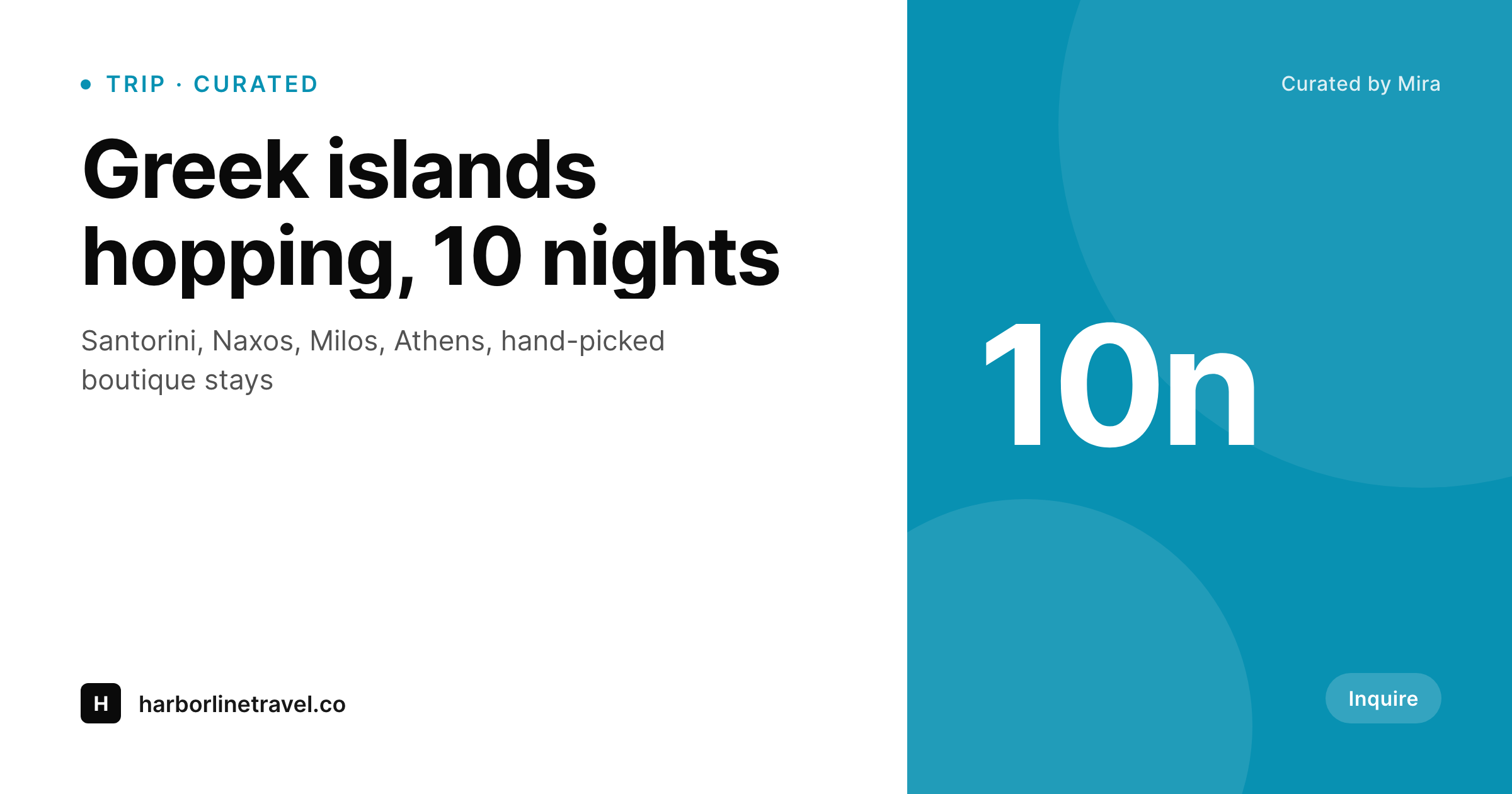
Agent-curated itineraries already carry destination, duration, traveler count, and travel style. SleekPixel renders a 1200x630 OG card per trip so client emails, agent socials, and supplier referrals all open with a branded preview.
♾️ Lifetime License available
Travel agents compete on taste, then send links that hide it
Independent travel agents and small agencies sell something specific: judgment. The Greek hotel that's better than the one ranking higher on Booking. The Tuscany driver who'll save the family from a stressful first day. The boutique safari camp that's worth the upcharge. That judgment is the entire product, and it gets communicated through emails, WhatsApp messages, and proposal PDFs sent to clients. The trip page on the agent's WordPress site is often the destination of those messages. When the client clicks through, the page sells well. The problem is the link preview that the client sees before clicking. A bare URL with a generic agency logo doesn't communicate any of the curation that took the agent days to assemble.
The data is already structured. The trip CPT or post holds destination, duration, traveler count, travel style, lead agent, and a hero photo from the chosen hotel or destination. Custom itineraries pull from a more detailed schema with daily activities, supplier names, and price tier. The same data could drive the OG image, except agents typically run too lean to maintain a Canva queue per quote.
SleekPixel reads the trip fields on save and renders the OG card automatically. Agent name, destination, duration, and trip style appear on the share preview. Every link, whether to a curated trip page, a custom proposal, or a destination guide, unfurls with the agent's brand intact. The judgment behind the trip survives the WhatsApp share.
Workflow
From client brief to branded link preview
Map the trip schema
Design the agent template
Save curated and custom trips
Share via any channel
Output
What gets generated per trip
A 1200x630 PNG showing destination, duration, lead agent name, and hero photo from the curated trip page.
Comparison
Manual trip cards vs SleekPixel
Canva / PDF cover
- Each curated trip needs a manual cover image for the proposal and the link
- WhatsApp link previews show agency logo on gray for every client share
- Custom trips for individual clients never get share images at all
- Quote revisions leave old preview images attached to outdated trip versions
- Supplier referral links share with default previews instead of agent branding
SleekPixel
- Every trip page saves with a 1200x630 OG image rendered from trip fields
- Destination, duration, lead agent, and travel style render automatically
- Custom client trips get their own OG cards without manual design work
- Bulk regenerate the entire trip portfolio when branding refreshes
- Per-agent variants so multi-agent agencies surface the right name per trip
Features
What SleekPixel gives you for travel agents
Trip OG per page
Every curated trip saves with a branded 1200x630 PNG. Destination, duration, and agent name pull from the trip fields automatically.
Per-agent branding
Multi-agent agencies render the curating agent's name and headshot per trip. Clients see who designed their trip, not just the agency logo.
Quote revision aware
Update a trip with new dates, hotel changes, or revised pricing and the OG image regenerates. Client shares always reflect the current proposal.
Use cases
Where agent OG images convert
Curated trip catalogs
Agencies that publish a portfolio of signature trips get branded share previews per trip. Clients browsing the catalog land with intent.
Custom client proposals
Bespoke itineraries built per client get their own OG card. The proposal link in the email opens with destination and duration visible.
Destination guides
Agent-written destination content (when to go, what to skip) shares with location-specific OG cards. Builds authority alongside trip listings.
The bigger picture
Why OG images matter for relationship-driven travel sales
Travel agencies sell trust transferred through warm relationships. The client found the agent through a friend, got a quote via email, and now decides whether to book based on whether the agent feels real and capable. Every link the agent sends is a chance to reinforce that impression or undercut it.
A WhatsApp message with a bare URL and a generic logo preview reads as small-time. A WhatsApp message with a destination-specific OG card showing the agent's name and a curated photo reads as a real travel professional running a real business. The conversion gap between those two outcomes is wide, and it compounds across the agent's entire client list.
For an agent juggling 30 active client conversations, OG cards are the most-seen marketing asset in the practice, far more than the website homepage or the agency Instagram feed. Hand-designing OG cards in Canva for every custom client trip is impossible at any meaningful scale. Auto-rendering them from the trip CPT collapses the work into the existing quote workflow.
The agent builds the proposal in WordPress; the share preview generates itself; the client opens the WhatsApp link and sees a polished preview before they even tap through. The judgment that took the agent three hours to assemble survives the link share, and that's where the booking conversion lives.
Questions
Common questions about SleekPixel for travel agents
Yes. Trips published as private or password-protected still get OG images. The og:image URL points at the public PNG file in uploads even when the trip post itself requires a password to view. Useful for client-specific quotes that aren't in the public catalog.
Yes. The post author drives the agent name and headshot on the OG card. Each agent's user profile holds a name, photo, and signature line, and SleekPixel reads those into the template. Clients see the curating agent's name, not just the agency.
Multi-destination trips can render the primary destination as the headline with secondary destinations in a stack below. Or the template can list 'Greece + Italy' style. Both layouts pull from a destinations repeater field on the trip post.
Yes. Many agents build a mood board per trip with photos pulled from supplier libraries. If those images are uploaded to the trip post or attached via an ACF gallery, the template selects the first or a tagged hero image as the OG photo.
If the trip data syncs back to a WordPress post via webhook or API, yes. SleekPixel only needs the data to live on a WP post for the template to read. Many agents use those tools for itinerary building and embed the result on a WP page where SleekPixel renders the OG image.
Yes. Per-template visibility rules can hide price fields, supplier names, or other commercially sensitive data on the OG image while leaving them on the trip page itself. The share preview stays generic enough for forwarding without exposing margins.
Yes. WPML translates the trip post per language and SleekPixel renders an OG image per translation. The English version of a Greek trip gets English-text card; the Spanish version gets a Spanish one. Each translation has its own og:image URL.
Rendering happens on save, one trip at a time, so per-trip render cost is small. Bulk regeneration of an entire portfolio runs as a background job and chunks through hundreds of trips without blocking the admin. Even a 500-trip agency can rebuild the catalog in under an hour.
Pricing
More than 1000+
happy customers
Explore our flexible licensing options tailored to your needs. Upgrade your license anytime to access more features, or opt for a lifetime license for ongoing value, including lifetime updates and lifetime support. Our hassle-free upgrade process ensures that our platform can grow with you, starting from whichever plan you choose.
Lifetime ♾️
Most popular
EUR
once
- Unlimited websites
- Lifetime updates
- Lifetime support
...or get the Bundle Deal
and save €250 🎁
💎 Want everything forever? The All Access Pass is going away on 01.08.2026.
The Bundle (unlimited sites)
Pay once, own it forever
Elevate your WordPress site with our exclusive plugin bundle that includes all of our premium plugins in one package. Enjoy lifetime updates and lifetime support. Save significantly compared to buying plugins individually.
What’s included
-
SleekAI
-
SleekByte
-
SleekMotion
-
SleekPixel
-
SleekRank
-
SleekView
€749
Continue to checkoutBrowse more
- Beacons.ai banner
- Linktree banner image
- Instagram feed posts
- Etsy cover photos
- Ko-fi banners
- LinkedIn post images
- KakaoTalk channel banners
- Patreon tier images
- Twitch profile banner
- Tidal cover art
- Behance project covers
- Facebook post images
- Vimeo thumbnails
- Discord stage banner
- Mastodon post images