






SleekPixel for golf courses
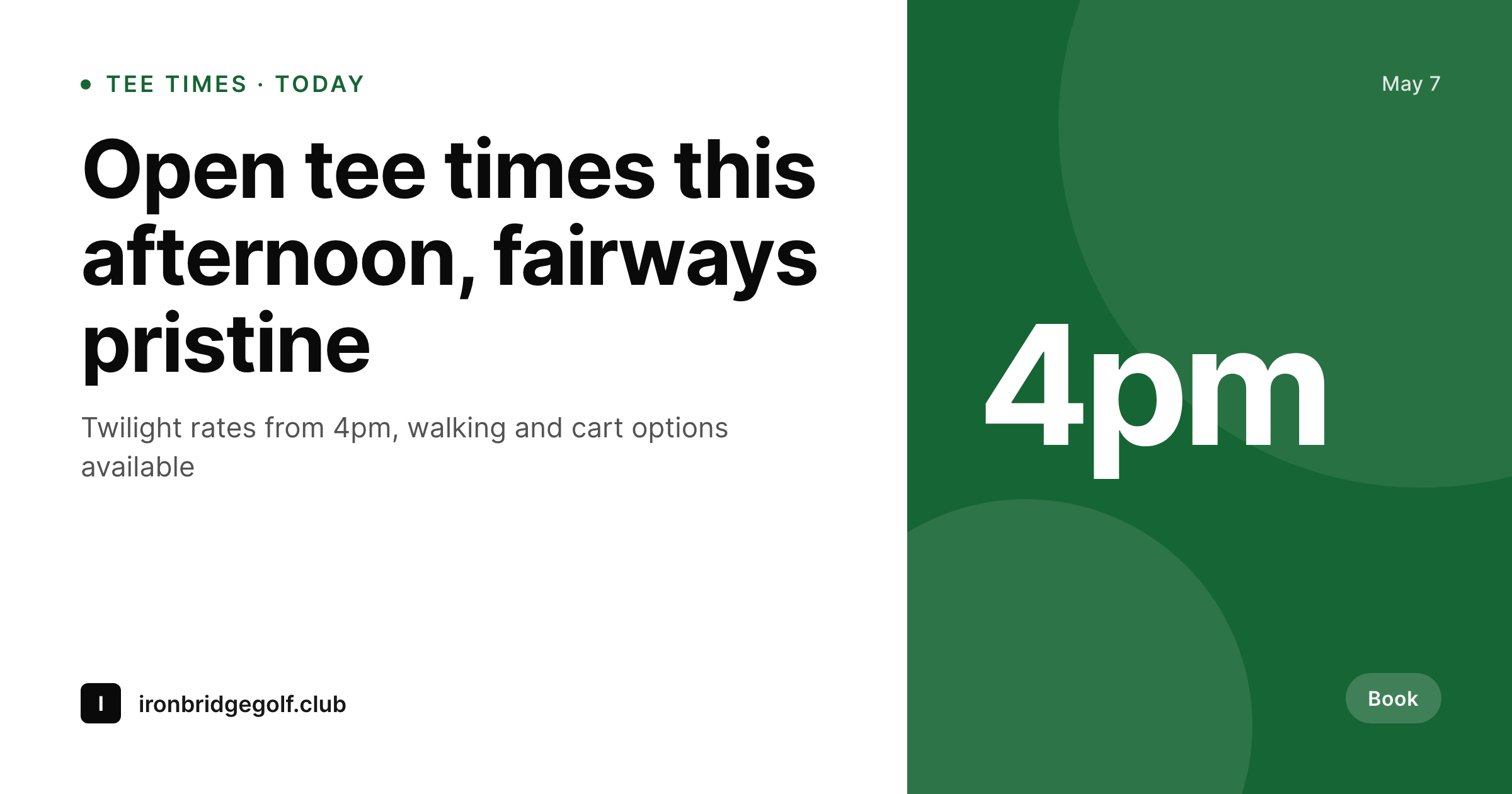
Course pages already carry tee time slots, course condition, weather, and event schedules. SleekPixel pipes those fields into a 1200x630 OG card so every share, from member emails to local Facebook groups, opens with current course info.
♾️ Lifetime License available
Golf marketing runs on word-of-mouth and last-minute decisions
Public golf courses live on a tight margin. Tee times are perishable inventory, and an empty 4pm slot represents lost revenue that can never be recovered. The marketing channels that fill those slots are local Facebook groups, twosome WhatsApp threads, and member email blasts pointing at the course's online booking page. The conversion happens at the link share, when a golfer in a group chat sees the unfurl and decides whether to round up a foursome or skip it.
The data that would close that conversion is already on the course website. The booking page knows which tee times are open this afternoon. The conditions report knows the fairways are dry and the greens running 11. The events page knows tomorrow's twilight scramble has 12 spots open. The OG image, however, is usually a generic course photo from 2019 with no current data. Golfers seeing the bare link in a group chat scroll past because nothing on the preview tells them why today is the day to book.
SleekPixel reads the booking and event fields on save and renders a 1200x630 OG card with current availability, condition tier, and any active promo. The og:image meta updates as inventory changes. Group chat shares of the booking page show 'Tee times open from 4pm, twilight rates' on the unfurl. The decision to book gets made on the preview, not buried two clicks deep on the course site.
Workflow
From open tee sheet to filled foursomes
Map the booking schema
Design the course template
Publish updates as usual
Golfers share and book
Output
What gets generated per tee time post
A 1200x630 PNG showing course name, available tee time window, condition tier, and rate from the booking page.
Comparison
Manual booking graphics vs SleekPixel
Canva / Static photo
- Booking pages share with a static course photo from years ago
- Twilight rate promos need a fresh manual graphic each shoulder season
- Tournament announcements get hand-built graphics one event at a time
- Member email blasts link to pages with generic OG previews
- Condition reports (fairways dry, greens fast) never reach link unfurls
SleekPixel
- Every booking page saves with a 1200x630 OG image showing current availability
- Tee time windows, rate tier, and course condition pull from the booking system
- Tournament posts render OG cards with date, format, and entry fee
- Bulk regenerate when the course rebrands or installs new signage
- Variants per condition tier (cart path only, fully open, frost delay) per template
Features
What SleekPixel gives you for golf courses
Tee time OG
Booking pages save with branded OG cards showing current availability windows. Tee time slots, rate tier, and walking/cart options pull from the page fields.
Tournament cards
Each event post (member-guest, charity scramble, club championship) renders its own OG card with date, format, and entry fee from event fields.
Condition aware
Course condition field drives the OG accent. Pristine fairway days render in deep green; cart-path-only days render with an alert color and clear messaging.
Use cases
Where golf course OG cards fill tee sheets
Public booking pages
Local twosome groups share booking links daily. Branded OG cards with current availability convert browsers into bookers at the unfurl.
Tournament marketing
Member-guest tournaments, junior camps, charity events. Each post saves with an OG card showing date, format, and registration deadline.
Twilight and shoulder rates
Discount tee time windows during shoulder seasons get their own OG cards. Email subscribers see the rate before they tap through to book.
The bigger picture
Why OG cards drive tee sheet utilization
Public golf course revenue is fundamentally a yield management problem. Every tee time on the sheet has a fixed window of bookability, and an unsold 4pm slot at $45 is gone forever the moment 4pm passes. The marketing channels that move that inventory are not Google Ads or Instagram, they're local Facebook golf groups, member email blasts, and informal twosome text threads.
The conversion event in those channels is the link unfurl. A golfer in a WhatsApp foursome chat scrolls past 30 messages, sees a course link from a buddy, and either taps through or doesn't based entirely on the preview. A bare URL with an old course photo from 2019 gets ignored.
A preview showing 'Tee times open from 4pm, $35 twilight, fairways pristine' gets the buddy to ping the group and round up three players. For a course running 100 tee times a day across two loops, the OG card might be the single highest-leverage marketing asset in the operation. Hand-designing booking previews in Canva for every shoulder-season rate window is impractical for a pro shop staff focused on starter duties and cart returns.
Auto-rendering from the booking system means the rate, time, and condition update on every page save, and the unfurl always reflects current inventory. The decision to book a foursome happens at the preview, and that's where afternoon tee sheet utilization actually gets won.
Questions
Common questions about SleekPixel for golf courses
If the booking data lives on WordPress, yes. Many courses use a booking plugin that stores tee time availability as custom fields or a CPT. SleekPixel reads those. Third-party booking systems like GolfNow or Lightspeed Golf would require a webhook or API mirror back to a WP post.
It can show the most recent saved state. If the booking system writes back to the post on each booking change, the OG image regenerates per change. For a busy course, you might rate-limit regeneration to every hour rather than per booking. The image will reflect data as of the most recent save.
Each tournament post is a regular WordPress post or event CPT entry. Date, format (scramble, best-ball, individual), entry fee, and field size all map to template slots. The OG card renders on save and updates if details change.
Yes. A condition tier field (pristine, normal, cart-path-only, frost delay, closed) drives accent colors and badge text on the OG card. Golfers learn to read the preview at a glance: green border means full course, amber means cart restrictions, red means closed.
Yes. Private member tournament pages can render their own OG cards even when the post is password-protected or member-only. The OG image URL is public; the post content stays gated. Useful for member-guest invites and tournament sign-up sheets.
Different rate windows (morning regular, afternoon mid, twilight) can each have their own OG variants on the same booking page. The template renders the active rate based on a current_rate field that the booking system updates per session of the day.
Yes. The template enforces brand fonts, logo placement, color palette, and visual structure. Pro shop staff updating booking data don't touch the design, only the data. The branding stays consistent across every render.
Yes. Resort properties with multiple courses (Pinehurst, Bandon Dunes) can have one template per course or one shared template with a course_name field. Each course's posts render with appropriate course branding and condition data on each OG card.
Pricing
More than 1000+
happy customers
Explore our flexible licensing options tailored to your needs. Upgrade your license anytime to access more features, or opt for a lifetime license for ongoing value, including lifetime updates and lifetime support. Our hassle-free upgrade process ensures that our platform can grow with you, starting from whichever plan you choose.
Lifetime ♾️
Most popular
EUR
once
- Unlimited websites
- Lifetime updates
- Lifetime support
...or get the Bundle Deal
and save €250 🎁
💎 Want everything forever? The All Access Pass is going away on 01.08.2026.
The Bundle (unlimited sites)
Pay once, own it forever
Elevate your WordPress site with our exclusive plugin bundle that includes all of our premium plugins in one package. Enjoy lifetime updates and lifetime support. Save significantly compared to buying plugins individually.
What’s included
-
SleekAI
-
SleekByte
-
SleekMotion
-
SleekPixel
-
SleekRank
-
SleekView
€749
Continue to checkoutBrowse more
- Kindle book cover
- LINE official account banners
- YouTube community images
- X list banners
- Douyin cover
- YouTube Shorts covers
- Discord stage banner
- Klaviyo email headers
- Threads story-style images
- Douyin thumbnails
- YouTube channel banners
- YouTube podcast thumbnails
- Instagram stories
- Slack channel headers
- Twitch schedule banners