






SleekPixel for ski resorts
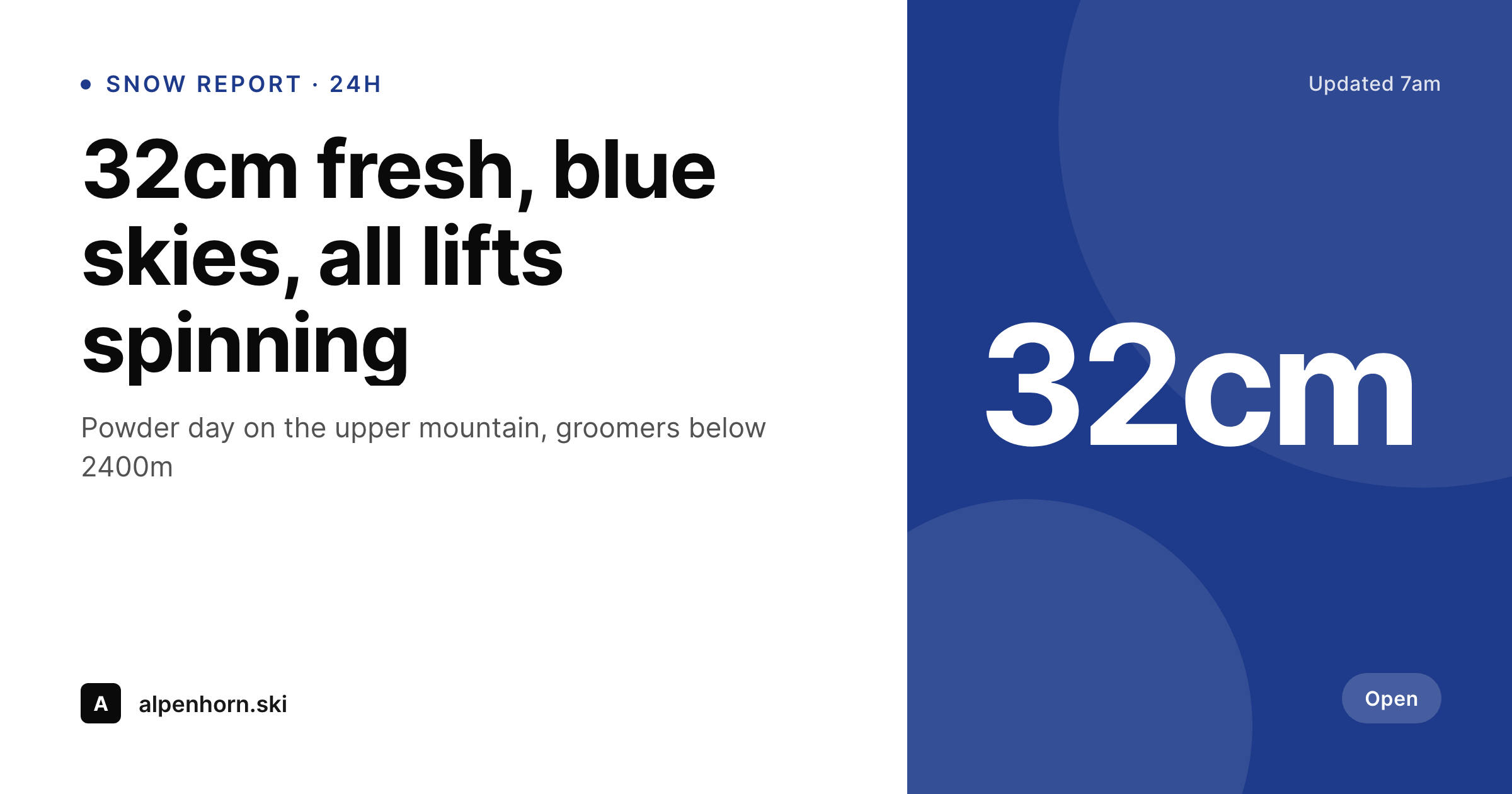
Snow reports already carry overnight snowfall, base depth, lifts open, and conditions. SleekPixel pipes those fields into a 1200x630 OG card so every share, from skier WhatsApp groups to local news, opens with the resort's actual numbers.
♾️ Lifetime License available
Snow reports are the most-shared content a resort produces
Ski resorts publish more snow reports than any other content type. Every morning, sometimes twice a day during storms, the operations team posts current snowfall, base depth, lifts open, runs available, and weather. Skiers refresh that page religiously during dump cycles, and the report gets shared in WhatsApp ski groups, Facebook ski communities, Reddit threads, and via screenshot on Instagram Stories. The link travels further than any other resort URL during winter.
Despite the reach, most resort snow report links unfurl as a generic logo or a stretched homepage banner. The numbers that matter (32cm overnight, all 28 lifts spinning, blue skies) are buried two clicks deep instead of front and center on the share preview. Skiers debating whether to drive up scroll past the bare link in a group chat without engaging because nothing on the preview tells them today is special.
SleekPixel reads the snow report fields on save and renders a 1200x630 OG card showing the snowfall number, lift count, and conditions. The og:image meta updates with every report cycle. The WhatsApp ski group sees '32cm fresh, all lifts spinning' on the preview before anyone even taps the link. The conversion from group chat lurker to lift ticket buyer happens at the unfurl, not the page.
Workflow
From morning report to shared preview
Map the report schema
Design the report template
Publish reports as usual
Skiers share the link
Output
What gets generated per snow report
A 1200x630 PNG showing overnight snowfall, base depth, lifts open, weather, and report timestamp from the daily snow report.
Comparison
Manual report graphics vs SleekPixel
Canva / Photoshop daily
- Operations team makes a manual graphic each morning before lifts open
- Storm cycles mean multiple reports per day, all hand-designed
- Numbers in the graphic drift from the actual report on the website
- Group-chat shares of the report show generic logo previews
- Old reports stay in social feeds with stale conditions because graphics don't update
SleekPixel
- Every snow report saves with a 1200x630 OG image rendered from current data
- Snowfall, base depth, lift count, and weather pull from the report fields
- Updates automatically with every report cycle - no manual export per push
- Variants per condition tier (powder, packed, slush) trigger different visual treatments
- Event posts (races, festivals) use the same template engine with different data
Features
What SleekPixel gives you for ski resorts
Report-driven OG
Every snow report save renders a 1200x630 PNG. Overnight cm, base depth, and lifts open pull from the report's existing fields.
Updates per cycle
Two reports a day during storms means two OG renders. Each WhatsApp share grabs the most recent unfurl with current numbers.
Event posts too
Race days, terrain park comps, apres events. The same template engine renders OG cards for event posts with date, type, and venue fields.
Use cases
Where snow report OG cards drive ticket sales
Daily snow reports
Powder mornings move the most lift tickets. The OG card gets the snowfall number into WhatsApp previews so skiers commit before the parking lot fills.
Event announcements
Big air comps, slalom races, end-of-season festivals. Each event post saves with a branded OG card showing date, format, and venue.
Conditions highlights
First chair Sunday morning, blue-bird forecast Tuesday. Featured condition posts on the resort blog share with weather-aware OG cards.
The bigger picture
Why snow report OG cards drive lift ticket conversion
Ski resort revenue is concentrated in roughly 80 powder days per year. The decisions that drive those days happen at 6am in WhatsApp ski groups when one skier shares the snow report link and the others either commit to driving up or stay home. The unfurl on that link is the conversion event.
A bare URL with a generic logo preview reads as 'just another report, probably not worth the drive.' A preview showing '32cm fresh, all lifts spinning, blue skies' reads as 'pack the truck.' The gap between those two outcomes is measured in lift tickets, ski school bookings, lodge food revenue, and rental shop traffic. For a mid-sized resort doing 200 powder-day shares per group across hundreds of WhatsApp groups, the OG card might literally be the highest-revenue asset the marketing team produces all season. Hand-rendering reports in Canva at 5:45am twice during a storm cycle is not realistic for an operations team that needs to be focused on grooming reports and avalanche control.
Auto-rendering from the report CPT means the operations team types the numbers into the existing fields, hits save, and the OG card is ready before the patrol meeting starts. The numbers that drive the drive-up decision survive the WhatsApp unfurl, and that's where ski day revenue actually gets won.
Questions
Common questions about SleekPixel for ski resorts
Yes if the report lives on WordPress. Most resorts use a custom snow report CPT with fields for overnight cm, base depth, lifts open, runs open, and weather. SleekPixel reads those fields directly. If your reports are in a third-party widget, you'd need to mirror the data into a WP post for SleekPixel to render against.
Yes. The template can format the snowfall field as either cm or inches based on a site setting or user choice. European resorts default to cm; North American resorts default to inches. Both render to the same template with locale-appropriate units.
Each mountain gets its own report post and its own OG card. Vail and Beaver Creek under one corporate brand still render two distinct OG images per morning, one per mountain, with mountain-specific snowfall and lift counts.
Yes. Templates can be conditional on a condition tier field. Powder mornings render with a blue accent and a 'POWDER' badge; packed-powder days render with a different accent; spring slush gets a third treatment. Skiers learn to scan the preview color before reading numbers.
If the weather data is pulled into custom fields on the report post, yes. Many resorts ingest a weather API and write the result into ACF fields each morning. SleekPixel reads those fields like any other source. The render happens after the weather sync.
Yes. The same report data can render to multiple formats per save: a 1200x630 OG card, a 1080x1080 Instagram square, and a 1080x1920 Story vertical. Operations downloads the right format from the post sidebar for whichever platform they're posting to.
Facebook caches OG images for about 30 days unless the URL changes. Since the snow report URL stays consistent (same post, updated content), Facebook will serve the cached preview. The Sharing Debugger can force a refresh, or you can append a cache-buster query string when sharing during storm cycles.
Each report cycle is a save, and each save renders a fresh OG image. A morning report and an afternoon update both produce their own renders. The most recent timestamp shows on the OG card, so skiers checking the link at 4pm see the afternoon numbers, not the dawn ones.
Pricing
More than 1000+
happy customers
Explore our flexible licensing options tailored to your needs. Upgrade your license anytime to access more features, or opt for a lifetime license for ongoing value, including lifetime updates and lifetime support. Our hassle-free upgrade process ensures that our platform can grow with you, starting from whichever plan you choose.
Lifetime ♾️
Most popular
EUR
once
- Unlimited websites
- Lifetime updates
- Lifetime support
...or get the Bundle Deal
and save €250 🎁
💎 Want everything forever? The All Access Pass is going away on 01.08.2026.
The Bundle (unlimited sites)
Pay once, own it forever
Elevate your WordPress site with our exclusive plugin bundle that includes all of our premium plugins in one package. Enjoy lifetime updates and lifetime support. Save significantly compared to buying plugins individually.
What’s included
-
SleekAI
-
SleekByte
-
SleekMotion
-
SleekPixel
-
SleekRank
-
SleekView
€749
Continue to checkoutBrowse more
- Instagram grid tiles
- Patreon tier images
- Threads post images
- X social cards
- YouTube community images
- Douyin thumbnails
- Vimeo thumbnails
- Fansly banner
- Pinterest Idea Pins
- Depop listing images
- SoundCloud track art
- Etsy listing images
- KDP paperback cover
- Instagram highlight covers
- YouTube ad thumbnails