






SleekPixel for support update cards
Teams running customer support out of WordPress or a helpdesk want every reply to feel finished. SleekPixel renders one card per ticket update, generated from the ticket fields on save.
♾️ Lifetime License available
Support replies are the brand under stress
Support communication is where brand perception is most fragile. A customer who is annoyed about a delayed order, a defective product, or a confused checkout is reading every reply with sharpened attention. The visual quality of those replies, header image, signature treatment, link previews, sends a quiet signal about whether the company has its act together. A reply that looks like every other Zendesk default email feels generic. A reply with a clean, branded card that names the ticket and the status feels like a team that is paying attention.
Most teams cannot produce a per-ticket visual by hand. The volume is too high and the design budget is allocated to marketing assets, not support. The default is a generic header image, or no image at all. That works until the moment a customer forwards the reply, screenshots it for a refund dispute, or shares it on social. In every one of those moments the lack of a real card is a missed brand opportunity.
SleekPixel renders a card per support update. Ticket ID, status, reply summary, and assigned agent bind to fields written by the helpdesk plugin or the custom ticket post type. The render fires on save or on status change. The card embeds in the support email and lives as og:image on the ticket page. Forwarded threads carry the brand, screenshots include the ticket context, dispute replies look professional.
Workflow
From ticket reply to a real support card in seconds
Design the support template
Connect to the ticket trigger
Reply is posted
Email and page pull the image
Output
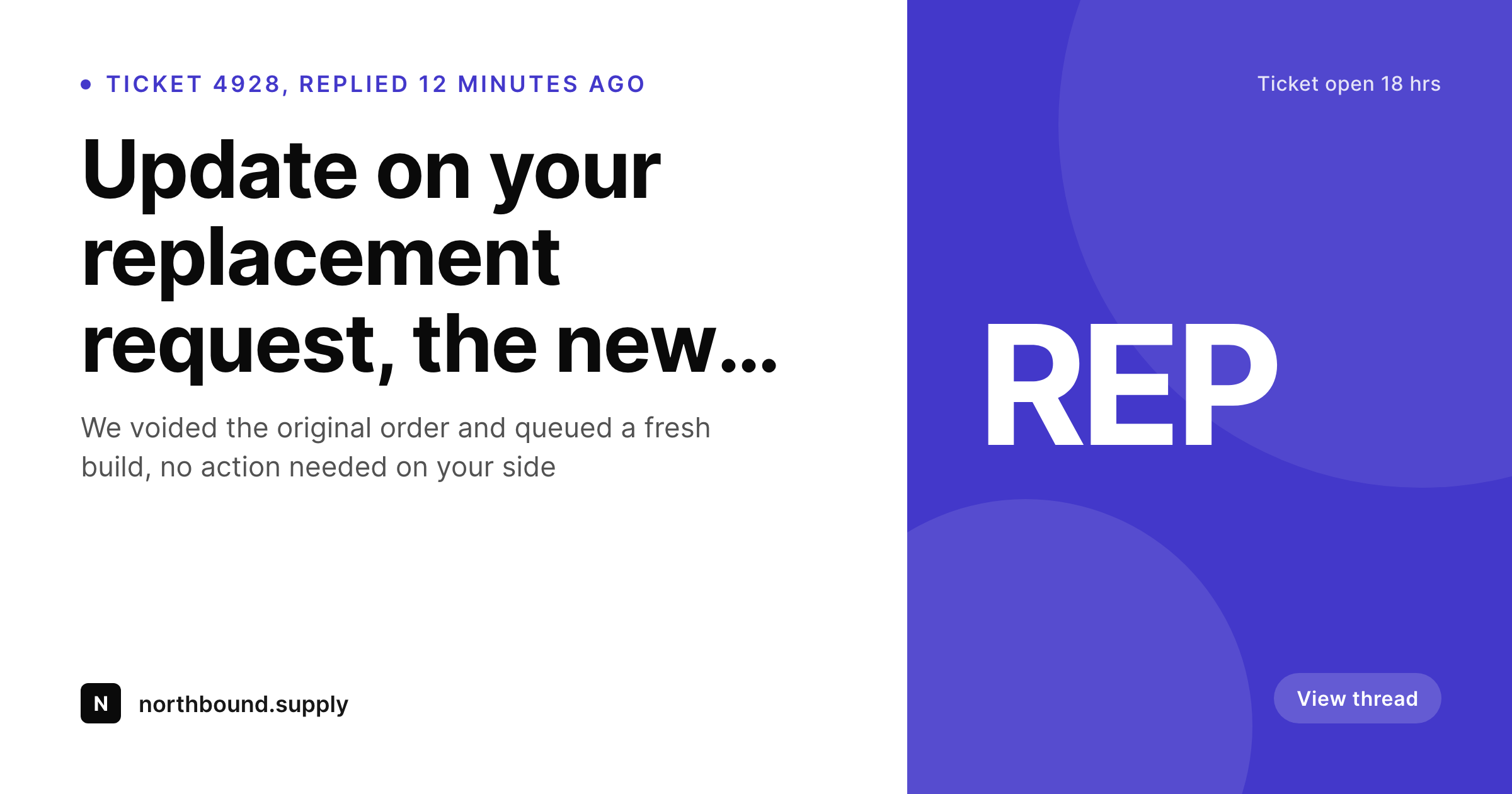
What a generated support update card looks like
A 1200x630 share image with the ticket ID, status, and reply summary pulled from the ticket fields on update.
Comparison
Default support reply vs SleekPixel
Default support update image
- Support emails ship with a generic header image or no image at all
- Ticket ID and status stay buried in subject lines and footers
- Forwarded replies lose the brand and the thread context
- Screenshots of replies carry no recognition cue
- No regeneration path when the helpdesk brand is updated
SleekPixel
- Render fires on ticket reply or status change
- Ticket ID, status, and reply summary come from helpdesk fields
- Embedded in support emails and the ticket page
- Per-status templates for open, replied, resolved, refunded
- Bulk regenerate after a brand refresh updates historical replies
Features
What SleekPixel gives you for support update cards
Ticket context at glance
Show ticket ID, current status, and the assigned agent. The customer sees the state of their case in the first glance, no scrolling required.
Status changes re-render
Move a ticket from open to resolved, save, the card re-renders with the new status. The same path holds the latest card so emails and pages stay in sync.
Dispute-ready visuals
When customers escalate to payment providers or platforms, branded support replies carry weight. The card makes screenshots look like documentation, not memory.
Use cases
Where support update cards earn their keep
Ecommerce support teams
Stores fielding refund, replacement, and shipping questions all day. Every reply ships with a card that names the order and the next step.
SaaS and developer tools
Technical support replies that get forwarded into engineering threads. The card carries the ticket ID and status so the context never gets lost mid-thread.
Course and membership platforms
Educators and operators answering high volumes of access questions. The card frames each reply as part of a tracked conversation, not a one-off email.
The bigger picture
Why support replies are worth a per-ticket card
Support is the part of the customer relationship that scales least gracefully when something goes wrong. A delayed parcel turns into a fifteen-message thread, a defective product turns into a return and a refund and a follow-up, and a single confused customer can generate a week of inbound work. Through all of that, the visual quality of the brand's replies shapes how the customer talks about the experience afterwards.
A team that ships polished, contextual support cards comes out of bad situations with intact loyalty. A team that ships default Zendesk emails comes out with a worse online review. The unit cost of producing a per-ticket visual by hand is impossible at any realistic volume, which is exactly the case where automated rendering creates leverage.
SleekPixel makes the card a side effect of replying to a ticket, which means every customer interaction inherits the design polish that normally only lives on the marketing site.
Questions
Common questions about SleekPixel for support update cards
Yes. SleekPixel binds to whatever post type the helpdesk uses for tickets, reads the meta fields the plugin writes, and renders on the save and status hooks the plugin exposes.
A short reply summary fits in a 1200x630 card, typically the first two lines. Longer replies render as truncated summaries with the full text living in the email and page body.
The card lives at a path tied to the ticket ID and is only referenced from the ticket email and page. Treat it as private metadata, same security model as the ticket itself.
Yes. The accent color or a status badge can bind to ticket status. Open tickets render in one color, resolved tickets in another, refunded tickets in a third.
If the helpdesk writes the agent ID or name to ticket meta, the template can render the name and even a small avatar. The reply feels signed by a person, not a queue.
Each reply triggers a new render at the same path. The card always shows the latest state. Older state can be archived per ticket if you need an audit trail.
No. The render runs after the save in the hook the helpdesk exposes. Most templates render in under a second. The agent's reply flow is not blocked.
Yes. Per-channel templates support email, web form, and chat tickets each rendered with the right channel cue, while staying inside one brand system.
Pricing
More than 1000+
happy customers
Explore our flexible licensing options tailored to your needs. Upgrade your license anytime to access more features, or opt for a lifetime license for ongoing value, including lifetime updates and lifetime support. Our hassle-free upgrade process ensures that our platform can grow with you, starting from whichever plan you choose.
Lifetime ♾️
Most popular
EUR
once
- Unlimited websites
- Lifetime updates
- Lifetime support
...or get the Bundle Deal
and save €250 🎁
💎 Want everything forever? The All Access Pass is going away on 01.08.2026.
The Bundle (unlimited sites)
Pay once, own it forever
Elevate your WordPress site with our exclusive plugin bundle that includes all of our premium plugins in one package. Enjoy lifetime updates and lifetime support. Save significantly compared to buying plugins individually.
What’s included
-
SleekAI
-
SleekByte
-
SleekMotion
-
SleekPixel
-
SleekRank
-
SleekView
€749
Continue to checkoutBrowse more
- order confirmation cards
- founder story cards
- infographic card snippets
- year-end recap card
- online course
- case study cards
- data visualization cards
- office hours recap card
- contributor spotlight card
- podcast clip cards
- OKR recap card
- myth vs fact cards
- limited edition cards
- expert quote card
- assignment cards
- Twitch profile banner
- YouTube Shorts cover
- YouTube end screens
- VK community cover photos
- Twitch schedule banners
- Amazon A+ content images
- Twitter/X header
- Discord event cover
- LinkedIn post images
- LinkedIn banner images
- Bluesky link cards
- X Space banners
- WhatsApp status images
- Stan Store cover
- Fanvue page banner