






SleekPixel for Advanced Custom Fields
SleekPixel reads ACF text, number, image, taxonomy, and repeater fields and renders a 1200 by 630 share card on save. The same field structure that powers your front-end now powers your social previews.
♾️ Lifetime License available
ACF-driven sites deserve ACF-driven share cards
Advanced Custom Fields underpins thousands of WordPress sites where the structured data is the product. Real estate listings, course catalogues, recipe sites, event directories, member profiles - all built around ACF field groups attached to custom post types. The front-end renders title, price, location, and image from those fields. The share preview, almost universally, does not. The og:image is either the post's featured image (often missing on listing CPTs) or the SEO plugin's site-wide default.
SleekPixel reads any ACF field directly. Text fields land as overlay text. Number fields format with commas or currency symbols depending on configuration. Image fields composite as the card background or as inline avatars. Taxonomy fields render as pill badges. Repeater rows can list up to a configurable number of items, with the rest collapsing into 'plus 4 more'. The model is the same one ACF developers already use in template files, just rendered to pixels instead of HTML.
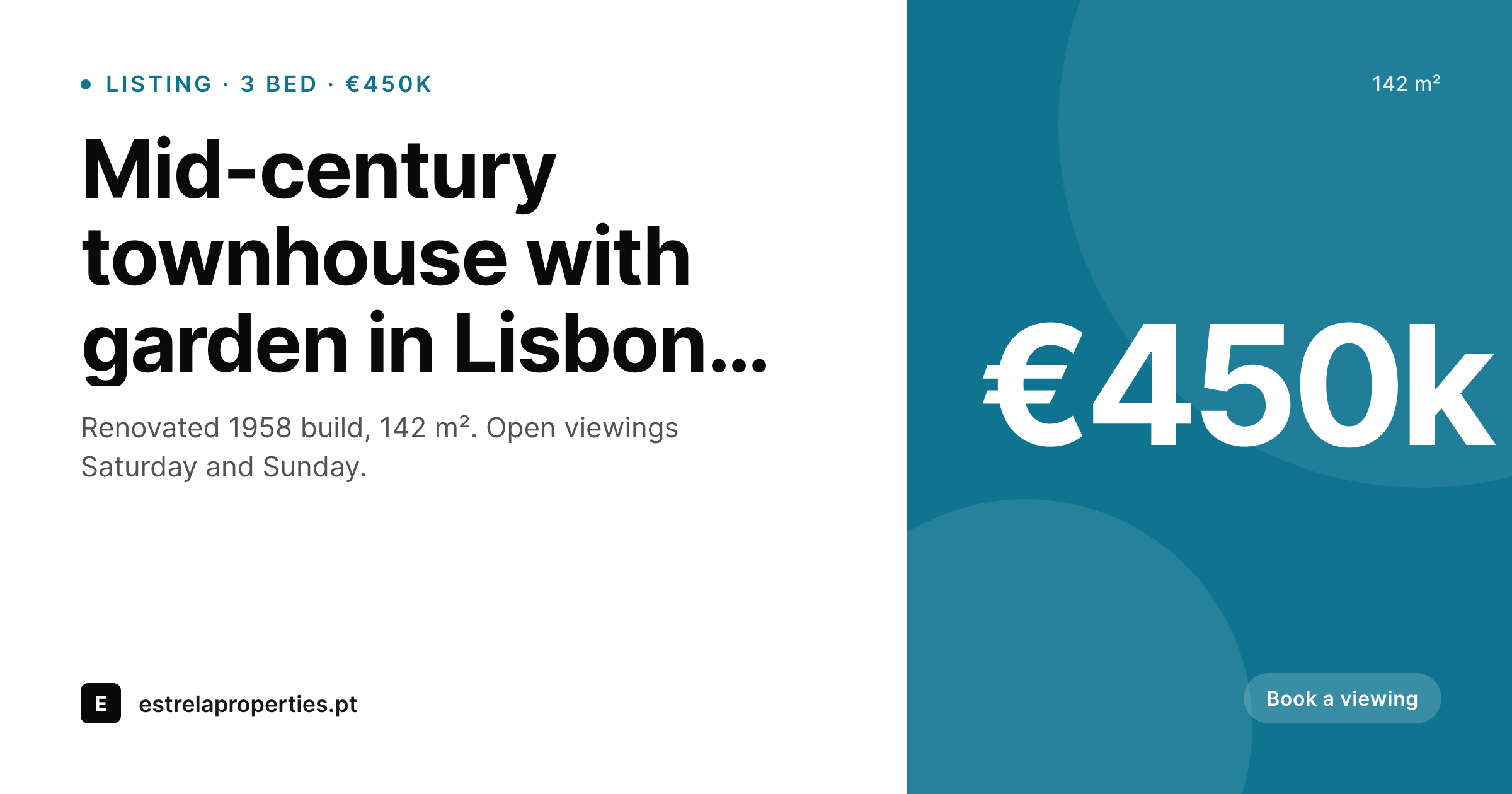
For listing-heavy sites, this changes the share economy. A property listing with bed count, square metres, and price now shares with all three values visible in the unfurl. A course detail page shares with instructor and duration baked in. The data is already in ACF - it just needed a render path to the share image. SleekPixel provides that path without requiring developers to write template-level code, and without paying a per-image fee to an external rendering service.
Workflow
From ACF field group to share card
Pick the post types
Map the fields
Save a post
Meta tags update
Output
What gets generated per post
A 1200 by 630 OG and Twitter card with title, ACF text or number fields, and brand mark - rendered on save and saved as a real PNG to uploads.
Comparison
ACF data + manual cards versus SleekPixel
Featured image only
- ACF fields drive the front-end but never reach the og:image meta tag
- Featured image is often the in-page hero, framed for the page, not the unfurl
- Listing CPTs without a featured image fall back to a site-wide default that says nothing
- Updating an ACF price field after publish leaves stale share cards in social caches
- Manual export of cards for hundreds of listings is impractical at scale
SleekPixel
- Reads ACF text, number, image, taxonomy, and repeater fields
- Number formatting handles currencies, decimals, thousands separators
- Image fields composite as background or as inline avatars
- Updates the share image on any save that changes a mapped ACF field
- Bulk regenerate covers thousands of ACF-driven posts in one command
Features
What SleekPixel gives you for Advanced Custom Fields
All ACF field types
Text, textarea, number, range, image, gallery, taxonomy, post object, and repeater fields all map to template placeholders. The picker mirrors the ACF field group structure.
Number formatting
Number fields format with currency symbols, decimal places, and locale-aware separators. €450,000 displays as €450k or €450,000 depending on template.
Save-driven updates
Editing any ACF field on a post and saving triggers a fresh render. The share card always reflects the current data, even mid-revision cycles.
Use cases
Where ACF-driven cards earn their keep
Real estate listings
Each listing card shows price, beds, square metres, and address. Buyers scrolling Instagram see specs at a glance and decide whether to tap.
Course catalogues
Course pages show duration, instructor, and skill level. Students sharing course links in study Slacks unfurl with the same context the page uses.
Team directories
Member profile pages render headshot, role, and team. Internal directory shares show the right person at a glance, no broken-card moments.
The bigger picture
Why ACF sites need data-driven cards
ACF exists because WordPress's default post fields are too thin for most real businesses. Once a site has ACF, it has structured data: prices, dates, dimensions, ratings, custom relationships. That structure is the difference between a generic blog and a directory, a catalogue, a marketplace, a knowledge base.
The share preview, on most ACF-driven sites, throws all that structure away. og:image becomes a generic featured image or a fallback default, and the unfurl gives the same impression as a five-page brochure site - even though the actual page renders rich, structured content. SleekPixel closes that gap.
The same ACF field group that drives the listing detail page now drives the share card. Price visible. Bed count visible.
Address visible. The structured data that makes the site valuable becomes visible in the moment of social preview, which is exactly the moment a prospective buyer or student decides whether to click. None of this requires custom development or third-party render fees - just a field map between ACF and a template, defined once.
Questions
Common questions about SleekPixel for Advanced Custom Fields
Both. ACF Free covers text, number, image, and taxonomy fields - all of which SleekPixel can render. ACF Pro adds repeater, flexible content, gallery, and clone fields, which SleekPixel also supports. There is no Pro-only requirement, but Pro field types do unlock richer template options.
Yes. Repeaters list rows up to a configurable count - typically 3 to 5 - with overflow collapsing into 'plus N more'. The most common use is amenities lists on listings, or curriculum bullets on courses. Each row can include text and an icon.
ACF blocks (Pro) are Gutenberg blocks built with ACF. The block content stays in the post body. SleekPixel reads from post-level fields and meta, so block-internal data is not directly mapped, but any field saved to the post via ACF (block or not) is available.
Location rules determine where field groups appear in the editor. SleekPixel reads the actual saved post meta, so location rules do not affect rendering. If a post has the meta key, SleekPixel can pull it onto the card.
Yes. Point the template at any image field - whether it is the listing's primary photo, a hero shot from a flexible content row, or a custom thumbnail field. SleekPixel applies a darken or gradient layer behind text for legibility.
Yes. Taxonomy fields render as pill badges or text labels, depending on template. A listing's amenity taxonomy can show three amenity tags on the card, with the rest in a 'plus N more' label.
Empty fields collapse gracefully. A template that shows price, beds, and area will hide any of the three if the field is empty, without leaving a placeholder gap. Configurable per-field on a strict-or-graceful basis.
ACF conditional logic affects field display in the editor, not field rendering. SleekPixel templates have their own conditional blocks - if-this-field-is-empty, if-this-taxonomy-includes - that work independently of ACF's editor logic.
Pricing
More than 1000+
happy customers
Explore our flexible licensing options tailored to your needs. Upgrade your license anytime to access more features, or opt for a lifetime license for ongoing value, including lifetime updates and lifetime support. Our hassle-free upgrade process ensures that our platform can grow with you, starting from whichever plan you choose.
Lifetime ♾️
Most popular
EUR
once
- Unlimited websites
- Lifetime updates
- Lifetime support
...or get the Bundle Deal
and save €250 🎁
💎 Want everything forever? The All Access Pass is going away on 01.08.2026.
The Bundle (unlimited sites)
Pay once, own it forever
Elevate your WordPress site with our exclusive plugin bundle that includes all of our premium plugins in one package. Enjoy lifetime updates and lifetime support. Save significantly compared to buying plugins individually.
What’s included
-
SleekAI
-
SleekByte
-
SleekMotion
-
SleekPixel
-
SleekRank
-
SleekView
€749
Continue to checkoutBrowse more
- Passes page banner
- KakaoTalk channel banners
- Mailchimp email headers
- Discord server icon
- Twitch camera frame
- Facebook event covers
- GitHub social preview images
- Tidal cover art
- X community banners
- Facebook cover photos
- YouTube playlist covers
- YouTube ad thumbnails
- Etsy cover photos
- Pinterest Idea Pins
- Linktree banner image