






SleekPixel for eyewear store
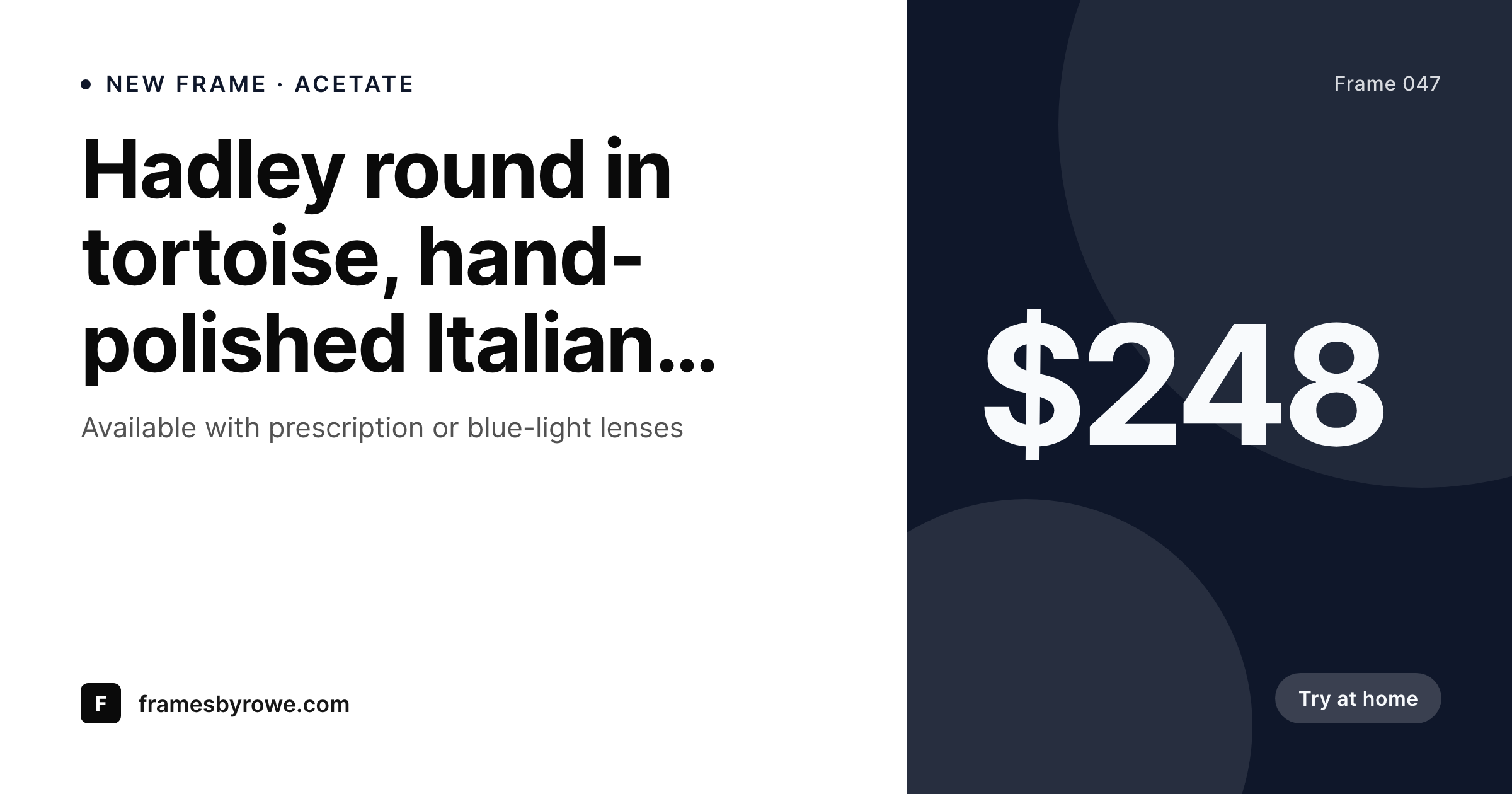
Frame name, color, material, lens type, and price live as fields on the product. SleekPixel renders a branded 1200x630 card on save, so try-at-home links and DM shares look like one curated collection.
♾️ Lifetime License available
Frame catalogs scale faster than the design queue
An indie eyewear brand often launches a frame in five or six colorways at once: tortoise, crystal, black, sage, amber, and a limited deep navy. Each colorway is its own SKU, its own product page, and its own share moment, and customers forward links endlessly while choosing what suits their face. By the third drop, the design queue is six pages of frame cards in Canva that nobody on the team wants to keep up with, and the colorways start shipping with the WooCommerce default share preview because the bottleneck is the brand designer.
The frame data is already structured on the website. Color, material, hinge type, lens width, bridge size, and price are stored as variation attributes on the product or as ACF fields on a frame CPT. The same data drives the size guide, the filter sidebar, and the cart. Doing the share image by hand means re-typing the colorway and acetate type for the seventh time this season, while the actual product page already knows.
The fix is rendering driven by the product. Define one frame template, map the variation fields, and every colorway saves with a branded card. Limited runs, restocks, and lens-only updates all carry the brand without a single Canva export. The design queue empties; the catalog still ships on time.
Workflow
From new SKU to live link preview
Map frame fields
Design the brand template
Publish or restock a frame
Bulk regenerate on rebrand
Output
What gets generated per frame
A 1200x630 OG card showing the frame name, color, material, and price, composed from the product fields and variation attributes.
Comparison
Canva queue vs auto-rendered frame cards
Manual / Canva / WooCommerce default
- Six colorways per drop means six Canva files, all hand-built
- Try-at-home shares load with the WooCommerce favicon, not the frame
- Restocks and lens updates ship with cards from the original launch
- Acetate name and bridge size get retyped and occasionally typo'd
- Brand refreshes mean reworking every frame card across the catalog
SleekPixel
- Every frame saves with a 1200x630 card rendered from its own fields
- Color, material, lens width, and price pulled from WooCommerce variations
- Variation-aware: tortoise and crystal each get their own correct card
- Stories and Pinterest pins generated alongside the OG card
- Bulk regenerate the catalog when the brand evolves
Features
What SleekPixel gives you for eyewear store
Per-colorway card
Each variation saves with its own 1200x630 card. Color, material, and price pull from the product fields, no manual retyping.
Hero shot composited
The frame's primary photo composites into the template alongside the metadata. Customers forwarding a link see the frame, not a generic banner.
Restock-aware
Edit availability or price and the card re-renders. Sold-out frames can swap to a waitlist variant of the template automatically.
Use cases
Where frame cards earn their spend
Drop announcements
New colorways launch with matching cards across every SKU. The drop reads as one collection on Instagram, Pinterest, and email.
Try-at-home shares
Customers DM the link to a partner before placing the order. The preview shows the frame and price instead of a broken thumbnail.
Press and editorial
Frames featured in style magazines or eyewear editorial come with share-ready cards already sitting in uploads, ready for the embargo.
The bigger picture
Why eyewear catalogs need rendered cards to scale
Eyewear is a sharing purchase. Customers rarely commit alone, and the link to a frame routinely lands in three or four chats before the order goes through. The link preview is the brand's chance to make a complete pitch in a thumbnail: the right frame, the right color, the right price, on the right shoulders.
A generic favicon and a truncated title ends the conversation before it starts. Indie eyewear scales by colorway and limited run, which means the catalog grows several SKUs every drop while the design team stays the same size. Doing share cards by hand forces the brand to choose between shipping new colorways late and shipping them with default thumbnails.
SleekPixel removes the choice. The card is a property of the variation. The store launches twelve new SKUs in a day and the social, email, and OG previews all exist in the same save.
The brand stays consistent across acetates, finishes, and seasons, and the design team stops being the bottleneck on every drop.
Questions
Common questions about SleekPixel for eyewear store
Yes. SleekPixel reads variation attributes the same way it reads parent product fields. Each variation can render its own card with its own color and price. The variation's URL points at the right card via og:image, so customers forwarding a specific colorway see that exact piece.
Yes. Templates can be conditional on lens type, sun versus optical, or any custom field. Sun frames can use a warmer palette while optical frames use a neutral one, and both still pull frame name, color, and price from the same product.
If the try-on flow runs on WordPress and uses post types or custom fields, yes. SleekPixel only cares about the data on the post. Whatever the buyer can put in their try-on cart, the share card will reflect, including price and any cart-specific badges you template in.
Yes. The product's primary image is one of the available slots in the template. SleekPixel composites it onto the layout without reprocessing color, so the on-cheek and packshot photography stays accurate to your photoshoot.
Yes. Eyewear is a strong Pinterest category. A single frame can render a 1200x630 OG card, a 1080x1080 Instagram square, and a 1000x1500 Pinterest pin in one save, all driven by the product fields.
Add-on attributes like blue-light filtering, anti-reflective, or progressive can show as small badges on the card via conditional fields. The customer DM-ing the link sees both the frame and the lens spec they were comparing.
Yes. Edit the template, run a bulk regenerate, and every frame across every colorway gets a new card. The PNG file in uploads is replaced, so social platforms re-fetch on their next cache cycle.
If the frame data lives in WordPress, SleekPixel renders for it. Drop-shipped catalogs that import via CSV into WooCommerce work the same way as in-house lines, since the data ends up as post meta either way.
Pricing
More than 1000+
happy customers
Explore our flexible licensing options tailored to your needs. Upgrade your license anytime to access more features, or opt for a lifetime license for ongoing value, including lifetime updates and lifetime support. Our hassle-free upgrade process ensures that our platform can grow with you, starting from whichever plan you choose.
Lifetime ♾️
Most popular
EUR
once
- Unlimited websites
- Lifetime updates
- Lifetime support
...or get the Bundle Deal
and save €250 🎁
💎 Want everything forever? The All Access Pass is going away on 01.08.2026.
The Bundle (unlimited sites)
Pay once, own it forever
Elevate your WordPress site with our exclusive plugin bundle that includes all of our premium plugins in one package. Enjoy lifetime updates and lifetime support. Save significantly compared to buying plugins individually.
What’s included
-
SleekAI
-
SleekByte
-
SleekMotion
-
SleekPixel
-
SleekRank
-
SleekView
€749
Continue to checkoutBrowse more
- Odnoklassniki banners
- LinkedIn event banners
- Threads post images
- TikTok Now image
- LinkedIn showcase page banners
- Threads profile banner
- Instagram collab post images
- Snapchat snap images
- YouTube Music cover art
- LinkedIn document post covers
- Amazon Storefront banners
- Klaviyo email headers
- Fansly banner
- Lemon Squeezy product covers
- TikTok ad images