






SleekPixel for event
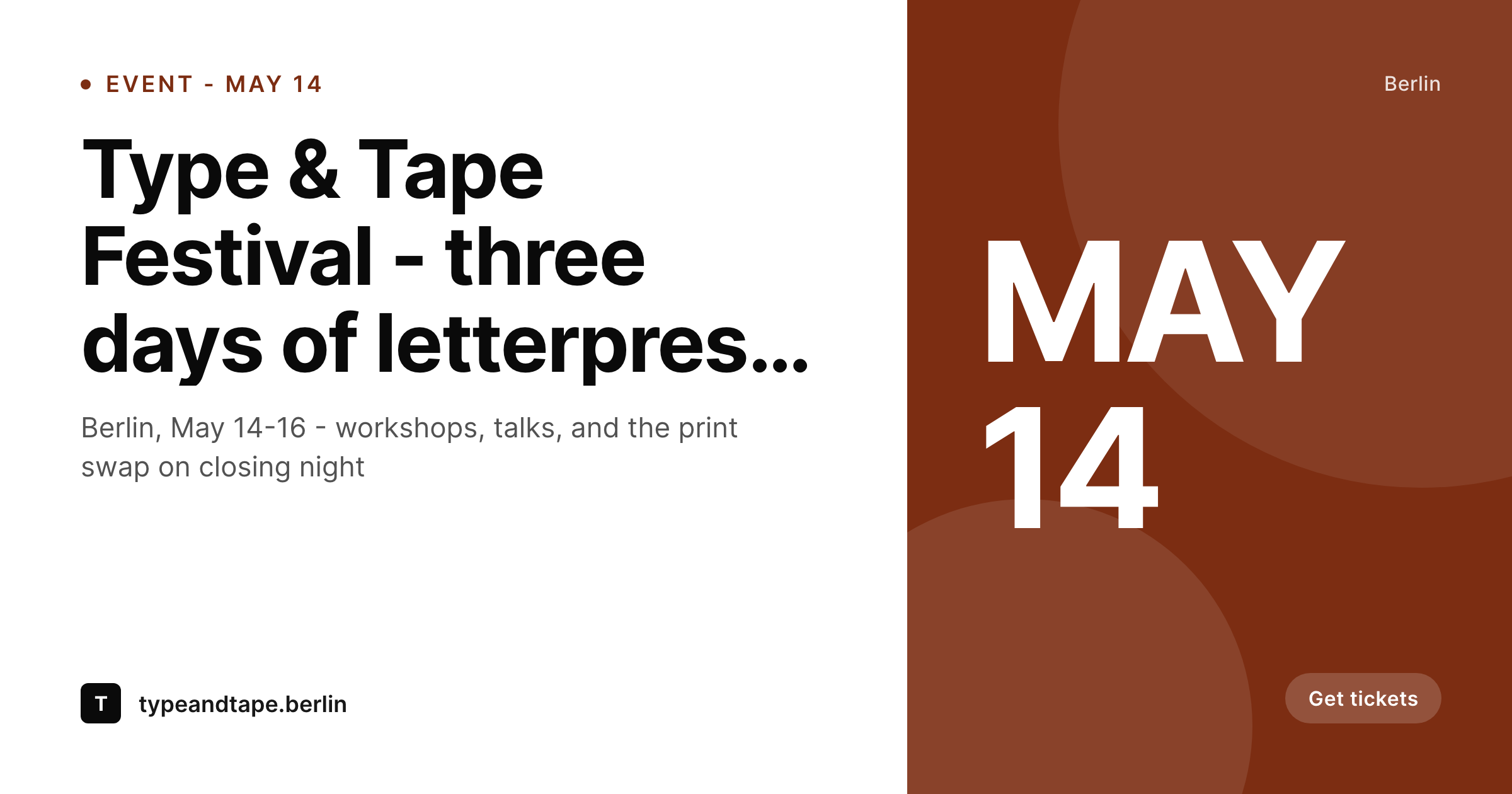
Events spread when attendees share the link. SleekPixel renders an OG image per event page on save - title, date, venue, brand mark - so every share looks like a real event poster, not a default crop.
♾️ Lifetime License available
Events depend on attendees sharing the link
Events get filled by word of mouth. Someone buys a ticket, posts the link to their group chat, drops it into a Slack workspace, shares it to their Threads followers. Every share is a tiny ad, and the OG image is the entire ad. If the link card shows the event title, the date, the city, and the brand, the click rate is high. If the card shows whatever the WordPress site uploaded as the featured image with no overlay, the link feels generic and the share dies in the feed.
The first instinct is to design a poster image per event in Photoshop and upload it as the featured image. That works for a flagship annual conference. It does not work for a venue or a community organization that runs 10-50 events a year. The design overhead per event is real, the consistency drifts, and small events get neglected because nobody has time to design a poster for a Tuesday night meetup.
SleekPixel templates the event poster at the WordPress level. The Events Calendar, EventOn, MEC, custom event CPT - any plugin that stores events as posts works. Bind the template to event title, start date, end date, venue, and brand. Each new event ships with a poster image automatically, ready to share on Threads, Slack, Facebook, or LinkedIn.
Workflow
Event poster workflow from save to share
Build template
Add event
Render on save
Share the link
Output
What an event OG image looks like
A 1200x630 PNG with the event title, date and venue, served as og:image when the event URL is shared on social.
Comparison
Manual event posters vs SleekPixel
Photoshop poster per event
- Designer rebuilds a poster for each event from a duplicated PSD
- Small recurring events get no poster because of design overhead
- Event date and venue change but the poster does not get re-exported
- Different event types have inconsistent visual language
- Featured image cropped wrong on shares, no event details visible
SleekPixel
- Render runs on every event save (Events Calendar, EventOn, custom CPT)
- Event title, date, venue, brand from event fields
- Per-event-type templates (workshop, conference, meetup)
- Date or venue change regenerates the share card
- Bulk regenerate for entire event series in one command
Features
What SleekPixel gives you for event
Date-aware layout
The template formats the date - month abbreviation, day large, weekday small - by reading the event start date directly. Recurring events render with their own dates each instance.
Multi-event types
Workshop, talk, conference, meetup - each can have its own template. Per-category template assignment means the right visual style ships per event without manual switching.
Updates regenerate
Date moved, venue switched, title tweaked. The OG image regenerates on save so the event link card always reflects the current event details.
Use cases
Event scenarios this fits
Conferences & festivals
Multi-day events with a flagship visual style. Each session and side event ships with a card matching the parent event's brand without designing 50 posters by hand.
Recurring meetups
Monthly community events that need a poster for every instance. Date changes per month, template stays the same, the share card updates automatically.
Venues with calendars
Performance venues, galleries, and clubs that publish 5-30 events a month. Each event gets a card without the designer rebuilding for every gig.
The bigger picture
Why event share cards drive attendance
Event marketing budgets are limited and most events get filled by attendee shares, not paid promotion. The single highest-leverage moment is when an attendee buys a ticket and posts the link somewhere - a group chat, a Slack workspace, a Threads post, a LinkedIn share. The link card that gets generated by that share is the event's billboard.
If the card has the title, date, venue, and brand legible at thumbnail size, the chance of someone in that audience clicking through is much higher than if the card is a default featured-image crop with no event details. Most WordPress events plugins set og:image to the event's featured image and call it done, which works in the rare case where the featured image happens to look like a poster but fails for the more common case where the featured image is a venue photo or a stock image. The events that fill consistently invest in poster design, but most organizations that run 10-50 events a year cannot afford a designer per event.
SleekPixel solves this at the system level. The poster template is built once and reflects the brand. Every new event ships with a card.
Date changes, venue changes, title tweaks all propagate. The share that an attendee posts always looks like a real event poster, the click rate stays high, and the events fill faster.
Questions
Common questions about SleekPixel for event
Yes. The Events Calendar stores events as a custom post type with structured fields for date, venue, and other event metadata. SleekPixel reads those fields directly so the template can bind to start date, end date, venue name, and any custom event fields.
Both work. EventOn and Modern Events Calendar both use custom post types and store fields the same way. Bind the SleekPixel template to the field names those plugins use, and the share cards render on event save.
Yes, with caveats. If recurring events are stored as separate post instances (one per occurrence), each instance renders with its own date. If they are stored as a single recurring post, the card shows the next or first occurrence depending on how you bind the template.
Yes. The template can show a date range (May 14-16) by binding to both start and end dates. For festivals with a lineup, additional fields can carry the headliners or workshop names which render onto the poster.
Yes. Bind an image layer to the speaker custom field. ACF or Meta Box image fields work directly. The photo crops to the shape you defined - circle, square, full bleed - and the speaker name renders alongside.
Mark the event with a cancelled status (custom field or category) and add a conditional badge layer to the template. The card auto-regenerates with a "Cancelled" overlay so accidental shares of stale links carry the correct status.
The renders are 1200x630 PNG which is too low-res for print at large sizes. For physical posters, set up a separate template at print resolution (e.g. 3000x1800) and use the Gutenberg sidebar download button to grab that version.
Yes. WooCommerce-based ticketing plugins (Tickera, FooEvents, WooCommerce + The Events Calendar) all store events or ticket products as posts. SleekPixel binds to the post fields the same way and renders cards for each event/ticket.
Pricing
More than 1000+
happy customers
Explore our flexible licensing options tailored to your needs. Upgrade your license anytime to access more features, or opt for a lifetime license for ongoing value, including lifetime updates and lifetime support. Our hassle-free upgrade process ensures that our platform can grow with you, starting from whichever plan you choose.
Lifetime ♾️
Most popular
EUR
once
- Unlimited websites
- Lifetime updates
- Lifetime support
...or get the Bundle Deal
and save €250 🎁
💎 Want everything forever? The All Access Pass is going away on 01.08.2026.
The Bundle (unlimited sites)
Pay once, own it forever
Elevate your WordPress site with our exclusive plugin bundle that includes all of our premium plugins in one package. Enjoy lifetime updates and lifetime support. Save significantly compared to buying plugins individually.
What’s included
-
SleekAI
-
SleekByte
-
SleekMotion
-
SleekPixel
-
SleekRank
-
SleekView
€749
Continue to checkoutBrowse more
- Pinterest Idea Pins
- YouTube community images
- Shopify product images
- Bandcamp release cover
- VK community cover photos
- Facebook Marketplace images
- Instagram collab post images
- X community banners
- Flickr cover photo
- Etsy cover photos
- Fansly banner
- Snapchat ad images
- Twitter card images
- LinkedIn post images
- Bandcamp banner