






SleekPixel for tool of the day cards
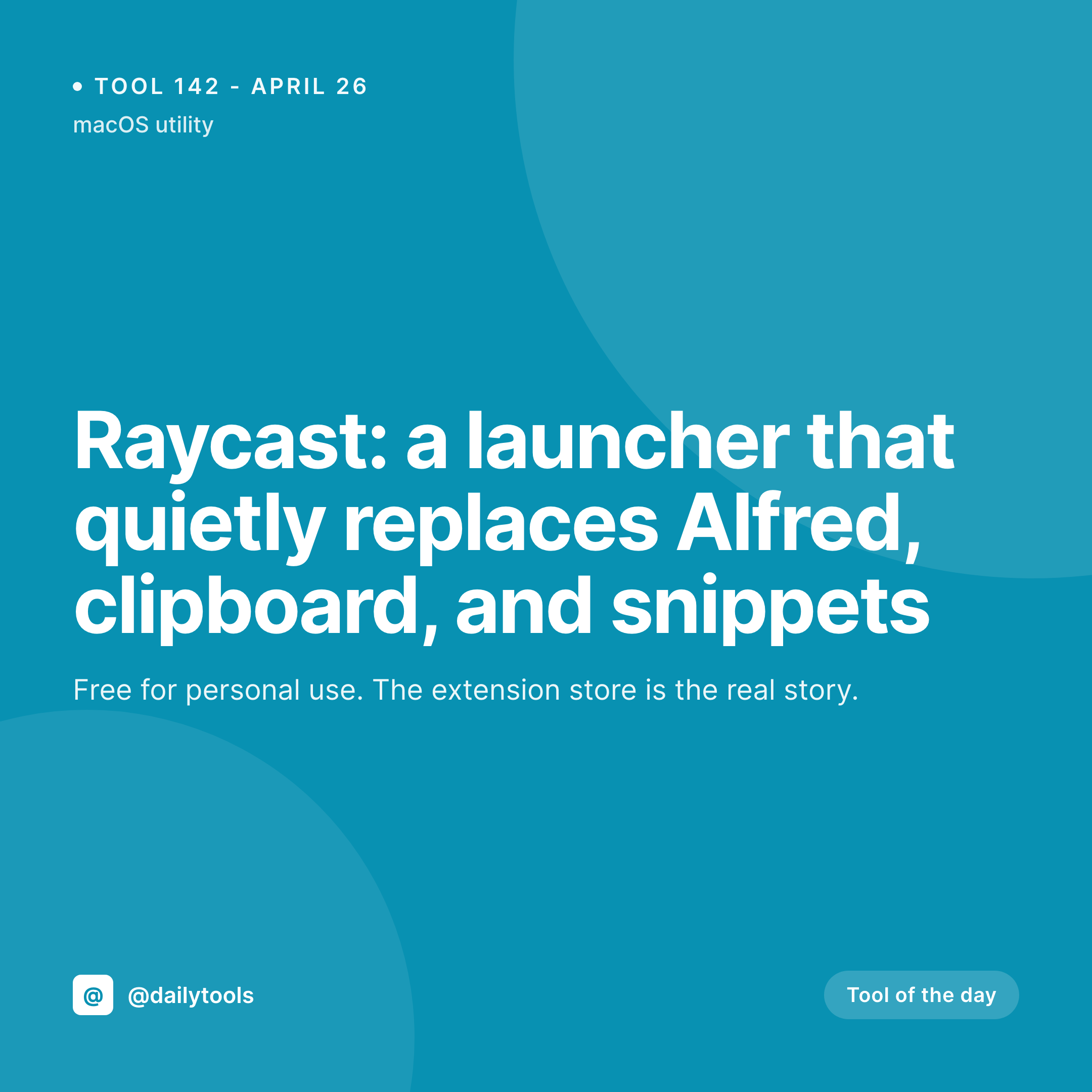
Tool-curators publish a recommendation per day or per week. SleekPixel renders a 1080x1080 card for every tool post the moment you save, pulling tool name, number, and category from the post fields.
♾️ Lifetime License available
Tool curation lives or dies by the share
A tool-of-the-day account is one of the highest-converting niches on Twitter, Instagram, and LinkedIn. The audience signs up because they want a curated stream of new tools without spending an hour scanning Product Hunt. The producer's job is to find a tool, write a tight take, and ship it as a post. The economics only work because each post is small, but small does not mean cheap, and the design overhead is what flips the math.
A curator who manually designs each tool card in Canva spends more time on design than on tool discovery. The library style drifts as the curator gets bored of the template, and the feed reads as inconsistent six months in. Worse, when the curator gets behind, the cards skip entirely and the audience stops trusting the cadence.
SleekPixel removes the design step. The tool post in WordPress holds the tool name, number, category, and an optional logo or screenshot. The template binds to those fields and writes the PNG to /uploads on save. The og:image meta tag updates automatically. The curator writes the next tool, posts the card, and moves on. No Canva. No drift. No cadence break.
Workflow
From tool post to social-ready recommendation
Design the template
Publish the tool
Share to Instagram
Iterate freely
Output
What a rendered tool-of-the-day card looks like
A 1080x1080 PNG with the tool number, name, and category pulled from the post fields, laid out in the locked template.

Comparison
Default tool card vs SleekPixel
Default tool of the day cards image
- Same generic image on every tool recommendation
- Canva exports drift in style across the year
- Tool logos rarely fit the safe area cleanly
- Long tool names overflow at thumbnail size
- No template enforcement when guest curators contribute
SleekPixel
- Render runs on save for every tool post
- Tool name, number, and category from post fields
- Logo or screenshot fits a defined slot automatically
- og:image and twitter:image meta tags written automatically
- Per-category accent colors for visual variety
Features
What SleekPixel gives you for tool of the day cards
Logo-aware layout
A defined logo slot crops and centers the tool's logo or screenshot automatically. Curators do not hand-fit each tool's mark to the template.
Category palettes
A category field drives the accent. Developer tools, design tools, productivity, and AI each carry their own color so the feed reads as a curated stream.
Edits regenerate
Replace a tool's logo or refine the recommendation text after publishing and the social card updates on save. The og:image stays in sync.
Use cases
Who uses SleekPixel for tool of the day cards
Solo curators
Independent operators running a daily tool feed. The card system makes the feed look like a curated publication without designer time per post.
Newsletter offshoots
Newsletter publishers running a daily tool post alongside their main issue. The card style links visually back to the parent publication.
Discovery accounts
Product Hunt-adjacent curators surfacing new launches. The card supports the social share that drives traffic back to the recommendation post.
The bigger picture
Why tool curation needs a real visual system
Tool curation accounts compete on trust. The audience subscribes because they trust the curator to surface tools they would not have found alone, and they screenshot the cards they want to remember. A card that looks part of a real publication anchors that trust.
A card that looks like a Canva export anchors a different impression: that the curator is a hobbyist, and the recommendation is the kind of thing the audience could have found themselves. SleekPixel makes the publication look real even when one person runs it. The template carries the brand.
The post holds the recommendation. The renderer produces the artifact in the background. The curator competes on tool discovery instead of design discipline, and the feed reads as a curated stream that the audience comes back to every day.
Questions
Common questions about SleekPixel for tool of the day cards
Yes. Map the logo slot to the post's featured image, an ACF image field, or a Meta Box image field. The renderer crops and centers it according to the slot dimensions in the template.
The name layer auto-shrinks between configurable min and max sizes. Short names fill the frame, longer names scale down to fit without breaking the layout.
Yes. A category taxonomy on the post drives the accent. Developer tools, design tools, productivity, and AI can each carry their own color.
Yes. SleekPixel binds to any post type. ACF, Meta Box, Pods, and native custom fields are all supported as data sources.
Yes. Register a 1200x630 size against the same post type and SleekPixel renders both formats on save. The square covers Instagram, the OG image covers Twitter and LinkedIn.
No. SleekPixel renders the PNG inside WordPress and exposes a download button in the Gutenberg sidebar. Posting still happens through a scheduler or a manual upload.
Yes. The image slot accepts a logo or a screenshot. Some curators use the favicon or app icon, others use a small UI screenshot. The renderer crops to whatever the template defines.
Yes. Each tool post produces its own file in /uploads, named per the slug. The archive is browsable from the WordPress media library by date and parent post.
Pricing
More than 1000+
happy customers
Explore our flexible licensing options tailored to your needs. Upgrade your license anytime to access more features, or opt for a lifetime license for ongoing value, including lifetime updates and lifetime support. Our hassle-free upgrade process ensures that our platform can grow with you, starting from whichever plan you choose.
Lifetime ♾️
Most popular
EUR
once
- Unlimited websites
- Lifetime updates
- Lifetime support
...or get the Bundle Deal
and save €250 🎁
💎 Want everything forever? The All Access Pass is going away on 01.08.2026.
The Bundle (unlimited sites)
Pay once, own it forever
Elevate your WordPress site with our exclusive plugin bundle that includes all of our premium plugins in one package. Enjoy lifetime updates and lifetime support. Save significantly compared to buying plugins individually.
What’s included
-
SleekAI
-
SleekByte
-
SleekMotion
-
SleekPixel
-
SleekRank
-
SleekView
€749
Continue to checkoutBrowse more
- podcast cover art
- Etsy cover photos
- Linktree banner image
- VSCO cover
- LinkedIn post images
- Mailchimp email banner
- Bluesky link cards
- YouTube Shorts cover
- Fanvue page banner
- Instagram Shop product images
- Facebook Shop product images
- Vimeo thumbnails
- X social cards
- Threads story-style images
- LinkedIn newsletter headers