






SleekPixel for metric spotlight cards
Teams sharing standout metrics need a card where the number reads at thumbnail size and the context fits in one line. SleekPixel renders one card per metric in WordPress, built from the fields on save.
♾️ Lifetime License available
Standout metrics deserve a card, not a sentence
Every team has a handful of metrics that capture the work better than any paragraph of marketing copy. The percentage of customers retained past the first quarter. The average hours saved per week per user. The number of integrations a single customer connected in their first month. These numbers belong in feeds and decks as much as in dashboards, and they almost never make it there because the design step is the bottleneck.
The shape of a metric spotlight card is simple. One big number on the dominant axis. A short context line under it that names what is being measured. A time frame somewhere on the card so the number is anchored in a window. A brand frame so the card belongs to a company, not to a generic stock template. Built once as a template, this works for every metric the team wants to surface for the next two years.
SleekPixel binds the card to a metric post or a content block. Headline number, context line, time frame, and an optional supporting stat come from fields. The render fires on save, writes the PNG to uploads, and serves it as og:image. New metric this week, new post, save, share asset is ready.
Workflow
From a standout number to a share card in one save
Design the metric template
Set up the metric post type
Save the post
Post the metric
Output
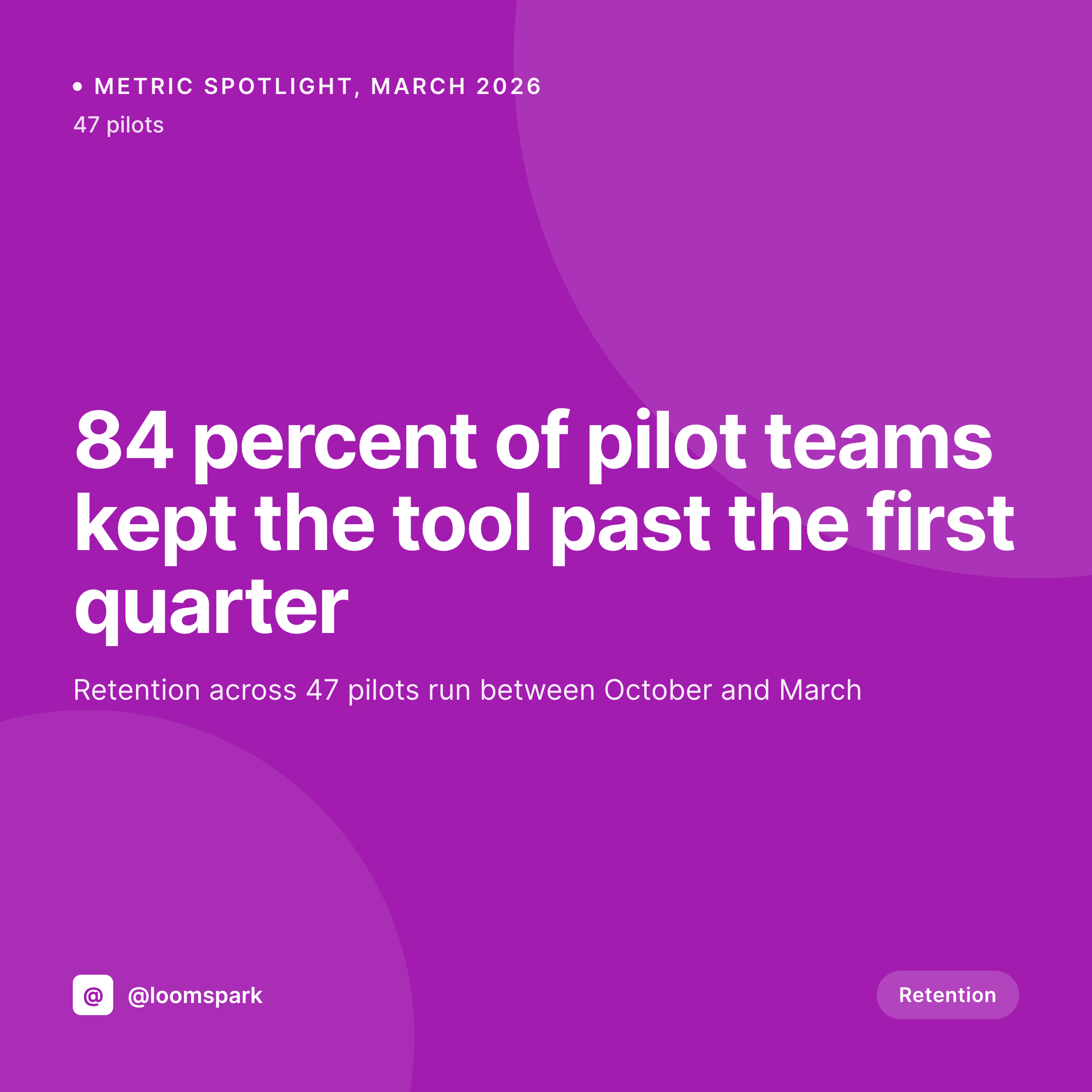
What a generated metric spotlight card looks like
A 1080x1080 PNG with the headline number in display size, the supporting context in one line, and the time frame in a corner slot.

Comparison
Default metric image vs SleekPixel
Default metric callout
- Metric buried in body text, never gets the visual weight it deserves
- Context and number split across two graphics that never travel together
- Time frame missing from the share so the number reads ambiguously
- Each spotlight requires a separate design pass and never gets one
- No regeneration path when the metric updates next month
SleekPixel
- Render fires on save for every metric post or block
- Headline number, context, and time frame pulled from fields
- Display-size number reads at thumbnail in feeds and decks
- og:image and twitter:image meta tags written automatically
- Monthly metric updates ship as fresh cards on each save
Features
What SleekPixel gives you for metric spotlight cards
Number as the hero
The headline number takes the largest type slot on the card. Whether it is a percentage, a count, or a multiplier, the rendering keeps the digit weight consistent so cards read as part of one series.
Context in one line
A single context line under the number names what is being measured. Character limits enforce a one-line read, which is the part the number can carry without losing legibility at thumbnail size.
Time frame visible on the card
Numbers without time frames are misleading. A small slot for the period (March 2026, Q1 2026, last 90 days) anchors the metric so the reader knows the window without having to guess.
Use cases
Where metric spotlight cards earn their keep
Founders posting growth updates
Founders who share weekly or monthly growth metrics on LinkedIn and X. Each metric becomes a clean card that does not depend on a designer to ship.
Customer marketing teams
Teams turning customer outcomes into shareable proof points. Each notable metric from a customer cohort becomes a card that fits in newsletters and decks.
Investor and board updates
Operators including key metrics in updates. The card travels into PDFs and decks as a single image that frames the number consistently across investor cycles.
The bigger picture
Why standout metrics need their own card format
Numbers do not survive paragraph format. A retention rate buried in the middle of a 300-word LinkedIn post gets scrolled past, while the same number rendered as a square with a one-line context survives the feed long enough to register. Treating standout metrics as a content type, with their own template and their own posting cadence, builds a body of share assets that compound across months.
A year of monthly metric cards becomes a visual record of momentum that a single dashboard screenshot never can. The template path also removes the design bottleneck that usually kills this kind of practice. Each new metric ships on save, the visual stays consistent, and the team can post a new metric on the day the data lands rather than two weeks later after a Figma pass.
Questions
Common questions about SleekPixel for metric spotlight cards
Yes. The headline value field accepts any string, including 4.7x, 12.3 percent, or $1.4M. The template renders whatever the field holds with consistent typography.
Update the value and save. SleekPixel re-renders the card. The og:image overwrite means the next share scrape pulls the corrected number.
Yes. Add a secondary field for the previous value and the template can render a small delta line under the main number, like "up from 76 percent last quarter."
Yes. The unit slot adapts based on the field value. Percent, count, multiplier, and currency all use the same layout with the digit weight tuned per type.
An optional sparkline slot can render a simple line from a series of past values stored as a meta field. The main number stays dominant and the sparkline sits as a supporting element.
Yes. Configure two templates that bind to the same fields and pick which one renders the og:image based on a meta toggle, or render both and use one as a downloadable asset.
Headless render on save, usually under a second. The save returns immediately and the PNG lands in uploads in the background.
Yes. The bulk regenerate action re-renders every metric post under a chosen template. Useful when the typography or color system changes.
Pricing
More than 1000+
happy customers
Explore our flexible licensing options tailored to your needs. Upgrade your license anytime to access more features, or opt for a lifetime license for ongoing value, including lifetime updates and lifetime support. Our hassle-free upgrade process ensures that our platform can grow with you, starting from whichever plan you choose.
Lifetime ♾️
Most popular
EUR
once
- Unlimited websites
- Lifetime updates
- Lifetime support
...or get the Bundle Deal
and save €250 🎁
💎 Want everything forever? The All Access Pass is going away on 01.08.2026.
The Bundle (unlimited sites)
Pay once, own it forever
Elevate your WordPress site with our exclusive plugin bundle that includes all of our premium plugins in one package. Enjoy lifetime updates and lifetime support. Save significantly compared to buying plugins individually.
What’s included
-
SleekAI
-
SleekByte
-
SleekMotion
-
SleekPixel
-
SleekRank
-
SleekView
€749
Continue to checkoutBrowse more
- Ghost feature images
- LinkedIn post images
- Substack podcast cover
- Etsy cover photos
- TikTok profile banners
- Ko-fi shop images
- Lemmy post images
- Twitch panel images
- Mastodon post images
- KDP hardcover cover
- Spotify playlist cover
- Kick stream thumbnails
- Apple Podcasts covers
- Facebook Marketplace images
- Kindle book cover