






SleekPixel for SendGrid emails
SendGrid is the transactional and marketing API of choice for product teams. The marketing side gets archived to WordPress for the public record, and SleekPixel makes sure every archive page carries a real cover image rendered from the campaign's own fields.
♾️ Lifetime License available
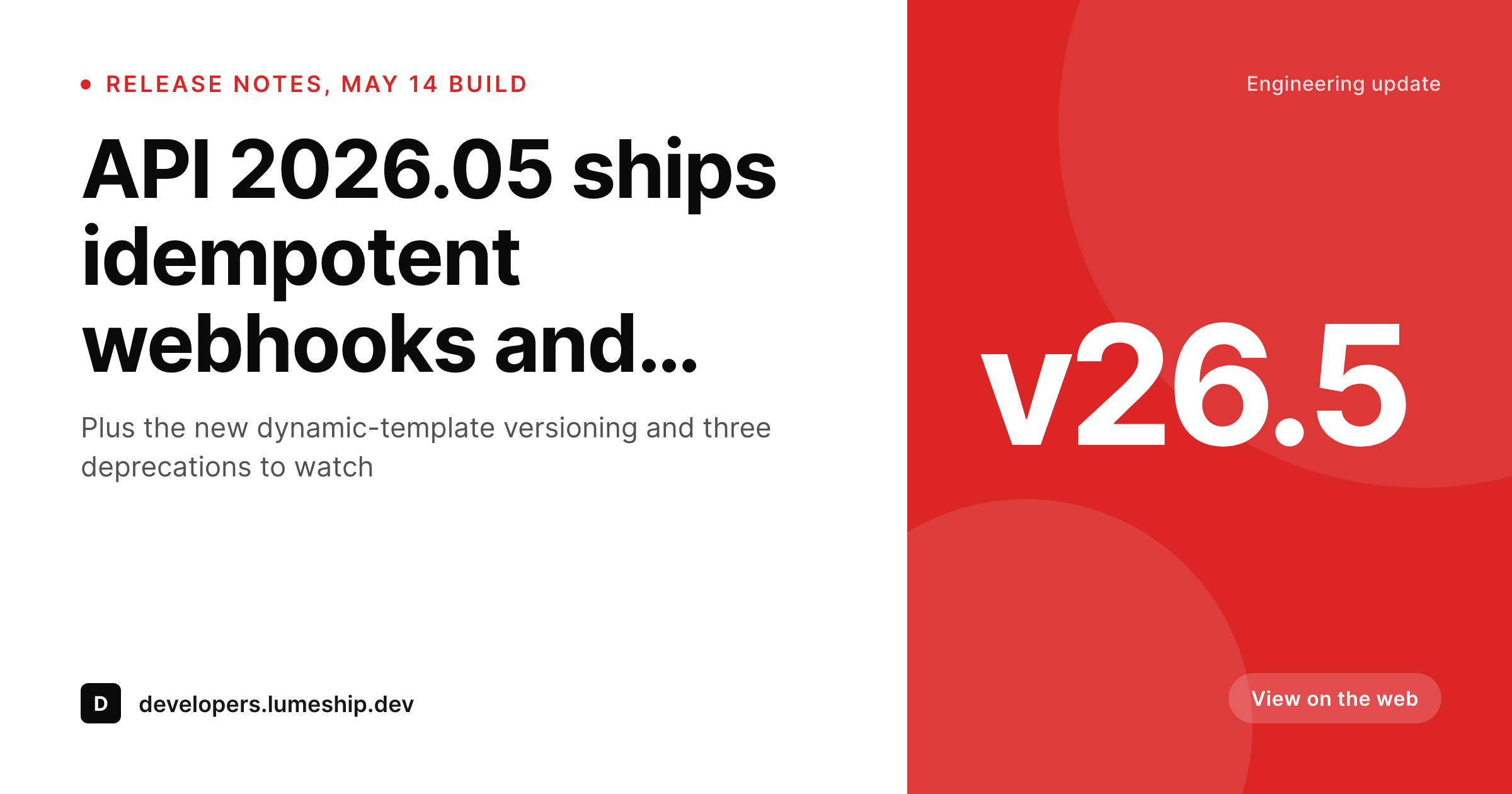
SendGrid covers two very different jobs
SendGrid (now part of Twilio) is best known as the transactional API behind a huge slice of the internet's notification email. The Marketing Campaigns side runs alongside the transactional API and powers product release notes, customer-success updates and developer-facing newsletters for engineering-led teams. Those campaigns get archived to WordPress when the team wants a permanent public URL for each send, especially for release notes and changelog updates that get referenced from documentation.
The archive URL is where social shares and developer-channel links land. A release-notes campaign forwarded to a Slack channel, posted in Discord or quoted on Hacker News all read the WordPress archive's OG image as the first visual. Default theme handling fills that slot with the homepage banner or a featured screenshot at the wrong aspect ratio, and the team that designed the campaign loses the design effort the moment it leaves the inbox.
SleekPixel renders a branded archive cover on save from the SendGrid campaign post fields. Subject line, version tag, build identifier and send date all live on the post; the template reads them and emits the right cover. The og:image tag writes itself, and developer-channel shares now open with a card that looks like a release notes update instead of a generic newsletter banner. Subject-line and version updates after send propagate to the cover automatically.
Workflow
From SendGrid campaign to documentation-ready archive
Design the archive cover
Mirror the campaign
Reference from documentation
Edit and re-render
Output
What a SendGrid archive cover ships with
A 1200 by 630 PNG: version tag, subject line, send date and team mark, rendered from the campaign post fields on save.
Comparison
Default SendGrid archive share vs SleekPixel
Default SendGrid archive image
- Theme falls back to the homepage banner on every archived campaign
- Release notes posts share with no version visible on the preview card
- Featured screenshot gets cropped wrong on Twitter, Slack and Discord previews
- Manual cover art falls behind as version numbers change
- Developer-channel forwards open with no context about the release
SleekPixel
- Render fires on save for every archived SendGrid campaign
- Subject line, version tag and send date pulled from existing fields
- og:image and twitter:image written automatically
- Per-channel templates for marketing, release notes and developer updates
- Bulk re-render past releases when the brand or version scheme changes
Features
What SleekPixel gives you for SendGrid emails
Release-aware
Version tag, build number and component name render onto the cover. The release notes archive looks like documentation, not a generic newsletter.
Per-channel templates
Marketing campaigns, release notes, developer-facing posts and customer-success updates each get their own template, picked from a category field.
Edits regenerate
Tweak the version, fix the build date or correct a subject after the send, the next save re-renders. Documentation and archive stay aligned.
Use cases
Who uses SleekPixel for SendGrid emails
Developer-led product teams
Release notes and changelog emails sent via SendGrid get archived to WordPress for documentation. Each archive page shares with a real release card.
Customer success teams
Quarterly customer updates and success digests share with branded covers. Forwarded links to executive sponsors open with the right context.
Startup product marketing
Feature announcement campaigns get a permanent archive home. Social, press and partner forwards all open with the same branded card.
The bigger picture
Why developer-led brands need release-aware archive covers
SendGrid's marketing side is disproportionately used by engineering-heavy teams shipping release notes, API updates and developer newsletters. Those audiences pay attention to versioning and to whether a release announcement looks like documentation or like marketing fluff. A release-notes archive whose share preview shows the version tag, build identifier and date reads as documentation.
The same archive sharing with a homepage banner reads as undifferentiated marketing, which engineering audiences tune out. The cover preview is the first signal of seriousness on a release announcement shared into a developer channel. The second reason is the linking pattern around release notes.
Documentation references a release URL repeatedly: in the changelog index, in deprecation notices, in upgrade-guide preambles. Each of those links can show its own version-aware preview, which makes the entire documentation experience feel coherent. Without that, every release link in the documentation shares with the same generic banner regardless of which version it points to, and the version distinction collapses at the preview layer.
SleekPixel keeps the version on the cover always, because the template reads the version field on the archived post and renders it on every share.
Questions
Common questions about SleekPixel for SendGrid emails
Not directly. Transactional emails (receipts, password resets, notifications) are private per-recipient and do not have public archive equivalents. SleekPixel applies to public archived campaigns from the Marketing Campaigns side. If you publish summary pages for transactional template families, those pages can have covers via the same mechanism.
Three common patterns: SendGrid Event Webhook firing into a custom wp-json endpoint, Zapier from a SendGrid trigger, or a manual paste-in after each send. SleekPixel reads the resulting post fields, so any of these flows work. Engineering teams usually prefer the webhook because it scales cleanly.
Yes, if those values are stored as custom fields on the archived post. Most release-notes flows include them in the payload from CI or release tooling. Bind the template slot to the field and the cover renders the SHA or build number in a compact monospaced slot.
Yes. The dynamic template only matters for the email body; the archive cover is rendered from the WordPress side using the campaign post fields. If your dynamic template variables also land on the archived post (subject, version, audience), the cover renders from those values.
Yes. Multi-product teams often mirror each product's release notes into a separate category or post type. The template router picks the matching cover layout per product. Each product can have its own logo, color and version-format conventions.
Use a dedicated template variant for high-priority release types. The cover can carry a 'breaking change' badge or color band. The data driving that variant is a tag or boolean on the archived post. Recipients of the share preview see the urgency immediately.
Yes. The bulk re-render iterates through the archive post type and renders each entry from its existing fields. A two-year history of weekly release notes renders in a few minutes. Useful when refreshing the visual style for an architecture milestone or major version.
No. SleekPixel only touches the OG image meta on the WordPress archive page. SendGrid's IP reputation, deliverability monitoring and event tracking all happen inside their platform on the send and click-redirect side. The WordPress archive is a separate, downstream concern.
Pricing
More than 1000+
happy customers
Explore our flexible licensing options tailored to your needs. Upgrade your license anytime to access more features, or opt for a lifetime license for ongoing value, including lifetime updates and lifetime support. Our hassle-free upgrade process ensures that our platform can grow with you, starting from whichever plan you choose.
Lifetime ♾️
Most popular
EUR
once
- Unlimited websites
- Lifetime updates
- Lifetime support
...or get the Bundle Deal
and save €250 🎁
💎 Want everything forever? The All Access Pass is going away on 01.08.2026.
The Bundle (unlimited sites)
Pay once, own it forever
Elevate your WordPress site with our exclusive plugin bundle that includes all of our premium plugins in one package. Enjoy lifetime updates and lifetime support. Save significantly compared to buying plugins individually.
What’s included
-
SleekAI
-
SleekByte
-
SleekMotion
-
SleekPixel
-
SleekRank
-
SleekView
€749
Continue to checkoutBrowse more
- SoundCloud track art
- Snapchat Spotlight covers
- LinkedIn document post covers
- Ghost feature images
- Instagram Reels covers
- Instagram ad images
- X community banners
- Instagram grid tiles
- Twitch schedule banners
- Facebook event covers
- Tidal cover art
- LinkedIn carousel slides
- Douyin cover
- Pinterest video pin covers
- Twitch stream overlay images