






SleekPixel for life coach
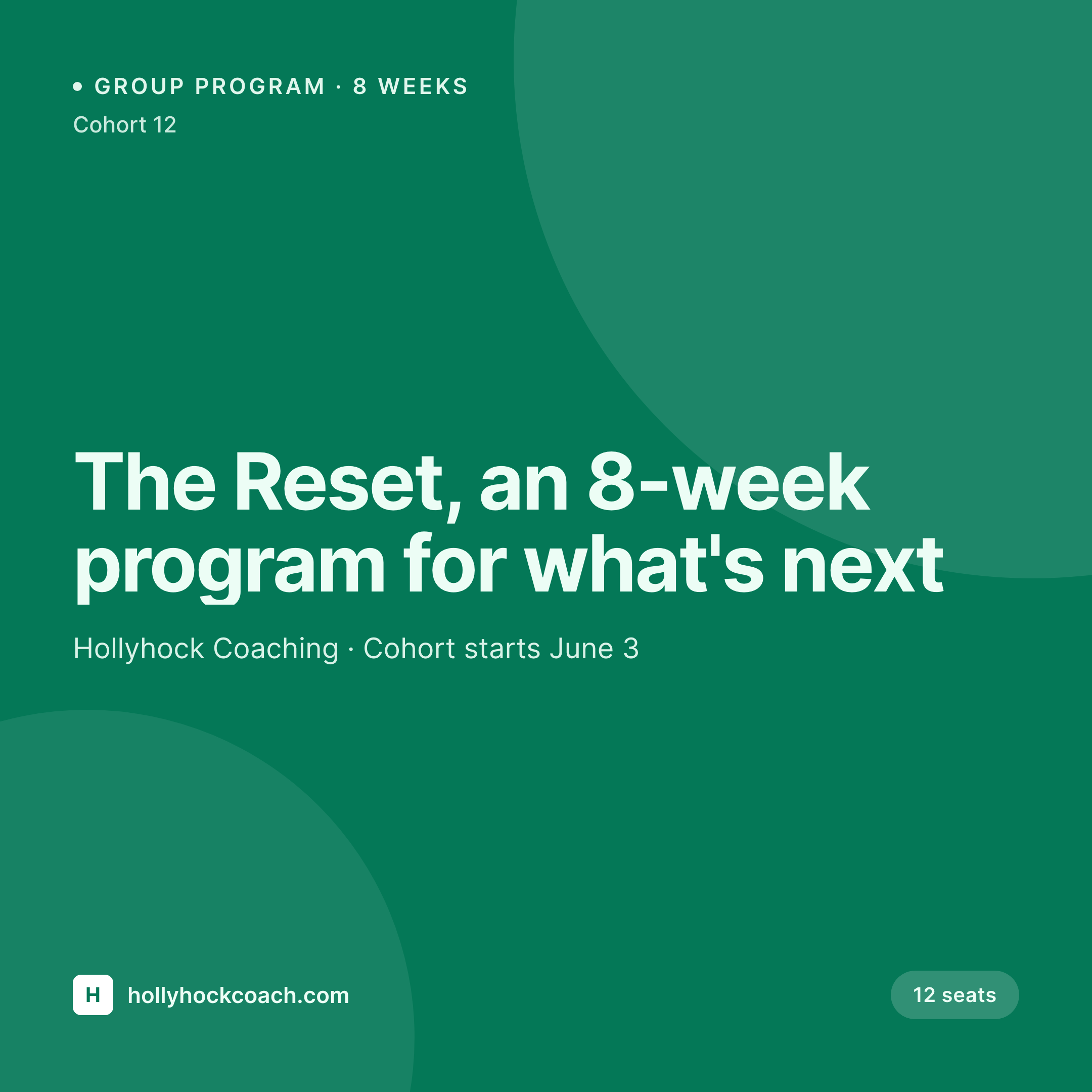
Eight-week resets, quarterly cohorts, 1:1 programs, and free workshop pages each render a square card with the cohort number, the cadence, and the seats available baked in. Saving the page in WordPress saves the Instagram card the next student will see.
♾️ Lifetime License available
Cohort coaches live on a grid, the grid should match the launch
A life coach who runs cohort-based programs spends a lot of time on Instagram. Cohort launches, free workshops, alumni stories, recurring 1:1 program announcements. Every one of those is a square post that the coach used to build in Canva, often the morning of the launch, often missing one of the details that turned out to matter.
The data is already on the WordPress program page. The cohort number, the start date, the cadence, the seats remaining, the price. The default WordPress preview doesn't help; it's an OG card built for blog posts, not a 1080x1080 square sized for the feed. The coach ends up rebuilding the same card by hand for every cohort, and the grid drifts in style and accuracy as the year goes.
SleekPixel renders a square Instagram card per program page. The cohort number, the cadence, the start date, and the seats render onto a 1080x1080 image that matches the rest of the grid. Saving the program page saves the card. The launch post and the page share the same data, because the card is the page.
Workflow
From cohort page to launch post
Map cohort fields
Design one square template
Save the cohort page
Coach posts to Instagram
Output
What gets generated per cohort page
A 1080x1080 square card with the program, the cohort number, the start date, and the seats. Pulled from the page fields.
Comparison
Default life coach image vs SleekPixel
Default life coach image
- Coach rebuilds the launch card in Canva for every cohort
- Cohort number and start date get retyped wrong between the page and the post
- Seats remaining drifts away from the page reality
- Grid style shifts as the year goes and different cards get made by different hands
- Square card sizing has to be redone for OG, Twitter, and Instagram separately
SleekPixel
- Save the cohort page, the Instagram card lands in uploads
- Cohort number, start date, cadence, and seats pulled live
- Square format sized for Instagram and a consistent grid
- Same render available for OG and Twitter on the same page
- One template across resets, retreats, alumni programs, and workshops
Features
What SleekPixel gives you for life coach
Cohort and start date
Each cohort page renders with the cohort number and the start date so the post and the page never disagree on what's launching.
Seats and cadence
Eight-week cadence, twelve-week cadence, or quarterly cohorts each render the cadence on the card. Seats remaining renders as a small mark.
Square grid sizing
1080x1080 sizing built for Instagram. The same render is wired to OG and Twitter so cross-posting doesn't require a redesign.
Use cases
Who uses SleekPixel for life coaches
Cohort-based group coaches
Eight-week and twelve-week cohort programs render with the cohort number, the cadence, and the seats from the program page.
1:1 coaches with named programs
1:1 programs and signature engagements render with the program name and the next-available start date on the card.
Free workshop and webinar hosts
Free workshop pages render with the date, the topic, and the registration count on the card for cross-channel sharing.
The bigger picture
Why the cohort card protects the launch
Most life coaches running cohort programs already have a system. A waitlist of warm leads, a launch sequence that runs over a few weeks, an Instagram strategy that mixes alumni stories with reminder posts. The card that anchors the launch is the most reused asset in that whole sequence.
When it lives in Canva, the cohort number drifts, the start date gets retyped, the seats-remaining gets stale, the design wanders as different cards get made by different hands. When the card is derived from the program page on save, everything in the launch sequence stays aligned with the actual cohort. The post and the page can't disagree.
The coach spends time on the program, not on rebuilding the same square card before every launch.
Questions
Common questions about SleekPixel for life coach
Yes. Cohort 12, Cohort Spring 2026, or any naming convention is a field on the program page and renders directly onto the card.
Yes. A short seats field re-renders the card on save. Many coaches update the field daily during a launch window so the post and the page never disagree.
Yes. SleekPixel renders multiple sizes per page from one template. 1080x1080 for Instagram, 1200x630 for OG, 1200x675 for Twitter, all derived from the same source.
Yes. Workshop and webinar pages render their own cards with the date, the topic, and any registration count on the preview.
Yes. A short price field renders as a small line. Many coaches choose to leave price off the launch card and keep it on the page so the post stays warm.
Not directly. SleekPixel renders the preview from a WordPress page. Many coaches keep a marketing page on WordPress and host the actual program on Kajabi, Thinkific, or Podia.
No. The render lands in uploads. Posting is a manual step from the Instagram app or a scheduling tool.
Yes. Alumni story pages can carry the client's first name and outcome as fields and render onto the same template. Many coaches keep the surname off the card for privacy.
Pricing
More than 1000+
happy customers
Explore our flexible licensing options tailored to your needs. Upgrade your license anytime to access more features, or opt for a lifetime license for ongoing value, including lifetime updates and lifetime support. Our hassle-free upgrade process ensures that our platform can grow with you, starting from whichever plan you choose.
Lifetime ♾️
Most popular
EUR
once
- Unlimited websites
- Lifetime updates
- Lifetime support
...or get the Bundle Deal
and save €250 🎁
💎 Want everything forever? The All Access Pass is going away on 01.08.2026.
The Bundle (unlimited sites)
Pay once, own it forever
Elevate your WordPress site with our exclusive plugin bundle that includes all of our premium plugins in one package. Enjoy lifetime updates and lifetime support. Save significantly compared to buying plugins individually.
What’s included
-
SleekAI
-
SleekByte
-
SleekMotion
-
SleekPixel
-
SleekRank
-
SleekView
€749
Continue to checkoutBrowse more
- Substack podcast cover
- YouTube Shorts thumbnails
- Bandcamp banner
- Etsy cover photos
- YouTube end screens
- LinkedIn showcase page banners
- Mastodon link previews
- Klaviyo email banner
- Depop listing images
- Bluesky link cards
- Ghost feature images
- Pinterest pins
- X ad images
- Weibo post images
- Lemon Squeezy product covers