






SleekPixel for swipe file card
A swipe file is only as good as the count of examples and the credibility of the sources. SleekPixel renders a Twitter card that shows both at preview size, pulling the count from the repeater length and the source line from a post field, all rendered on save.
♾️ Lifetime License available
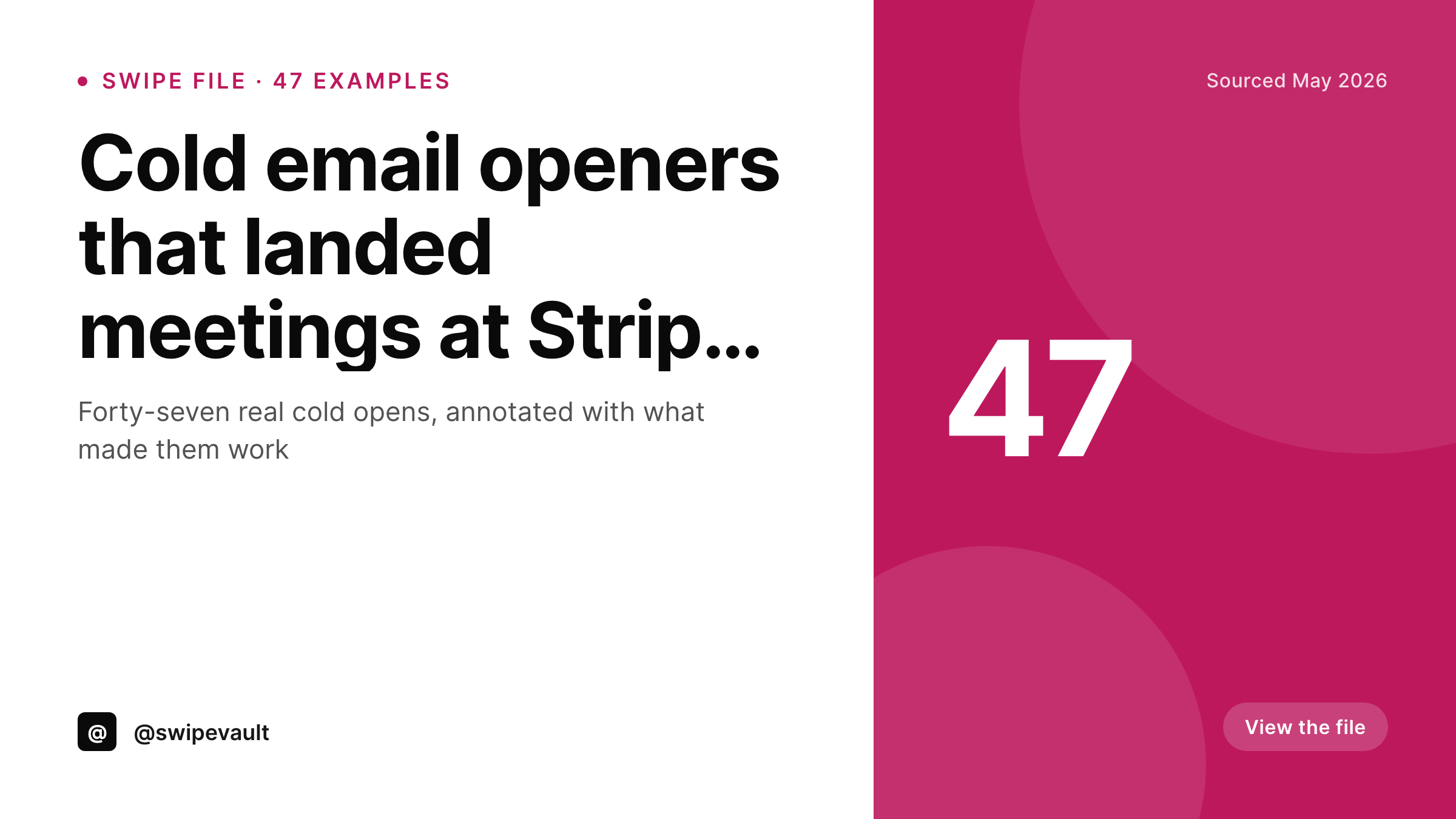
Swipe files live or die on count and credibility
A swipe file with five examples is a tweet thread. A swipe file with fifty examples is a resource. The number is the value proposition. So is the source: 'cold opens from Stripe, Linear, and Notion' converts harder than 'cold opens from various companies.' Most share cards for swipe files surface neither. They show a stock OG image with the title and the reader has to click through to learn whether the file is worth their time.
SleekPixel surfaces the count and the source on the card itself. The repeater of examples on the post drives the count automatically. A 'sources' field on the post drives a credibility line near the title. The template renders a Twitter card sized 1200x675, with the title leading, the count in a corner, and the source line subtle but readable. On save, the card renders and og:image updates.
The right reader sees the count and the sources and clicks because the file is exactly what they wanted. The wrong reader keeps scrolling, which saves both sides time. The post drives the card. The sources drive the credibility. The count drives the click.
Workflow
Swipe file cards from a repeater and a source field
Add a swipes repeater
Set the source line
Design the template
Publish
Output
Sample swipe file share card
A 1200x675 Twitter card with the title, example count badge, and source attribution line rendered from a repeater and a field on the post.
Comparison
Title-only OG card vs SleekPixel
Title-only share
- Example count never appears on the share preview
- Source companies are hidden until after the click
- Updates to the file count never propagate to the card
- Old swipe files keep stale counts when new examples get added
- No back-catalog rendering for older files
SleekPixel
- Repeater length drives the example count automatically
- Source line surfaces credibility before the click
- Title anchors the card regardless of length
- Updates to the file refresh the card on save
- Bulk refresh covers the whole archive when the brand changes
Features
What SleekPixel gives you for swipe file card
Count from the repeater
The example count comes from the array length of the swipes repeater. Add or remove examples and the card updates the count automatically on save.
Sources as credibility
A sources field on the post drives a short attribution line near the title. 'From Stripe, Linear, and Notion' or 'From 12 YC alumni' renders cleanly on the card.
Category-aware accents
Cold email files, landing-page swipes, ad creatives, all can carry per-category accent colors so the swipe library reads as a coherent set of related products.
Use cases
Where swipe file cards earn their keep
Cold outbound libraries
Curators of cold-email swipe files for sales teams get share cards that surface count and source companies, the two metrics that drive clicks.
Ad creative libraries
Marketing operators publishing curated ad-creative galleries get cards that show example counts and source brands across every share.
Copy and headline swipes
Newsletter writers and copywriters maintaining headline swipe files get share cards that communicate the size of the file and the credibility of the sources.
The bigger picture
Why example count and source belong on the card
Swipe files have always sold on two numbers: how many examples and who they come from. Curators know this and put both in the headline of the landing page. The share card, where the headline is on stage in the feed, often loses both signals to whatever stock OG image WordPress assigns.
SleekPixel fixes that. The count comes from the actual length of the swipes repeater, so it stays correct as the file grows. The source line comes from a curated field or a unique-source rollup, so credibility is structural rather than something a designer has to remember to update.
Readers in the feed see both signals before they click and self-select cleanly. Curators stop losing right-fit readers to title-only previews. The swipe file becomes a discoverable product instead of a buried URL, because the share surface honestly reflects what the file actually is.
Questions
Common questions about SleekPixel for swipe file card
Either a manually maintained 'sources' field on the post, or a rollup of unique source names from the swipes repeater. Templates can read either, and curators pick the one that fits their workflow.
Yes. The count is bound to the repeater length. Add a new example, save the post, the count refreshes on the card. og:image stays the same URL so social re-fetches pick up the new image.
The card describes the file as a whole. If part of the file is gated, the landing page communicates that; the card represents the total count. Curators can also add a 'free preview / paid full' badge if needed.
Yes. The template can render the first one or two example titles or opening lines as proof of substance. Useful when the example titles are themselves the value.
Yes. The template can include a small thumbnail of the first example image. ACF gallery fields and Meta Box image groups both work as sources for the thumbnail.
Yes. Use 'and 9 more' or 'from 12 sources' patterns when the list is long. The template handles the truncation with a configurable cutoff.
Yes. WPML and Polylang translate the post and its source line. SleekPixel renders one card per translation, each with its localized title and sources.
Yes. Configure a second template at 1080x1080 or 1080x1920 bound to the same fields. SleekPixel renders both formats on save.
Pricing
More than 1000+
happy customers
Explore our flexible licensing options tailored to your needs. Upgrade your license anytime to access more features, or opt for a lifetime license for ongoing value, including lifetime updates and lifetime support. Our hassle-free upgrade process ensures that our platform can grow with you, starting from whichever plan you choose.
Lifetime ♾️
Most popular
EUR
once
- Unlimited websites
- Lifetime updates
- Lifetime support
...or get the Bundle Deal
and save €250 🎁
💎 Want everything forever? The All Access Pass is going away on 01.08.2026.
The Bundle (unlimited sites)
Pay once, own it forever
Elevate your WordPress site with our exclusive plugin bundle that includes all of our premium plugins in one package. Enjoy lifetime updates and lifetime support. Save significantly compared to buying plugins individually.
What’s included
-
SleekAI
-
SleekByte
-
SleekMotion
-
SleekPixel
-
SleekRank
-
SleekView
€749
Continue to checkoutBrowse more
- Twitch starting soon screen
- Mastodon post images
- X ad images
- Facebook Shop product images
- LINE official account banners
- Snapchat ad images
- Tumblr header
- YouTube end screens
- Rednote (Xiaohongshu) post
- Beacons.ai banner
- Pinterest Idea Pins
- kbin post images
- Telegram channel banner
- TikTok cover images
- Fansly banner