






SleekPixel for WP Event Manager events
WP Event Manager handles the schedule, the tickets and the venue, but its default share image is the site banner. SleekPixel reads the event fields and renders a 1200 by 630 OG-ready card per event, with date, venue and organizer logo where they belong.
♾️ Lifetime License available
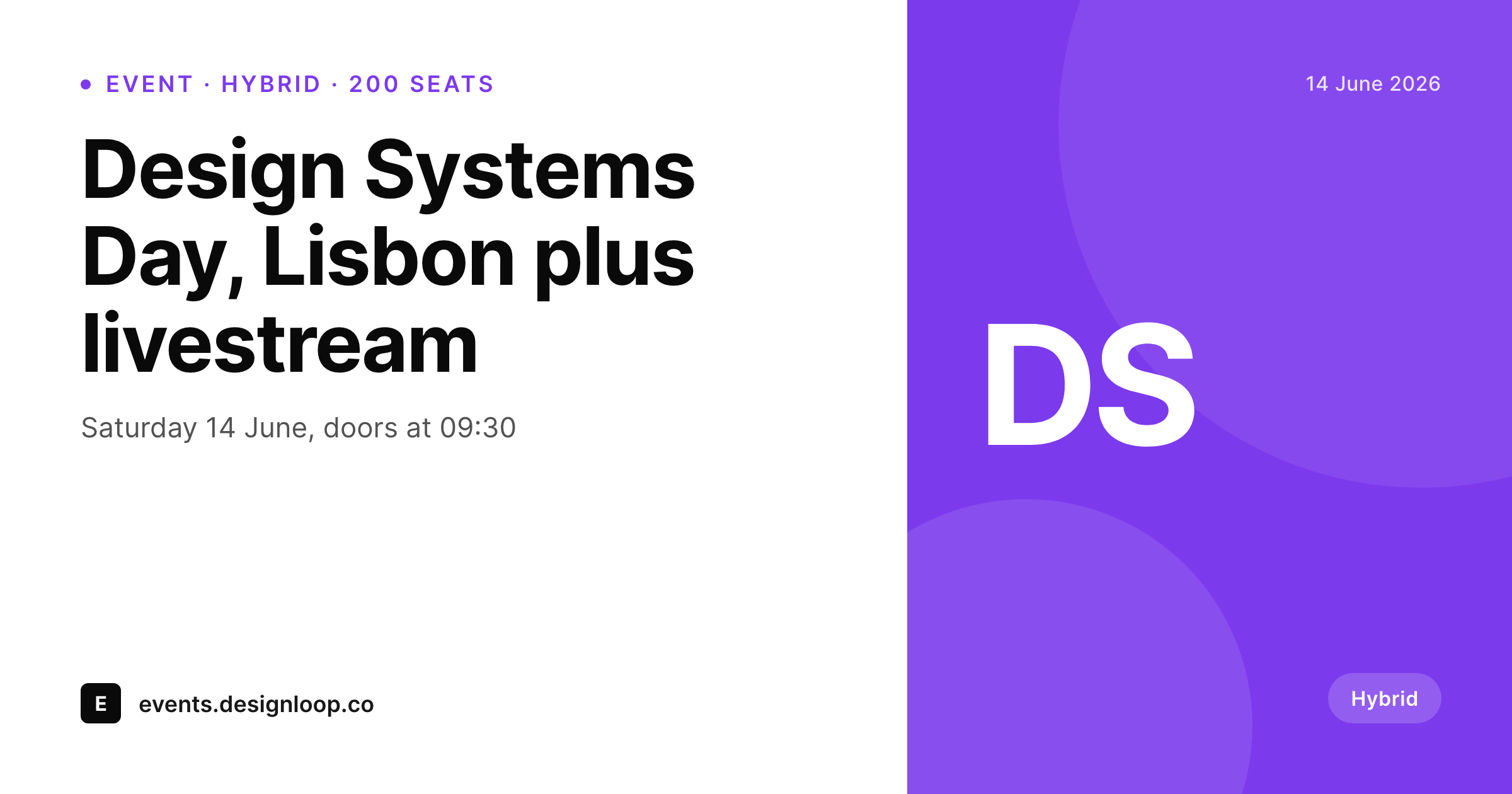
Events sell on details, default previews hide them
WP Event Manager is the WordPress plugin most independent conferences, meetups and workshop series reach for. It models events properly: dates, venues, organizers, types, categories, recurring schedules. None of that detail makes it onto the default social preview when an event URL is shared on LinkedIn, Twitter or in a community Slack.
The fallback is the site's homepage banner, or a single OG image the theme has hard-coded for every page. A reader sees the site brand but not the event date, not the city, not the format. The click rate suffers, and the organizer ends up screenshotting the event page or designing a one-off card every time a new event goes up.
SleekPixel reads the WP Event Manager event fields (title, start and end dates, venue name, city, event type, organizer name and organizer logo) and renders a per-event 1200 by 630 OG card. The card is consistent across the full season of events, the data binds cleanly to slots, and the design only has to be done once for the entire program.
Workflow
From WP Event Manager event to branded share card
List the event fields
Build the event template
Render on save
Share the event URL
Output
What ships for every WP Event Manager event
A 1200 by 630 OG-sized PNG: event title, start date, venue and city, event type pill, organizer logo and a brand wordmark, rendered from WP Event Manager fields.
Comparison
Default WP Event Manager share vs SleekPixel card
Default WP Event Manager share
- Default WP Event Manager does not ship a per-event social card
- Most installs fall back to a site-wide banner image
- Date, venue and city never reach the social preview
- Event type (workshop, conference, meetup) is invisible pre-click
- Organizer logos uploaded for the event do not surface on the share
SleekPixel
- Reads WP Event Manager event fields directly
- Per-event 1200 by 630 PNG sized for OG and Twitter
- Date, venue and event type bind to dedicated slots
- Different template variants for in-person, hybrid and online events
- Re-renders when the schedule or venue changes
Features
What SleekPixel gives you for WP Event Manager events
Date slot
Start date binds to a prominent slot with proper typography. Recurring events can render with a 'next session' helper line below the headline date.
Venue and city slots
Venue name and city appear in their own slots, so a reader knows whether the event is in their neighborhood without opening the page.
Format variants
In-person, hybrid and online events each get a visual cue. A small connection icon for online, a venue pin for in-person, a split badge for hybrid.
Use cases
Who renders events as branded cards
Independent conferences
Single-track conferences ship a full season of branded event cards from one template, with each event's date and venue front and center.
Meetup networks
City chapters of a developer or design meetup share recurring sessions with cards that read consistently across cities while showing the local venue.
Workshop series
Multi-session workshops ship a card per session with the date, the topic and the cohort number, so each session URL stands on its own.
The bigger picture
Why event marketing needs a card per event
Events are bought on three pieces of information visible at a glance: what, when, where. A social preview that omits all three forces the reader to click for context, and most readers do not. WP Event Manager already carries the structured data that a good card needs.
The gap between the data and the visible share is the gap SleekPixel closes. SleekPixel does not replace WP Event Manager and does not touch the schedule, the ticket flow or the organizer accounts. It only handles the visual layer that ships when the event URL leaves the site.
Organizers get branded social cards as a side effect of creating the event, and a season of twelve events ships with one consistent visual standard instead of twelve one-off graphics.
Questions
Common questions about SleekPixel for WP Event Manager events
Yes. Recurring events have a parent post and child instances. Each instance can render its own card with its own date, or the parent card can render with a 'next session' helper line. Both patterns are template choices.
Add-ons like Ticket Selling, Registrations, Embeddable Event Widget and Event Alerts add fields to the event post. Any of those fields can bind to extra slots on the card (ticket price, seat count, registration status).
Yes. Templates can branch on the end date. After the event ends, the card can render a 'this event has passed' variant, or the og:image can fall back to a generic recap card.
The custom banner can occupy a background slot inside the template. The event details still render on top of it in branded typography. Or organizers can opt out and use their banner alone via a flag on the listing.
No. SleekPixel only writes the og:image meta tag. Event schema and JSON-LD output by WP Event Manager (and any SEO plugin) is untouched.
Yes. The template can branch on a 'ticket required' flag. Free events render with an 'open to all' pill; paid events render with a price slot. Both flows still use one template.
The start datetime carries a time zone. The template can format the date in the venue's local zone, the organizer's preferred zone, or both. A small UTC offset line below the headline date is a common pattern.
Rendering happens on save and finishes in well under a second on most hosts. The organizer's workflow is unchanged. They write the event, save the post, and a branded card is ready when the URL leaves the site.
Pricing
More than 1000+
happy customers
Explore our flexible licensing options tailored to your needs. Upgrade your license anytime to access more features, or opt for a lifetime license for ongoing value, including lifetime updates and lifetime support. Our hassle-free upgrade process ensures that our platform can grow with you, starting from whichever plan you choose.
Lifetime ♾️
Most popular
EUR
once
- Unlimited websites
- Lifetime updates
- Lifetime support
...or get the Bundle Deal
and save €250 🎁
💎 Want everything forever? The All Access Pass is going away on 01.08.2026.
The Bundle (unlimited sites)
Pay once, own it forever
Elevate your WordPress site with our exclusive plugin bundle that includes all of our premium plugins in one package. Enjoy lifetime updates and lifetime support. Save significantly compared to buying plugins individually.
What’s included
-
SleekAI
-
SleekByte
-
SleekMotion
-
SleekPixel
-
SleekRank
-
SleekView
€749
Continue to checkoutBrowse more
- uptime report card
- media mention card
- support update cards
- incident postmortem card
- tool of the day cards
- term explained cards
- certification announcement cards
- product update images
- press kit card
- office hours recap card
- patent grant card
- shortlist card
- playlist cards
- founders day card
- preorder cards
- Ghost feature images
- Audible audiobook cover
- Facebook group banners
- Threads post images
- Discord server banners
- Facebook Shop product images
- GitHub README banners
- Facebook post images
- Ko-fi shop images
- YouTube end cards
- Twitch stream overlay images
- Spotify Canvas
- Notion page covers
- Bluesky link cards
- Instagram carousel slides