






SleekPixel for vegetarian restaurant
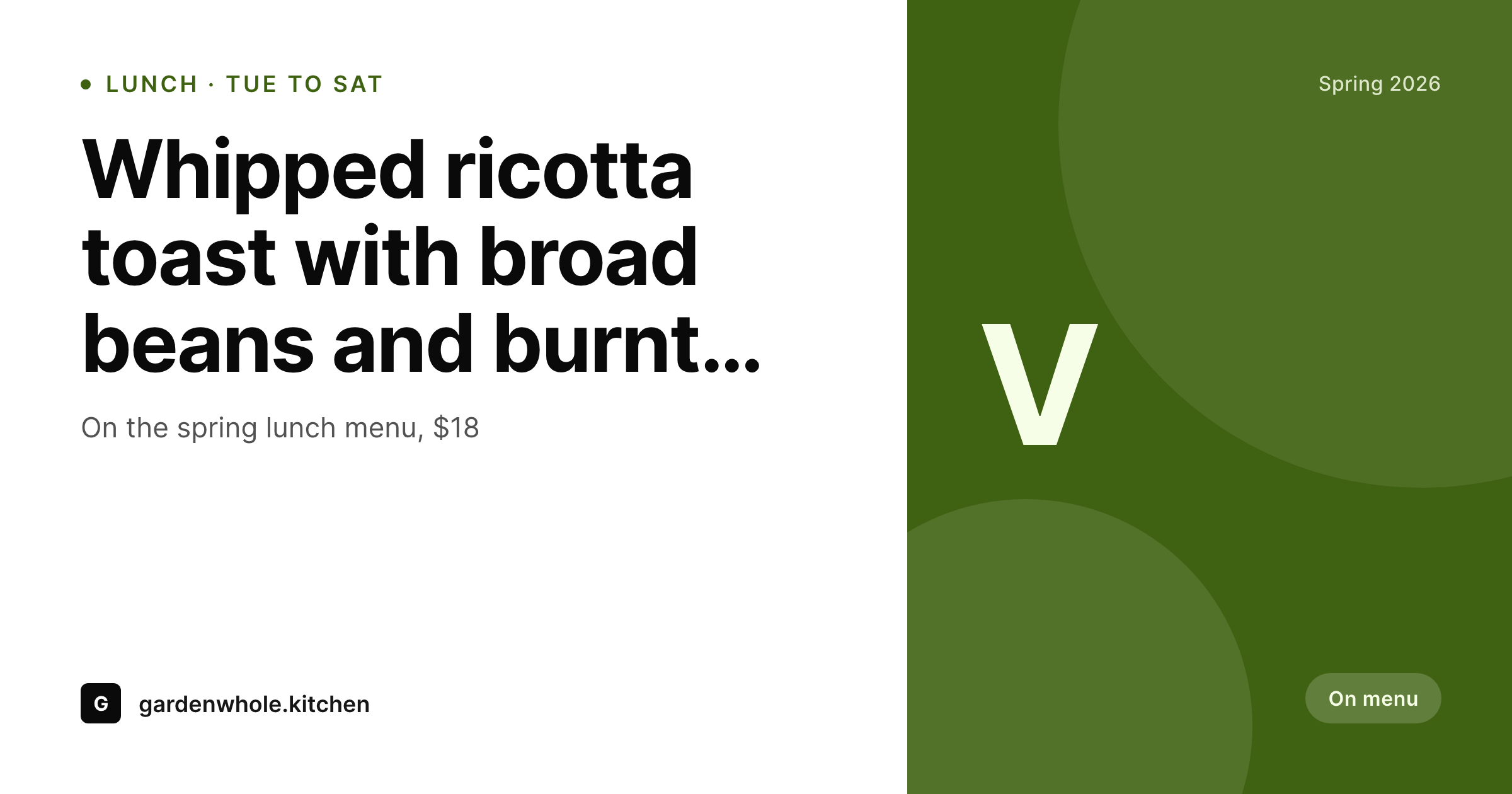
SleekPixel renders 1200 by 630 OG cards for every dish post, with plate name, price, allergens, and chef notes composed in. Lunch menus rotate, dinner specials change, and the share card always matches the current menu.
♾️ Lifetime License available
Vegetarian menus are detail-heavy, share cards have to keep up
Vegetarian restaurants live or die on detail. The dish is the story: which farm the squash came from, whether the cheese is rennet-free, what the bread is dressed with. That detail lands when a diner is sitting at the table reading the menu, but it does not survive the trip from the website to Instagram unless the share card carries some of it through.
SleekPixel reads the dish post. Plate name, ingredients, allergens (dairy, gluten, egg), price, course position, and a short sourcing line. The template composes a 1200 by 630 card that gives the plate name a strong typographic weight, places allergens in a small but legible band, prices clearly in a corner, and tucks the sourcing note as a sub-line. Each dish post regenerates its card on save.
For lunch menu rotations, the same engine handles a daily or weekly menu card that pulls the active dishes. Newsletter links, press features, and Instagram shares preview as the current rotation rather than a generic exterior shot, which is the difference between a click and a scroll.
Workflow
From dish post to share-ready card
Model the menu
Build the card template
Bind the fields
Update menu, share the link
Output
Sample dish card
1200 by 630 OG card composed from one dish post: plate name, allergen band, price, course, and a short sourcing note.
Comparison
Default vegetarian restaurant OG vs SleekPixel
Default WordPress OG
- Dish pages share as the homepage exterior shot
- Allergens and sourcing notes lost in transit to social
- Seasonal menu changes don't propagate to share cards
- Press features link to dishes that preview as a building
- Newsletter dish links convert lower because previews don't match
SleekPixel
- Per-dish OG cards rendered on save
- Allergens visible on every card
- Lunch menu rotation cards pull from active dishes
- Sourcing note carries through to the share surface
- Seasonal regenerate refreshes the whole menu in one pass
Features
What SleekPixel gives you for vegetarian restaurant
Dish-aware
Reads plate name, course, allergens, price, and sourcing notes from the dish post. The card matches whatever version of the dish is currently live.
Allergen visibility
Dairy, gluten, egg, and nut flags render as a quiet row on the card, helping vegetarian and flexitarian diners scan suitability before clicking.
Sourcing notes
A short sourcing line (farm, supplier, region) renders as a sub-line on the card, which is the detail that vegetarian-positioned diners actually care about.
Use cases
Where vegetarian restaurants use it
Lunch menu rotations
Weekly lunch menu cards pull from active dishes. A new rotation goes live and its card matches what is actually on the plate that week.
Press and review traffic
A reviewer linking to a single dish gets a card with the actual plate, allergens, and sourcing. The share converts to bookings at higher rates.
Newsletter and CRM
Newsletter links to featured dishes share with cards that match the body copy, instead of a stock exterior shot.
The bigger picture
Why share cards convert vegetarian traffic
Vegetarian-positioned restaurants compete for an audience that filters every restaurant choice through the dish list. A diner deciding between three nearby spots clicks the share preview as part of that filter, and if the preview is a building exterior the click is no faster than reading the address. A preview that shows the actual plate, the allergens, and a short sourcing note is the difference between scrolling past and booking the table.
Templated dish cards remove the only thing standing between the menu post and the share preview, which is design time. The seasonal rotation, the press feature, the newsletter link all preview as the current menu, which is the surface where the audience actually converts.
Questions
Common questions about SleekPixel for vegetarian restaurant
Yes. SleekPixel reads from WordPress fields, so menu plugins like Restaurant Menu by MotoPress or Five Star Restaurant Menu work alongside the renderer.
Yes. Add a pairings field. The template can show a small pairing line on the card, useful for tasting and dinner menu shares.
Output is PNG for OG and social. Printed menus run through InDesign or similar, though some teams use the rendered card as the starting design.
Yes. If dishes live as WooCommerce products with online ordering, the OG card on each product URL renders the dish. Shared product links preview as the food.
Yes, with WPML or Polylang. Each dish has translations; SleekPixel renders one card per locale and writes the right og:image per language URL.
Optional. Add nutrition fields and the template can show a small nutrition line. Most restaurants keep the card clean and link to a deeper nutrition page.
A bulk regenerate scoped to a menu rotation runs through every dish in that rotation and refreshes each card without anyone touching the posts.
No. SleekPixel writes the og:image; SEO plugins read from the same field. The two run alongside each other without conflict.
Pricing
More than 1000+
happy customers
Explore our flexible licensing options tailored to your needs. Upgrade your license anytime to access more features, or opt for a lifetime license for ongoing value, including lifetime updates and lifetime support. Our hassle-free upgrade process ensures that our platform can grow with you, starting from whichever plan you choose.
Lifetime ♾️
Most popular
EUR
once
- Unlimited websites
- Lifetime updates
- Lifetime support
...or get the Bundle Deal
and save €250 🎁
💎 Want everything forever? The All Access Pass is going away on 01.08.2026.
The Bundle (unlimited sites)
Pay once, own it forever
Elevate your WordPress site with our exclusive plugin bundle that includes all of our premium plugins in one package. Enjoy lifetime updates and lifetime support. Save significantly compared to buying plugins individually.
What’s included
-
SleekAI
-
SleekByte
-
SleekMotion
-
SleekPixel
-
SleekRank
-
SleekView
€749
Continue to checkoutBrowse more
- YouTube Music cover art
- TikTok shop images
- Reddit subreddit banners
- LinkedIn company banners
- X social cards
- Xiaohongshu cover images
- Twitch profile banner
- Pinterest video pin covers
- Pinterest shop banners
- Etsy shop banners
- Snapchat Spotlight covers
- Twitch panel images
- Pinterest board covers
- VSCO cover
- LinkedIn showcase page banners