






SleekPixel for shooting range
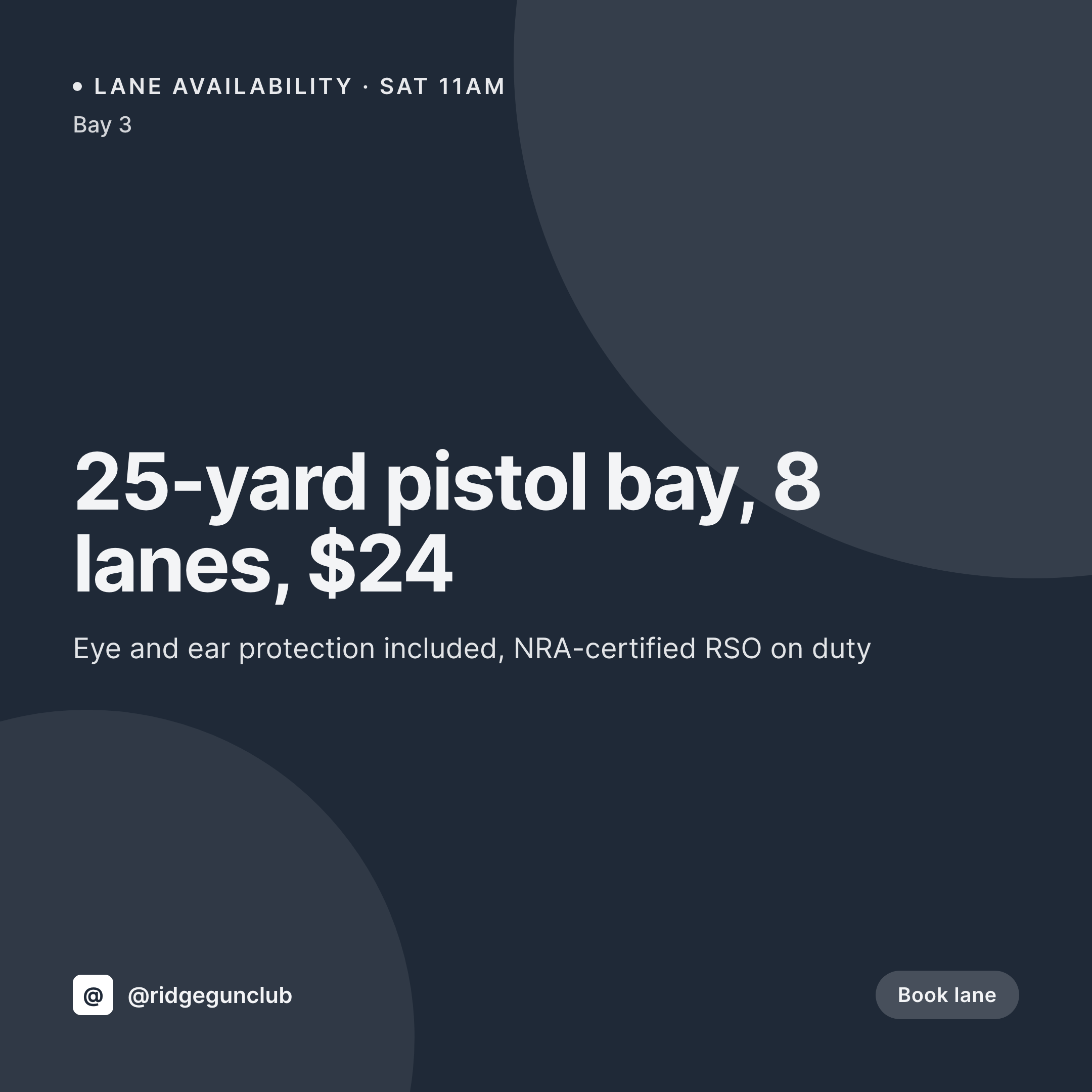
Pistol bays, rifle lines, concealed-carry classes, and rental memberships already live on the booking pages. SleekPixel renders a 1080x1080 card per session with distance, caliber policy, and price right on the image, so the desk can post between range checks.
♾️ Lifetime License available
Lane turnover, class enrollments, and a feed that has to stay current
A shooting range runs three different businesses on the same calendar. Walk-in lane time, training classes (CCW, fundamentals, advanced), and gun rentals or memberships. Each has a different price, a different qualification requirement, and a different schedule. The booking page on the site has to keep them straight. The Instagram feed often does not, because the staff is running the desk and the safety briefing, not opening Canva.
The data already lives on WordPress. Most ranges run a session CPT for lane time and a class CPT for training, with fields for distance, caliber restrictions, instructor, and price. The site visitor sees the right info on each page. The tile is where it breaks, because the front desk retypes the same fields into a graphic tool whenever they want to promote a class or alert about an open lane.
SleekPixel renders the tile straight from the post. The class fills out its title, instructor, and seat count, and the 1080x1080 PNG lands in uploads on save. Lane availability, rental specials, and class openings all flow through the same template, so the feed stays current without taking the RSO away from the floor.
Workflow
From bay booking to posted card
Map the booking fields
Design the bay template
Publish the session
Desk posts it
Output
What gets generated per session
A 1080x1080 Instagram card with the session name, distance, caliber policy, instructor or RSO name, and price pulled live from the booking post.

Comparison
Default shooting range image vs SleekPixel
Default shooting range image
- Desk staff opens Canva between safety briefings to make a class flyer
- Caliber policy on the tile drifts away from what the bay actually allows
- Class seats are full but the Instagram post still says open seats
- Pistol bay, rifle line, and shotgun stand all get different fonts and colors
- Range officer name on the rental promo is two months out of date
SleekPixel
- Every session post saves with a 1080x1080 bay or class card
- Distance, caliber policy, instructor, and price pulled live from fields
- Class seats and lane availability render from the same data the booking page reads
- OG image for the booking URL renders alongside the tile in one save
- Bulk regenerate after a price or policy change so every card refreshes at once
Features
What SleekPixel gives you for shooting range
Caliber policy visible
Up to .45 ACP, up to .308, no steel core, no tracer. Whatever the bay policy field says appears on the tile, so customers do not show up with the wrong ammunition.
Instructor on the card
CCW classes and fundamentals get the instructor name and credential pulled from the class post, so students know who is teaching.
Seats and openings
Class capacity, seats remaining, and class date all read live from the post. The tile updates when seats sell out, no manual edit.
Use cases
Who uses SleekPixel for shooting ranges
Concealed-carry course schedules
Multi-state CCW classes render with date, instructor, and state coverage on the card. The same template handles fundamentals, defensive, and law-enforcement courses.
Walk-in lane promotions
Slow-day specials and ladies-night sessions each render with the right price and bay distance. Last-minute openings post as stories from the same template.
Membership drives
Annual and monthly memberships each get a card pulling tier name, benefits, and price from the membership product.
The bigger picture
Why shooting ranges need the tile to match the bay policy
A shooting range carries real liability for what the customer brings to the bay. If the Instagram tile says steel core is allowed and the bay policy says it is not, the RSO is having a hard conversation at the line. If the class flyer says the instructor is one person and the booking page says someone else, the student loses trust.
The data that prevents both problems is already on the site, because the booking and the class pages have to be right for the business to operate. Treating the tile as a rendering of that same data means the caliber policy, the instructor, the seat count, and the price stay in sync everywhere the customer might look. The desk staff can stay on the desk, the RSO can stay on the floor, and the feed still reads like a well-run range across walk-in days, CCW class weekends, and league nights.
Questions
Common questions about SleekPixel for shooting range
Yes. Class registration plugins typically expose seat count and capacity as meta fields. SleekPixel reads the same fields and renders them on the tile, so the social card matches what the registration form shows.
Yes. Repeater fields (ACF, Meta Box) are supported. The template can list allowed calibers as a stack of small tags on the card, so the policy reads at a glance.
Templates can be conditional on category. Pistol bays use one layout, rifle lines another, shotgun stands a third. All pull from the same session fields, just styled per discipline.
Yes. A class post can carry a list of state coverage as a custom field or repeater. The template renders that list as a row of state abbreviations on the card.
No. SleekPixel renders the image to uploads with og:image meta. Posting is a manual step or handled by a separate scheduling tool that picks up the saved PNG.
A 1080x1920 story renders alongside the square card in the same save. When a class sells out, the story can be posted as a waitlist alert with the next available class date.
No. Rendering runs on save in the admin. Customers reading the booking page see the cached PNG. The og:image meta points at a static file, so social previews load instantly.
Yes. Memberships are products or subscription posts with tier name, benefits, and price fields. The template renders each tier as its own card from the same template.
Pricing
More than 1000+
happy customers
Explore our flexible licensing options tailored to your needs. Upgrade your license anytime to access more features, or opt for a lifetime license for ongoing value, including lifetime updates and lifetime support. Our hassle-free upgrade process ensures that our platform can grow with you, starting from whichever plan you choose.
Lifetime ♾️
Most popular
EUR
once
- Unlimited websites
- Lifetime updates
- Lifetime support
...or get the Bundle Deal
and save €250 🎁
💎 Want everything forever? The All Access Pass is going away on 01.08.2026.
The Bundle (unlimited sites)
Pay once, own it forever
Elevate your WordPress site with our exclusive plugin bundle that includes all of our premium plugins in one package. Enjoy lifetime updates and lifetime support. Save significantly compared to buying plugins individually.
What’s included
-
SleekAI
-
SleekByte
-
SleekMotion
-
SleekPixel
-
SleekRank
-
SleekView
€749
Continue to checkoutBrowse more
- Dribbble shot covers
- KDP hardcover cover
- VK community cover photos
- Poshmark listing images
- Tumblr header
- Threads profile banners
- KakaoTalk channel banners
- SoundCloud banner
- Substack post thumbnail
- Mastodon profile banners
- YouTube end cards
- X ad images
- LINE official account banners
- Spotify Canvas
- Lens Protocol posts