






SleekPixel for tour operators
Tour pages already carry destination, duration, group size, and departure dates. SleekPixel pipes those fields into a 1200x630 OG card so every itinerary share looks intentional, not generic.
♾️ Lifetime License available
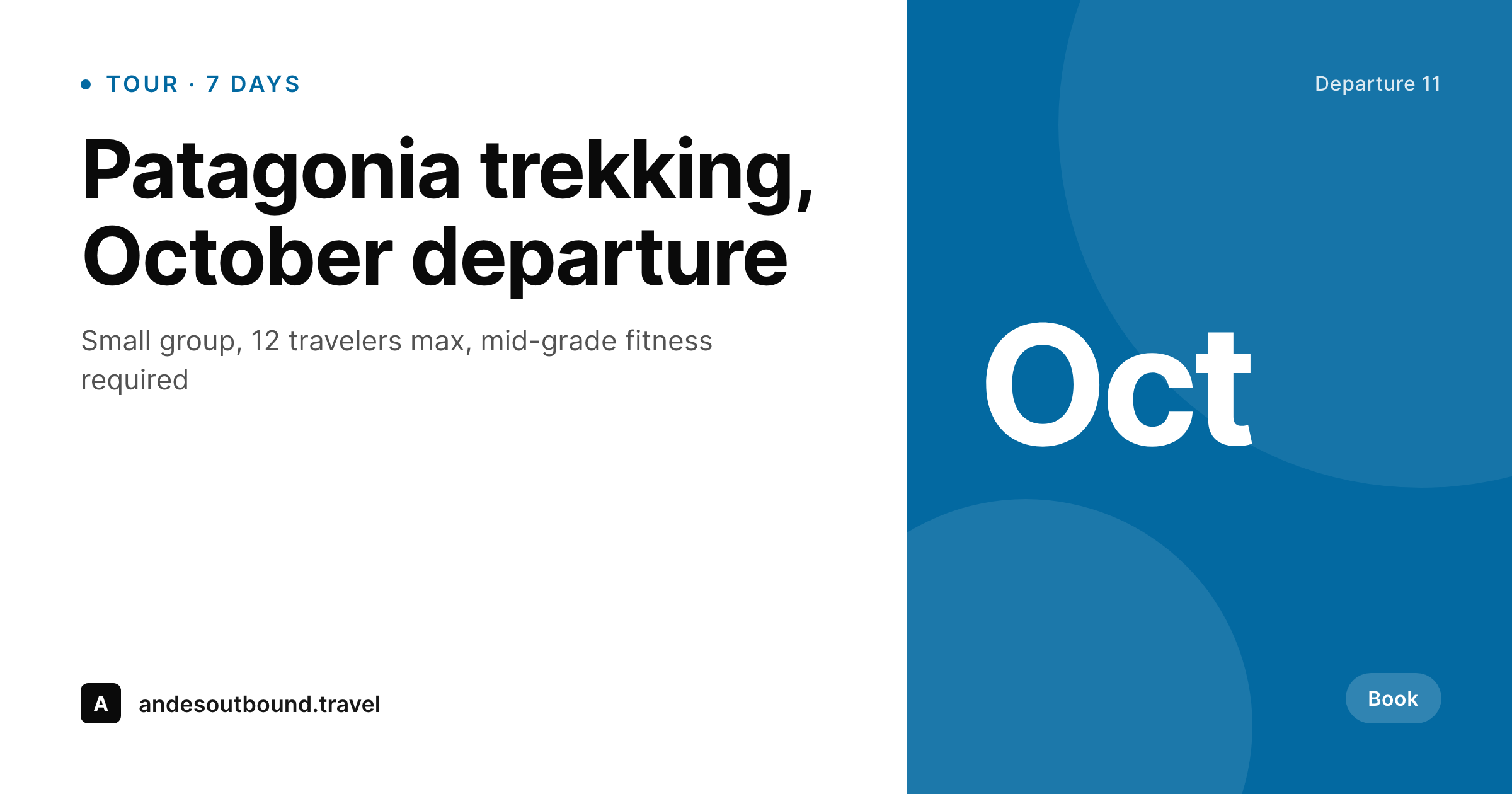
Tour operators sell on imagination, then break the spell with bare links
A tour operator's website is a catalog of dreams. Patagonia trekking, Morocco desert nights, Vietnam cycling, Iceland ring-road camping. Each itinerary takes weeks to scope, route, and price. The product page sells it well: a hero photo, day-by-day breakdown, included meals, what to pack. Then a salesperson pastes the link into an email or a travel agent shares it on Facebook, and the unfurl shows the company logo on a gray background. The dream collapses into a generic preview and the click-through suffers.
The data to fix this is already structured on the page. The tour CPT typically holds destination, country, trip duration, departure dates, group size cap, fitness grade, price, and a hero gallery. The same data drives the website filter and the brochure PDF. It could drive the OG image too, except no one wires the rendering. Manual design in Canva for each tour is achievable for a 10-tour catalog, untenable for a 60-tour one with 200 yearly departures.
SleekPixel reads the tour fields on save and renders a 1200x630 PNG showing destination, duration, departure month, and the hero photo. The og:image meta tag points at the file. Every tour share, whether from sales emails, agent posts, or Facebook ads, opens with a branded card matching the tour. The dream survives the unfurl.
Workflow
From itinerary to ready-to-share OG card
Map the tour fields
Design the OG template
Publish tours as usual
Share anywhere
Output
What gets generated per tour
A 1200x630 PNG showing destination, trip duration, departure month, group size, and the hero photo from the tour page.
Comparison
Manual tour graphics vs SleekPixel
Canva / Photoshop
- Each tour and each departure needs a separate manual graphic
- Sales emails share bare links with logo-on-gray Slack unfurls
- Departure date changes leave promo cards out of sync with the website
- Foreign-language editions of the same tour double the design work
- Agents reposting tours on Facebook get default fallback previews
SleekPixel
- Every tour page saves with a 1200x630 OG image rendered from tour fields
- Destination, duration, departure month, and group size pull automatically
- og:image and twitter:image meta tags written to the head on save
- Bulk regenerate the entire catalog when the brand evolves
- Variants per departure month so seasonal promos share with seasonal art
Features
What SleekPixel gives you for tour operators
Tour OG, on save
Every tour CPT entry saves with a 1200x630 PNG. Destination, country, duration, and departure month pull from the existing fields.
Variants per departure
October Patagonia and February Patagonia get their own OG cards. Departure dates drive the visual, so seasonal promos look seasonal.
Edit-aware rebuilds
Update a tour with a price change, new departure, or revised duration and the OG image regenerates. Shares stay accurate without manual work.
Use cases
Where tour OG images move the needle
Destination tours
Multi-country trips, single-region deep dives, expedition itineraries. Each tour saves with an OG card showing destination and trip length.
Sales follow-ups
Reps email tour links to leads who requested information. The OG card confirms the destination at a glance instead of forcing a click to remember.
Agent referrals
Travel agents repost operator tours on Facebook and Instagram. Branded OG cards make agent shares look professional, not generic.
The bigger picture
Why OG images matter for tour conversion
Tour operators run on referral and remarketing economics. A traveler hears about a Patagonia trip from a friend, gets the link via WhatsApp, opens the message, and decides in three seconds whether to tap through. The OG image is the entire pitch in that window.
A bare logo on gray reads as a low-effort small operator. A branded card showing the destination, duration, and a hero photo of the trail reads as a serious outfit running organized expeditions. The click-through gap between those two outcomes is large, and it compounds across every share channel: sales follow-up emails, agent reposts, paid social, newsletter blasts, partner cross-promotions.
For a tour operator running 60 tours with 4 departures each, the OG card is the most-seen marketing asset in the entire business, viewed more than the website hero, more than the brochure, more than the ads. Hand-building 240 OG cards a year and keeping them in sync with departure date changes is not realistic for a 5-person team with a real reservation system to operate. Auto-rendering them from the tour fields collapses the work into the existing publish flow.
The team writes the itinerary; the share preview falls out of it.
Questions
Common questions about SleekPixel for tour operators
Yes. SleekPixel reads any post type. A tour CPT, a WooTours product, a WP Travel Engine itinerary, or plain pages all map onto the OG template. Field names like destination, duration, and departure_dates plug into template slots.
Yes. Templates can be conditional on tour category or country taxonomy. Patagonia treks use one style, Morocco desert tours another, cycling tours a third. All pull from the same field schema, just rendered with regional variants.
If your tour has a departures repeater field, the template can render a card per departure with the specific date. The October 11 Patagonia and the November 4 Patagonia get distinct OG cards on the same tour page, selectable via URL query or sub-page.
Yes. Featured image is the default. If the tour has an ACF gallery or WP Travel Engine gallery, the template can pick the first image, a tagged hero image, or rotate through gallery shots for variant cards.
Yes. WPML and Polylang both expose translated fields per language. The OG image renders per translation, so the German Patagonia page gets a German-text OG card and the English page gets an English one. Each translation has its own og:image URL.
Yes if you want it. The template can include a price field, a from_price field, or omit price entirely. Many operators leave price off the OG card and surface it on the landing page after the click. Either configuration works.
Open-ended or self-guided tours can leave the duration field blank and the template renders without it. You can set a default like 'Self-guided' or hide the duration block when empty. Nothing breaks if the field is missing.
Yes. The rendered PNG lives in your uploads folder at a public URL. Agents who repost tours on their own social accounts can hot-link to the OG image or download it from the tour page. One operator template drives all agent reposts.
Pricing
More than 1000+
happy customers
Explore our flexible licensing options tailored to your needs. Upgrade your license anytime to access more features, or opt for a lifetime license for ongoing value, including lifetime updates and lifetime support. Our hassle-free upgrade process ensures that our platform can grow with you, starting from whichever plan you choose.
Lifetime ♾️
Most popular
EUR
once
- Unlimited websites
- Lifetime updates
- Lifetime support
...or get the Bundle Deal
and save €250 🎁
💎 Want everything forever? The All Access Pass is going away on 01.08.2026.
The Bundle (unlimited sites)
Pay once, own it forever
Elevate your WordPress site with our exclusive plugin bundle that includes all of our premium plugins in one package. Enjoy lifetime updates and lifetime support. Save significantly compared to buying plugins individually.
What’s included
-
SleekAI
-
SleekByte
-
SleekMotion
-
SleekPixel
-
SleekRank
-
SleekView
€749
Continue to checkoutBrowse more
- YouTube end screens
- VK community cover photos
- Bluesky profile banners
- YouTube Shorts thumbnails
- X Space banners
- Mastodon profile header
- Klaviyo email headers
- Depop listing images
- YouTube ad thumbnails
- Gumroad product covers
- Substack podcast cover
- YouTube Shorts covers
- Bluesky feed banner
- Mailchimp email headers
- Discord event cover