






SleekPixel for AMA recap card
Guest name, topic, question count, and headline themes already live in the AMA recap post. SleekPixel renders a 1200x627 LinkedIn-ready card on save so the recap goes out while attention is still warm.
♾️ Lifetime License available
Why AMA recaps lose half their reach to delay
An AMA produces its biggest spike of audience interest the hour it ends. The session went well, the questions were good, the guest dropped at least one quotable take. People want to share, regulars want to recommend the replay, and the algorithm rewards posts that arrive while the conversation is still fresh. By tomorrow morning the energy is gone and the recap reads like a press release for an event nobody attended.
The blocker is design. The community manager has a Notion doc with the guest name, the topic, the question count, and three or four bullet themes pulled from the transcript. Turning that into a sharable card is a thirty-minute Canva session at the worst possible time. Either the recap goes up untimed and unbranded, or the team ships text and accepts the lower reach.
SleekPixel skips the design step. The recap post holds the structured fields. The template renders the LinkedIn card with the guest, topic, question count, and themes pre-positioned. Save the post, the card exists. The community manager moves straight to writing the post body, and the visual asset arrives at the right moment without anyone opening a design tool.
Workflow
From AMA wrap to share-ready card
Build the recap template
Write the recap post
Cross-post the card
Update if a theme shifts
Output
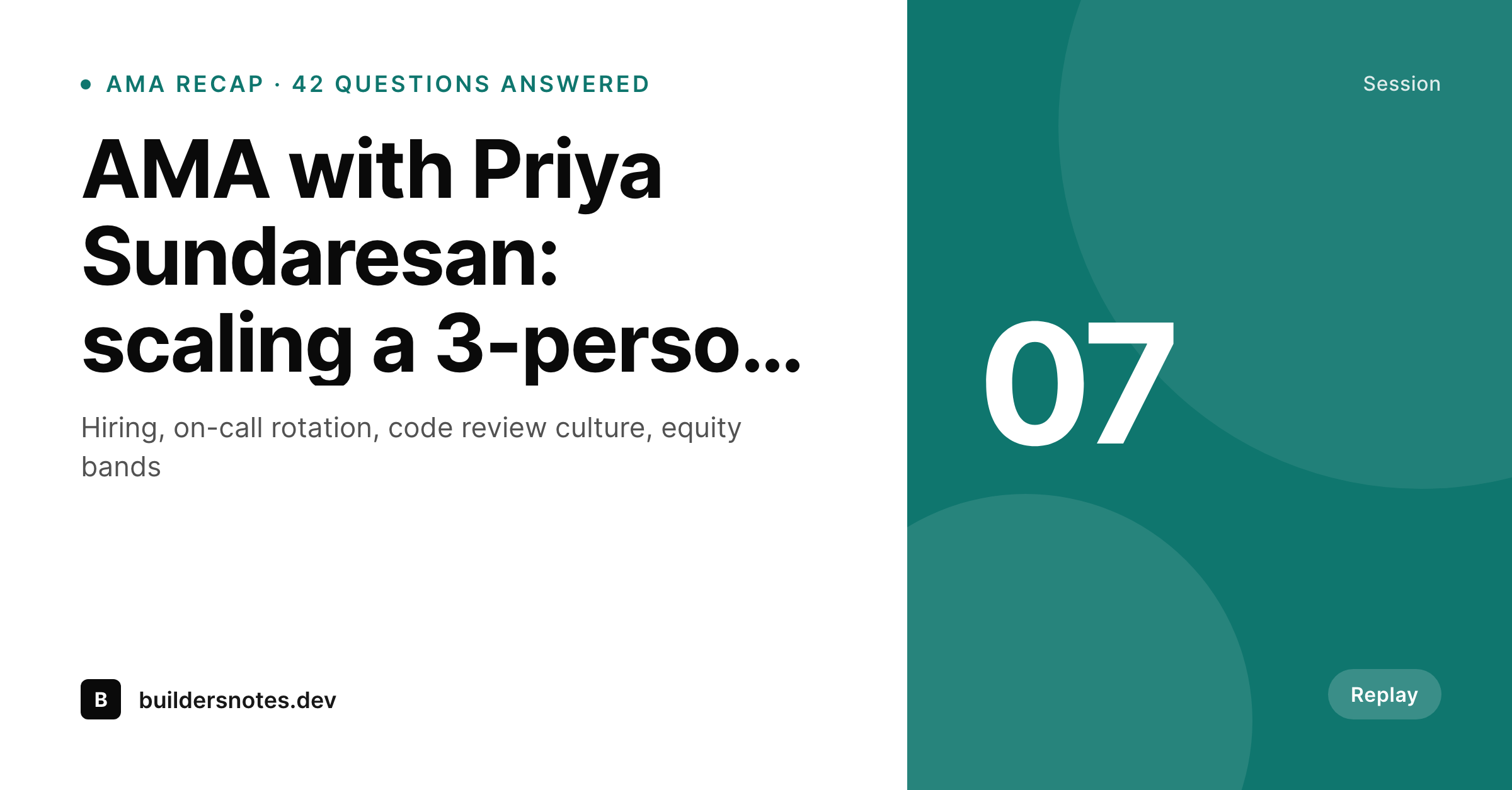
What a rendered AMA recap card looks like
A 1200x627 LinkedIn post card with guest name, topic, question count, and three key themes laid out from the AMA recap post.
Comparison
Manual recap card vs auto-rendered card
Canva after the AMA
- The card lands twelve hours after the session ends
- Question count gets eyeballed instead of counted
- Guest avatar gets cropped differently every time
- Recap looks more polished than the AMA itself
- Replay link goes out without a visual asset on day one
SleekPixel
- Recap card renders the moment the recap post is saved
- Guest name, topic, question count, and themes from real fields
- LinkedIn 1200x627 plus square sizes for cross-posting
- Themes list auto-fits between three and five bullets
- Bulk regenerate after a brand refresh covers the AMA archive
Features
What SleekPixel gives you for AMA recap card
Guest-aware
Guest name, role, and headshot render from fields on the recap post. The card stays consistent across every guest the series hosts.
Theme bullets
Three to five short themes pulled from the transcript render as anchored bullets. The layout balances whether the recap has three or five themes.
Same-hour ship
Because the recap is just typing the fields, the card lands while the audience that attended is still active. Reach follows the timing.
Use cases
AMA formats this template handles
Twitter Spaces recaps
Recap a Space with the speakers, the question count, and the three things people will quote. Post the card with the replay link.
Discord AMAs
Community AMAs from Discord get a recap card with the guest, the topic, and the key themes for members who could not attend live.
Livestream Q&A
A YouTube or Twitch livestream Q&A gets a recap card paired with the replay link. The card and the replay travel together.
The bigger picture
Why recap timing decides the AMA's reach
Live formats compound on momentum. A Space, a Discord AMA, a livestream Q&A all earn their second life through the recap that goes out after the session. That recap is competing for attention with everything else in feeds, and the difference between landing inside the hour and landing the next morning is roughly an order of magnitude in reach.
Hosts know this and still miss it because the visual asset is gated behind a design tool. SleekPixel collapses the design step into typing the recap fields, which the community team has to do regardless. The card stops being a chore and becomes part of the recap form.
AMAs stay on cadence because the publishing cost matches the value of one session, not three.
Questions
Common questions about SleekPixel for AMA recap card
Yes. The template supports three to five bullets and auto-fits the typography so a three-theme recap and a five-theme recap both look intentional.
Yes. Map the avatar placeholder to an ACF image field, the featured image, or a remote URL. The renderer fetches and crops the photo at save time.
Yes. Register multiple sizes against the same template. Each save renders one card per registered size, so LinkedIn, Twitter, and Instagram crops are all ready.
Not as a clickable link. The image is static, but you can include a short URL or a QR code if your audience scans them. Most hosts keep the link in the post body.
Yes. Add a session number field on the post and bind it to a small mark in the corner. AMA 07 reads as part of a series, AMA 23 reads as a more mature one.
Edit the post, save, the PNG regenerates at the same URL. The og:image and the Gutenberg download both serve the updated version.
Yes. Tag the recap with a community pillar (product, growth, team) and bind the accent to that taxonomy. Pillar palettes stay distinct without a separate template.
No. The same template works for async AMAs, written Q&A threads, and forum recaps. Anywhere a recap post holds a guest, a topic, and a count, this renders cleanly.
Pricing
More than 1000+
happy customers
Explore our flexible licensing options tailored to your needs. Upgrade your license anytime to access more features, or opt for a lifetime license for ongoing value, including lifetime updates and lifetime support. Our hassle-free upgrade process ensures that our platform can grow with you, starting from whichever plan you choose.
Lifetime ♾️
Most popular
EUR
once
- Unlimited websites
- Lifetime updates
- Lifetime support
...or get the Bundle Deal
and save €250 🎁
💎 Want everything forever? The All Access Pass is going away on 01.08.2026.
The Bundle (unlimited sites)
Pay once, own it forever
Elevate your WordPress site with our exclusive plugin bundle that includes all of our premium plugins in one package. Enjoy lifetime updates and lifetime support. Save significantly compared to buying plugins individually.
What’s included
-
SleekAI
-
SleekByte
-
SleekMotion
-
SleekPixel
-
SleekRank
-
SleekView
€749
Continue to checkoutBrowse more
- A/B test result card
- how-to guide cards
- security advisory cards
- KPI cards
- checklist download card
- lookbook card
- GDPR update card
- team spotlight cards
- deal of the day banners
- compensation report cards
- rating cards
- survey result card
- company milestone card
- command of the day card
- diversity report card
- WeChat Moments images
- Telegram channel images
- Substack post thumbnail
- Pinterest Idea Pins
- Substack podcast cover
- Bluesky link cards
- Depop listing images
- LinkedIn banner images
- Bandcamp release cover
- Facebook group banners
- Instagram stories
- Spotify playlist cover
- Xiaohongshu cover images
- Discord server icon
- Poshmark listing images