






SleekPixel for vegan restaurant
SleekPixel renders OG cards for each dish, tasting menu, and seasonal change from the dish post in WordPress. Plate name, allergens, price, and chef notes get composed in so the share link from any reservation, review, or feature shows the actual food.
♾️ Lifetime License available
Vegan menus turn over fast, share cards can't lag
Vegan restaurants live on seasonal turnover. The spring menu shifts to summer in three weeks, the tasting menu rotates monthly, and a new feature dish lands every Wednesday. Each of those changes is a marketing event, because regulars and food press are watching the feed and the website for the next thing. The OG card on each dish page is the single image that shows up when anyone shares the link, and a default site-header card forfeits the surface entirely.
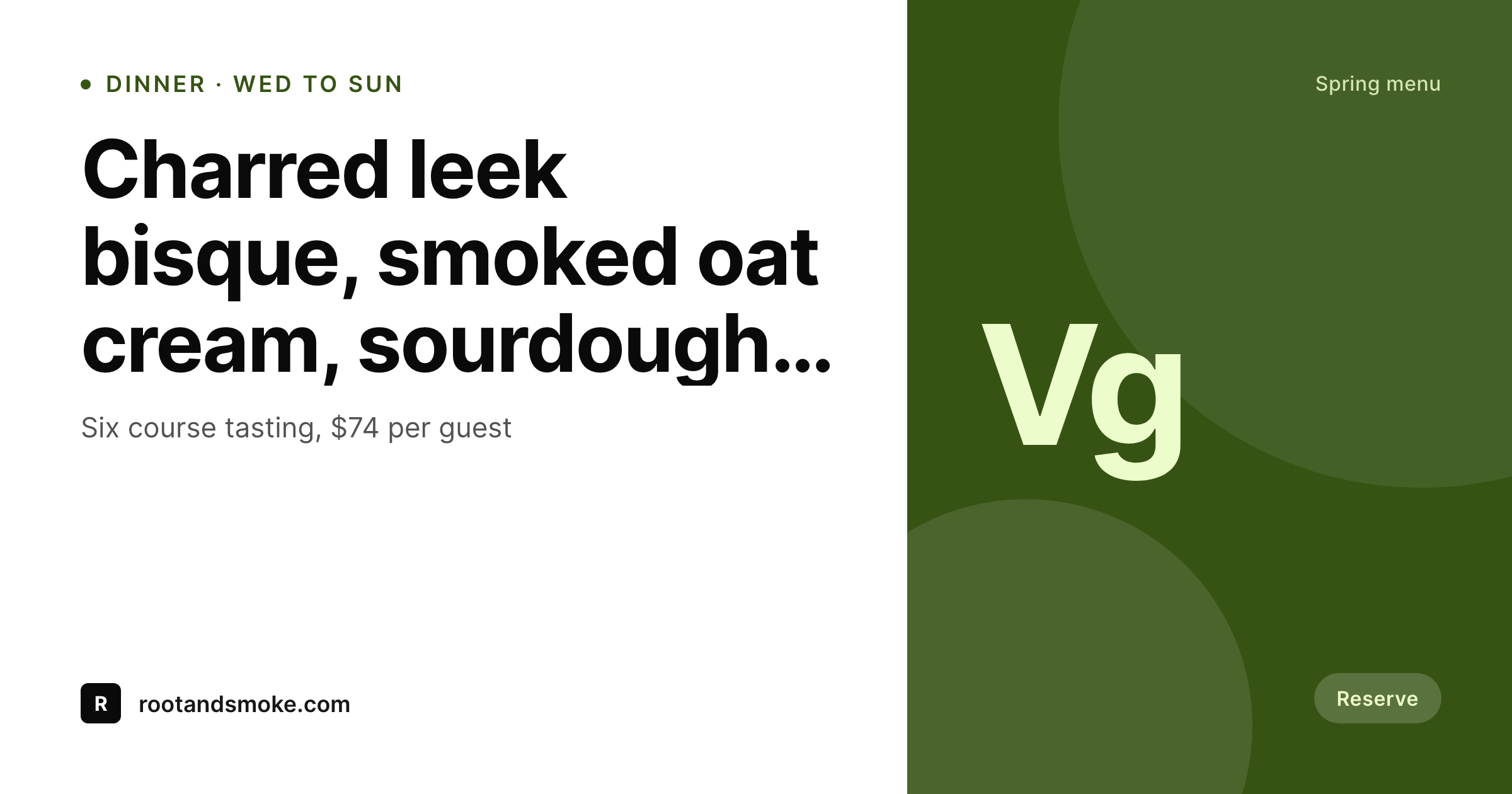
SleekPixel reads the dish post in WordPress. Plate name, plating notes, allergen list (nuts, gluten, soy), price, course position in a tasting menu, chef quote. The template composes a 1200 by 630 card with the plate name in a strong typographic position, the allergen row in a quiet but visible band, the price in a corner, and the chef notes as a short sub-line.
For tasting menus, the same engine renders a tasting menu card that pulls the course list from related dishes. Reserve buttons, press feature links, and Instagram shares all preview as the actual menu rather than the homepage header. The conversion from share to reservation jumps the moment the share looks like the food, not the building.
Workflow
From dish post to share-ready card
Model the menu
Design the card template
Bind the fields
Update menu, share the link
Output
Sample dish card
1200 by 630 OG card composed from one dish post: plate name, allergen row, price, course position, and a short chef note.
Comparison
Default vegan restaurant OG vs SleekPixel
Default WordPress OG
- Shared dish pages preview as the homepage banner
- Allergen information lost when links travel to social
- Seasonal menu changes don't propagate to share cards
- Press features link to dishes that preview as the building exterior
- Tasting menu pages share as a generic logo card
SleekPixel
- Per-dish OG cards rendered on save
- Allergen list composed onto the card from a structured field
- Tasting menu cards pull from related dish posts
- Seasonal menu change triggers a card refresh across affected posts
- Press features and review embeds finally preview as the food
Features
What SleekPixel gives you for vegan restaurant
Dish-aware
Reads plate name, course, allergens, price, and chef notes from the dish post. Tasting menus pull the course list from related dish posts automatically.
Allergen-aware
Nuts, gluten, soy, and other allergens render as a quiet but legible row on the card, helping diners and press reference exactly what is on the plate.
Seasonal cycles
Menu version changes trigger a bulk regenerate for that season's dishes. The spring menu's cards age out cleanly when summer goes live.
Use cases
Where vegan restaurants use it
Tasting menu rotations
Monthly or seasonal tasting menus get a single tasting card that pulls in the courses, plus per-dish cards for the deeper dish pages.
Press features and reviews
A critic links to the dish that won the review. The card shows the actual dish, the allergens, the price, the course context. Click-through rises.
Reservation pushes
Reservation links shared on Instagram or in newsletters preview as the current menu rather than the building, which converts at higher rates.
The bigger picture
Why share cards decide vegan restaurant traffic
Vegan restaurants over-index on share traffic because the audience is community-driven and the discovery loop runs through Instagram, food press, and recommendation threads on Reddit. A shared dish page is a marketing surface that the restaurant doesn't have to pay for, but it only converts if the preview shows the food. A default homepage banner card forfeits that surface entirely.
A rendered dish card with allergens, price, and chef context turns the share into a reservation. Templated cards remove the operational impossibility of designing per-dish cards on a small marketing team, so every dish, every season, every press feature gets the right artwork without a designer in the loop.
Questions
Common questions about SleekPixel for vegan restaurant
OpenTable handles the booking flow; SleekPixel handles the OG image on the WordPress pages that link out to OpenTable. The card appears wherever the WordPress URL is shared.
Yes. Add a pairings field on the tasting menu post. The template can show a small pairing line under the course list, useful for press features.
Map allergen fields on the dish post. The template renders the allergens visibly so diners and press can scan compatibility at a glance.
That is the use case. A solo marketing manager or chef-owner who runs the website can ship per-dish cards without a designer in the loop after the template is built.
No. The output is PNG, optimized for OG and social. Printed menus are a different workflow, though some teams use the rendered card as a starting point in InDesign.
Yes, with WPML or Polylang. Each dish has translations; SleekPixel renders one card per locale and writes the right og:image per language URL.
Yes. SleekPixel writes the og:image meta tag; Yoast reads from it. The two run alongside each other without conflict.
Yes. A bulk regenerate scoped to a menu season runs through every dish in that season and updates each card without anyone touching the posts.
Pricing
More than 1000+
happy customers
Explore our flexible licensing options tailored to your needs. Upgrade your license anytime to access more features, or opt for a lifetime license for ongoing value, including lifetime updates and lifetime support. Our hassle-free upgrade process ensures that our platform can grow with you, starting from whichever plan you choose.
Lifetime ♾️
Most popular
EUR
once
- Unlimited websites
- Lifetime updates
- Lifetime support
...or get the Bundle Deal
and save €250 🎁
💎 Want everything forever? The All Access Pass is going away on 01.08.2026.
The Bundle (unlimited sites)
Pay once, own it forever
Elevate your WordPress site with our exclusive plugin bundle that includes all of our premium plugins in one package. Enjoy lifetime updates and lifetime support. Save significantly compared to buying plugins individually.
What’s included
-
SleekAI
-
SleekByte
-
SleekMotion
-
SleekPixel
-
SleekRank
-
SleekView
€749
Continue to checkoutBrowse more
- salary report cards
- explainer video thumbnails
- course module cards
- LinkedIn update cards
- customer story card
- chart of the week cards
- founding customer card
- pricing comparison cards
- AMA card
- remote first card
- flash sale banners
- lifetime deal card
- command of the day card
- podcast episode
- did-you-know card
- Instagram collab post images
- Twitch offline banners
- Discord event cover
- Bandcamp banner
- GitHub README banners
- Substack post headers
- Poshmark listing images
- Bluesky feed banner
- Substack post thumbnail
- Dribbble shot covers
- Kick channel banners
- Telegram channel cover images
- Instagram stories
- Instagram Reels covers
- YouTube playlist covers