






SleekPixel for cider maker
Heirloom Russet from the single orchard, a perry made with Bartletts, a barrel-aged Kingston Black. Every release has a variety, an orchard, an ABV, and a release date. SleekPixel renders the 1080x1080 card on save.
♾️ Lifetime License available
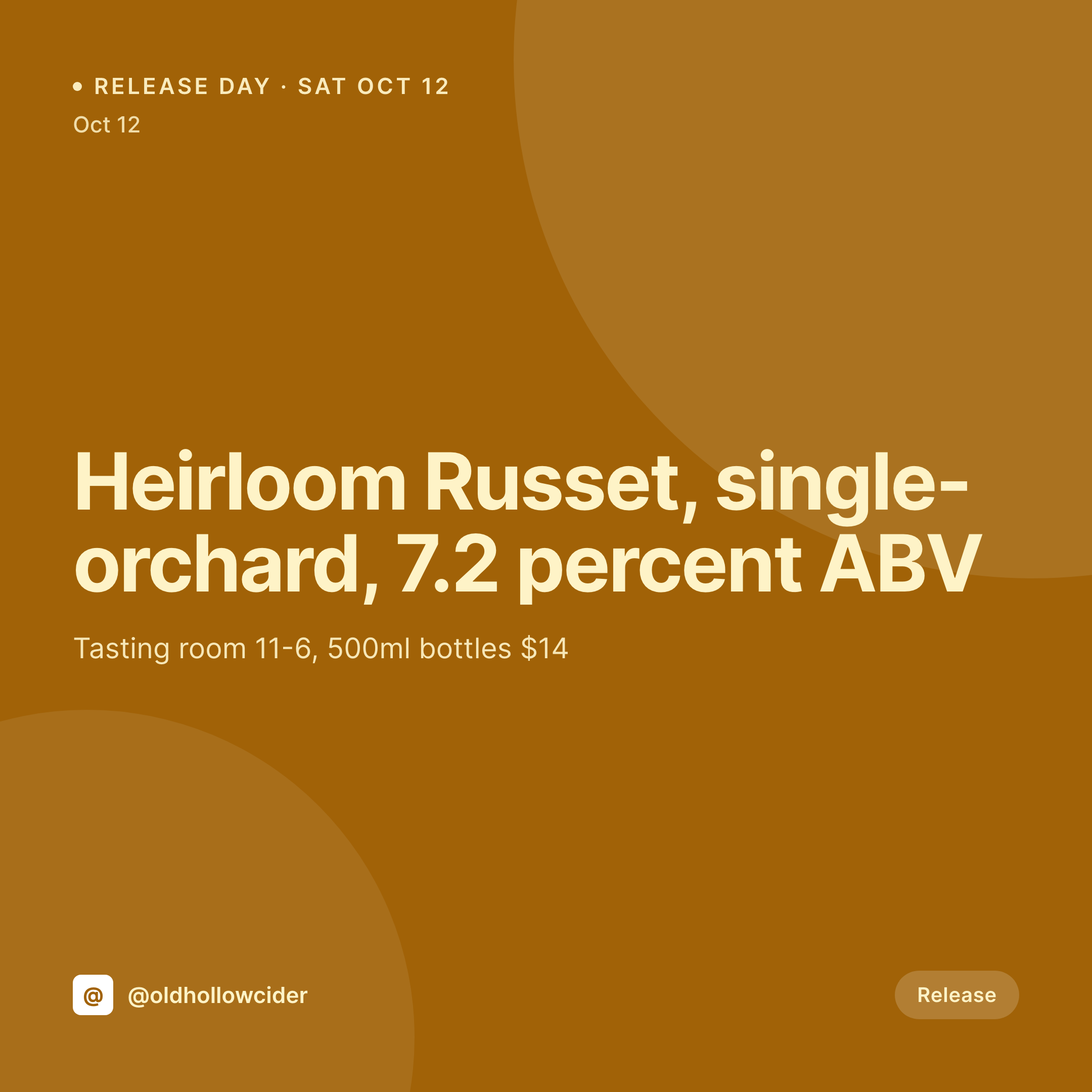
Release days and the orchard story
A cider maker's calendar is a release calendar. The autumn flagship drops in October, the rose hip cider in spring, the dry English-style in February. Each release has a variety, an orchard or blend, an ABV, a release date, and a tasting room window. Drinkers who care about cider track those releases the way wine drinkers track vintages.
The product page on the WordPress site holds the data already. The variety is the product title, the orchard is an ACF field, the ABV is on the variation, the tasting notes are in the long description, the release date is on the event post. The site is the source of truth.
SleekPixel renders the card from that source. Saving the release post produces a 1080x1080 PNG with the variety, the orchard, the ABV, and the release date, framed in the cider house's brand. The tasting room posts it the morning of release. The grid reads like a cider list across a year of releases.
Workflow
From release date to social card
Map release fields
Design one square template
Publish the release
Post on release morning
Output
What gets generated per release
A 1080x1080 square card with the cider variety, orchard, ABV, release date, and tasting room hours, pulled from the product post.

Comparison
Default cider maker image vs SleekPixel
Default cider maker image
- Cider maker rebuilds a Canva card for each release
- Apple variety names get typed inconsistently across releases
- ABV on the card lags behind the lab measurement
- Tasting room hours on release day are wrong on the social card
- Multi-cidery groups end up with off-brand cards per location
SleekPixel
- Save the release post, the 1080x1080 card lands in uploads
- Variety, orchard, ABV, and release date pulled from fields
- Tasting room hours render from the location post
- OG image wires to the release URL for share previews
- One template across cideries keeps each release on-brand
Features
What SleekPixel gives you for cider maker
Variety and orchard
Apple varieties (Kingston Black, Dabinett, Yarlington Mill) and the source orchard render from the product fields, accurately every time.
ABV from the lab
The ABV field can carry the lab measurement, so the social card matches the label and the tasting room shelf talker.
Tasting room hours
Release-day tasting room hours come from the location post, so the card always shows the right times for the day customers visit.
Use cases
Who uses SleekPixel for cider makers
Single-orchard cideries
Estate cideries render a card per release with the orchard name, vintage year, and variety, the way a winery would render a vintage card.
Hopped and infused cideries
Hop-forward and botanical cideries render cards with the hop variety or botanical blend alongside the apple base.
Tasting room cideries
Cideries with a tasting room render cards that include the day's hours and the per-glass and per-bottle pricing.
The bigger picture
Why cider releases live and die on the launch graphic
Cider is at a moment where serious drinkers are paying for orchard transparency, single-variety releases, and vintage cider the same way they pay for wine. The cideries that earn the price premium are the ones whose Instagram grid reads like a wine producer's: clean, consistent, varietal-forward. The trap is that small cideries are usually a one- or two-person operation, and the cidermaker is also the orchard manager and the bottling line.
Sundays in October don't leave time for a Canva session. The fix is to treat the release graphic as something the release post produces. The variety, the orchard, the ABV, the release date all live in the post that the cidermaker filled out the night before bottling.
Saving that post renders the card. The release morning posts on time, the grid reads as one producer across a year of vintages, and the price-per-bottle that's printed on the shelf talker is the one that justifies the work in the orchard.
Questions
Common questions about SleekPixel for cider maker
Yes. A vintage field on the release post renders directly on the card. Estate cideries can carry vintage the same way wine does.
Both. SleekPixel reads any post type and any field, so WooCommerce products, a Release CPT, or a hybrid model all map onto the card.
Yes. When the stock field hits zero, the card re-renders with a sold-out variant. The OG image updates with it.
A hop or botanical field on the release post renders on the card. Hop-forward cideries can show the hop variety alongside the apple base.
Yes. SleekPixel reads any field on any post type. Easy Digital Downloads products with custom fields work just as well as Woo.
Labels are a separate print workflow. SleekPixel renders the social card, the OG image, and any web-facing variant. Print labels stay in the design tool of choice.
Yes. Each release can override the default tasting room hours with a release-specific window. The card renders the override when present.
Yes. One save can produce a 1080x1080 grid card, a 1080x1920 story, and a 1200x630 OG image, each tied to the same release post.
Pricing
More than 1000+
happy customers
Explore our flexible licensing options tailored to your needs. Upgrade your license anytime to access more features, or opt for a lifetime license for ongoing value, including lifetime updates and lifetime support. Our hassle-free upgrade process ensures that our platform can grow with you, starting from whichever plan you choose.
Lifetime ♾️
Most popular
EUR
once
- Unlimited websites
- Lifetime updates
- Lifetime support
...or get the Bundle Deal
and save €250 🎁
💎 Want everything forever? The All Access Pass is going away on 01.08.2026.
The Bundle (unlimited sites)
Pay once, own it forever
Elevate your WordPress site with our exclusive plugin bundle that includes all of our premium plugins in one package. Enjoy lifetime updates and lifetime support. Save significantly compared to buying plugins individually.
What’s included
-
SleekAI
-
SleekByte
-
SleekMotion
-
SleekPixel
-
SleekRank
-
SleekView
€749
Continue to checkoutBrowse more
- Behance project covers
- LinkedIn article covers
- Signal sticker pack
- Stan Store cover
- GitHub README banners
- YouTube podcast thumbnails
- YouTube Shorts covers
- YouTube end cards
- Apple Music cover art
- Shopify product images
- Beacons.ai banner
- Patreon post thumbnails
- Etsy cover photos
- Threads profile banners
- YouTube ad thumbnails