






SleekPixel for cocktail bar
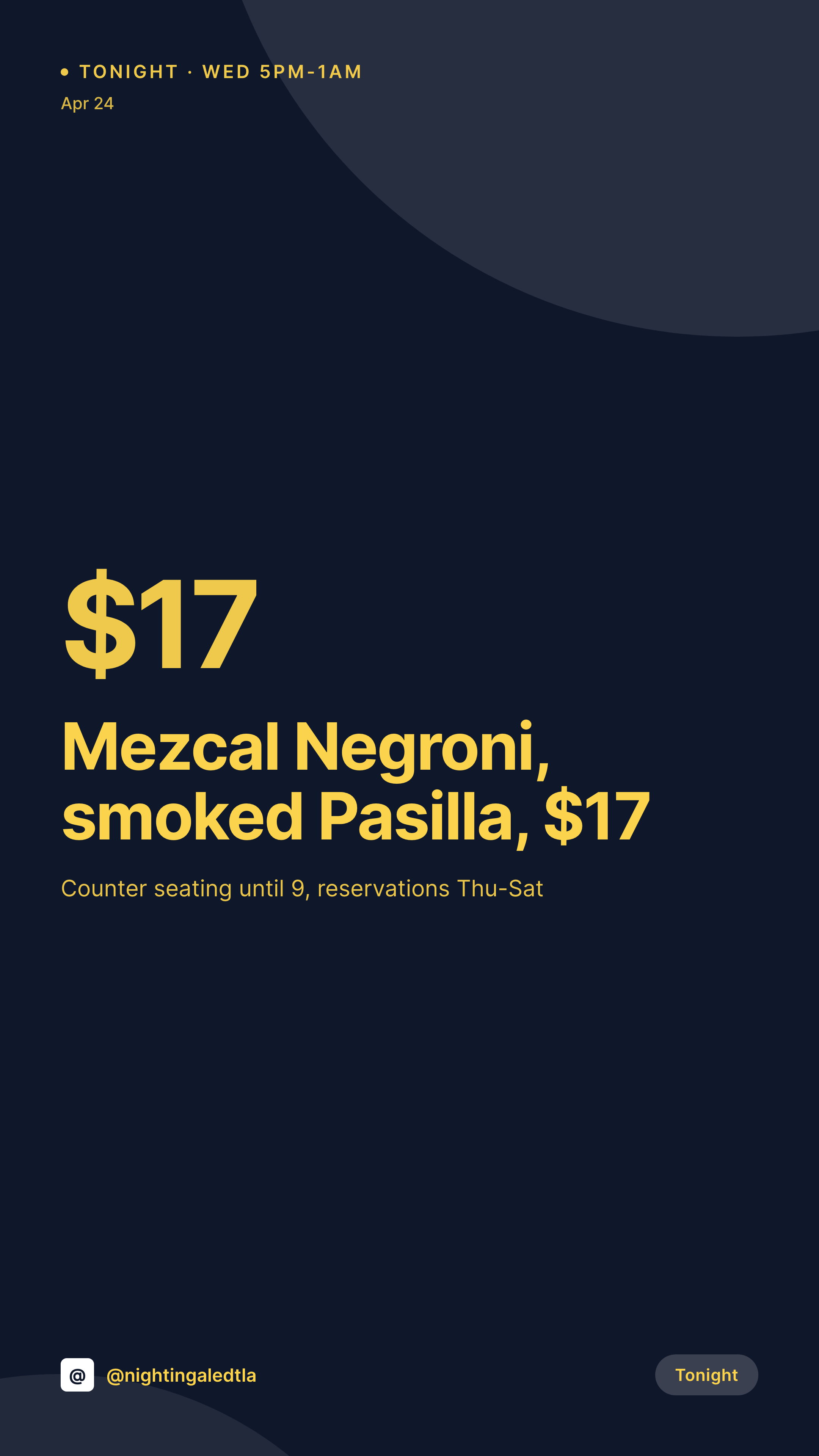
A mezcal negroni, a clarified daiquiri, the rotating sherry highball. Each cocktail has a name, a spec, and a price. SleekPixel renders the 1080x1920 Story card on save, so the bar's nightly Story is on time.
♾️ Lifetime License available
Cocktail bars live on Stories
Cocktail bars run on Instagram Stories. A regular sees the new spring menu on Tuesday night, walks in Wednesday, posts a photo Thursday. The whole demand loop is held together by a Story cadence, and the bars that fill the seats are the ones whose Stories show up consistently with tonight's specials, the new menu drops, and the limited collaborations.
The cocktail data is on the website. The menu CPT carries the drink name, the spec, the price, and the category. The hours sit on the location post. The bar's brand mark and palette are locked in. The work of typing the menu has been done.
SleekPixel renders the Story card on save. The 1080x1920 PNG carries the drink name, the spec, the price, and tonight's hours, framed for the Story crop. The bartender posts it before service. The grid stays consistent across a year of seasonal menus.
Workflow
From menu update to Story
Map menu fields
Design one Story template
Publish or update the menu
Post before service
Output
What gets generated per drink
A 1080x1920 vertical card with the cocktail name, spec, price, and tonight's hours, pulled from the menu post and framed for Stories.
Comparison
Default cocktail bar image vs SleekPixel
Default cocktail bar image
- Bartender rebuilds a Canva Story before every shift
- Drink specs drift between the menu PDF and the social card
- Tonight's hours typed differently on every Story
- Limited collaborations launch with a hand-built phone post
- Multi-location groups end up with each bar posting its own off-brand Story
SleekPixel
- Save the menu post, the 1080x1920 Story lands in uploads
- Drink name, spec, and price pulled from menu fields
- Tonight's hours render from the location post
- Sold-out and limited variants share one template
- One template across locations keeps the bar group on-brand
Features
What SleekPixel gives you for cocktail bar
Specs accurate
Two ounces of mezcal, half ounce of Campari, half ounce of vermouth. The spec field renders precisely on the card and matches the back-bar print.
Nightly hours
Wednesday 5pm to 1am, Friday 5pm to 2am. Tonight's hours come from the location post and render on the Story without retyping.
Collab tags clean
Guest bartender takeovers and brand collaborations render the cohost's handle and the collab title pulled from event fields.
Use cases
Who uses SleekPixel for cocktail bars
Seasonal menu bars
Bars that drop a new menu every quarter render one Story per drink at launch, with consistent typography across the menu.
Guest bartender takeovers
A monthly guest bartender night renders a Story with the guest's bio, the takeover cocktails, and the night's hours.
Multi-location bar groups
A group with two or three bars shares one menu template across locations, each Story carrying the per-bar hours and address.
The bigger picture
Why cocktail bars need a consistent Story
A cocktail bar's Story feed is the closest thing it has to a marketing engine. Regulars open Instagram, see what's pouring tonight, and decide whether tonight is the night they walk over. The bars that hold their regulars are the ones whose Stories are the same shape every night: drink name, spec, price, tonight's hours, the bar mark in the corner.
The trap is that the bartender is also the social media manager, and pre-shift is for prepping garnish trays and shaking down the bar mat, not for opening Canva. The fix is to type each drink into the menu post that already runs the printed menu and let the template render the Story on save. The Story lands on time, the regulars open the post, the bar fills.
The visual identity stays cohesive across seasons, which is the surface where cocktail bars compete with one another for repeat traffic.
Questions
Common questions about SleekPixel for cocktail bar
Yes. Tonight's hours come from the location post or a per-day field. Wednesday's Story renders Wednesday hours, Friday's renders Friday hours.
Both. SleekPixel reads any post type and any field, so Five Star Restaurant Menu, RestroPress, or a Cocktail CPT all map onto the card.
Yes. When the stock or availability field flips, the Story re-renders with a sold-out variant. The OG image updates with it.
A takeover event post carries the guest's name, handle, and cocktail list. The Story renders the takeover variant with the guest's bio and the night's hours.
Yes. One save can produce a 1080x1080 grid card, a 1080x1920 Story, and a 1200x630 OG image, each carrying the same drink data.
No. SleekPixel renders the image and saves it to uploads. Posting stays a manual step from the bartender's phone or a scheduling tool.
Yes. With multisite or a location taxonomy, each bar renders Stories with the same brand frame but its own address and hours.
SleekPixel renders static PNG and JPG only. Reels covers in 1080x1920 work, but motion stays in the bar's video tool.
Pricing
More than 1000+
happy customers
Explore our flexible licensing options tailored to your needs. Upgrade your license anytime to access more features, or opt for a lifetime license for ongoing value, including lifetime updates and lifetime support. Our hassle-free upgrade process ensures that our platform can grow with you, starting from whichever plan you choose.
Lifetime ♾️
Most popular
EUR
once
- Unlimited websites
- Lifetime updates
- Lifetime support
...or get the Bundle Deal
and save €250 🎁
💎 Want everything forever? The All Access Pass is going away on 01.08.2026.
The Bundle (unlimited sites)
Pay once, own it forever
Elevate your WordPress site with our exclusive plugin bundle that includes all of our premium plugins in one package. Enjoy lifetime updates and lifetime support. Save significantly compared to buying plugins individually.
What’s included
-
SleekAI
-
SleekByte
-
SleekMotion
-
SleekPixel
-
SleekRank
-
SleekView
€749
Continue to checkoutBrowse more
- guest spot card
- product tour cards
- feature flag card
- podcast quote cards
- review snippet cards
- incident postmortem card
- holiday greeting cards
- acquisition announcement cards
- Stripe Atlas card
- contributor spotlight card
- bundle deal cards
- shortlist card
- Hacker News launch card
- roadmap update cards
- Twitter thread card
- Instagram grid tiles
- TikTok cover images
- Klaviyo email headers
- Depop listing images
- Etsy shop banners
- LinkedIn company banners
- Spotify playlist cover
- Klaviyo email banner
- Vimeo thumbnails
- Bluesky link cards
- Signal sticker pack
- Medium article headers
- X social cards
- Rumble thumbnails
- Facebook Shop product images