






SleekPixel for ecommerce store
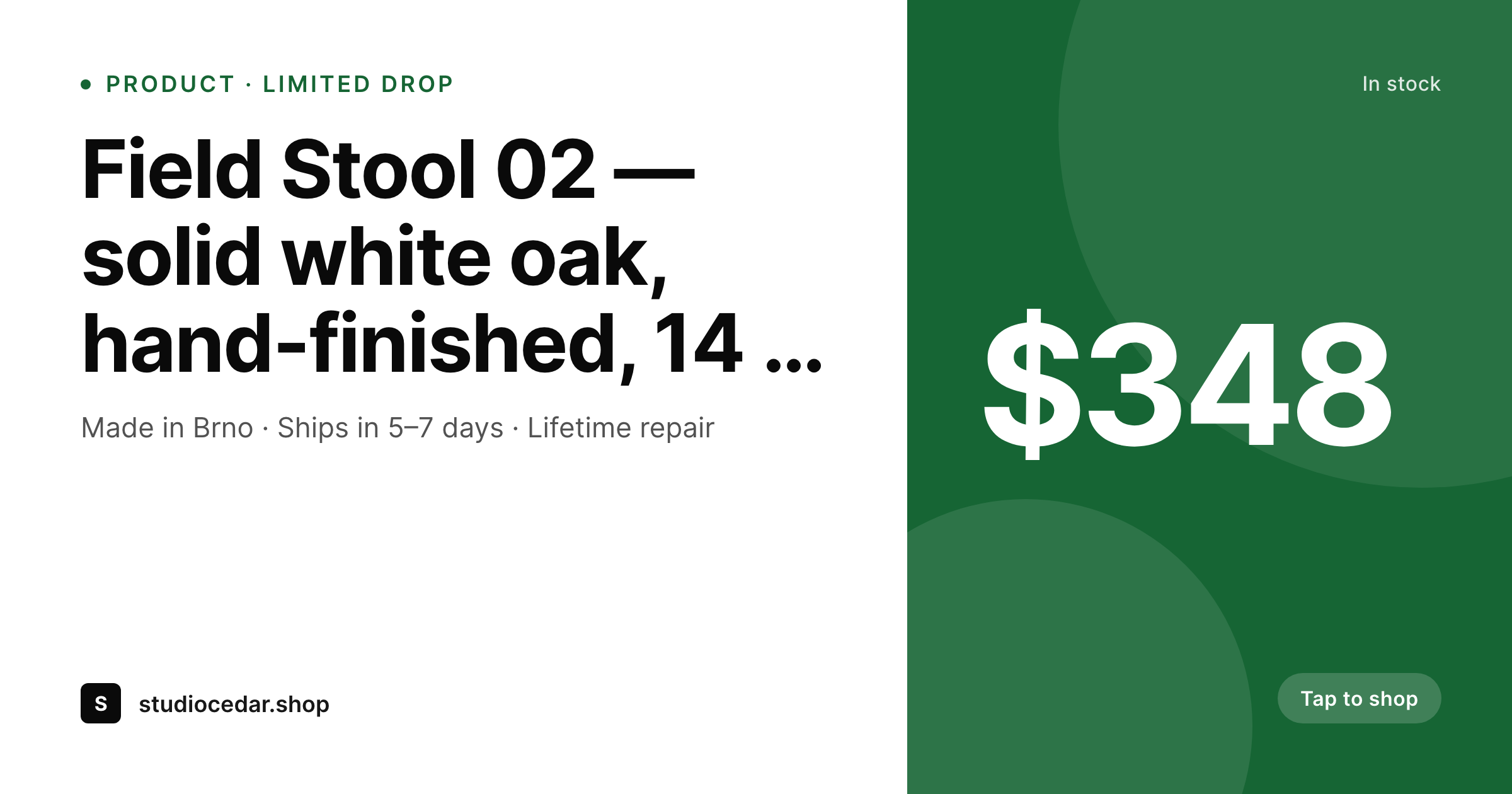
SleekPixel renders a branded OG card for every WooCommerce product on save, pulling title, price, and stock status straight from the product. Drop a link into Slack, iMessage, or LinkedIn and customers see the actual product, not a generic store header.
♾️ Lifetime License available
Every shared product link is a missed sale
An ecommerce store with a hundred SKUs has a hundred share moments. Customers drop product links into iMessage, Slack groups, and Reddit threads. Marketing posts to LinkedIn. Affiliates share to Pinterest. Every one of those moments is gated by the OG card. If the link previews as the store-wide homepage banner, the product is invisible. If it previews as the actual product with price and availability, the click-through rate jumps. Most stores ship with the homepage banner because designing an OG card per SKU is operationally impossible.
SleekPixel pulls product data straight from WooCommerce. Title, price, availability, featured image, brand. The template renders a 1200 by 630 card on every save and on every stock change webhook. A new drop publishes; the card exists. Inventory hits zero; the card flips to sold-out automatically. A price changes for a flash sale; the card matches the storefront within seconds, not after a designer touches anything.
For Shopify-on-WordPress hybrids and stores using ACF for additional product attributes, the template can read whichever fields you choose. Material, colorway, edition number, lead time. Whatever the brand uses to describe the product on the page can render onto the card. The OG image stops being a default and becomes a real signal of what is being sold.
Workflow
From product publish to share-ready card
Build the product template
Map product fields
Publish or update a SKU
Refresh the catalog at will
Output
What the rendered product card shows
An OG card with the product name, price, in-stock status, and store mark — composed from the WooCommerce product on save.
Comparison
Default product OG vs rendered cards
Default WooCommerce OG
- Shared product links preview as the store homepage banner
- Sale prices on the storefront aren't reflected on social shares
- Sold-out items still preview as available on cached link cards
- Designers can't ship a card per SKU at any meaningful scale
- Affiliate posts on Pinterest go up with no product context
SleekPixel
- Card renders per product, including new drops and back-catalogue
- Price and stock status pulled live from WooCommerce
- Sold-out automatically flips the card to a sold-out state
- Bulk regenerate refreshes the catalog after a brand update
- og:image meta tag is set per product, not site-wide
Features
What SleekPixel gives you for ecommerce store
Woo-aware
Reads title, price, sale price, stock status, and featured image from WooCommerce. ACF and Meta Box product fields work alongside core attributes.
Sale-aware
When a product goes on sale, the card regenerates with the sale price and any badge you configure. When the sale ends, the card flips back.
Stock-aware
Stock changes trigger a re-render. Out-of-stock products show a sold-out state without anyone touching the post or a design tool.
Use cases
Where ecommerce teams use it
New drops
Limited drops where every SKU needs to share well in the first 24 hours. Cards exist the moment products go live.
Flash sales
Sale prices and badges propagate to the cards within seconds of going live, so social shares match the storefront.
Catalog hygiene
Old SKUs in the back-catalogue get the same card treatment as new arrivals. Pinterest and SEO long-tail traffic finally see the product.
The bigger picture
Why ecommerce needs per-product cards
Direct-to-consumer ecommerce runs on shared links. Product links flow through iMessage, Slack groups, Pinterest, Reddit, and creator newsletters. The OG card on each product URL is the storefront equivalent of a window display, except it is rendering inside someone else's chat.
A generic site-wide card forfeits that surface entirely. A per-product card converts a link share into a click. Manually designing cards per SKU is impossible at any meaningful catalog size, which is why most stores accept the default and lose the conversion.
SleekPixel removes the manual step. Title, price, image, stock state, brand mark — these already live on the product. Rendering a card from them takes the operational cost from impossible to invisible.
The catalog presents itself correctly across every share surface, sales and stock changes propagate within seconds, and a brand refresh later is a template change rather than a quarter-long redesign of every product page asset.
Questions
Common questions about SleekPixel for ecommerce store
Yes. The template reads from the variable product's parent attributes by default — title, price range, featured image. If you need per-variation cards, you can register variations as separate render targets, with each variation getting its own URL and OG image.
Yes. SleekPixel reads the sale_price field on the product. When a sale starts, the card regenerates with the sale price and any sale badge in your template. When the sale ends, the card returns to the regular price without manual work.
Yes. The template can include a sold-out variation tied to stock status. When inventory hits zero, the card flips. When stock returns, the card flips back. The product page and the social card stay aligned automatically.
Yes. Map any ACF or Meta Box field — material, colorway, edition number, lead time — into the template. Whatever you display on the product page can be displayed on the card.
Yes. Rendering happens per product on save, not as a single batch job. A bulk regenerate exists for when the template changes, and runs across thousands of products without manual intervention. The renderer is designed for ecommerce-scale catalogs.
No. SleekPixel produces the OG card and writes the meta tags. Posting to Instagram, LinkedIn, or Pinterest still happens through your scheduler. Once the card exists at the URL, every share through any tool picks up the correct artwork.
If products live as a custom post type backed by an external commerce engine, SleekPixel still works — it renders from whichever fields you provide. The Shopify connector populates the post; SleekPixel renders the card from the populated fields.
Yes. Once the og:image is set per product, any link share — affiliate, internal, or customer — picks up the correct card. Affiliates posting product URLs to Pinterest or Twitter get the same artwork as the brand's own social channels.
Pricing
More than 1000+
happy customers
Explore our flexible licensing options tailored to your needs. Upgrade your license anytime to access more features, or opt for a lifetime license for ongoing value, including lifetime updates and lifetime support. Our hassle-free upgrade process ensures that our platform can grow with you, starting from whichever plan you choose.
Lifetime ♾️
Most popular
EUR
once
- Unlimited websites
- Lifetime updates
- Lifetime support
...or get the Bundle Deal
and save €250 🎁
💎 Want everything forever? The All Access Pass is going away on 01.08.2026.
The Bundle (unlimited sites)
Pay once, own it forever
Elevate your WordPress site with our exclusive plugin bundle that includes all of our premium plugins in one package. Enjoy lifetime updates and lifetime support. Save significantly compared to buying plugins individually.
What’s included
-
SleekAI
-
SleekByte
-
SleekMotion
-
SleekPixel
-
SleekRank
-
SleekView
€749
Continue to checkoutBrowse more
- Discord stage banner
- Behance banner
- Pinterest board covers
- Instagram collab post images
- Substack podcast cover
- Nostr note images
- YouTube end cards
- Telegram bot avatar
- Slack channel headers
- Shopify product images
- TikTok cover images
- Twitch stream overlay images
- Instagram stories
- LinkedIn ad images
- Threads post cover