






SleekPixel for jewelry store
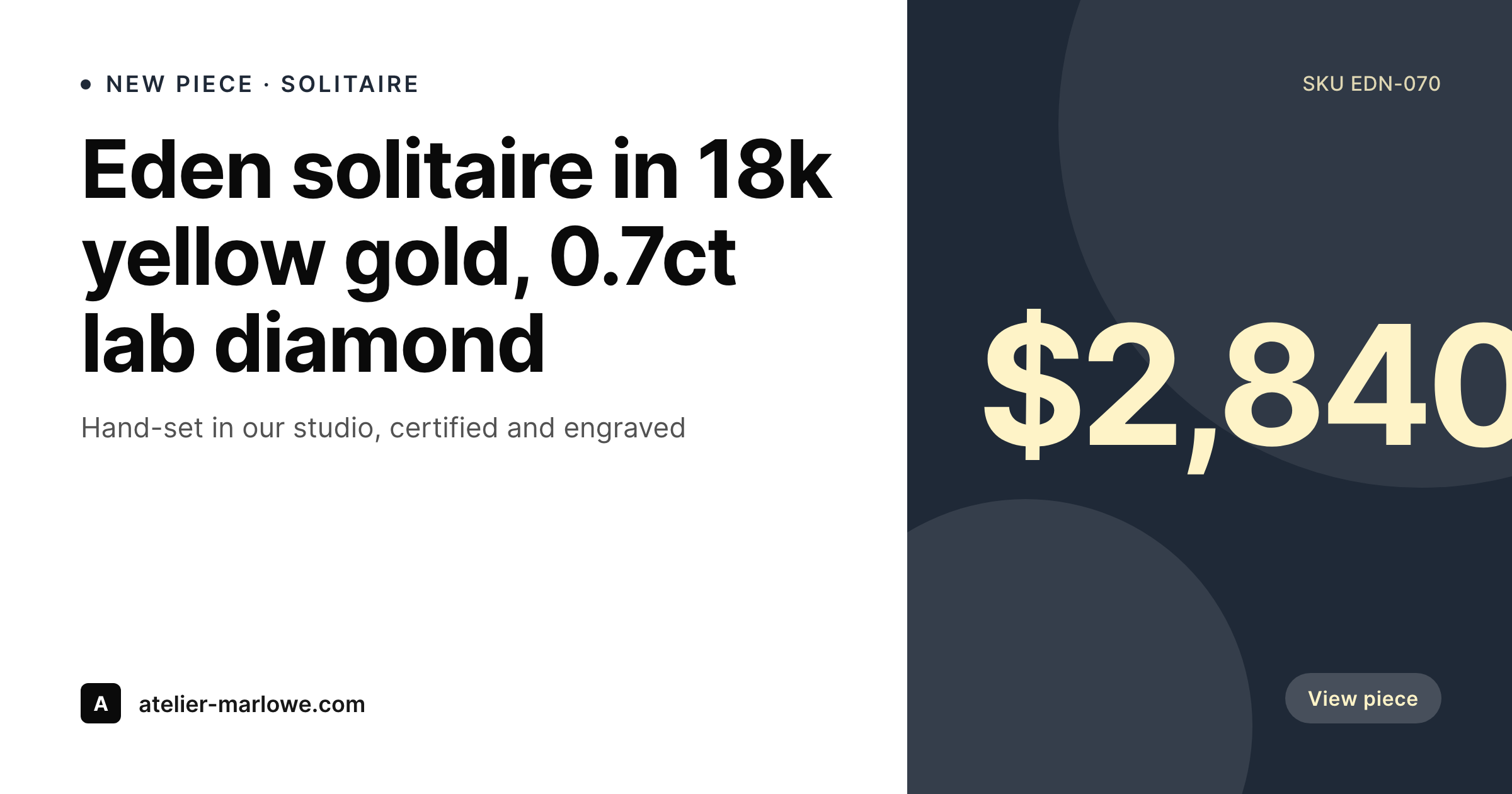
Stone, metal, carat weight, setting, and price already live on the WooCommerce product. SleekPixel renders a branded 1200x630 card the moment a piece is published, so DM forwards and Pinterest pins look like the rest of your studio's work.
♾️ Lifetime License available
Each piece is one of one, but the share previews look identical
A jewelry studio's catalog is the opposite of a fast-fashion grid. Each piece is described by hand: the stone provenance, the carat, the metal, the setting, the engraver's note. Yet the moment a customer forwards a piece to a partner over iMessage, the link preview collapses everything into a generic site favicon and a truncated title. The studio that spent three weeks finishing a sapphire halo loses the entire visual context the second the URL leaves the browser.
The data is already structured. Most independent jewelers run WooCommerce with custom fields for stone type, carat, metal purity, setting, and certification number. Some use a PIM that pushes the same fields into product posts. The product page renders all of this beautifully on the website. The OG card, the Pinterest pin, and the email banner each get re-typed by hand into Canva, and the brand drifts a little every month as the social manager swaps fonts or guesses at the gold tone.
SleekPixel binds the share images to the product. The carat, stone, and price come from the same fields the product page uses. One studio template, rendered automatically on every save. Limited drops, custom commissions, and backlist pieces all carry the same branded card without anyone re-opening a Canva file.
Workflow
From new piece to live link preview
Map product fields
Design the studio template
Publish a new piece
Bulk regenerate on rebrand
Output
What gets generated per piece
A 1200x630 OG card showing the piece name, stone and metal, carat, price, and the studio mark, composed from the WooCommerce product fields.
Comparison
Hand-built Canva cards vs auto-rendered piece cards
Manual / Canva / WooCommerce default
- Every new piece means a fresh Canva file with the carat retyped
- Limited drops launch with the WooCommerce default favicon as the preview
- Engagement-ring shoppers DM links and the partner sees a broken card
- Studio rebrand requires redoing every product card by hand
- Pinterest pins drift in font and color across seasons of new work
SleekPixel
- Every product saves with a branded OG card rendered from its own fields
- Stone, metal, carat, and price pulled from WooCommerce or ACF
- Pinterest pin and Instagram square render alongside the OG card
- Bulk regenerate the catalog when the studio rebrand or repackage
- Manual download in the Gutenberg sidebar for newsletters and lookbooks
Features
What SleekPixel gives you for jewelry store
Per-piece OG
Each piece saves with its own 1200x630 card. Stone, metal, carat, and price pull from the product fields, no Canva round-trip.
Stone-aware variants
Templates can branch on stone type or collection. Diamonds use one accent, colored stones another, while the layout stays the studio's.
Sidebar export
Need the card for a press kit or a private buyer email? One tap in the Gutenberg sidebar grabs the PNG, ready to attach.
Use cases
Where jewelry cards earn their keep
Limited drop announcements
New collections launch with branded cards across every piece. The drop reads as one curated release on Instagram and Pinterest.
DM and iMessage forwards
Engagement and anniversary buyers forward links to partners. The card carries stone, metal, and price instead of a tiny favicon.
Editorial and press features
Pieces featured in print or online get share-ready cards already sitting in uploads. No last-minute design pass before the embargo lifts.
The bigger picture
Why jewelers lose the share moment without rendered cards
Independent jewelry sells on intimacy and intention. A buyer rarely commits on the first visit. They send the link to a partner, a parent, or a best friend, and the decision happens over a few days of forwarded messages.
The link preview becomes the studio's brand on every screen the buyer's circle uses, and a generic favicon undermines weeks of careful product photography and tactile retail experience. Most jewelers can afford to make ten or twenty hero pieces look polished, but the catalog grows faster than design time. Limited drops, commissioned work, and backlist pieces all start to share with stale or missing previews, and the studio's Pinterest board ends up reading as a folder of half-built launches.
SleekPixel makes the card a property of the product itself. The studio adds a piece, the share image exists. The catalog reads as one body of work across years of new collections, and the buyer's forwarded link looks as considered as the piece itself.
Questions
Common questions about SleekPixel for jewelry store
Yes. WooCommerce, ACF, Meta Box, Pods, or a custom CPT all work. SleekPixel reads any post type and any field, so stone, metal purity, carat, and certification number can all map onto the template. PIMs that push to WooCommerce work the same way because the data ends up as post meta.
Yes. Templates can be conditional on stone type, collection, or any custom field. Colored stones can use a warmer accent, diamonds a cooler one, while both keep the studio's wordmark and layout. All variants read from the same product fields.
Variant products are fully supported. Each variation, yellow gold, white gold, platinum, can render its own card with the right metal label and price. The customer's chosen variation drives which card the OG tag points at.
Yes. Any field on the product can map onto the template, including GIA or IGI numbers, batch numbers, and engraver notes. Studios that want to keep certification private can simply leave it out of the template while still storing it on the post.
Yes. A single product can render a 1200x630 OG card, a 1080x1080 Instagram square, and a 1000x1500 Pinterest pin in one save. Each format is a configurable template that pulls the same product data.
Yes. Edit the template once and run a bulk regenerate. Every existing piece gets a fresh card in the new brand. Logo swaps, color shifts, or layout changes propagate across the catalog without touching individual posts.
The card uses your accent and background tokens, not the photo itself. If the product hero photo is part of the template, SleekPixel composites it without reprocessing color. The template designer sets the gold or champagne tone in the brand palette so the surround stays consistent.
No. SleekPixel renders images for WordPress and writes them to your uploads with og:image meta tags. Cross-posting to Etsy, Shopify, or other marketplaces is a separate step. The PNG is downloadable from the sidebar if you want to upload it manually.
Pricing
More than 1000+
happy customers
Explore our flexible licensing options tailored to your needs. Upgrade your license anytime to access more features, or opt for a lifetime license for ongoing value, including lifetime updates and lifetime support. Our hassle-free upgrade process ensures that our platform can grow with you, starting from whichever plan you choose.
Lifetime ♾️
Most popular
EUR
once
- Unlimited websites
- Lifetime updates
- Lifetime support
...or get the Bundle Deal
and save €250 🎁
💎 Want everything forever? The All Access Pass is going away on 01.08.2026.
The Bundle (unlimited sites)
Pay once, own it forever
Elevate your WordPress site with our exclusive plugin bundle that includes all of our premium plugins in one package. Enjoy lifetime updates and lifetime support. Save significantly compared to buying plugins individually.
What’s included
-
SleekAI
-
SleekByte
-
SleekMotion
-
SleekPixel
-
SleekRank
-
SleekView
€749
Continue to checkoutBrowse more
- Mastodon post images
- WhatsApp status images
- Twitch starting soon screen
- Poshmark listing images
- LinkedIn company banners
- SoundCloud track art
- Substack podcast cover
- Instagram collab post images
- Bluesky profile banner
- Facebook Shop product images
- YouTube thumbnails
- Facebook cover photos
- Mastodon profile banners
- Lemon8 post
- LinkedIn event banners